Element-android: Select image size on upload
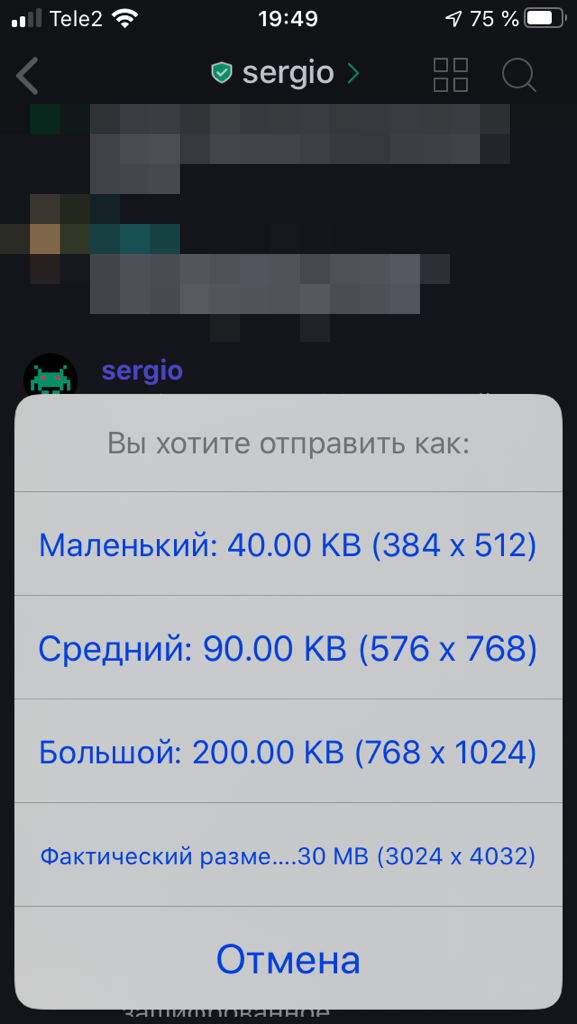
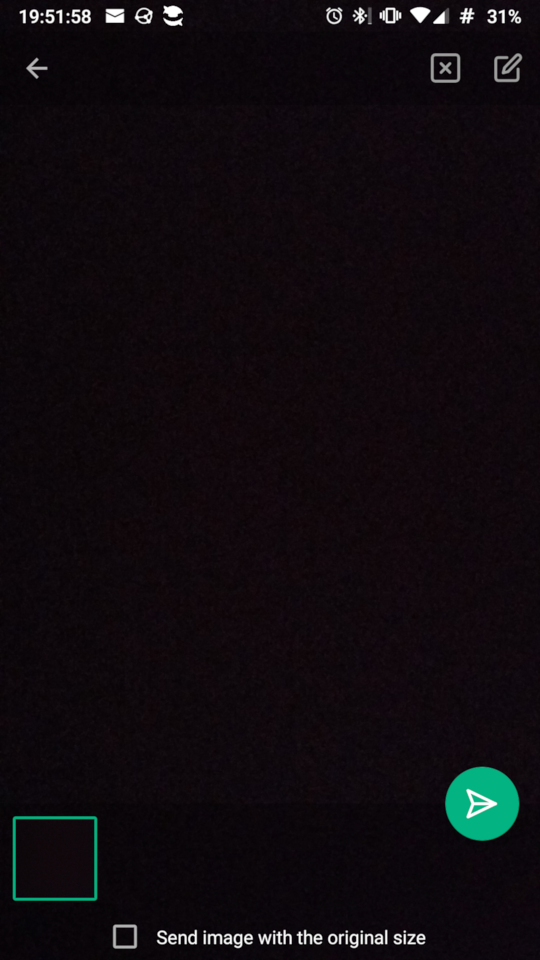
Behaviour must be the same on all platforms:
ios:
android:
 532910
All 8 comments
Agree that things should look more alike on Android-iOS but do you really need the ability to select image sizes so detailed? I prefer Androids approach with just 1 option: "compressed or uncompressed". Way more user friendly and less complex
 kojid0
on 6 Jul 2020
kojid0
on 6 Jul 2020
I believe that small size is useless, but I'd prefer to see 3 options: original, high quality, low quality
532910
on 6 Jul 2020
Given your Screenshot from above, the difference between small and middle is 50kb (0,05MB) which is literally nothing. Also small to large is 0,16MB in difference. Original size photos have usually around 2-4MB.
What's the point of saving 0.05 or 0.16 MB of data traffic? There's surely also no visible difference in quality, or am I wrong?
All I want to say is that things shouldn't be more complicated that they need to be, thinking about user choices and 1000 options/questions.
kojid0
on 6 Jul 2020
The screenshot above is just to show the difference between ios and android.
2-4MB
Yes, an iphone 8 with low quality camera hardware makes 2.86M image.
This is an old OP3T, that produces more than 6M image with 16MP camera:
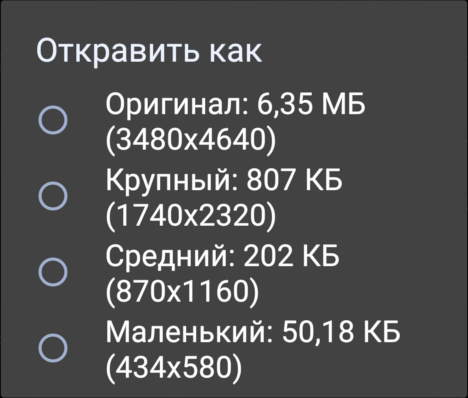
Modern 48 MP camera will produce more that 10Mb file.
532910
on 6 Jul 2020
I would also like to see a bit more control over the size, like the old Riot.im or Android app.
AFAICS, RiotX now only supports a reduced version by default, or the original version. With a few examples (Full HD PNG screenshot and 8MP JPG camera image), I've seen that even the "reduced" version just sends the original image (both around 1.2MB), so I guess the "reduced" setting has a fairly high quality or size threshold that my images do not exceed?
In any case, when sending images with Riot.im, I usually had the following usecases:
- For most images, where I want to show people some photograph where full detail is not relevant, I would use the old Riot.im "medium" setting (couple of hundred kb). This would be more than enough for people to look at my photos, especially on mobile devices, without being a significant load on the server, my upstream databundle and the receivers' downstream bundles.
- When I was on a bad or expensive connection (e.g. outside EU without wifi), I would use the "small" option (<100kb) to minimize data usage.
- When some image contains very relevant tiny details, or I want to send an image to someone for printing/editing/archiving, I would use the original size (this ocurred only rarely).
I rather liked the original size popup from Riot.im, but I guess this could be confusing or annoying for some users. Some things that could improve things:
- Use some reduced / medium version by default, but add a "Send image in other size" option that opens a menu of sizes. If it includes the "original" size, this option could then replace the current "Send image in original size" option.
- Maybe have a global setting to configure the default size to use?
 matthijskooijman
on 15 Jul 2020
matthijskooijman
on 15 Jul 2020
Hi all,
i may be wrong but it seems that Riot/RiotX/Element only use 2 scaling factors to reduce picture size : 0.5 (for medium size) and 0.25 (small size), at least on Android. Element choose one of them, depending on the original image resolution (this is my assumption, to be true i didn't check the code). Sadly, sometimes Element chooses to shrink a picture by a 0.25 factor although original resolution is not sufficient.
Let's consider the following cases :
. pictures taken with a 8 MP devices (typically a 3264x2448 resolution) are shrunk by Element with a 0.5 scaling factor, so uploaded pictures are 1632x1224 pixels. This can be considered an acceptable size for display on common FullHD screens.
. but for pictures taken with a 12MP device (4032x3024 image resolution or so), Element automatically choose the 0.25 scaling factor : pictures are uploaded with a size of only 1008x756 pixels (!). This is far too small on common FullHD screens, as upscale to 1920x1080 produces blur and detail losses, which are easily revealed when zooming. To me this gives a sub-optimal user experience.
For 12MP pictures, choosing a 0.5 shrinking factor would produce 2000x1500 images : a far better visual experience at the cost of less than 0.5MB (this is probably not a big deal as users concerned by limiting traffic will limit the number of uploads anyway, and they will also avoid to display pictures or video in fullscreen mode).
For now, it is a pity that 4000x3000 resolution pictures are so drastically downsized to 1000x750 by default, reducing the user experience with bad quality pictures !
Even on larger 24MP pictures, using 0.25 scaling factor gives not-so-great 1500x1000 images, whereas a 0.5 shrink factor would produce a comfortable 3000x2000 image for a bit more than 1MB.
To me this should be considered as an impacting issue because :
. every 12MP devices owners are negatively impacted : they should consider to systematically check the "original size" checkbox to send decent pictures, but this will upload much bigger files. Please note there are a lot of good devices using the 4000x3000 resolution, because it is a good compromise between sufficient resolution with high level of details while still keeping a reasonable file size around 3MB.
. every element/riot users are negatively impacted by receiving not-so-nice pictures from people which don't care to check the original size upload button (or prefer not to do so). For common people, this can lead to a feeling that pictures on Element are less sharp compared to other apps.
Considering this app is often used for sharing images with remote family (a least for my personal case), an acceptable resolution (not necessarily an original one) is not an option : i will stay on Riot.im until this issue is fixed.
To do so, the easiest way could be to choose 0.25 scaling factor only for very high resolution pictures, ie. above 32MP (so a 32MP will produce a reduced 2MP image, ie. a 1632x1226 resolution image, ~500kB). In this case, image resolution is still good and file size should be approximately 16 times smaller than original size.
Between 8MP and 32MP, scaling factor could be 0.5 as the corresponding uploads would be from 2 to 8MP (with file size approximately 4 times smaller than the original, ie. ~500kB to 2MB).
Below 8 MP, there is no need to change resolution, but removing exif/metadata may be desirable (this is another topic). Uploaded images should stay below 2MB, which is probably acceptable.
Note that this solution is probably the easiest way to implement (scaling factors remain the same, and resolution is still chosen automatically by Element). In theory one only need to change the condition on scale factor selection (i may be wrong).
A probably better (but harder) way to implement could be to adapt the scaling factor for a chosen upload resolution, ie. whatever the original image resolution (lets assume it has a 4:3 format), the client would shrink it to upload a 3MP image by default (ie. 2000x1500, you see the logic).
I also like the possibility to choose between different resolutions on riot.im (depending on use case) but i also admit it is less user-friendly than the automatic solution. For me this is the reason why the automatic downscale should remain the default behavior. Having the possibility to change the uploaded resolution would be a great feature but this should not be a way to circumvent a "faulty algorithm" that choose the wrong scale factor.
IMHO for this reason the first step could be to fix this bad factor selection, other features will benefit from this anyway.
 s1github
on 13 Aug 2020
s1github
on 13 Aug 2020
I self-host a matrix server. With the new element vs old riot app on android I for myself as also other people on my server complained to me, that they could not upload files to the server/chatrooms due to my limit of 10MB per file. Files shared via matrix don't need to be high-res, however no-one will change the camera settings to low-res before making a photo to be shared or use a compression app on the phone - try telling this an average mobile phone user.
I would suggest that:
- either a reasonable file size is offered to resize the image on upload
- or even better orientate the possible upload file size on the max upload file size of the server, so when uploading a file where compressing was chosen and the server responds back e.g. max 10MB that the file is compressed down to 10MB.
 MaxGitHubAccount
on 23 Dec 2020
MaxGitHubAccount
on 23 Dec 2020
With a few examples (Full HD PNG screenshot and 8MP JPG camera image), I've seen that even the "reduced" version just sends the original image (both around 1.2MB), so I guess the "reduced" setting has a fairly high quality or size threshold that my images do not exceed?
This seems to be fixed now, with recent Element versions, the "Reduced" version is now properly reduced (170K or so from a 1MB original).
@MaxGitHubAccount, you write:
either a reasonable file size is offered to resize the image on upload
But in my experience, Element on Android actually defaults to a fairly small size by default, and only sends the full image only when you tick "Send image with the original size"? Or are you seeing > 10MB sizes for the default reduced version? Maybe this depends on the original file size or resolution as well?
matthijskooijman
on 24 Dec 2020
Related issues
 bmarty
·
3Comments
532910
·
3Comments
bmarty
·
3Comments
532910
·
3Comments
 Kekun
·
3Comments
Kekun
·
3Comments
 nadonomy
·
3Comments
nadonomy
·
3Comments
 Flam3z
·
3Comments
Flam3z
·
3Comments
Most helpful comment
I self-host a matrix server. With the new element vs old riot app on android I for myself as also other people on my server complained to me, that they could not upload files to the server/chatrooms due to my limit of 10MB per file. Files shared via matrix don't need to be high-res, however no-one will change the camera settings to low-res before making a photo to be shared or use a compression app on the phone - try telling this an average mobile phone user.
I would suggest that: