Electrum: "script failed an OP_EQUALVERIFY operation" trying to send from wallet with 11K addresses
I have a standard wallet with a lot of (~11,000) addresses and have been having issues sending various amounts ranging from 0.001 to 3 BTC from it. I think the problem only occurs when my transaction has many inputs. I've been transferring BTC into a new wallet, and I have to keep retrying until I happen to get a transaction with only a few inputs.
When it fails, I get an OP_EQUALVERIFY failure. Here's an example error from trying to send 1 BTC to my new wallet:
error: {'message': 'the transaction was rejected by network rules.\n\n16: mandatory-script-verify-flag-failed (Script failed an OP_EQUALVERIFY operation)\n[010000001938901ba8e0bbc5c758df36d0272266abf5fd4770d7935ad94b54dfe1b3817100000000006a473044022020874056443b88632bc82f1bb1a2ae2906d1c9bfcdaee467d1a6c84914857a6802200115b39b9de31ef72d09498e3579c0c0f8bf9f84e95867b4c570ee6425f8fcc2012102c410b4a13f204d9a4eae939f67241abdd6253e5229348c1088e6fae5429497befeffffff6172c1529e56217db514b202f74f635ed2eb9e975e39e9ea24192a6c7446ca08010000006a47304402206b01f38649f94340280995b86dbccdddb066e10ac5d2f223a265711f3f81840502203ea3fc31121403edf37cf01e5f594e4343ab4ac458d05bf53d02a7e54f14cfbc012102f870169d32d84b426d968589d15558a19b59bd620aace4cc58855ea47f4bdee3feffffff4922716ca78c3cf611dbef034723545aa918b7a2424bb7863a2250c74c4dd21b010000006b483045022100fd789c138450d5745d7e51e90cf3b398d4a955a3dc7b5ce3cdb219084a2f926502202298358cbaa0da50c345732ee91435d544f0cc4fd90421bad5ccfe5f2c5528ed01210258888b0e53d7becf9c95d80f45767395fc490561e1383db41a042f1385f760cafeffffff403b45b5fb2653b973b70a35bd7dfca4b16164bf22235b2c3d26011afb490d1c000000006b483045022100854d0938fb4b302261dc2dfba3b7fc40ef32719b95f1a2e0f05babd64c28699b02205291d3a45dd581827dcc5d5acd6382b0e3e81a68967185587ef9f1baf46014f9012103fea833e70927487dba74ee2379a93d8f021e70f74742e992ea5778ab7ac3299efeffffff203995754d5ad276450df15a76a34f4e8d9191641bee2077afe45baf68df2a1e2f0000006a473044022066a2146f7b3dc93fd628bc13c5637a67b2e3b224cdca72ae36e4c94f95be434e02205dda19a548f5e4b828d84cb866156b5f9898b2021e7ef3c70576b5d4aadbfe7b0121037c8d5b27eb89a08bc2d0211c4e7bf42ff77efab68d34929cebe81317090d46eefeffffff013ecbb0a04b40c95c8b8a86532442d4d118c3e92f21c38f90f34f4ce5de2d26010000006b483045022100aedff8aa9bb1c4bd7bc80c4b593734a48bae9d30cfadc1d0518deffe07a89337022066e9c46e13ea8d3aa4be67c2e9fa005d9443ffd4aae9d0a09a8f43484b5e1363012103fea833e70927487dba74ee2379a93d8f021e70f74742e992ea5778ab7ac3299efeffffff529bf8207be3ba737a8e898bc8af88b34729a2aaff314398f96c07b704c68a29100000006a4730440220286e00b2a3581fae22dce97cc606af263eca090e26249cd08a34ee9b505d592102206090eaf7fa14060005ec16e6db724ecc47c07519b3ec9dabf6f8fc143f36a7090121037c8d5b27eb89a08bc2d0211c4e7bf42ff77efab68d34929cebe81317090d46eefeffffff7f3167ecb1af74b1070f5b022d808079735f7b89b3783b0f32af5c7c802c0d3e0d0000006b483045022100b6e967f9fdbd9c6cd17b4fabd5e9e8db913f65f51ba2fe578e985ff8a53d252d0220096df846610025d02eece23caa4e55e058300f79b1806497e6d82d2cc382135d012103fce32e60478717ea688f395a668bfc3f772d794f472eaf9af822359fc5792d98feffffff18d3d03c0c639f5dda703ebadb7a1cd43a2ec34572579035d9f5a7fb3e05743e000000006a4730440220376af4092e733c5c653493c079bc19e4835a0dcf47b63b25e60613551ef0e84102207a1cf0770c413ddf08cecb2480c7e5209dda02b3a8a1fccb34257c87b2fd06ca012102058bbc02769aa091b0f427be28e36b544dffcd14d5d1010f8a966c715357b949feffffff8993ff0160a6619176b88d8ed1913e39f2763e31c72aec7c9968d236506a744b000000006b4830450221009e4d25fab610b1f122ee24267e469ef0bfd3e524fc24bda01e690c449e5147b60220683244fefaff8cdaecae7061a6c34bc815163bb5ba92090aa909a1ed9f6435bd01210219195e8d516dc9f37f1bbc4c6aa21a637909a937b1975f05edc485cf7ff09f4ffeffffffc0d802211fe89dbd0e8e1c9aed8172a479962e27d17c097ca748ef06814d4e56000000006a47304402204bd60c83f9c6d8d50c2cc23c8c4aa26b4d4e177295d30d57176d4a3805ba26bc0220383f5047c5e9dbdfbcecae2093e3edc46efe1f7b7264a057979795341a43b68401210256b860c9891f7b9c615313424e535b10ca004b27d6f744549b41bd4c0b96e1c2feffffffdca948a9c3e3e52772d698f3144f9594dbfda1b5abe80e3f21d060ab3530405b010000006b483045022100d79ae44bd742caddff41944954992f60a4623463561458dde44569f2c40f9bd60220286438abff71b1365e20c20c1ffa8298409273679a9c37646cb76087942253c80121034b940c00419d74bf10856bea0b7d05ac54d8ef03c1e0000d5112515cdfc05388feffffffa70f35969ce9cb1380f3f5c3f71d5ffede9068140d3a4cc435160f7ba9e26b7b000000006a47304402203c65b66ef265c308d74fd0af81ac9f3a0cc5fe1ff0bc3481afcdafd350b0ebe80220467afa5790d63d4574a5b5390ad78cc797952d374d16eb5b4eb4ee7215beca13012103ffda209272c6a6f03db993a55c3bf76181a4f8e66133355b738f895bb5c1ed99fefffffffeeb24b4e17f1b7a41e69c05df72ad3ad63f501417ecd2344032c87192d02086010000006a47304402203e08cb465a68aba3711eea8117b30120abc36dbcc956e35fc5506ab5cd4ffdb302207b5435a00f875abacb55223a4a0f0ceb5d8d7e805cd9760c36ffd9eccee82313012103fea833e70927487dba74ee2379a93d8f021e70f74742e992ea5778ab7ac3299efefffffff754475b179f7642bd241c3422a5c5e1454055a479f58e9b53a7dffb4744eda2010000006b483045022100a0139f757ae70df30003079e39cfab052d70f0edc5db0dcbdb20273dc6d90ff40220382eae117a65ee4be73e717ebe9c4d20689fd80df91dd7f1bfd16dc864c689a0012103279bd6a46796da4ff6d27e5caded5e74d1a327652501e5eb58e5205932c23b30fefffffffbbcec8b665ee185d5ab423ee1388353a1158ac65d69c105a076c2e7303caca5000000006b483045022100c1ee34cce6cb953b498da280300808302aff27fe8506cc93a8c46b2d123348310220252d265217867fa4f5626ebd1221026ccfd14e0d10cfe0447f7545fb121ecde8012103279bd6a46796da4ff6d27e5caded5e74d1a327652501e5eb58e5205932c23b30feffffffb60cb962c9e9e4e4c7a7abe04dcf82f046e72e9c580a569982f7da84c52c40a6010000006a47304402203bb478d6403f9be135539b40ac03ac823fa78e57ecb734b1f8816faed3363847022005865ebbdf1a2fa5d2c6a873a74a80946d796435093df8cdf18c93a44b38c43301210256b860c9891f7b9c615313424e535b10ca004b27d6f744549b41bd4c0b96e1c2feffffff94ec81ae90b46b58649e684d174557a896f37066cf59126291aabb36361852b0000000006a47304402207e17bc74a2e8f324c974068687c3d028ad8487e514cee899568a872acabc110502205d920b0a6deab26b66fcb5c606651860a0e332bfe28b465b60db4944b5b3c3db01210258888b0e53d7becf9c95d80f45767395fc490561e1383db41a042f1385f760cafeffffff70c1eb613b9ccbbc67d8f43ceaeee4f539582f10bc108b05c38a43fdfbffbfb0000000006b483045022100b2ea2f4c2061c4a7d8db9208d917f25bcde5ee2eb9253701db367d1438bfac130220512f6eb0250be5df0b218c4fd311eb21595e4627f81cbd27444473d364c75df5012103fc0426966c77fc70c6b242035cb9dda7071741e380438f3af0f58e141f2ae203feffffffa102ecdcdd5ce3c95269df817542715ec29f515085354dc193424759b928cfb6010000006a473044022052cfaec5365dd7e71908aa4a96ecbab853b538e49bdfa46a70088b3b8a656770022064ab9c0729065c275d470797c416b83f493850c352958b69c4f353c0f20343180121032296b45ccbae41ae50695209ed2d8a625c0890871677ae3427233d0eadfb03e1feffffffbc0c8e2d6ed45035eedf338e0ade88bd6806a44cfeaae4afbfe84e9c18502ccd010000006a473044022001f0ceb92d2941324430ed3a79cc24aaf1b17a10331922fc633cd9f9f638bd7f02206bc9c1f548f2dca12f22e49dc1d3b7afb862a4d65d63fa4382315b0a25bff9ca01210235427e21c15cc92d5a397874dd1ccdf091e26fd9a6222f8166a9f198fb651611feffffff5ffadf888d7bacc246c8f8c64307e2499c14e050ab9fc73c5aa9545d7c7049e6170000006a473044022007babdfa060a16d6a0628b6b7bc3954214f894977231992fe9be914cee588f1502206886a5f8b7ee2ebb1163fe585b4ba38005756a0084c056a2b8e8a29864b00b31012103ffda209272c6a6f03db993a55c3bf76181a4f8e66133355b738f895bb5c1ed99feffffff5f6a753054703084ce546f0fbd03f75359fcf6793516cfb27ffa53d560f164ea010000006a473044022013b1643d1e9e4bac9fc142bb6a45a2268d000481be1a5093494e11bc379dac830220261b14830ee6071d8500767b076e5a2d242891a17599f1cb592b82d37f5c3e3101210258888b0e53d7becf9c95d80f45767395fc490561e1383db41a042f1385f760cafeffffff31571ea20882e904647f0ea374208b304957e0c990cb050973f5a4080be8e3f2010000006a47304402200c2c2a6e4eb7d31a3228be812d9ca369a414f56cc2d24ebc87ffa4306ffae30002205f997a61f0321a7628b03d9e6415aa2e817a15e56c05411a3e860e26ec5c8a17012103279bd6a46796da4ff6d27e5caded5e74d1a327652501e5eb58e5205932c23b30feffffff558e0342f52de67bc3c00ae3d7c3c23f2232b552c337e9874e0dade3492063f6000000006b483045022100b6ef2b10ebb7cd89dc7feec9e8271e4932cd4d5f64ab76371c0a5f2ad05ff3e702200d40ebeec6777d2d0d3e8347e7c9f89f7dfd34d70f5c24b06170da16c761dede012103843c5eedb17df886a6279faf892da4017c02974e232b7074d6592f264fbb6fbcfeffffff0268170300000000001976a91440659b6b61ed80ce1a5197e6bd3b62b09bd6f55c88ac00e1f505000000001976a914d07ed0e810f0f0c3571ed5b38bc8ffc6990cd6c088ac36c30700]', 'code': -1}
 aleczadikian
All 34 comments
What version of Electrum?
I have to keep retrying until I happen to get a transaction with only a few inputs
You can choose the inputs using the Coins tab
 SomberNight
on 11 Feb 2018
SomberNight
on 11 Feb 2018
Is this an offline + online wallet setup, or a single online wallet?
SomberNight
on 11 Feb 2018
Sorry, forgot to say this is in 3.0.5 and 3.0.6. Single online wallet, created from a seed, regular BTC and not testnet, using the default recommended fee.
Thanks for the tip about choosing inputs. At this point my remaining balance is spread across many addresses, so certain larger amounts can't be sent in one transaction, but I'm making do for the time being.
aleczadikian
on 12 Feb 2018
It looks as if you couldn't spend from 16ZiEecEoWqoX3KPoozhrqU5VZ4i2Fi3r1
The pubkey included in the scriptSig is erroneously 03279BD6A46796DA4FF6D27E5CADED5E74D1A327652501E5EB58E5205932C23B30 but that is wrong.
Due to this, the scripts in input 14, 15 and 23 fail in your txn.
In the in-app console, could you run:
ismine("16ZiEecEoWqoX3KPoozhrqU5VZ4i2Fi3r1")
ismine("1KCu7cckFHVpa2aonwGYvhmSBSCS9SnzTJ") # actual address for the pubkey
and tell the return values?
I guess you could try spending these coins if you are willing to make a txn. :)
If you do and it fails,
- please back up the wallet file (create a copy)
- try restoring from seed words, and try spending those coins in the new wallet
- if it works this time, please keep the copy you made, we would like to debug this further despite your success
- if it doesn't work, we would debug that too! :P but then the wallet file won't be needed
SomberNight
on 12 Feb 2018
After restoring from the seed:
>> ismine("16ZiEecEoWqoX3KPoozhrqU5VZ4i2Fi3r1")
true
>> ismine("1KCu7cckFHVpa2aonwGYvhmSBSCS9SnzTJ")
true
I was able to send from 16ZiEecEoWqoX3KPoozhrqU5VZ4i2Fi3r1 if I created a transaction that only sent from it (so now it's got no balance and I can't send again from it), but I still have it fail when I try to send the wallet's entire balance from its other addresses. I've pasted the latest failed TX at the bottom* and won't do anything to that wallet for now so I can retry the TX for debugging.
May be interesting that those two addresses you mentioned were generated consecutively (off by one error somewhere?):
>> addrs = listaddresses()
>> addrs.index("16ZiEecEoWqoX3KPoozhrqU5VZ4i2Fi3r1")
404
>> addrs.index("1KCu7cckFHVpa2aonwGYvhmSBSCS9SnzTJ")
405
If it matters, I've restored from the seed many times in the CLI on different machines, each time setting an encryption passphrase. Each time, I generate the 11,000 addresses because the default gap limit is only 20 or something, and Electrum won't recognize the other addresses as "mine" (WRT balance and sending) until I generate them.
- latest failed transaction:
010000000f6172c1529e56217db514b202f74f635ed2eb9e975e39e9ea24192a6c7446ca08010000006b483045022100ddf2395a57e40abb1119122bd519b4078c831b880fb39c373a0348f651530d500220306fdb3c1f2a89afd3a4c6e936c1d587bd024e092aec6ae8d675612b5fbdda83012102f870169d32d84b426d968589d15558a19b59bd620aace4cc58855ea47f4bdee3feffffffe4681c7cf09846aa5dbcf4065416a6a9c74f14b9ea153137923187c6c9815b3f010000006b48304502210087ea3bd15df52e10486d582c1764da0891f4f18ced7f257146de5587b4b0010d02206ff1dc9d72348398bd8e626013567ef1da795061407064ef7c710f17f2dacb32012103ffda209272c6a6f03db993a55c3bf76181a4f8e66133355b738f895bb5c1ed99feffffff96fc70627fd149a713dc23ef27162bea275c37237fd289b7c93dd01f20deac48030000006a4730440220047bea6c11c2fb00467d0664efd8451309e805b574c69c9930ce5b40619b7fae0220277ca0d521ebadddcaf7fcb6b49f237412e734bacb2f89ec92f0b62c15fd214701210208e74226ec0a0379df59f27443c06b37390a003187698aed36898b91b2bd5b45feffffff95dab40f4ba88823747e48f8a614391c21e8858ed7adf8195cdc358bc21da859000000006b483045022100c8f6769ab5f0fe523c94e1c6fbb2f77546d04100ed458080d653354aa89f0f7402203fdc33b2af8687f27a06f89954a76de87cdfa76adce0c8326759d8d957ae75d2012102f649fddd2d086665e7ef60cc754e8da90c70ee31932d9a377dc33b01365ce185feffffff9b2f32ee5899c07bf4370cbd1a63a2223dd836992bc8ce80c1895f89720feb6b000000006a473044022051bf4a334a4a6df94951e3edfec1166e324245972d90d8004819dd797cd3cfb902202dbbd6c10153acfeb3f192a8589df392abe987bb473795bac2c58a6bf9cd65b3012102cbc3ddf1e311e7bb9ffeb3a140e6af75b813b9bea7702ca284099ba46d875f6dfeffffff5d0add96493a39976cba88e27f135b83c4effb5e5f9ffae68c564dd1d1274d74000000006b4830450221008fbdd9dd1f762509d5e1fde628d4bda399e2434b93f77df1b6c3b84b53e5284502200c36b3664a8896c1b1b044304a92e58d741d3f0a5069fc6779bfdc17b7f8b98e0121021c5fc208ff19c962abd2082b74b7f1b44bd03a750814f7e800fbdfdb9c5b2b5afeffffffe4581d70ea29e2fb01a40e26f8de726ef92391f9131eb13b7cb8861e512c2576020000006b4830450221009a0dcd35a4158d526c545ade2bacd198f8fd96cb3b6ab045b378b1a0d238ce2b02207992322c4ca3ea4f9be6b06db0ce5067617873889d224987490e702c427af12501210208e74226ec0a0379df59f27443c06b37390a003187698aed36898b91b2bd5b45feffffffa70f35969ce9cb1380f3f5c3f71d5ffede9068140d3a4cc435160f7ba9e26b7b000000006a47304402206582b770242f97189d6dbbfe06e337cb60e3a500ed635c2740e9e5c97e8d15d602202b72e3fcfb030a99a4a07f54ded2bc22dd0bea52356151b1a31642d31cd7d043012103ffda209272c6a6f03db993a55c3bf76181a4f8e66133355b738f895bb5c1ed99feffffffa6c3658aa6a32da2c52b1425f823b45ac1ba25793835ee8cea2fc80e3a440587000000006a473044022017ac4d1185c300f2adec4614e405bc221c9202d8d25d1220cc40562c97e06ca502204c118b1e1142afccf0d543227c6a43d613049ab42d1eb729e66bf15bf89b4992012103ffda209272c6a6f03db993a55c3bf76181a4f8e66133355b738f895bb5c1ed99feffffff695c639d58d1602e6c93cd60b9206a0c37d08535a600a20f5410098e9a49cd9b170000006b483045022100e185d532f1647ba2f3a2990f8f05cbbefe1dd0fe993c8350ff52ccf706ce129f022043991ec694aa3a93525afb0de9291084def246957034fe3cb56a0514ae293bd7012102f7214101164c2da49936a4530565a659d1b0fb4f7daf4e4cbecc1be07124e46efeffffff70c1eb613b9ccbbc67d8f43ceaeee4f539582f10bc108b05c38a43fdfbffbfb0000000006a473044022044a00c2462d456ba268966028f92dca9d894e383b5cb7f77f1cf594ae051be0a0220581e426ce2031f04e2246aa6cfbbc7678899f95c3ffa5d44503f46bd031f02d5012103fc0426966c77fc70c6b242035cb9dda7071741e380438f3af0f58e141f2ae203feffffffa3033fa9781d1cb53975cfb9b47b72b12f1bda571903452664ae5a1fd3949fc1000000006a47304402201eb98f7692db87886e9085ccab2f092245794ca63e71cdf42f8d1edca26bca0502203b9eda1ba22144e956e8403d3b1b97db633c277b4e83752155d22a464cd987dd012103fc0426966c77fc70c6b242035cb9dda7071741e380438f3af0f58e141f2ae203feffffff9b5188f0fe2b5ca6c81d17815dc9c14719dbeac4102aa79e839012f0610523c2000000006a473044022056a4b4f5db8160a353165100d0e48e0c544c507d56a87e7ec2964c9baa8a153702202f9fd74e8e6dceb8cb5fcc3664f6cc20d04191c3ccd974f1e1c9eb51b249660701210210e952fadf6b306762c86cf680303eba2c4f8cbb44654b2588bb7a6339e6bd33feffffff3d0ce9d7e20ca680bba058c214801ef5a67da59c44c5714f725a313b14a4c7c5070000006b483045022100a628da1108983abdc415b36dcf313814a03d2b0b25f478d5d5827d1e4f871422022046d567bfa2378336db3081a3ce57dead5f64ee00a94a2ee8177a128a37f53ae6012103fc0426966c77fc70c6b242035cb9dda7071741e380438f3af0f58e141f2ae203feffffffd87c6a2c741400a38e9bd479f7440291d2009c5665365d5ac99b30231429a6e9010000006a47304402201eb8da90a292c9a48be5c194af1fd50c7d3c89eefba858e6ff215002d181fdc0022044284bc58bbed2373c8b60e83415fe9a7e1e361b65e77edb5da6b23777ec548a01210204d4540b2391c31d2d33c1808fb553ddb0b631f10f25bdc8cd105a84268af84ffeffffff0163515601000000001976a914d07ed0e810f0f0c3571ed5b38bc8ffc6990cd6c088acb5c30700
aleczadikian
on 12 Feb 2018
can you share the xpub with us? you can email it if you dont want it to be public..
 ecdsa
on 12 Feb 2018
ecdsa
on 12 Feb 2018
Sure, I've emailed you. It's not _that_ sensitive, so if you think it's helpful for me to put it here, I wouldn't mind too much.
aleczadikian
on 12 Feb 2018
thanks. the balance of 16ZiEecEoWqoX3KPoozhrqU5VZ4i2Fi3r1 is zero, coins were spent only 7 blocks ago. was that you?
ecdsa
on 12 Feb 2018
Yeah, those were the ones I sent as I commented ~33min ago and mentioned I'm able to send from that address by itself. I haven't done anything since the last transaction I pasted so things can be easier to debug.
aleczadikian
on 12 Feb 2018
how are you able to spend from that address? using the "spend from" menu, or by importing the private key in another wallet?
ecdsa
on 12 Feb 2018
I used the "Coins" tab in Electrum, right-clicked the address, hit "Spend," and sent it from this screen. Example for another address:
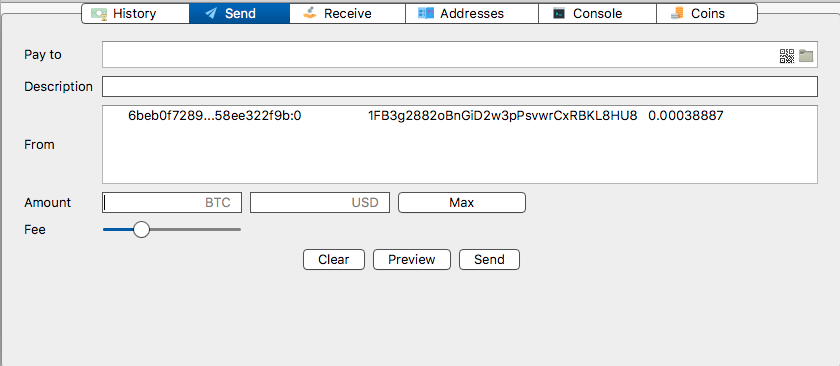
(I'm not gonna actually send right now so I don't make any changes if you're debugging.) That worked fine from the 16ZiE... address.
What fails consistently is if I clear that, select max, and send. The transaction it generates has 15 inputs, and something fails the script check.
aleczadikian
on 12 Feb 2018
ok.. thanks for not spending from 1FB3.. while we are investigating
ecdsa
on 12 Feb 2018
did you generate the second transaction above using the max button?
are some of your addresses frozen?
ecdsa
on 12 Feb 2018
Yes, I used the max button. No, I haven't frozen any addresses.
>> addresses = listaddresses()
>> type(addresses)
<class 'list'>
>> frozen = False
>> for address in addresses: frozen = frozen or wallet.is_frozen(address)
>> frozen
False
with gap limit 200 I see 16 utxos in your wallet, not 15..
you mentioned that you restored several times from CLI, do you get the same balance everytime?
do you get 15 outputs everytime?
ecdsa
on 12 Feb 2018
which server are you connected to?
ecdsa
on 12 Feb 2018
I'm seeing the same balance on both restored copies I have in front of me, can try more if needed. The other times were on ephemeral servers, so those local copies are gone now.
I see only 15 UTXOs, and I've generated more addresses locally than you have. It always sends from 15 when I preview a "send max" transaction.
>> for _ in range(200): createnewaddress()
>> for _ in range(800): createnewaddress()
>> len(wallet.get_utxos())
15
I'm connected to electrumx.westeurope.cloudapp.azure.com on both.
aleczadikian
on 12 Feb 2018
well I see 186 UTXOs with a gap limit of 1000
SomberNight
on 12 Feb 2018
no you have not generated more addresses than us if you did not change the gap limit
ecdsa
on 12 Feb 2018
~Is createnewaddress() really different from changing the gap limit?~ oh didn't see above comment in time Anyway, I tried this too, will retry in 10 or so minutes in case something has to sync:
>> wallet.change_gap_limit(1000)
True
>> len(wallet.get_utxos())
15
Edit: It wasn't trying to sync for some reason. Reopened Electrum and tried this again, and it's syncing this time... is taking a while but so far seeing 25 UTXOs and increasing...
aleczadikian
on 12 Feb 2018
@aleczadikian how did you receive coins in this wallet? did you use some kind of web commerce plugin that does not care about creating large gaps?
ecdsa
on 12 Feb 2018
I was testing and running a payment system where each user would get one or more addresses to send to, so the wallet had to have at least an address per user. Not sure if this is the proper way, but so far it's been doing fine for receiving.
aleczadikian
on 12 Feb 2018
Done syncing. I see 188 UTXOs now (2 new addresses just got some balance a few minutes ago), so I'm in line with what @SomberNight saw. Should I try sending max now and see if that works?
BTW, I was missing the balance from those addresses until I increased the gap limit. The FAQ says to run createnewaddress() to generate addresses beyond the gap limit, but isn't this misleading?
aleczadikian
on 12 Feb 2018
When you failed to spend from 16ZiEecEoWqoX3KPoozhrqU5VZ4i2Fi3r1 initially; and then you succeeded later; was that from two different wallet files?
SomberNight
on 12 Feb 2018
Yes, but both wallet files had the same default gap limit of 20 and everything else the same.
aleczadikian
on 12 Feb 2018
Do you have the wallet file where it failed originally?
Run this there
wallet.get_address_index("16ZiEecEoWqoX3KPoozhrqU5VZ4i2Fi3r1")
or the wallet file where you create the second malformed tx you pasted here;
run this there
wallet.get_address_index("1FB3g2882oBnGiD2w3pPsvwrCxRBKL8HU8")
In this comment https://github.com/spesmilo/electrum/issues/3890#issuecomment-365020519
the indices; are those from a wallet where the spend worked or the one where it did not?
SomberNight
on 12 Feb 2018
The indices I posted were in the one where the spend worked. But I didn't try spending just from that one address on the original wallet. I think it would have worked either way.
I don't have the original wallet with me right now, only the one where I created the second malformed tx. It's now at gap limit 1000. Here's what it gives me:
>> wallet.get_address_index("1FB3g2882oBnGiD2w3pPsvwrCxRBKL8HU8")
(False, 375)
Great, thanks.
Am I correct in assuming that before we told you about change_gap_limit, you've been using code snippets such as what you wrote above:
for _ in range(200): createnewaddress()
?
SomberNight
on 12 Feb 2018
Yes
aleczadikian
on 12 Feb 2018
I still can't reproduce this, though I'm on master not 3.0.6, it might be less likely there, or maybe it's due to the difference in our hardware/OS/etc.
Anyway I'm guessing this is a concurrency bug.
First off, that address index you pasted is wrong, it's not 375, it should be 374.
wallet.get_address_index("1FB3g2882oBnGiD2w3pPsvwrCxRBKL8HU8")
(False, 374)
You are calling this function in a loop:
https://github.com/spesmilo/electrum/blob/82e88cb89df35288b80dfdbe071da74247351251/lib/wallet.py#L1637-L1646
Notice that there is no locking there on the globals; and access will become contended as soon as you find a used address and the synchronizer notices this, which happens on a different thread.
https://github.com/spesmilo/electrum/blob/82e88cb89df35288b80dfdbe071da74247351251/lib/network.py#L972-L977
https://github.com/spesmilo/electrum/blob/82e88cb89df35288b80dfdbe071da74247351251/lib/synchronizer.py#L181-L184
https://github.com/spesmilo/electrum/blob/82e88cb89df35288b80dfdbe071da74247351251/lib/wallet.py#L1660-L1664
https://github.com/spesmilo/electrum/blob/82e88cb89df35288b80dfdbe071da74247351251/lib/wallet.py#L1648-L1658
The synchronizer will also start calling createnewaddress, and while it will take wallet.lock, your script won't care, there is no testing for it in createnewaddress.
SomberNight
on 12 Feb 2018
Ah, makes sense. I've been doing these tests on macOS but noticed the original problem on a few different Ubuntu Linux machines. In all cases, rather slow hardware, whatever that means for this race condition.
I mentioned this above, but the FAQ recommends users use createnewaddress in a loop to generate addresses after restoring from a seed. Shouldn't the FAQ instruct users to just increase the gap limit instead? Simply generating new addresses won't show the right number of UTXOs.
aleczadikian
on 12 Feb 2018
Simply generating new addresses won't show the right number of UTXOs.
It will if you generate enough. :P
the FAQ recommends users use createnewaddress in a loop to generate addresses
The FAQ also says:
WARNING: Addresses beyond the gap limit will not automatically be recovered from the seed. To recover them will require either increasing the client's gap limit or generating new addresses until the used addresses are found.
Also, the FAQ is talking about "pre-generating" addresses, not trying to find used ones. If it didn't find used addresses while the loop is running, the race condition would not get triggered.
Anyway, clearly this is a bug. At the very least, even if not wallet.create_new_address but the createnewaddress command should behave properly with wallet synchronisation.
SomberNight
on 12 Feb 2018
Got it. Thanks for the quick help and the bugfix. I'll set my gap limit from now on if I want to send or view balance and merely generate addresses if I'm looking to receive. I'll leave the issue open cause I assume you're waiting to close it after the PR.
aleczadikian
on 13 Feb 2018
Related issues
 Akshansh1903
·
4Comments
Akshansh1903
·
4Comments
 Javcho2020
·
3Comments
Javcho2020
·
3Comments
 fresheneesz
·
4Comments
fresheneesz
·
4Comments
 GuestInCorle
·
3Comments
GuestInCorle
·
3Comments
 shawnpringle
·
3Comments
shawnpringle
·
3Comments
Most helpful comment
I still can't reproduce this, though I'm on master not 3.0.6, it might be less likely there, or maybe it's due to the difference in our hardware/OS/etc.
Anyway I'm guessing this is a concurrency bug.
First off, that address index you pasted is wrong, it's not 375, it should be 374.
You are calling this function in a loop:
https://github.com/spesmilo/electrum/blob/82e88cb89df35288b80dfdbe071da74247351251/lib/wallet.py#L1637-L1646
Notice that there is no locking there on the globals; and access will become contended as soon as you find a used address and the synchronizer notices this, which happens on a different thread.
https://github.com/spesmilo/electrum/blob/82e88cb89df35288b80dfdbe071da74247351251/lib/network.py#L972-L977
https://github.com/spesmilo/electrum/blob/82e88cb89df35288b80dfdbe071da74247351251/lib/synchronizer.py#L181-L184
https://github.com/spesmilo/electrum/blob/82e88cb89df35288b80dfdbe071da74247351251/lib/wallet.py#L1660-L1664
https://github.com/spesmilo/electrum/blob/82e88cb89df35288b80dfdbe071da74247351251/lib/wallet.py#L1648-L1658
The synchronizer will also start calling
createnewaddress, and while it will take wallet.lock, your script won't care, there is no testing for it increatenewaddress.