Electron-vue: Problem when trying to use global Sass files.
Found an issue or bug with electron-vue? Tell me all about it!
Questions regarding how to use electron or vue are likely to be closed as they are not direct issues with this boilerplate. Please seek solutions from official documentation or their respective communities.
Describe the issue / bug.
# I am trying to use a global Sass file and access color variables from it in my components, but I always get the result of "variable not found".
How can I reproduce this problem?
# In a new project from scratch, configure a global Sass file following the official guide in this link.
If visual, provide a screenshot.
#

Tell me about your development environment.
- Node version: v8.11.3
- NPM version: 5.6.0
- Yarn version: 1.6.0
- vue-cli version: 2.9.6
- Operating System: Windows 10 BUILD 1803
If you are looking to suggest an enhancement or feature, then feel free to remove everything above.
 4t4sh
4t4sh
All 12 comments
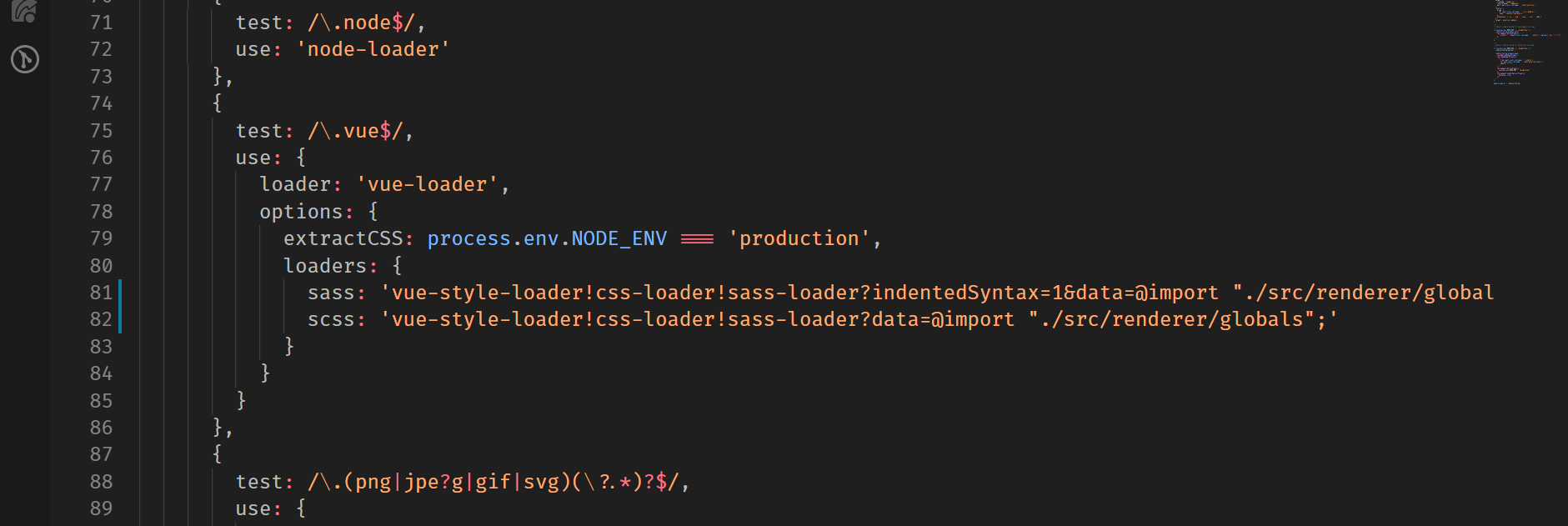
This is my current webpack configuration.
4t4sh
on 22 Sep 2018
Change this

to

This worked for me.
 abramdev
on 10 Oct 2018
abramdev
on 10 Oct 2018
Had a similar issue _#752_. It was solved using @Abramwow tip. thanks
 JojoMig
on 15 Nov 2018
JojoMig
on 15 Nov 2018
To whomsoever it may concern—
I had a similar problem, and spend about nine, NINE hours trying to debug this. Turns out, I just had to include the file extension in the webpack.renderer.config.js file.
loaders: {
    sass: 'vue-style-loader!css-loader!sass-loader?indentedSyntax=1&data=@import "./src/renderer/assets/css/main.scss"',
    scss: 'vue-style-loader!css-loader!sass-loader?data=@import "./src/renderer/assets/css/main.scss";'
}
I now wear a toupé.
 sujan-s
on 6 Jan 2019
sujan-s
on 6 Jan 2019
Ah ok, this problem is solved with answer of @Abramwow. Please, close this issue.
Thanks!
4t4sh
on 21 Jan 2019
This saved my day. Thanks.
 asakiasako
on 11 Mar 2019
asakiasako
on 11 Mar 2019
@abramdev 's answer worked for me.
This should probably be updated in https://simulatedgreg.gitbooks.io/electron-vue/content/en/using_pre-processors.html because the example given doesn't work.
 mochi-co
on 12 Mar 2019
mochi-co
on 12 Mar 2019
Wanted to follow up on this as I am also having issues following:
https://simulatedgreg.gitbooks.io/electron-vue/content/en/using_pre-processors.html
I did also try using @abramdev 's approach and that worked, however I could never get it to allow me to use standard scss formatting. It kept wanting me to use indentedSyntax no matter how hard I tried to turn it off.
If anyone has any thoughts where I might be going wrong, please let me know. New to vue-electron.
 cuzzins
on 12 Jul 2019
cuzzins
on 12 Jul 2019
Wanted to follow up on this as I am also having issues following:
https://simulatedgreg.gitbooks.io/electron-vue/content/en/using_pre-processors.htmlI did also try using @abramdev 's approach and that worked, however I could never get it to allow me to use standard scss formatting. It kept wanting me to use indentedSyntax no matter how hard I tried to turn it off.
If anyone has any thoughts where I might be going wrong, please let me know. New to vue-electron.
Did you update the scss not the sass loader?
 karlpablo
on 13 Jul 2019
karlpablo
on 13 Jul 2019
Thank you @abramdev
 DiegoFleitas
on 16 Feb 2020
DiegoFleitas
on 16 Feb 2020
Change this
to
This worked for me.
data has been renamed to prependData in v8.
 bbrandt
on 15 Apr 2020
bbrandt
on 15 Apr 2020
I've just spent the better part of the day resolving this, and in my case the fault lied in missing the semicolon at the end of the import.
 ngr900
on 3 Jul 2020
ngr900
on 3 Jul 2020
Related issues
 webrtcn
·
3Comments
webrtcn
·
3Comments
 simdax
·
3Comments
simdax
·
3Comments
 rodrigomata
·
3Comments
rodrigomata
·
3Comments
 haomehaode
·
3Comments
haomehaode
·
3Comments
 jt-wang
·
3Comments
jt-wang
·
3Comments
Most helpful comment
Change this
to
This worked for me.