Electron-vue: Menu problem in MAC OS [FIXED]
EDIT :: OK I fixed the problem, but it is really not clear in Electron doc, so I let the solution here (there are comments in stackoverflow's post https://stackoverflow.com/questions/40440666/native-menus-not-showing-os-x-electron)
See edit. Tried that originally, still no app menu. – thephpdev Nov 6 '16 at 10:44
1
@thephpdev You have to call Menu.setApplicationMenu() after the app is ready, so move that call into createWindow(). – Vadim Macagon Nov 6 '16 at 10:53
I see. I feel a bit thick now, I thought I'd tried that, but I realise now that I called mainWindow.setMenu(). I'm new to electron, this is my first electron app, in case you're interested. github.com/CaelanStewart/Mathulator – thephpdev Nov 6 '16 at 11:34
Totally worked. – meriadec Apr 11 '17 at 21:20
Hello Everybody
I can't have the menu I want.
I'm creating a new project from scratch. I just adding to src/main/index.js the code from the official electron site :
const {app, Menu} = require('electron')

  const template = [
    {
      label: 'Edit',
      submenu: [
        {role: 'undo'},
        {role: 'redo'},
        {type: 'separator'},
        {role: 'cut'},
        {role: 'copy'},
        {role: 'paste'},
        {role: 'pasteandmatchstyle'},
        {role: 'delete'},
        {role: 'selectall'}
      ]
    },
    {
      label: 'View',
      submenu: [
        {role: 'reload'},
        {role: 'forcereload'},
        {role: 'toggledevtools'},
        {type: 'separator'},
        {role: 'resetzoom'},
        {role: 'zoomin'},
        {role: 'zoomout'},
        {type: 'separator'},
        {role: 'togglefullscreen'}
      ]
    },
    {
      role: 'window',
      submenu: [
        {role: 'minimize'},
        {role: 'close'}
      ]
    },
    {
      role: 'help',
      submenu: [
        {
          label: 'Learn More',
          click () { require('electron').shell.openExternal('https://electronjs.org') }
        }
      ]
    }
  ]

  if (process.platform === 'darwin') {
    template.unshift({
      label: app.getName(),
      submenu: [
        {role: 'about'},
        {type: 'separator'},
        {role: 'services', submenu: []},
        {type: 'separator'},
        {role: 'hide'},
        {role: 'hideothers'},
        {role: 'unhide'},
        {type: 'separator'},
        {role: 'quit'}
      ]
    })

    // Edit menu
    template[1].submenu.push(
      {type: 'separator'},
      {
        label: 'Speech',
        submenu: [
          {role: 'startspeaking'},
          {role: 'stopspeaking'}
        ]
      }
    )

    // Window menu
    template[3].submenu = [
      {role: 'close'},
      {role: 'minimize'},
      {role: 'zoom'},
      {type: 'separator'},
      {role: 'front'}
    ]
  }

  const menu = Menu.buildFromTemplate(template)
  Menu.setApplicationMenu(menu)
And I clearly dont have it :

The menu is working for linux.
Is this a bug or am I doing something wrong ??
Thank you
 simdax
All 9 comments
I found a solutions for it, and it seems like it is a race condition happening on Mac only.
So instead of having the code in an arbitrary place, I put a function here:
app.on('ready', () =>  {
  generateMenu();
  initApp();
})
 peturh
on 23 Oct 2018
peturh
on 23 Oct 2018
I found a solutions for it, and it seems like it is a race condition happening on Mac only.
So instead of having the code in an arbitrary place, I put a function here:
app.on('ready', () =>  {
 generateMenu();
 initApp();
})
I have the same, i cant use var template as below, template gets high-lighted and i get a warning about
Argument of type '{ label: string; submenu: ({ label: string; role: string; type?: undefined; } | { type: string; label?:
var template = [
      {label: 'File', submenu: [
        {label: 'New', role: 'file-new'},
        {label: 'Open', role: 'file-open'},
        {label: 'Save', role: 'file-save'},
        {label: 'Save As', role: 'file-save-as'},
        {label: 'Close', role: 'file-close'},
        {type: 'separator'},
        {label: 'Quit', role: 'quit'}
      ]},
      {label: 'View', submenu: [
        {label: 'HTML/Markdown', role: 'view-toggle'}
      ]}
    ];
    Menu.setApplicationMenu(Menu.buildFromTemplate(template));
This does work, yet its not adding an edit menu. But i adds all to main app menu.
Menu.setApplicationMenu(Menu.buildFromTemplate([
      {
        label: 'Edit',
        submenu: [
          { role: 'undo' },
          { role: 'redo' },
          { type: 'separator' },
          { role: 'cut' },
          { role: 'copy' },
          { role: 'paste' },
          { role: 'pasteandmatchstyle' },
          { role: 'delete' },
          { role: 'selectall' },
          { type: 'separator' },
          { role: 'reload' },
          { role: 'toggleFullScreen' },
          { role: 'toggleDevTools' },
          { type: 'separator' },
          { role: 'quit' }
        ]
      }
    ]));
 schroef
on 25 Apr 2019
schroef
on 25 Apr 2019
PS doesnt you initApp do the CreateWindow? So you make the menu first, than create window?
schroef
on 25 Apr 2019
@schroef Yes, exactly. What's weird is this is only required on Mac, not on Win or Linux.
peturh
on 25 Apr 2019
Ow i found my issue i think, its the type: 'separator' which caused the issue here.
It also works with var template now. within creatWindow function :)
Im kinda new to this. found tons of these threads none worked. Now i just started reading the error message and trying to understand it. Simple took out the type and replaced it by role....
schroef
on 26 Apr 2019
This does work, yet its not adding an edit menu. But i adds all to main app menu.
Try adding to the template object array like this:
``
Menu.setApplicationMenu(Menu.buildFromTemplate([
    {
      label: app.getName(),
      submenu: [
        { role: 'about' },
        { type: 'separator' },
        { role: 'services' },
        { type: 'separator' },
        { role: 'hide' },
        { role: 'hideothers' },
        { role: 'unhide' },
        { type: 'separator' },
        { role: 'quit' }
      ]
    },
    {
      label: 'Edit',
      submenu: [
        { role: 'undo' },
        { role: 'redo' },
        { type: 'separator' },
        { role: 'cut' },
        { role: 'copy' },
        { role: 'paste' },
        { role: 'pasteandmatchstyle' },
        { role: 'delete' },
        { role: 'selectall' },
        { type: 'separator' },
        { role: 'reload' },
        { role: 'toggleFullScreen' },
        { role: 'toggleDevTools' },
        { type: 'separator' },
        { role: 'quit' }
      ]
    }
  ]));
This worked in my project.
 cjstage
on 1 May 2019
cjstage
on 1 May 2019
So after some research it seems that on mac, the name of the first menu is the name of the application, since the application you are using (at least to start with) is simply 'Electron' thats what the first menu items gets called (this is the OS doing this).
Once you package your project for distribution and give it a name, e.g. 'myApp' you will see this menu item change to 'myApp'
It would seem you cannot have the first item being 'File' or whatever on mac. Once I read this it became quite obvious since every other application in mac OS behaves the same.
 bchellingworth
on 1 May 2019
bchellingworth
on 1 May 2019
But also the issue of type: 'Separator'. Though the documentation states this, its causing issues. When i change that to role or leave out it does work just fine.
This is how i use it now, though im gonna take out the separator since it looks weir now
  // Mac App menu - used for styling so shortcuts work
  if (process.platform === 'darwin') {
    // Create our menu entries so that we can use MAC shortcuts
    const template = [
      {
        label: 'File', submenu: [
          { role: 'quit' },
        ],
      },
      {
        label: 'Edit', submenu: [
          { role: 'undo' },
          { role: 'redo' },
          { role: 'separator' },
          { role: 'cut' },
          { role: 'copy' },
          { role: 'paste' },
          { role: 'pasteandmatchstyle' },
          { role: 'delete' },
          { role: 'selectall' },
        ],
      },
      {
        label: 'Help', submenu: [
          { role: 'reload' },
          { role: 'toggleFullScreen' },
          { role: 'toggleDevTools' },
        ],
      },
    ];
    Menu.setApplicationMenu(Menu.buildFromTemplate(template));
  }
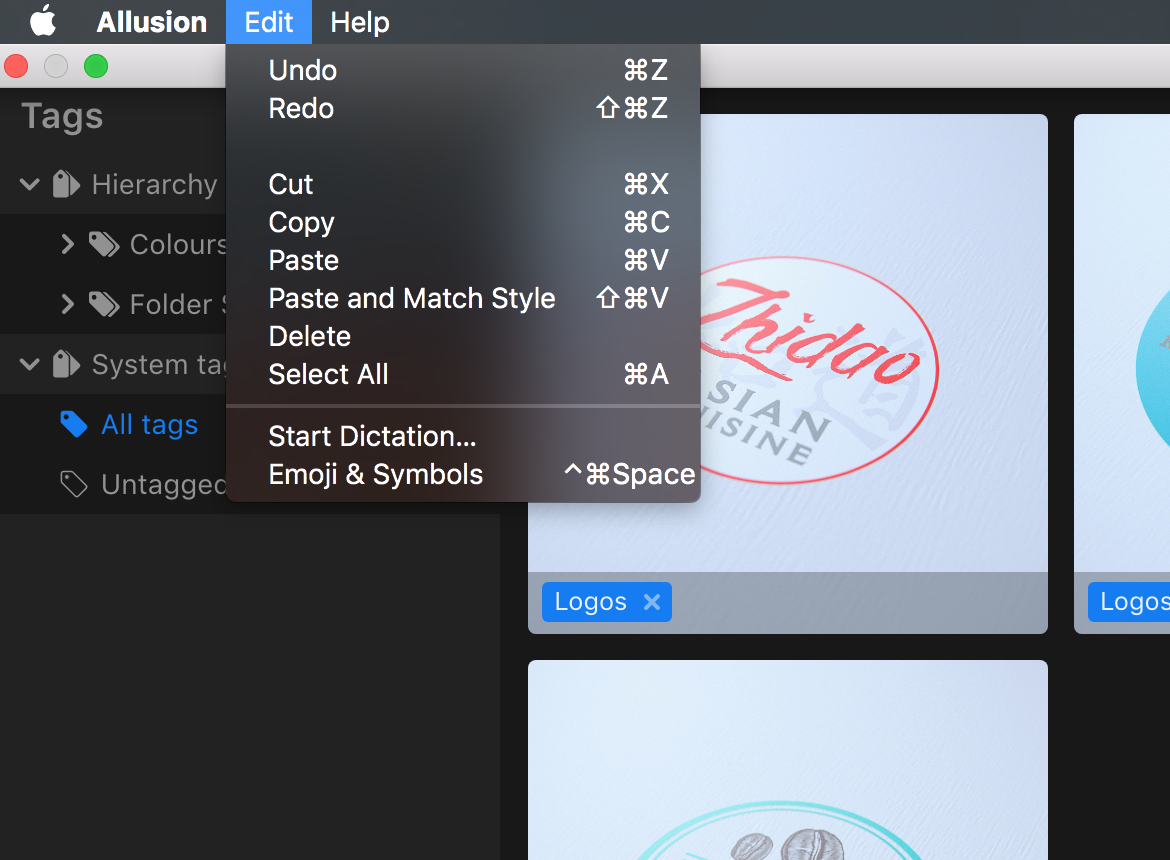
This is how its rendered
schroef
on 2 May 2019
I understood the problem. Here is a simple fix
Add ... before (process.platform === 'darwin' ? [{
label: app.getName(),
 TechThank
on 2 Aug 2019
TechThank
on 2 Aug 2019
Related issues
 imomaliev
·
3Comments
imomaliev
·
3Comments
 Oriol-GG
·
3Comments
Oriol-GG
·
3Comments
 kinoli
·
3Comments
kinoli
·
3Comments
 blackw212
·
3Comments
blackw212
·
3Comments
 jt-wang
·
3Comments
jt-wang
·
3Comments
Most helpful comment
So after some research it seems that on mac, the name of the first menu is the name of the application, since the application you are using (at least to start with) is simply 'Electron' thats what the first menu items gets called (this is the OS doing this).
Once you package your project for distribution and give it a name, e.g. 'myApp' you will see this menu item change to 'myApp'
It would seem you cannot have the first item being 'File' or whatever on mac. Once I read this it became quite obvious since every other application in mac OS behaves the same.