Electron-vue: How to import svg and fonts?
Hi everyone! This isn't a bug. But I'm a bit confused.
This is my project structure:

Font issue:
When I import a font with url in my sass file an error is shown in the build:
Module not found: Error: Can't resolve '../../fonts/BebasNeueBook.woff2'
Then in a .scss file (styles/base/reset.scss):
@font-face {
  font-family: 'BebasNeueBook';
  src: url('../../fonts/BebasNeueBook.woff2') format('woff2');
}
SVG issue:
I use the svg as follow:
<svg class="icon-menu">
    <use xlink:href="/icons/icons.svg#icon-menu"></use>
</svg>
But I can show this error in the dev tools console:
vue.esm.js?65d7:5819 GET http://localhost:9080/icons/icons.svg

Tell me about your development environment.
- Node version: 8.0.0
- NPM version: 5.3.0
- vue-cli version: 2.8.2
- Operating System: MacOS 10.12.6
Thanks for any help you can give me!
Regards!
 algil
algil
All 6 comments
i think the path to fonts is wrong. im not sure. it should be
@font-face {
font-family: 'BebasNeueBook';
src: url('../fonts/BebasNeueBook.woff2') format('woff2');
}
 emjimadhu
on 21 Aug 2017
emjimadhu
on 21 Aug 2017
@algil
For the font issue, you could try using the webpack alias with something like url(~@/assets/fonts/BebasNeueBook.woff2), where the @ provides you a reference to the src/ directory.
As for the SVG issue, you will not be able to use the xlink:href approach as vue-loader won't treat that as a require statement. You could either alt for using a <img> tag, or place your icons within the static/ directory and access from there.
 SimulatedGREG
on 31 Aug 2017
SimulatedGREG
on 31 Aug 2017
For future Googlers, that's what worked for me.
- If use quote it doesn't work
- Fonts under
/src/assets/fonts - Other formats were available (as SVG, for example), but when applied the font was ignored – so check every file format
@font-face {
    font-family: 'fontName';
    src:
       url(~@/assets/fonts/fontName.woff2) format('woff2'),
       url(~@/assets/fonts/fontName.woff) format('woff'),
       url(~@/assets/fonts/fontName.ttf) format('truetype');
    font-weight: normal;
    font-style: normal;
}
 hmaesta
on 21 Sep 2018
hmaesta
on 21 Sep 2018
@hmaesta
Removing the SVG source url is what did the trick for me. Cheers!
 Jasonkoolman
on 28 Sep 2018
Jasonkoolman
on 28 Sep 2018
It's very very very bad news about SVG sprites. symbolic sprites the most convenient way for dev. I can't leave it like this
 WebKieth
on 19 Dec 2018
WebKieth
on 19 Dec 2018
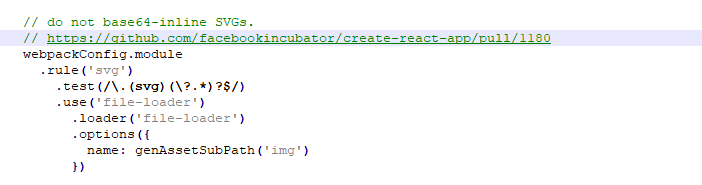
https://github.com/vuejs/vue-cli/blob/master/packages/@vue/cli-service/lib/config/base.js#L112
Thats why you can't import svg files as fonts, only as images.
Solutions:
1) Rewrite rule, but who gives a fuck about it?
2) So, for svg rule you should just change fonts -> img.
/*!
 * Font Awesome Pro 5.9.0 by @fontawesome - https://fontawesome.com
 * License - https://fontawesome.com/license (Commercial License)
 */
@font-face{
    font-family:"Font Awesome 5 Pro";
    font-style:normal;
    font-weight:400;
    font-display:auto;
    src:url(~@/assets/fonts/fa-regular-400.eot);
    src:url(~@/assets/fonts/fa-regular-400.eot?#iefix) format("embedded-opentype"),
    url(~@/assets/fonts/fa-regular-400.woff2) format("woff2"),
    url(~@/assets/fonts/fa-regular-400.woff) format("woff"),
    url(~@/assets/fonts/fa-regular-400.ttf) format("truetype"),
    url(~@/assets/img/fa-regular-400.svg#fontawesome) format("svg");
}
.far{
    font-family:"Font Awesome 5 Pro";
    font-weight:400;
}
Fonts under assets/fonts or assets/img
That's what you gonna get in output:
@font-face {
    font-family: Font Awesome\ 5 Pro;
    font-style: normal;
    font-weight: 400;
    font-display: auto;
    src: url(../fonts/fa-regular-400.8367c7f8.eot);
    src: url(../fonts/fa-regular-400.8367c7f8.eot?#iefix) format("embedded-opentype"),
    url(../fonts/fa-regular-400.bc70ae3f.woff2) format("woff2"),
    url(../fonts/fa-regular-400.9d318325.woff) format("woff"),
    url(../fonts/fa-regular-400.caf8defa.ttf) format("truetype"),
    url(../img/fa-regular-400.8e0462b9.svg#fontawesome) format("svg")
}

.far {
    font-family: Font Awesome\ 5 Pro;
    font-weight: 400
}
 afwn90cj93201nixr2e1re
on 12 Nov 2019
afwn90cj93201nixr2e1re
on 12 Nov 2019
Related issues
 xiaomizhou66
·
3Comments
xiaomizhou66
·
3Comments
 haomehaode
·
3Comments
haomehaode
·
3Comments
 simdax
·
3Comments
simdax
·
3Comments
 imomaliev
·
3Comments
imomaliev
·
3Comments
 michalzaq12
·
3Comments
michalzaq12
·
3Comments
Most helpful comment
For future Googlers, that's what worked for me.
/src/assets/fonts