Electron-vue: Errors when using plugins/packages
Found an issue or bug? Tell me all about!
New to electron so this is very possibly user error, and if so, I apologize in advance. Would very much appreciate some help.
When I import _some_ packages into my project I get syntax errors in the console.
When I use the regular vue webpack-simple template with the same plugins an they work fine. Not sure what I'm doing wrong.
This is not for all plugins, just some. I'm unsure of how to debug the errors. The errors have so far come from template tags and css.
Describe the issue / bug.
#
Console Syntax Errors thrown on some plugins that work in regular vue webpack-simple template
How can I reproduce this problem?
#
vue init simulatedgreg/electron-vue my-project
$ cd my-project
$ npm install
$ cd app
$ npm install vue-video-player --save
then in app/src/renderer/main.js
import VueVideoPlayer from 'vue-video-player'
Vue.use(VueVideoPlayer)
then
$ npm run dev
If visual, provide a screenshot.
#

Tell me about your development environment.
- Node version: 7.9.0
- NPM version: 4.2.0
- vue-cli version: 2.8.1
- Operating System: Mac OSX (darwin platform)
Thank-you
If you are looking to suggest an enhancement or feature, then feel free to remove everything above.
 rugor
rugor
All 7 comments
@rugor
Quick fix, update your webpack.renderer.config.js at line 19 to...
externals: Object.keys(pkg.dependencies || {}).filter(d => !['vue','vue-video-player'].includes(d)),
Not entirely sure why some modules don't like to be treated as externals. When installing vue-video-player, did you use npm or yarn?
 SimulatedGREG
on 24 Apr 2017
SimulatedGREG
on 24 Apr 2017
@SimulatedGREG I used npm to install the package.
I'm figuring out electron-vue by porting over an existing project and a few plugins/modules had this issue. Will keep messing around with it, seems like a good way to learn -- will report back if I figure out anything more.
Thanks for taking the time to answer, and for this project.
rugor
on 24 Apr 2017
Thanks for the feedback. Feel free to comment back any questions.
SimulatedGREG
on 25 Apr 2017
Hey @SimulatedGREG , commenting back on this because I just updated to the newest version of electron-vue and I am receiving the same error as above when importing two npm packages. Steps to reproduce below:
$ vue init simulatedgreg/electron-vue my-project
$ cd my-project
$ npm install
$ npm install vue-video-player --save
then in webpack.renderer.config.js (now in the root folder) updating line 19 to:
externals: Object.keys(pkg.dependencies || {}).filter(d => !['vue', 'vue-video-player'].includes(d)),
Console error:
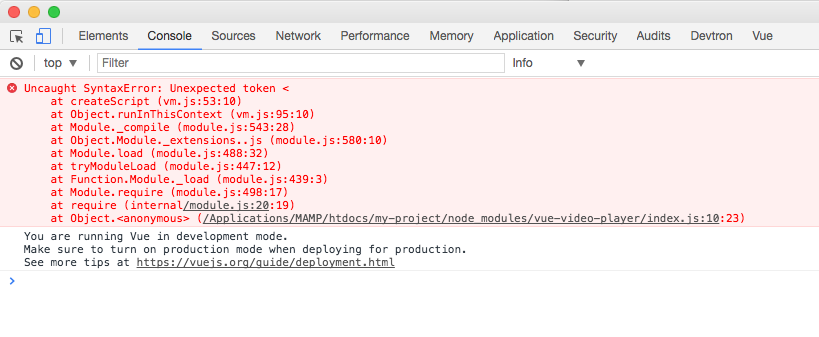
Any help appreciated.
rugor
on 22 Aug 2017
Cancel that... got it working by modifying whiteListedModules in.electron-vue/webpack.renderer.config.js as per:
https://simulatedgreg.gitbooks.io/electron-vue/content/en/webpack-configurations.html#white-listing-externals
rugor
on 23 Aug 2017
Not sure how you may have migrated your project to a newer electron-vue version, but make sure your vue-cli is updated for future reference. There was a bug awhile back that mistakenly merged cached templates with updated ones.
SimulatedGREG
on 23 Aug 2017
Thanks @SimulatedGREG will look into that.
rugor
on 23 Aug 2017
Related issues
 okwangyu
·
3Comments
okwangyu
·
3Comments
 Quadriphobs1
·
3Comments
Quadriphobs1
·
3Comments
 rodrigomata
·
3Comments
rodrigomata
·
3Comments
 Oriol-GG
·
3Comments
Oriol-GG
·
3Comments
 iwen-pengh
·
3Comments
iwen-pengh
·
3Comments
Most helpful comment
@rugor
Quick fix, update your
webpack.renderer.config.jsat line 19 to...Not entirely sure why some modules don't like to be treated as externals. When installing
vue-video-player, did you usenpmoryarn?