Electron-packager: Cannot launch bundled Electron 4.0 app on Linux via file manager
Compiled executable files for Linux are not compiled properly, not clickable executable and show up as a shared file with other bugs from it not being properly compiled also noticed other stuff on the Windows compiled binary missing the icon I set for it ect.
 coreybruce
All 13 comments
Thanks for filing an issue! Unfortunately, I cannot reproduce your problem with the information provided. My steps (on a Linux host, for a Linux target):
git clone https://github.com/electron/electron-quick-start && cd electron-quick-start
# edit package.json to use exactly electron-4.0.0-beta.5
npm install
npm install --save-dev electron-packager
$(npm bin)/electron-packager .
./electron-quick-start-linux-x64/electron-quick-start
My Electron Packager version:
$ $(npm bin)/electron-packager --version
Electron Packager 12.2.0
Node v10.2.1
Host Operating system: linux (x64)
In order to help you with your problem, we're going to need more information about it. In particular:
Console output when you run electron-packager with the environment variable
DEBUG=electron-packager_(instructions for Windows and non-Windows)_. Please include the stack trace if one exists.What command line arguments are you passing? Alternatively, if you are using the API, what
parameters are you passing to thepackager()function?Please provide either a failing minimal testcase (with code) or detailed steps to reproduce your
problem. Using electron-quick-start is a good starting point.
 malept
on 25 Oct 2018
malept
on 25 Oct 2018
@malept I am using Electron 4.0.0 beta on Xubuntu 18.04 LTS with Node v10.12.0
Here is what it looks like when compiled
http://i.imgur.com/ezYmJKe.png
Meanwhile using Electron 3.0.6 works just fine and compiles properly with electron-packager as you can see here
http://i.imgur.com/Iu93L78.png
coreybruce
on 25 Oct 2018
It's runnable from the command line (which is why I was unable to reproduce in the first place), but I can reproduce the behavior of trying to run it from Nautilus and getting the error message `There is no application installed for "shared library" files." Screenshot:
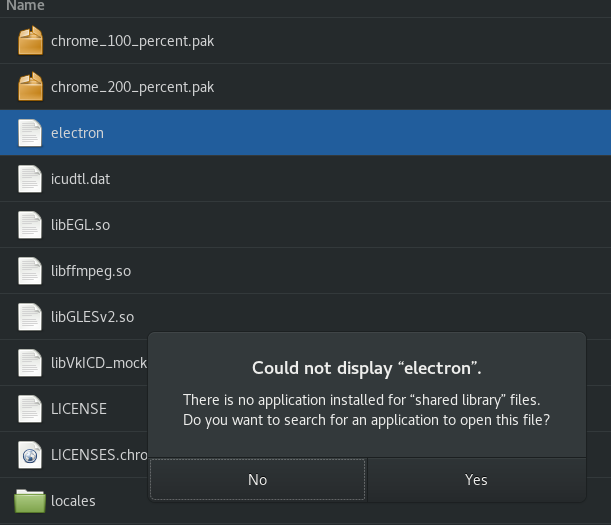
Unfortunately, this is a bug in Electron itself, not Electron Packager. Upstream changed their build process for 4.0 and this may have been one of the unintended side effects. Can you please file a bug in the Electron issue tracker so those developers are made aware?
For a workaround, you can try using electron-installer-debian to create an installable .deb file (with .desktop launcher shortcut) or electron-installer-snap to create a snap file.
malept
on 25 Oct 2018
@malept It is runable yes bug yes. but it isn't correctly compiling. I will make a bug report on Electron to get this fixed.
Thank you for the help.
coreybruce
on 26 Oct 2018
same problem,how to solve it?
CentOS 7.4 X64
use the command
···
./electron
···
no response
 mbigger
on 16 Jul 2019
mbigger
on 16 Jul 2019
Best solution unless you don't package it like I did for my software for Arch/Manjaro is to just make a desktop shortcut to it
coreybruce
on 16 Jul 2019
but even if i make a desktop shortcut for it, i cannot start it, when i double click the icon, no response.
i read this page
https://stackoverflow.com/questions/55060402/electron-executable-not-recognized-by-nautilus
, but it does not work on me.
this is the content of my desktop file:
[Desktop Entry]
Name=My Application
Exec=/root/electron-quick-start/node_modules/electron/dist/electron
Terminal=false
Type=Application
StartupNotify=true
Encoding=UTF-8
@mbigger did you mean to ping me? i'm not sure what help i can be here, unfortunately
 codebytere
on 16 Jul 2019
codebytere
on 16 Jul 2019
@codebytere sorry ,i want to @coreybruce
mbigger
on 16 Jul 2019
That's because on your example desktop shortcut your not even linking it to your application you made also you need to right click the application and go into properties than tick "allow this file to run" or something similar so it can run.
You can also do chmod +x exampleapplication
coreybruce
on 16 Jul 2019
@coreybruce Of course , I did this , chmod +x , and allow it to run. The icon has changed to the same as an
executable program.
mbigger
on 16 Jul 2019
Is this thread even serious, last comment is Jul 16 2019 and this is like a dealbreaker bug and it is closed for what reason?
 krastanov-veselin
on 3 Apr 2020
krastanov-veselin
on 3 Apr 2020
it is closed for what reason?
From https://github.com/electron/electron-packager/issues/901#issuecomment-433101967:
Unfortunately, this is a bug in Electron itself, not Electron Packager. Upstream changed their build process for 4.0 and this may have been one of the unintended side effects.
The related Electron issue: https://github.com/electron/electron/issues/15406
malept
on 3 Apr 2020
Related issues
 leanderBehr
·
3Comments
leanderBehr
·
3Comments
 pushkin-
·
4Comments
pushkin-
·
4Comments
 NoahAndrews
·
5Comments
NoahAndrews
·
5Comments
 kdawg1406
·
4Comments
kdawg1406
·
4Comments
 Orrison
·
3Comments
Orrison
·
3Comments