Electron.net: Unable to resotre DotNetCLI Reference
I grabbed a copy of the Music Player application written by you.
when i run the command dotnet electronize init i get an error.

I have tried running dotnet restore prior to this. I have .Net Core 2.0 SDK installed and am using Visual Studio 2017.
 newblord
All 12 comments
Could you a "dotnet restore"?
 robertmuehsig
on 3 Nov 2017
robertmuehsig
on 3 Nov 2017
Ive tried that but that doesnt seem to add the CLI reference.
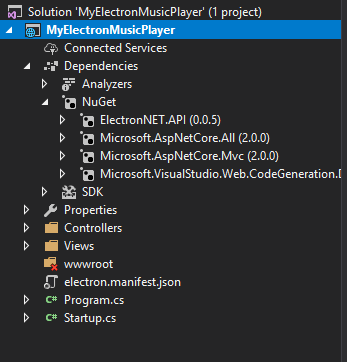
After i run "dotnet restore", the dependencies folder does not have the Electron.CLI under Nuget.
newblord
on 3 Nov 2017
This is (sadly) by design. CLI extensions can only be added through the .csproj and are not visible like other NuGet packages in VS.
I just cloned the project and it should look like something like this:
PS D:\Code\GitHub\electron.net-musicplayer-sample> dotnet restore
Restoring packages for D:\Code\GitHub\electron.net-musicplayer-sample\MyElectronMusicPlayer\MyElectronMusicPlayer.csproj...
Restoring packages for D:\Code\GitHub\electron.net-musicplayer-sample\MyElectronMusicPlayer\MyElectronMusicPlayer.csproj...
Installing ElectronNET.CLI 0.0.5.
Restore completed in 1.53 sec for D:\Code\GitHub\electron.net-musicplayer-sample\MyElectronMusicPlayer\MyElectronMusicPlayer.csproj.
Installing ElectronNET.API 0.0.5.
Generating MSBuild file D:\Code\GitHub\electron.net-musicplayer-sample\MyElectronMusicPlayer\obj\MyElectronMusicPlayer.csproj.nuget.g.props.
Generating MSBuild file D:\Code\GitHub\electron.net-musicplayer-sample\MyElectronMusicPlayer\obj\MyElectronMusicPlayer.csproj.nuget.g.targets.
Restore completed in 6.43 sec for D:\Code\GitHub\electron.net-musicplayer-sample\MyElectronMusicPlayer\MyElectronMusicPlayer.csproj.
PS D:\Code\GitHub\electron.net-musicplayer-sample>
robertmuehsig
on 3 Nov 2017
This is what my command outputs:

I do have the dotnetclireference in the .csproj. I assumed it would show up in that list if it actually got installed correctly. For me it is not even installing hte CLI reference.
Do i need to have anything else installed besides .NET Core 2.0 SDK?
newblord
on 3 Nov 2017
And dotnet electronize version doen't work? Maybe the Electron.NET CLI is already installed - it's hard to see from VS if it is there or not.
robertmuehsig
on 3 Nov 2017
i cant use any of the dotnet electronize commands
newblord
on 3 Nov 2017
Could you check if you have a electronnet.cli folder in the NuGet Cache?
Location: %userprofile%/.nuget/packages
And here: %userprofile%/.nuget/packages/.tools
If yes: Try to remove the electronnet.cli package there and do a new dotnet restore.
robertmuehsig
on 3 Nov 2017
I just removed it and i got this:
PS C:\Users\hiteshkpatel\Desktop\electron.net-musicplayer-sample-master> dotnet restore --force
Restoring packages for C:\Users\hiteshkpatel\Desktop\electron.net-musicplayer-sample-master\MyElectronMusicPlayer\MyElectronMusicPlayer.csproj...
Restoring packages for C:\Users\hiteshkpatel\Desktop\electron.net-musicplayer-sample-master\MyElectronMusicPlayer\MyElectronMusicPlayer.csproj...
Restore completed in 991.71 ms for C:\Users\hiteshkpatel\Desktop\electron.net-musicplayer-sample-master\MyElectronMusicPlayer\MyElectronMusicPlayer.csproj.
Installing ElectronNET.CLI 0.0.5.
Restore completed in 1.63 sec for C:\Users\hiteshkpatel\Desktop\electron.net-musicplayer-sample-master\MyElectronMusicPlayer\MyElectronMusicPlayer.csproj.
PS C:\Users\hiteshkpatel\Desktop\electron.net-musicplayer-sample-master> dotnet electronize init
No executable found matching command "dotnet-electronize"
newblord
on 3 Nov 2017
Try the default CMD.exe (Command Shell) - I got the same mysterious effects with PowerShell..
 GregorBiswanger
on 3 Nov 2017
GregorBiswanger
on 3 Nov 2017
oh man that worked. That is so weird that it would not work from Powershell or Nuget Package Manager.
Thanks for the help guys.
newblord
on 3 Nov 2017
You are welcome ;)
normal I like PowerShell but the VS integration is terrible...
GregorBiswanger
on 3 Nov 2017
I see that this issue is closed, but I had the same problem under different circumstances. I've managed to resolve it, so I am posting this comment in case someone else encounters the same problem.
In my case, I was using CMD.exe from the start and getting the same error message. Initially, I was running the "dotnet electronize start" command from the root of the solution folder. However, when I moved into the folder that contained the .csproj file that contained "ElectronNET.CLI" reference and ran the command again, it worked.
 fiodarsazanavets
on 1 Aug 2018
fiodarsazanavets
on 1 Aug 2018
Related issues
 zlspjp
·
5Comments
zlspjp
·
5Comments
 seanmars
·
5Comments
seanmars
·
5Comments
 thnk2wn
·
4Comments
thnk2wn
·
4Comments
 ernestotw85
·
3Comments
ernestotw85
·
3Comments
 philiphobgen
·
3Comments
philiphobgen
·
3Comments
Most helpful comment
Try the default CMD.exe (Command Shell) - I got the same mysterious effects with PowerShell..