Electron-forge: Maker-Squirrel installer not installing Electron 10 apps correctly
Preflight Checklist
- [x] I have read the contribution documentation for this project.
- [x] I agree to follow the code of conduct that this project follows, as appropriate.
- [x] I have searched the issue tracker for a bug that matches the one I want to file, without success.
Issue Details
- Electron Forge Version:
- 6.0.0-beta.53
- Electron Version:
- 10.0.0
- Operating System:
- Windows (All versions)
- Last Known Working Electron Forge version::
- N/A
Expected Behavior
Installing a basic Electron app on Windows (via the squirrel.windows Setup.exe produced by electron-forge make) should allow the app to run correctly.
Actual Behavior
The renderer process of the installed app appears to crash/hang, resulting in a blank window.
To Reproduce
- Create a minimal Electron Forge app (via
npx create-electron-app my-appor otherwise). - Verify the app is using >= v10.0.0 of Electron.
- run
electron-forge make. - Install the app.
Additional Information
I believe I've tracked this down to the installer not copying libEGL.dll and/or libGLESv2.dll (located in the swiftshader folder of the packaged app) into the app-x.x.x folder for the app in AppData. If I manually copy the swiftshader folder across, the app works again.
This issue is only present in version 10 of Electron; version 9 and below install and run correctly.
Just to clarify, this is only an issue with the installed version of the app (seemingly due to the missing folder described above); running electron-forge start or running the app from the output of electron-packager works fine.
 Nawv
Nawv
All 17 comments
I was having a similar issue. Basically, I have my forge configuration to make the "Setup.exe". Additionally, I have a hook (postmake) on my config to sign the "Setup.exe". The thing is that the certificate I used to sign the executable expired. Now when I create a new "Setup.exe" file without the code signing, the process shows the default loading step (green background with lines loading) and the process closes. The thing is that I am not sure if this related to no having the setup signed or it is related to something else. Is there a way to debug this process?
If I use the packaged (electron-forge package) application it opens without any issues.
I also have a previous "Setup.exe" signed with the expired certificate and it gets installed without any issues.
Does someone have any idea about this?
 ycabranes
on 9 Sep 2020
ycabranes
on 9 Sep 2020
I'm seeing this issue with both a signed and unsigned app, so I don't think that's related - @ycabranes do you see this issue if you follow the steps to reproduce outlined above (i.e. make a new empty electron app)?
Nawv
on 11 Sep 2020
I'm seeing this issue with both a signed and unsigned app, so I don't think that's related - @ycabranes do you see this issue if you follow the steps to reproduce outlined above (i.e. make a new empty electron app)?
Hello @Nawv. I will replicate the steps (when I got the change. I am busy working in another project now using my macOS) to see the results and I will let you know.
ycabranes
on 11 Sep 2020
I can't reproduce this with a minimal demo app: https://github.com/malept/electron-forge-demo123/actions/runs/256019253 (See squirrel artifact). I could extract the Setup file from the zip and install the demo app on an installation of Windows 10 Home 2004 (Version 10.0.19041).
Note: it's signed with a test certificate so you will get the "don't run this, it's unknown" dialog.
 malept
on 15 Sep 2020
malept
on 15 Sep 2020
@malept Thanks for taking a look at this; I've installed the app you provided on two separate machines (Windows 7 Pro SP1 & Windows 10 Enterprise Version 10.0.17763), and I'm seeing the same issue.
To clarify, once the app has been installed (via the Setup.exe from the squirrel (win32) zip you provided above), I'm just seeing a blank white screen:

Rather than what I believe I should be seeing:
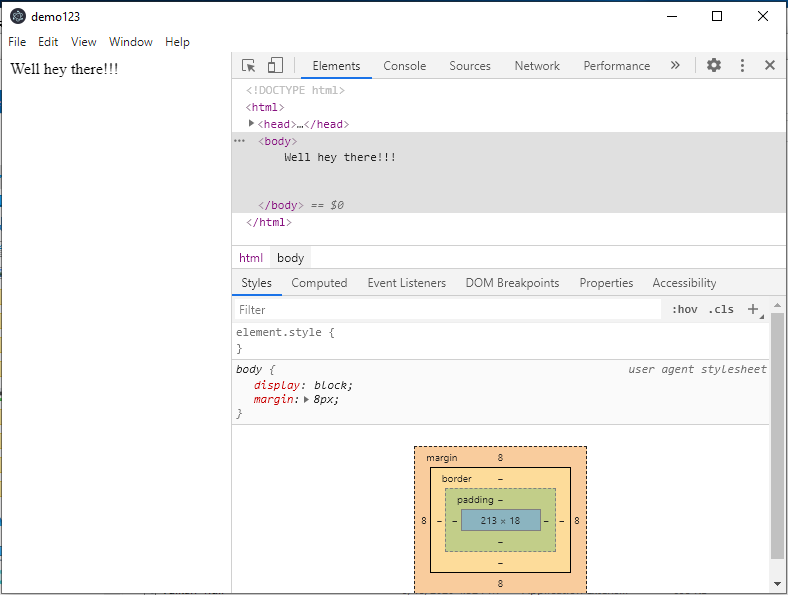
(That's from downloading the zip (win32) build artifact, and running demo123.exe directly from there)
I believe this is due to the renderer process crashing, because the dlls in the swiftshader directory are not being copied to the installation directory; as stated above, if I manually copy that folder across, the app works.
Can you confirm you're also seeing this behaviour?
Nawv
on 16 Sep 2020
Unfortunately, I cannot confirm. When I use the Setup.exe, I see Screenshot 2, not the blank screen.
Do you have any antivirus/anti-malware or similar installed on these devices? Perhaps they are preventing those files from being installed.
malept
on 16 Sep 2020
Unfortunately, I cannot confirm. When I use the Setup.exe, I see Screenshot 2, not the blank screen.
Do you have any antivirus/anti-malware or similar installed on these devices? Perhaps they are preventing those files from being installed.
Yes, I do have Kaspersky installed on my PC. After I cleaned the cache (removed .webpack folder) I was able to run electron-forge make and created the installer. Then, I ran the Setup.exe installer and the app got installed, however, Kaspersky deletes the update.exe.
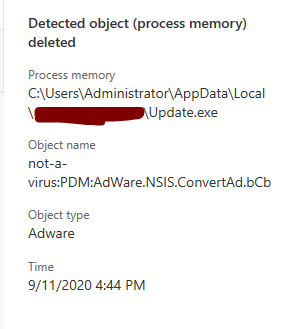
But, I think this is because I haven't signed the application yet. I am still waiting for the certificate to arrive :)
ycabranes
on 16 Sep 2020
@malept I don't have antivirus software installed on these machines. I've tested it on another couple of machines, and discovered that it works on one (Windows 10 pro Version 10.0.1836), but not on the other (Windows 10 Home 2004 v19041.388). Could this be an issue with dependencies already being installed on the machine?
Currently the only connection I've got is that all the machines it failed on were VMs, either through VirtualBox or Parallels, but this could simply be a coincidence at this point.
Nawv
on 18 Sep 2020
I definitely don't think this is an Electron Forge specific problem. The only thing I can think of is to see what the file/folder hierarchy differences are between the zipped version and the app as installed by Squirrel. That would give an indication of whether this is a bug with electron-winstaller or Electron itself.
malept
on 18 Sep 2020
@malept After some further testing, this problem is consistently only occurring on virtual machines (and it's manifested on every VM we've tried it on so far). I don't know if you've tried this on a VM, or if you could easily get your hands on one? I'm using a Windows 10 dev environment through Virtual Box (on a Mac laptop).
In terms of the differences in the file/folder hierarchy between the zipped version and the squirrel version, the only important difference I can sport is the swiftshader folder - here's the zipped version:

And here's the squirrel installed version:

As I said above, if I copy the swiftshader folder across to the squirrel installed folder, the installed app works fine. Similarly, if I delete the swiftshader folder from the zipped version, the zipped app stops working (i.e. blank screen).
I've also checked, and there's no difference (that I can spot) in the file/folder hierarchy of the squirrel installed app between machines on which the app works, and machines on which it doesn't.
Nawv
on 23 Sep 2020
@malept After some further testing, this problem is consistently only occurring on virtual machines (and it's manifested on every VM we've tried it on so far). I don't know if you've tried this on a VM, or if you could easily get your hands on one? I'm using a Windows 10 dev environment through Virtual Box (on a Mac laptop).
In terms of the differences in the file/folder hierarchy between the zipped version and the squirrel version, the only important difference I can sport is the
swiftshaderfolder - here's the zipped version:
And here's the squirrel installed version:
As I said above, if I copy the
swiftshaderfolder across to the squirrel installed folder, the installed app works fine. Similarly, if I delete theswiftshaderfolder from the zipped version, the zipped app stops working (i.e. blank screen).I've also checked, and there's no difference (that I can spot) in the file/folder hierarchy of the squirrel installed app between machines on which the app works, and machines on which it doesn't.
 jimtang9527
on 24 Nov 2020
jimtang9527
on 24 Nov 2020
I just confirmed this issue to be true on a virtualboxed win10 installation. The build app runs fine, the app installed with the setup does not. Only when I manually copy the swiftshader directory to the installed location I can successfully start the application...
So I guess the question becomes, why doesn't the Setup install this directory?
 basz
on 24 Nov 2020
basz
on 24 Nov 2020
This will be fixed when electron/windows-installer#367 is fixed.
malept
on 24 Nov 2020
The files from swiftshader directory are only needed if the device doesn't have 3d hardware acceleration.
I.e., the blank screen issue is exhibited only on devices not having the 3d acceleration.
 dawcal
on 21 Dec 2020
dawcal
on 21 Dec 2020
If it's not possible to enable 3D hardware acceleration you can apply following workaround in your app until the issue has been resolved:
app.disableHardwareAcceleration()
 ajgassner
on 11 Jan 2021
ajgassner
on 11 Jan 2021
This bug has been fixed in [email protected].
malept
on 10 Feb 2021
Thank you @malept ! :)
I can see you pulled in a lot of new dependencies recently - would it be reasonable to release the current master as a new beta version ( v6.0.0-beta.55 ) to make it easier for consumers to pull all those improvements in?
(We are running into the same issue; a resolution overwrite works of course, but would be neat to have it in an official electron-forge version :D)
 HKrausAxon
on 28 Apr 2021
HKrausAxon
on 28 Apr 2021
Related issues
 Slapbox
·
4Comments
malept
·
4Comments
Slapbox
·
4Comments
malept
·
4Comments
 vintprox
·
3Comments
vintprox
·
3Comments
 mistermicheels
·
4Comments
mistermicheels
·
4Comments
 damianesteban
·
3Comments
damianesteban
·
3Comments
Most helpful comment
This will be fixed when electron/windows-installer#367 is fixed.