Electron-forge: Application icon in production mode
Preflight Checklist
- [x] I have read the contribution documentation for this project.
- [x] I agree to follow the code of conduct that this project follows, as appropriate.
- [x] I have searched the issue tracker for a bug that matches the one I want to file, without success.
Issue Details
Electron Forge Version:
6.0.0-beta.51Electron Version:
v9.0.2Operating System:
Windows 10
Expected Behavior
Expected to set icon in production as the same way we do in development.
Actual Behavior
I'm having issues to set app icon in my application, below is my configuration, it works on development mode, but fails on production mode.
const mainWindow = new BrowserWindow({
    icon: 'src/assets/icon.png',
});
The output is the following
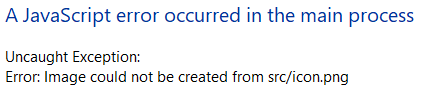
Error: Image could not be created from src/assets/icon.png
Also, here as printscreen from the error
To Reproduce
https://github.com/waghcwb/electron-forge-sample
Additional Information
The error happens when you run npm run make
Question
 waghcwb
All 2 comments
This isn't a bug in Electron Forge. See the FAQ entry from Electron Packager.
 malept
on 14 Jun 2020
malept
on 14 Jun 2020
This didn't work for me. For those who whiling how to setup icon in electron forge you can do this way in your package.json file
{
  "config": {
    "forge": {
      "packagerConfig": {
        "icon": "src/assets/images/icon.ico"
      },
  },
}
👍2
👀1
Was this page helpful?
0 / 5 - 0 ratings
Related issues
 kzimny
·
3Comments
kzimny
·
3Comments
 mistermicheels
·
4Comments
mistermicheels
·
4Comments
 Andreybest
·
3Comments
Andreybest
·
3Comments
 Slapbox
·
4Comments
Slapbox
·
4Comments
 damianesteban
·
3Comments
damianesteban
·
3Comments
Most helpful comment
This didn't work for me. For those who whiling how to setup icon in electron forge you can do this way in your
package.jsonfile