Electron-cash: workaround for 2fa
https://github.com/fyookball/electrum/issues/6
"had to restore the wallet from seed and check disable 2fa at end of the restore, now I can send bcc"
 fyookball
All 174 comments
That is strange fyookball i tried that yesterday and last night kept getting the same error message
 jcarzooj
on 3 Aug 2017
jcarzooj
on 3 Aug 2017
Downloaded electroncash.org.
Tried to open a new standard wallet to restore.
Entered seed to restore
Disabled 2fa
Still recieve same error
Please let me know if you think i am missing something. Thanks in advance for your help
jcarzooj
on 3 Aug 2017
confirmed still an error. it shifts from
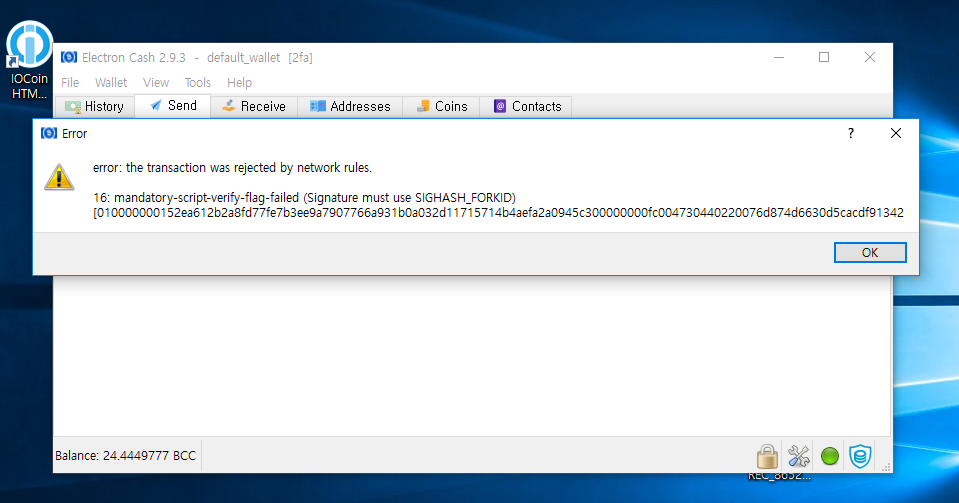
Error
error: The transaction was rejected by network rules. (16: mandatory-script-verify-flag-failed (Signature must use SIGHASH_FORKID))
[01000000013c3a9b75e046b4d4987ad5fae83c585bee3ca106c1029385f7c65201ce5d85d801000000fdfe000048304502210086d4ecc7b4c7501dea8bde3f16eeb7c78be60e2e31c4cb1c9aae0c4d3a9bc54e022050b1ec893d313f14e7baaad052923613dcd83a4b6772ee3be52b628968cd0bd541483045022100d80fd22c03aa91863bc79c69de1af2683b40dd2b2e4612bd70cde40aff28af3b02201e332a8e34ebcb9209495879454eed815bd5710795914b0c485f3d59bddebb1c014c69522102889dabc87e435ed37d384842654325106f8884cbd88914872692b3e0103df33321028bf32d4f99da4cd2a6bf84ce73c005d04ebe477db6b75495e7b0e4d3aefe9c5f210304792f0616d22b6931c4bcd3329874cb98dd7d73a318b108f1d56a16ba11b05553aefeffffff0240420f000000000017a914bd1442f94a5488b7b98f95d227193496b74a5b73872898dc020100000017a9148b33c8449ae98f3096f059779132b89be4a4ce5e8700000000]
OK
to
Error
error: The transaction was rejected by network rules. (16: mandatory-script-verify-flag-failed (Signature must be zero for failed CHECK(MULTI)SIG operation))
[01000000013c3a9b75e046b4d4987ad5fae83c585bee3ca106c1029385f7c65201ce5d85d801000000fc00463043021f19f57ea4662fd445683efc5ba9e47996b0750f33b2e7c08d82bbdad11e11bc022070280fd44bf8679467d7140279ec4328c29280009335864c50e3b67e14eb058441483045022100c6c35574edff26e8753190993c2c82e02df78f660f970ce52b6b64f5fecb533d02200b5428ac4efd3cff9451579b06a07060b79b45a3d9de9ccebc3c516cc69af5ed414c69522102889dabc87e435ed37d384842654325106f8884cbd88914872692b3e0103df33321028bf32d4f99da4cd2a6bf84ce73c005d04ebe477db6b75495e7b0e4d3aefe9c5f210304792f0616d22b6931c4bcd3329874cb98dd7d73a318b108f1d56a16ba11b05553aefeffffff0240420f000000000017a914a91f68cde0375c5c59cd8725de64301bdbf85147872898dc020100000017a9148b33c8449ae98f3096f059779132b89be4a4ce5e8700000000]
OK
 prolax13
on 3 Aug 2017
prolax13
on 3 Aug 2017
I've got the same issue.
The fix for https://github.com/fyookball/electrum/issues/6 works as long as 2fa is disabled after restoring the wallet from seed.
If 2fa is enabled while restoring from seed, the error occur:

 charleshsu168
on 3 Aug 2017
charleshsu168
on 3 Aug 2017
Charles it doesnt seem to work even if 2fa is disabled. In my above post I restored a wallet and disabled the 2fa and it gave the same error. It seems like it has to be an original wallet with no 2fa or multi sig setup for it to work on this software.
jcarzooj
on 3 Aug 2017
@jcarzooj are you using the latest built 2.9.2? i compiled it in ubuntu.
charleshsu168
on 3 Aug 2017
I dont want to disable the 2fa in my wallet.when can i expect the latest release which works fine with 2fa seeds?i promise 10 bcc when you succeed in doing this.
 dare2win2
on 3 Aug 2017
dare2win2
on 3 Aug 2017
When this issue is fixed, the 2fa should work again.
charleshsu168
on 3 Aug 2017
same issue here are my BCC lost or is someone able to fix this?
 jamieherd
on 3 Aug 2017
jamieherd
on 3 Aug 2017
Multisig is not fixed in electron cash wallet.both fyookball and trustedcoin need to work together on this to make it successful
dare2win2
on 3 Aug 2017
so you're saying TrustedCoin won't sign BCC transaction?
charleshsu168
on 3 Aug 2017
Well we need to convince them to do so.the reply i got from them is that they dont support electron cash
dare2win2
on 3 Aug 2017
I dont know if multisig is fixed in electron wallet or not.
dare2win2
on 3 Aug 2017
I may confirm. The problem still exist.
I restored wallet from seed, disable 2FA, get BHC/BCC but this is impossible to send it.
"transaction rejected by network rules" 16 mandatory script verify flag failed - signature must be zero for failed check-(multi)sig operation"
 Moonlightcat76
on 3 Aug 2017
Moonlightcat76
on 3 Aug 2017
Why dont try disabling the 2fa in electrum wallet first with the same private key?
dare2win2
on 3 Aug 2017
This is possible, to disable 2FA when you restore wallet from seed. In Electrum or Electron. In both cases restored wallets don't need 2FA for transactions. But wallets detected as {wallet name} - 2FA. Sorry for my poor English. But i think this problem is for all, who have enabled 2FA on Electrum wallet until 01 august.
The problem is, that i am not programmer. I am ordinary user, who try to withdraw BCC/BHC from Electron. And the second biggest probem, that we, ordinary users, don't have any notification from Electron. No any anouncments on Electroncash.org
90% of potential Electron usres don't know anything about this thred on GitHub. They try to visit Electroncash.org for information.
Moonlightcat76
on 3 Aug 2017
I'm the TrustedCoin admin. For a variety of reasons, we have no immediate plans to add support for BCC to our co-signing service. I suggest you modify the Trustedcoin plugin in the Electron Cash release to:
- Not allow totally new 2FA wallets to be created
- Allow existing 2FA wallets to be restored from seed only with the 2nd-factor disabled (i.e. restored with 2 keys in the wallet thus allowing unilateral spending).
- When opening an existing 2FA wallet with only 1 of the 3 keys in it, a dialog should be shown informing the user they must restore from seed to regain access to their wallet.
 badmofo
on 3 Aug 2017
badmofo
on 3 Aug 2017
@badmofo Thank you, but:
"Allow existing 2FA wallets to be restored from seed only with the 2nd-factor disabled (i.e. restored with 2 keys in the wallet thus allowing unilateral spending)." - yes, but unfortunately this is don't work.
I did this. The same error. De-facto all our BHC/BCC locked on these wallets at present time.
Moonlightcat76
on 3 Aug 2017
@Moonlightcat76 There are two things going on here:
- Trustedcoin's signatures are not BCC-compatible
- Electron 2.9.0's multisignature signing is not BCC-compatible https://github.com/fyookball/electrum/issues/6 and 2FA addresses are multisignature
My suggestions assume 2 would be fixed. That's the reason charleshsu168's solution worked.
badmofo
on 4 Aug 2017
@badmofo yes, thank you. I appologies, i wrong translated your last post. This is my bad English. Sorry.
Moonlightcat76
on 4 Aug 2017
I download Electron 2.9.2 for Windows. All work fine now. Thanks.
Moonlightcat76
on 4 Aug 2017
still not working
jamieherd
on 4 Aug 2017
@jamieherd if its not working for you , can you do the workaround?
fyookball
on 4 Aug 2017
Really struggling here, I have 2fa on my electrum then on my electron 2.9.0
Upgraded to 2.9.2 disabled 2fa along with other permutations but no go
Always with a network or SIG warning and transaction fails
Sent from Mailhttps://go.microsoft.com/fwlink/?LinkId=550986 for Windows 10
From: fyookballnotifications@github.com
Sent: 04 August 2017 15:25
To: fyookball/electrumelectrum@noreply.github.com
Cc: jamieherdjamieherd@msn.com; Mentionmention@noreply.github.com
Subject: Re: [fyookball/electrum] workaround for 2fa (#41)
@jamieherdhttps://github.com/jamieherd if its not working for you , can you do the workaround?
—
You are receiving this because you were mentioned.
Reply to this email directly, view it on GitHubhttps://github.com/fyookball/electrum/issues/41#issuecomment-320262629, or mute the threadhttps://github.com/notifications/unsubscribe-auth/AYcss3pBGrKQlr_W6_dCw8xMkYkR96Neks5sUym6gaJpZM4Osc0A.
jamieherd
on 4 Aug 2017
newsflash, payment sent thanks guys I appreciate the hard work
jamieherd
on 4 Aug 2017
how did you resolve it? maybe be useful for others. @jamieherd
fyookball
on 4 Aug 2017
I've followed the instructions several times so may be luck however this time I tried sending to a different exchange LiteBit.eu and it worked for me this time
jamieherd
on 4 Aug 2017
Hey fyookball the workaround seems to be working as I have sent a small amount. But now when i try to send a bigger order, now that we have confirmed it works it is telling me I dont have enough funds. I am only trying to send half of which is in my account so I should have plenty. I am obviously on the same server as the first transaction. The account is showing I have a balance but as soon as I put any number
into the amount box it says not enough funds. Thanks for your help
jcarzooj
on 4 Aug 2017
"spend from" certain address or wait for all tx to finish getting confirmation
fyookball
on 4 Aug 2017
Ok will do. Thanks for the help
jcarzooj
on 4 Aug 2017
For me is still not working.
I first had Electron 2.9.0 windows wallet and enabled 2fa. I now downloaded new Electron 2.9.2 windows wallet which doesnt even give me option to recover from seed or anywhere. I can only open old wallet i have made in 2.9.0 what can i do?
I can't opend 2.9.0 version back can you maybe upload new 2.9.2 version with possibility to recover from seed or what can i do? Funds are there but error still says invalid OTP when trying to send funds.
 mrcaptain101
on 4 Aug 2017
mrcaptain101
on 4 Aug 2017
open new wallet and then choose normal wallet and restore from seed. do not choose 2fa.
fyookball
on 4 Aug 2017
Well it doesnt work. Look this is what i do:
1: Open from seed: http://prntscr.com/g4gavw
- When i enter seed it automatically adds 2fa to it: http://prntscr.com/g4gcgz
i can choose BIP39 seed if i want that 2fa disappears: http://prntscr.com/g4gdnm
but then it asks me for this in step 3 - I don't know what this is m/44'/0'/0' : http://prntscr.com/g4gdvf
- It asks me to generate pass: http://prntscr.com/g4ge6d
- It opens empty wallet: http://prntscr.com/g4geeu
Any solution?
mrcaptain101
on 4 Aug 2017
Hey Mr Captain. It looks like for me your error is in step 2. I didnt choose BIB39 seed after entering my seed. I entered my seed then choose next and in the next step it should allow you to keep or disable the 2fa. Choose disable. Let me know if that helps
jcarzooj
on 4 Aug 2017
COMMENT EDITED!
ok yes now it actually worked!
I had to enter seed of my original BTC Wallet this was missing part. So on the 2nd part where i had to choose disable 2fa it really disabled it. I could send my bcc and transaction was done.
Thank alot for help !
mrcaptain101
on 4 Aug 2017
I think you should enter the seed of the wallet where you had the bitcoins at the time of the fork. Thats what I did
jcarzooj
on 4 Aug 2017
But make sure you transferred your actual bitcoin out of the wallet before you put that seed into electron cash
jcarzooj
on 4 Aug 2017
Let me know if that makes sense
jcarzooj
on 4 Aug 2017
It worked check my comment above! Thx!
mrcaptain101
on 4 Aug 2017
Ok good. Glad it worked
jcarzooj
on 4 Aug 2017
Steps Taken - Method 2:
From my Electron Cash wallet with mBCC in it:
File -> New/Restore
@ Wallet Prompt -> wallet_3 -> Next
Create wallet_3 _> Standard Wallet -> Next
Create or restore -> I already have a seed -> Next
Enter Seed ->
Please Wait... appears and stays for extremely long time I've waited 30 minutes and "Next" is still greyed out
Is the only way to restore using a 2FA and then disabling, why can u not generate a standard wallet from seed?
 muscarem
on 5 Aug 2017
muscarem
on 5 Aug 2017
Looking for advice, what form of storage do you recommend for my bitcoin
From your observed work over the last week I would do well to follow your lead
Sent from Mailhttps://go.microsoft.com/fwlink/?LinkId=550986 for Windows 10
From: fyookballnotifications@github.com
Sent: 04 August 2017 17:18
To: fyookball/electrumelectrum@noreply.github.com
Cc: jamieherdjamieherd@msn.com; Mentionmention@noreply.github.com
Subject: Re: [fyookball/electrum] workaround for 2fa (#41)
"spend from" certain address or wait for all tx to finish getting confirmation
—
You are receiving this because you were mentioned.
Reply to this email directly, view it on GitHubhttps://github.com/fyookball/electrum/issues/41#issuecomment-320290926, or mute the threadhttps://github.com/notifications/unsubscribe-auth/AYcss_a0vHXhITFvPIxhFGmiQCJPgHjCks5sU0RmgaJpZM4Osc0A.
jamieherd
on 5 Aug 2017
from reddit: https://www.reddit.com/r/btc/comments/6rhtab/electron_cash_version_292_is_available/dl89dcx/
I finally found the solution for the ones stuck with there BCC in the electron cash wallet because of electrum 2FA wallet. error : rejected mandatary 16.....
in your electron cash wallet. choose new/restore from your menu. choose restore and choose make 2fa wallet, NOT standard import old wallet by enter your seed he will confirm that it is a 2fa wallet and ask if you want to keep or disable, choose DISABLE now you will see your new wallet, with your BCC, and the trusted 2fa symbol right below corner will say it is disabled. put the server on electroncash.casharia... or electrum.abc.... send your bcc to your exchange bcc address.. and there they go, no rejection anymore :D
from another ticket:
For anyone out there with a similar issue not wanting to wait for an update,this is what I did to fix the issue.
Got on a different computer that already had version 2.9.2 on it
opened application and whatever wallet was already on that computer
File -> New/Restore
Gave a new wallet name
Standard wallet
I already have a seed
entered the seed that I saved from when I first opened electron cash (2.9.0) on the first computer
It then told me I had 2fa on that wallet and asked if I want to disable -> yes.
I then could see the balance, chose the casharia network and sent the balance (with max tx fee for increased speed) to another wallet to test - success, no error!
1 confirmation so far but still not able to see it in the receiving wallet, will update later.
fyookball
on 6 Aug 2017
@jamieherd storage? Electrum/Electron has great cold storage. Get yourself a secondhand offline cheap laptop, delete all the drivers for the internet (both wifi and ethernet)... then upload a wallet to it via usb stick, generate your addreses, send your bitcoin to it. back up your seed securely (that part is up to you)...
get the master pubkey so you can watch the address... and if youre confident you have your seed secured, remove the wallets from that computer.
fyookball
on 6 Aug 2017
Superb, many thanks
Sent from Mailhttps://go.microsoft.com/fwlink/?LinkId=550986 for Windows 10
From: fyookballnotifications@github.com
Sent: 06 August 2017 05:46
To: fyookball/electrumelectrum@noreply.github.com
Cc: jamieherdjamieherd@msn.com; Mentionmention@noreply.github.com
Subject: Re: [fyookball/electrum] workaround for 2fa (#41)
@jamieherdhttps://github.com/jamieherd storage? Electrum/Electron has great cold storage. Get yourself a secondhand offline cheap laptop, delete all the drivers for the internet (both wifi and ethernet)... then upload a wallet to it via usb stick, generate your addreses, send your bitcoin to it. back up your seed securely (that part is up to you)...
get the master pubkey so you can watch the address... and if youre confident you have your seed secured, remove the wallets from that computer.
—
You are receiving this because you were mentioned.
Reply to this email directly, view it on GitHubhttps://github.com/fyookball/electrum/issues/41#issuecomment-320485501, or mute the threadhttps://github.com/notifications/unsubscribe-auth/AYcss3HkmnMKmWQ0suqNgs8TRLiVDnAgks5sVUUVgaJpZM4Osc0A.
jamieherd
on 8 Aug 2017
from reddit "okay, for future reference. When creating the new wallet you have to select 2fa instead of standard for the new wallet type, then after entering the seed it will ask you if you want to keep or disable 2fa. Selecting to disable 2fa there will create a standard wallet and allow you to transfer your BCC."
fyookball
on 9 Aug 2017
For me it worked!! Thanks fyookball :-)
 Chatwalkers
on 12 Aug 2017
Chatwalkers
on 12 Aug 2017
@jcarzooj thanks for your method, it worked!!! Finally!!! I spent hours to figure out what to do, thanks again!!!!
 coincoinyop
on 15 Aug 2017
coincoinyop
on 15 Aug 2017
All described options are not working if i do not have my SEED.
I have:
- NOT entrypted Electrum wallet file with 2FA
- Password
- Access to Google Authenticator Code
Any options to restore the seed?
 Regipl
on 20 Aug 2017
Regipl
on 20 Aug 2017
^ Same problem here. I don't have the seed.
Any way to fix it if you don't have the seed?
Thanks in advance!
 Darknicks
on 20 Aug 2017
Darknicks
on 20 Aug 2017
I imported my BCC from a paper wallet succesfully into Electron Cash 2.9.2, but with 2fA unfortunatly. It shows I have 1999 mBCC, from what was 2 BTC. The BTC was sent to bittrex. I bought a portion of BCC on bitrex to get a wallet and tried to send it from Electron Cash and got the same error as other above in the thread.
error: The transaction was rejected by network rules. (16: mandatory-script-verify-flag-failed (Signature must be zero for failed CHECK(MULTI)SIG operation)) code code code 010101
When I create new wallets in Electron Cash without 2fa using my seed, I get an empty wallet.
I thought that was the fix? I'm reading and I'm seeing the fix is supposed to be easy, just create a new wallet without 2fa and use the seed, but why does my new wallet not show my balance my old wallet still that has 2fa still shows?
I don't know what to do so I copied my master key and three sets of other private keys on a document. Is there another way to get that BCC from my stuck Electon Cash wallet into a new Electron Cash wallet without 2fa? Is there a way to enter my keys in somehow after it's created even though it shows a 0 balance?
Whats confusing is both my wallet with 2FA and my new wallets I tried without 2FA say I have the same seed.
I exported my private keys as a csv file and the json file hoping I could import them in a new wallet, I don't know what I'm doing, that didn't work either, it won't even let me select it.
I tried to sweep with the private keys from my 2fa wallet into the non 2fa wallet, the sweep button doesn't function to let me.
I tried by tools>load transaction>text and it said: Electron Cash was unable to parse your transaction
One last note, I have Electrum on my computer now as well as I tried to troubleshoot. I used my seed and I got a wallet but it says 0BTC as it's not going to show BCC anyway, but what to do with that boggles my mind. I don't see the connection. I'm ready to do this and get my coins. If you can help I'll reward you a bit if you ask for it. Thanks.
Any other suggestions?
 RIPAC
on 23 Aug 2017
RIPAC
on 23 Aug 2017
Downloaded Electron Cash 2.9.3 looking to access my BCC by disabling 2FA.
I created a new wallet & typed in my original seed from Electrum where I stored my BTC.
After typing in my seed, I'm stuck at a Please wait... screen (been over an hour)
Screenshot - https://gyazo.com/df9384addbeb0b46a95ea082fe93aa87
Does anyone a solution for this issue?
Thank you
 ftwonka
on 24 Aug 2017
ftwonka
on 24 Aug 2017
@ftwonka @RIPAC I can help you with this. PM me on reddit: https://www.reddit.com/user/DarkLord_GMS/
 DarkLordGMS
on 24 Aug 2017
DarkLordGMS
on 24 Aug 2017
I'm stuck in the same position... after typing my seed, it says Please wait... then nothing...
 SilverstrandBC
on 25 Aug 2017
SilverstrandBC
on 25 Aug 2017
Hello everyone,
I will be posting the instructions to recover your Bitcoin Cash from your TrustedCoin 2FA Bitcoin wallet.
As you might already know, TrustedCoin decided to not support Bitcoin Cash. Therefore, if you had a 2FA Bitcoin wallet with them and you try to send Bitcoin Cash with that same wallet after the fork, then you'll see the "signature error" message.
I will be showing you how to recover your coins and dump TrustedCoin for good.
To be able to do this, you will need the following:
Electron Cash (latest version) that can be downloaded by clicking this link.
Electrum (latest version) that can be downloaded by clicking this link.
Your TrustedCoin 2FA wallet 12 word recovery seed. If you don't have this, you cannot recover the funds under any circumstances
Basic file management knowledge (copying/pasting and renaming files)
Patience
If you have all that, let's get started...
1) Open Electrum.
2) On the top left corner, click the File menu. Click New/Restore.
3) You will see this window. Type a wallet name and click Next.
Please use something easy to remember. In this example we will use "TrustedCoin" as the wallet name.
4) You will see this window.
Select the second option: "Wallet with two-factor authentication" and click Next.
5) You will see the TrustedCoin disclaimer. Click Next.
6) You will see this window.
Select the second option: "I already have a seed" and click Next.
7) Type your recovery seed and click Next.
8) You will see this window.
This is very important. Select the second option: "Disable" and click Next.
9) This is also very important. DO NOT USE A PASSWORD.
Don't encrypt the wallet since we need it unencrypted to be able to open it with a Text Editor later.
11) Click the File menu again and then click "Save copy".
12) Now in the next window, it will give you the option of saving a backup of the wallet.
I recommend saving it to an easy to find location like the Desktop.
Use the same wallet name you used on the step # 3. In this case, "TrustedCoin".
Click "Save" and close Electrum.
13) Use a Text Editor like Notepad or Notepad++ and open the wallet file you just saved.
14) Don't close the wallet file. We'll use it later.
15) Open Electron Cash (always use the latest version).
16) Click the File menu and then click New/Restore.
17) You'll see this window.
Type a wallet name and click Next. In this case we'll use this name "Disabled TrustedCoin".
18) Select "Multi-signature wallet". and click Next.
19) Here you have to adjust the first slider a little bit.
It must say "From 3 cosigners" and "Require 2 signatures". Click Next.
20) For the first cosigner (1 of 3), select "Use public or private keys" and click Next.
21) Remember the wallet file you opened earlier?
Go all the way down and you'll find something like this.
See the first xpriv (x1/) key? Copy that and paste it in Electron as the first cosigner key and click Next.
It will show you the master public key (xpub) for the first cosigner. Just click Next since you don't really need this.
22) For the second cosigner (2 of 3), select "Enter cosigner keys" and click Next.
23) Look for the second xpriv (x2/) in the wallet file.
Copy that and paste it in Electron as the second cosigner key and click Next.
24) For the third cosigner (3 of 3), select "Enter cosigner keys" and click Next.
25) Look for the third xpriv (x3/).
As you can see, it's showing as "null" but below it you'll see the master public key for that cosigner. It starts with "xpub".
Copy that and paste it in Electron as the third cosigner key and click Next.
26) No password again. You won't use this wallet again after you send the coins out of it.
Now you should be able to spend the Bitcoin Cash from this new wallet.
Send all of it to another wallet address you control. Remember that you don't need to pay more than 1 sat per byte.
I hope this guide helped you. Feel free to link to this guide to anyone who needs it. :)
Sincerely,
DarkLord_GMS
DarkLordGMS
on 28 Aug 2017
@DarkLordGMS thank you! confirmed it works.
ftwonka
on 29 Aug 2017
Sure! I'm glad I was able to help out the community. This is what I like the most. :)
DarkLordGMS
on 29 Aug 2017
I opened #157, which was quickly closed with reference to this issue.
@DarkLordGMS's workaround does not work for me on macOS using Electrum 2.9.3.
In Electrum, when I choose New/Restore > Wallet with two-factor authentication > I already have a seed and enter my seed, the Next button does not become activated, so I can't proceed to the next step. Does anyone know how to overcome this issue so that I can disable 2FA?
@fyookball
 harryscholes
on 29 Aug 2017
harryscholes
on 29 Aug 2017
@harryscholes Try to double click the "I already have a seed" option. If it doesn't work, let me know.
DarkLordGMS
on 29 Aug 2017
@DarkLordGMS Unfortunately that doesn't work because I already have a seed is a radio button :(
harryscholes
on 29 Aug 2017
I see. That's really odd. There must be an issue with the Mac version. Try installing an older version like 2.9.2 or 2.9.1. You can download older versions here: https://download.electrum.org/
DarkLordGMS
on 29 Aug 2017
I've tried it with Electrum 2.9.2, 2.9.0 and 2.8.3 for Mac and all of them break at the same step. Can anyone confirm whether @DarkLordGMS's method works on Mac?
harryscholes
on 30 Aug 2017
Thanks @DarkLordGMS , that worked! I'm confused how but it did. I had to enter a different seed that I created for Electrum originally than the one with Electron Cash but sure enough, when I opened my electron cash my money was there, 2FA was disabled and I sent it to my exchange. You're the man!
RIPAC
on 30 Aug 2017
Great! I'm glad it worked @RIPAC :)
@harryscholes Why don't you try Bootcamp and Windows? Electrum for Windows works for sure and it is only a one time thing. Or maybe ask someone you trust to do it for you. I can even do it for you if you can't find someone. I've done it with a few users here and on reddit. My reputation is pretty good. Up to you though. Just let me know: https://www.reddit.com/user/DarkLord_GMS/
DarkLordGMS
on 30 Aug 2017
@DarkLordGMS Problem solved now! Thanks to you for your workaround
harryscholes
on 31 Aug 2017
I can't find the seed of the 2fa wallet in order to restore it in a standard one.
http://img.pixady.com/2017/09/778887_screen_shot_20170901_at_7.40.17_am.jpg
Any help would be greatly appreciated.
 jeaneldahdah
on 1 Sep 2017
jeaneldahdah
on 1 Sep 2017
@DarkLordGMS worked for me! much appreciated, man.
 sugarraylover
on 7 Sep 2017
sugarraylover
on 7 Sep 2017
I have some trouble right this, so I tried make a new wallet with my private key(seed does not working. it is not finish loading)
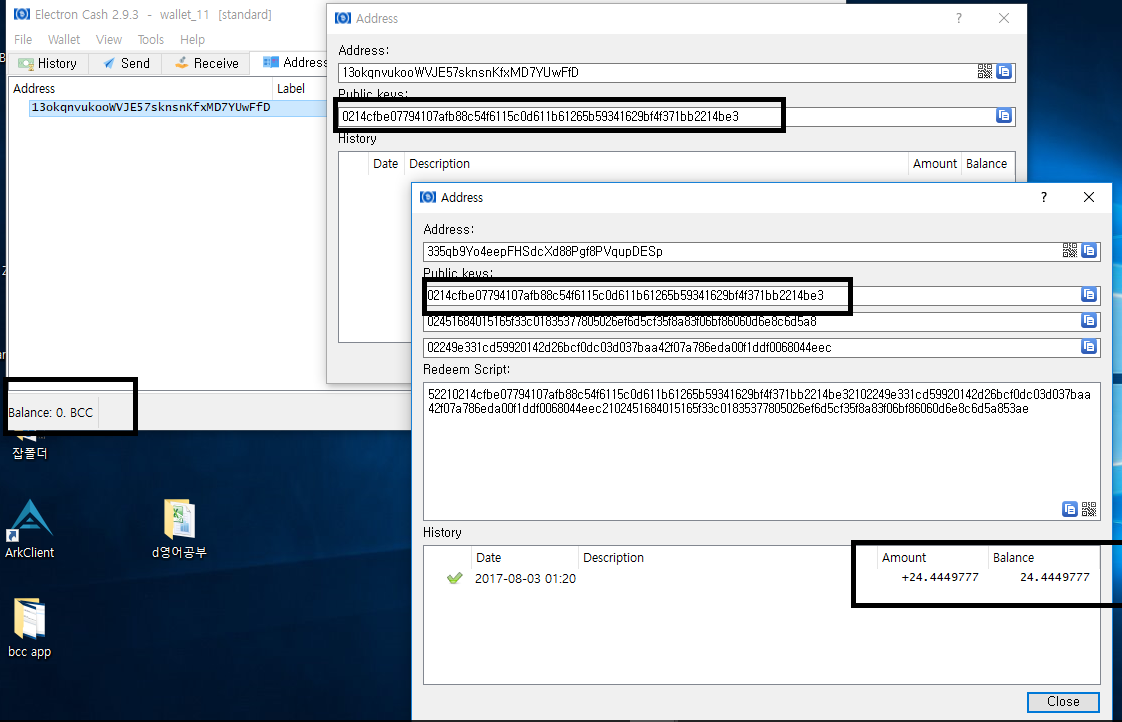
I made with my private key, as you can see it new wallet has '0' balance.
both same public key, but neither has another balance
 wefdi
on 16 Sep 2017
wefdi
on 16 Sep 2017
@wefdi You have to follow the instructions I posted here:
https://github.com/fyookball/electrum/issues/41#issuecomment-325228017
DarkLordGMS
on 16 Sep 2017
Hello DarkLordGSM, do I need use electrum before than electron cash if I use Electron in a different machine? Thanks for all your work helping us here.
 tremarcelli
on 17 Sep 2017
tremarcelli
on 17 Sep 2017
@tremarcelli It is easier if you do the whole process in the same PC but you can just save the wallet (step 18) in a flash drive and open it in the PC that has Electron Cash installed.
DarkLordGMS
on 17 Sep 2017
Ok thanks, just because I read from electrum.org that it is very dangerous to install electrum and electron in the same pc.
tremarcelli
on 17 Sep 2017
@tremarcelli only if you believe that this project is out to steal your coins.
fyookball
on 18 Sep 2017
@tremarcelli It's not dangerous because the Bitcoin Cash chain has replay protection so if you make a transaction on the BTC chain it won't affect the BCH chain. Both Electrum and Electron Cash are open source projects. If you have basic programming knowledge you can review the source code yourself.
DarkLordGMS
on 18 Sep 2017
Dear @DarkLordGMS I tried to follow your instructions to collect my Bitcoin Cash but I have issues.
First I had three wallets with Electrum. I did open 3 wallets in Electron and succeed to get the Bitcoin cash. I did it with 2fa and after a while decided to move some of the bitcoin cash out. I managed to open new wallets without the 2fa and saw the bitcoin cash there, moved it out. Now, after 2 months, I tried to do the same with my last wallet, where I see the bitcoin cash. But when I create a new wallet , with inactive 2Fa, I don't see any history and any Coin. Same happens (i tried to see the difference) if i do the same procedure with the other 2 empty wallet. No history nothing. The server is correct. Then I tried your system, same issue, also I open the electrum wallets into electron, (it says might not be compatible) but I go ahead, same story the wallets are empty without any history. I don't know how to get my last wallet coins again. Maybe any other solution or something to do? What if I sweep the private key of the old Bitcoin wallet in electrum into a NEW electron wallet? Please, be so kind to assist. Thanks
 21tango
on 7 Nov 2017
21tango
on 7 Nov 2017
Question from "error when trying to send Bitcoin Cash (Electron Cash 2.9.3) #220"
So I opened a new standard NO 2F wallet with new seed (I never got a seed for the other one), looked up my receive address and tried to send my coins to the new NO 2F wallet. Of course my old wallet still asked me for pass and 2F digits. So I put in the info in and it says "Payment sent", but nothing is happening. No change in the history, nowhere, nothing.
I'm running out of options here. In the thread it says I should open a new wallet with an existing seed. Well, I never received a seed for the defailt 2F wallet in question. Now what do I do?
 CoinDiver
on 7 Nov 2017
CoinDiver
on 7 Nov 2017
@21tango I already helped you on reddit.
@CoinDiver If you're trying to send BCH from a 2FA enabled wallet, it won't work. You have to disable 2FA first and the only way to disable it is with the 2FA recovery seed. They gave you the seed when you created the wallet. If you didn't save the recovery seed (big mistake on your part) then the only chance to get your coin is to contact TrustedCoin here: https://api.trustedcoin.com/#/contact-us
They'll ask you to send them your wallet file and they'll use their private key to send you the funds to a different BCH address of your choice.
DarkLordGMS
on 8 Nov 2017
Thanks again DarkLordGMS.
tremarcelli
on 8 Nov 2017
Can't i copy my public keys and adresses to my Electrum wallet so in can sent my bch? It is very stange that you don't get a warning not to choose two factor identification, or a warning before so you can act and sent your bch to another wallet or Change the setting...
 stralvm
on 9 Nov 2017
stralvm
on 9 Nov 2017
@tremarcelli Sure! No problem. I love helping out the community. :)
@stralvm Sadly, TrustedCoin is a multisig wallet so you'll need at least 2 private keys to move your coins. You can only see one of them on Electron and the other one can be obtained using the recovery seed. TrustedCoin has the other one. So you either retrieve the coins using your recovery seed or you'll have to ask TrustedCoin to send it to a different address using your private key + their private key. They won't give you their private key so you'll have to send them your wallet file + password. Otherwise, you won't be able to get the coins at all.
DarkLordGMS
on 9 Nov 2017
NOTE: If 2.9.4 is giving you trouble, use 2.9.3 for this process and then go back to 2.9.4
fyookball
on 12 Nov 2017
So when I follow the steps mentioned here and create a backup of my electrum wallet I do not see anything in transaction history. What could I be possibly missing ?
 raghavnath583
on 12 Nov 2017
raghavnath583
on 12 Nov 2017
So here is the situation:
I currently do not have any balance in electrum, took out what I had in October. Having said that, I did have coins before Aug 1 that should have created BCH/BCC.
What I would like to know is whether restoring my wallet with the seed will show me the history since I do not have any balance so the restored one by default will not have any balance in it. Because of this I am not sure if I am backing up the wallet correctly.
When I open Electron Cash and the backed up wallet with 2FA disabled, it does not show any balance there.
Please help me out.
@fyookball @DarkLordGMS
raghavnath583
on 12 Nov 2017
@fyookball Sir. i have read all of this but when i restore, looooong loading never ending. Please help me.
TY for your time
 esthjta
on 12 Nov 2017
esthjta
on 12 Nov 2017
@DarkLordGMS TY so much
esthjta
on 12 Nov 2017
@raghavnath583 open a new ticket i will try to help
fyookball
on 12 Nov 2017
raghavnath583
on 12 Nov 2017
@raghavnath583 You will not see any balance in Electrum if you already used your BTC. You will, however see your BCH balance in Electron if you had a balance before August 1st and you follow the steps above.
@esthjta Sure no problem. Apparently you were able to recover your BCH. Let me know if you need anything else.
DarkLordGMS
on 12 Nov 2017
@DarkLordGMS I mean I can't view the balance on electron cash. When I open the saved wallet after disabling the 2FA, the wallet on electron cash shows no balance.
I am also unable to view the history of my wallet after I restore it. Is this normal or am I doing something incorrectly that's leading to this?
raghavnath583
on 12 Nov 2017
@raghavnath583 Try this.
Open Electron and double click the green network button located on the lower right corner.
When you do that, you'll see a list with different nodes. There's one with a * next to it. That means that Electron is using that node to show up your balance and transaction history. Try selecting another one from the list. To do this, just right click it and then select "Use as server" and check if you can see your balance or transaction history. If you can't then you gotta start over and follow the steps I posted above.
Maybe you skipped a step or something. Or maybe there's something wrong with your recovery seed.
DarkLordGMS
on 12 Nov 2017
I've tried the method above. It does not work.
In my electrum wallet, the addresses start with 3. When I import my private keys in Electron Cash, the addresses all start with 1. And the balance shows 0. What should I do?
 citrusBerry
on 13 Nov 2017
citrusBerry
on 13 Nov 2017
When I tried to use Electron2.9.3 in windows, I chose wallet with 2fa/I have a seed, and then it shows "please wait" forever..
citrusBerry
on 13 Nov 2017
@ftwonka I've got stuck in the "please wait" sceen forever. How did you solve this?
citrusBerry
on 13 Nov 2017
I can get the right balance now with 2.9.2 windows. If I try to use 2.9.4, it will crash.
citrusBerry
on 13 Nov 2017
Hey guys,
Hoping someone with more sense than me can assist ;) I am having severe issues trying to import both my private key and my seed into the Electron Cash 2.9.4 (from my Electrum wallet). So, I go to enter the private keys and the next box remains greyed out; I enter the seed and the next box is also greyed out. I have tried choosing the BIP39 option with both 44 and 145 and this creates an empty wallet - no transaction history, no balance. I have attempted to change the server to no avail. The seed is correct as I verified this by recreating my electrum wallet. The Electrum wallet was 2fa - I restored, disabled - attempted both the seed (which still shows as 2fa) and the private key - still greyed out. I have checked my transaction log on Electrum and have confirmed it was holding BTC before/after 1st Aug. I am using a Windows PC, also attempted with Android TNA.
I'm pretty certain my BCH is sitting on the chain as I've checked the blockchain number against the split but for the life of me I can't get Electron to accept my key or seed, it remains greyed out... please help :(
 blueboy2011
on 13 Nov 2017
blueboy2011
on 13 Nov 2017
@blueboy2011 I think you have the same issue as mine. I solved it by using 2.9.2 windows. But since the fork is happening soon, 2.9.2 should not be used any more. I guess the new version of Electron should fix this problem.
citrusBerry
on 13 Nov 2017
@citrusBerry Thank you! I thought I was going mad ;) I checked the block chain and it's definitely there. I just hope that the fix is released before the BCH price crashes....
blueboy2011
on 13 Nov 2017
@citrusBerry Just want to say you're a bloody diamond mate! I spent two days trying to fix that issue. I can confirm using 2.9.2 worked!! :)
blueboy2011
on 13 Nov 2017
@blueboy2011 , if there is no fork, we could send bch in 2.9.2 to a wallet created by 2.9.4. I was able to do this before the fork with a small amount. But now I guess I need to wait for update of Electron to spend most of my bch. The 2.9.4 will crash so far.
citrusBerry
on 13 Nov 2017
@citrusBerry where did you find 2.9.2? I'm having the same problems and can't find anywhere to download...
 radutomy
on 13 Nov 2017
radutomy
on 13 Nov 2017
@radutomy Here https://github.com/fyookball/electrum/releases or here https://electroncash.org/downloads/2.9.2/win-linux/
citrusBerry
on 13 Nov 2017
@citrusBerry Holly smokes that worked!! Thanks so much!
radutomy
on 13 Nov 2017
@radutomy Glad I can help! @fyookball Would you fix this issue in the near future? Thank you!
citrusBerry
on 13 Nov 2017
Indeed today I tried to extract the bch from a window pc, it was easy with the system of Workaround, first recover with seeds the electrum wallet , saving the wallet file and after with electron import the wallet file saved and voila. It was easy to send but the electron did not accept the address from Bitpay so I use the adress from Kraken and ok. Thank you very much, now I have my Bitcoin Cash.
tremarcelli
on 13 Nov 2017
@citrusBerry if you can get your money in 2.9.2, then just copy your seed to 2.9.4. I won't be adding 2fa back into Electron as it does not work.
fyookball
on 14 Nov 2017
My wallet also crashes on startup when I updated to 2.9.4.
It was a 2FA electrum wallet that I was able to access in Electron Cash 2.9.2 by restoring from seed. When restoring I tried setting 2FA as disabled as instructed in the workaround though I am unsure whether this worked since the newly created wallet still ended up having [2_FA] by the name in the Electrum GUI's title bar. How would I 'copy the seeds' from 2.9.2 to 2.9.4 as you suggested above? Since I recovered it from a 2FA seed originally it seems like 2.9.4 won't accept the seed to restore again.
 nhayflick
on 14 Nov 2017
nhayflick
on 14 Nov 2017
@fyookball I tried to copy my seed to 2.9.4, but it showed 0 balance. In 2.9.2, I have some bch in it. What should I do? I guess it is because 2.9.4 does not have the option "wallet with 2fa", when I import the private key or the seed, the addresses generated all start with 1. But in electrum, addresses all start with 3. Only address started with 3 contain money.
citrusBerry
on 14 Nov 2017
Anyone with electrum wallet with 2fa has any other solution of how to get the money out??? Many thanks!
citrusBerry
on 14 Nov 2017
just send the money to a new address (new wallet). you can save the tx and broadcast from 2.9.4
fyookball
on 14 Nov 2017
Because of not being able to send BCH out of my 2fa 2.9.3 wallet that I created a few days ago, I installed 2.9.4 on another computer and created a new wallet with standard security so I could get the BCH sent away from my 2fa wallet. But I am still getting this error when trying to send anything out of the 2fa wallet:

Any suggestions?
EDIT:
Solved it with this solution by DarkLordGMS from Aug 28th (this comment had somehow been hidden before):
https://github.com/fyookball/electrum/issues/41#issuecomment-325228017
If anyone else is having trouble sending their coins out of their 2fa wallet, try this.
 dstzz
on 14 Nov 2017
dstzz
on 14 Nov 2017
@fyookball Yes, I did this but I was not sure yesterday if it was safe. I do not understand many of the technical stuff, so I just sent a small amount. Now the tx is not confirmed in the old version, so it will not allow me to send again. It keeps saying not enought fund. So sad.. What should i do now?
citrusBerry
on 14 Nov 2017
@citrusBerry tools, prferences, transactions, "spend only confirmed coins" to unchecked.
and dont send small amounts, send all in 1 or there may be another problem.
fyookball
on 14 Nov 2017
@fyookball Thanks! I solved it with another method. I will sum it up below.
citrusBerry
on 14 Nov 2017
Hope this can help anyone who has the same issue.
If you have Electrum seed wallet with 2FA, you can access your fund by:
- Electron 2.9.2 mac
- Electron 2.9.3 mac
- Electron 2.9.2 win
(these are what I've tried, feel free to mention others if it works).
Spending the money
- If it is your first time to spend it using old version (like 2.9.2, 2.9.3) after the fork, Nov 13, you can simply send ALL your money to a wallet created by 2.9.4. Send ALL the money and broadcast it.
- If you've sent once after the fork, the old version will not sync after your first tx. So you may have not enough fund issue. One solution is mentioned by @fyookball above (I did not try this). The other solution is what I've done.
I used Electron 2.9.3 Mac. When I opened it, the block height was the current right height and the amount was correct. During this time, I could make a tx and I transferred all the money. After the new block is mined, I had no-enought-fund issue again.
Now I control all my money in 2.9.4.
citrusBerry
on 14 Nov 2017
Hey,
Just an update... I sent my coins from the electron cash 2.9.2 version and although the transaction continues to show as confirmed within electron it has been received successfully and shows on the block chain (did take around 6 hours to confirm).
Appreciate it's not advisable to be sending from an old wallet, just in the event anyone gets as stuck as I did.
Sent from my Samsung Galaxy smartphone.
-------- Original message --------
From: citrusBerry notifications@github.com
Date: 14/11/2017 21:00 (GMT+00:00)
To: fyookball/electrum electrum@noreply.github.com
Cc: "WALKER, Karl" Karl.WALKER@education.gov.uk, Mention mention@noreply.github.com
Subject: Re: [fyookball/electrum] workaround for 2fa (#41)
Hope this can help anyone who has the same issue.
If you have Electrum seed wallet with 2FA, you can access your fund by:
- Electron 2.9.2 mac
- Electron 2.9.3 mac
- Electron 2.9.2 win
(these are what I've tried, feel free to mention others if it works).
Spending the money
- If it is your first time to spend it using old version (like 2.9.2, 2.9.3) after the fork, Nov 13, you can simply send ALL your money to a wallet created by 2.9.4. Send ALL the money and broadcast it.
- If you've sent once after the fork, the old version will not sync after your first tx. So you may have not enough fund issue. One solution is mentioned by @fyookballhttps://github.com/fyookball above (I did not try this). The other solution is what I've done.
I used Electron 2.9.3 Mac. When I opened it, the block height is the current right height and the amount is correct. During this time, I could make a tx and I transferred all the money. After the new block is mined, I had no-enought-fund issue again.
Now I control all my money in 2.9.4.
—
You are receiving this because you were mentioned.
Reply to this email directly, view it on GitHubhttps://github.com/fyookball/electrum/issues/41#issuecomment-344396658, or mute the threadhttps://github.com/notifications/unsubscribe-auth/AgE-vbX7GyTdsYoPy70m3CB8tPQIMQCNks5s2f9LgaJpZM4Osc0A.
This email has been scanned by the Symantec Email Security.cloud service.
For more information please visit http://www.symanteccloud.com
blueboy2011
on 14 Nov 2017
Sorry, **shows as unconfirmed
Sent from my Samsung Galaxy smartphone.
-------- Original message --------
From: citrusBerry notifications@github.com
Date: 14/11/2017 21:00 (GMT+00:00)
To: fyookball/electrum electrum@noreply.github.com
Cc: "WALKER, Karl" Karl.WALKER@education.gov.uk, Mention mention@noreply.github.com
Subject: Re: [fyookball/electrum] workaround for 2fa (#41)
Hope this can help anyone who has the same issue.
If you have Electrum seed wallet with 2FA, you can access your fund by:
- Electron 2.9.2 mac
- Electron 2.9.3 mac
- Electron 2.9.2 win
(these are what I've tried, feel free to mention others if it works).
Spending the money
- If it is your first time to spend it using old version (like 2.9.2, 2.9.3) after the fork, Nov 13, you can simply send ALL your money to a wallet created by 2.9.4. Send ALL the money and broadcast it.
- If you've sent once after the fork, the old version will not sync after your first tx. So you may have not enough fund issue. One solution is mentioned by @fyookballhttps://github.com/fyookball above (I did not try this). The other solution is what I've done.
I used Electron 2.9.3 Mac. When I opened it, the block height is the current right height and the amount is correct. During this time, I could make a tx and I transferred all the money. After the new block is mined, I had no-enought-fund issue again.
Now I control all my money in 2.9.4.
—
You are receiving this because you were mentioned.
Reply to this email directly, view it on GitHubhttps://github.com/fyookball/electrum/issues/41#issuecomment-344396658, or mute the threadhttps://github.com/notifications/unsubscribe-auth/AgE-vbX7GyTdsYoPy70m3CB8tPQIMQCNks5s2f9LgaJpZM4Osc0A.
This email has been scanned by the Symantec Email Security.cloud service.
For more information please visit http://www.symanteccloud.com
blueboy2011
on 14 Nov 2017
@blueboy2011 after you send a tx. The old version of Electron will not sync. It will not be confirmed. But don't worry. As long as the tx is on the blockchain, the tx is successful.
citrusBerry
on 15 Nov 2017
So i tried 2.9.3 - restore/new wallet - select 2FA wallet - i already have a seed - and now i stuck it doesn´t look like that the next window where i can enter the seed will show up. It just show´s "Please wait..." Or iam missing something?
 d412
on 15 Nov 2017
d412
on 15 Nov 2017
@d412 I had this issue before. I just re-try on another day or try 2.9.2 mac or win. You could give it a shot. Somehow, it worked.
citrusBerry
on 15 Nov 2017
Okay it looks like i could restore the seed with 2.9.2 it was not possible with 2.9.3 however i could not open the restored wallet with 2.9.4 then. But i tried to sent the funds with 2.9.2 to a 2.9.4 wallet but it takes really long to confirm... i hope though it will come through or ist this after the HF not possible anymore? It 2.9.2 also seem to have troubble to connect to servers. It always try to reconnect´s the light show´s like ten seconds green then switch to red again.
d412
on 15 Nov 2017
@d412 Check the tx in the blockchain. The 2.9.2 will NOT be reconnected anymore after you make a tx.
citrusBerry
on 15 Nov 2017
Okay the TX did not came through with 2.9.2 but then again with 2.9.3. Thank you guys who gave their best to help me.
Here is what i did presumably not the only method but it worked.
- Use 2.9.2 and create a new 2FA wallet.
- Select I already have a seed and put in your wallet´s seed.
- Click next and Disable 2FA at the next site.
- Open 2.9.4 and create a new standart wallet on 2.9.4
- Copy the receiving address from the 2.9.4 wallet.
- Open your restored wallet on 2.9.2 and make a transaction to your new 2.9.4 wallet address. Be carefull and sent the full amount, it looks like the old versions have connection problems after one TX (I had to use 2.9.3 for this step since the TX was invalid and did not came through with 2.9.2.)
If someone having trouble with finding the older versions of the Wallet: All electron cash releases. You just need to scroll down to each version.
d412
on 15 Nov 2017
fyookball
on 17 Nov 2017
Hello, how are you?
I can already recover my wallet in version 2.9.3 disable 2FA when I enter the seed gave me the option to disable it
I can see my transaction history and my funds
Many thanks to you guys and @fyookball
Now my concern is how can I spend my funds ...
If version 2.9.3 serves me or do I pass my funds to a new wallet created in 2.9.4?
Or please tell me what I have to do?
Thank you so much
 mauromoises
on 22 Nov 2017
mauromoises
on 22 Nov 2017
@mauromoises
You can spend your BCH using version 2.9.3. There's nothing wrong with that version.
If you're having any issue just let me know.
DarkLordGMS
on 22 Nov 2017
@DarkLordGMS Thank you for answering me
I thought that the hardfork the version 2.9.4 was the only one that served
I will keep you informed if I have any problems
mauromoises
on 22 Nov 2017
does anyone have a electron 2.9.3 binary for Mac? I'm having same problem where it won't let me click next when entering seed (using 2.9.0 electrum wallet and 2.9.4 electron cash) @citrusBerry
 brf249
on 24 Nov 2017
brf249
on 24 Nov 2017
@brf249 all the releases are available. For 2.9.3 see https://github.com/fyookball/electrum/releases/tag/2.9.3
 millette
on 24 Nov 2017
millette
on 24 Nov 2017
I have wallet 2.9.3 with 2fa
at the time of creating it
I do not generate the seed
created on November 10
received 0.31 BCC
now I can not spend them
the cash is withheld
and I can not reset because I do not have seed
please help me
I need to pay something
 rjjerez
on 5 Dec 2017
rjjerez
on 5 Dec 2017
following several guidelines I have come to this
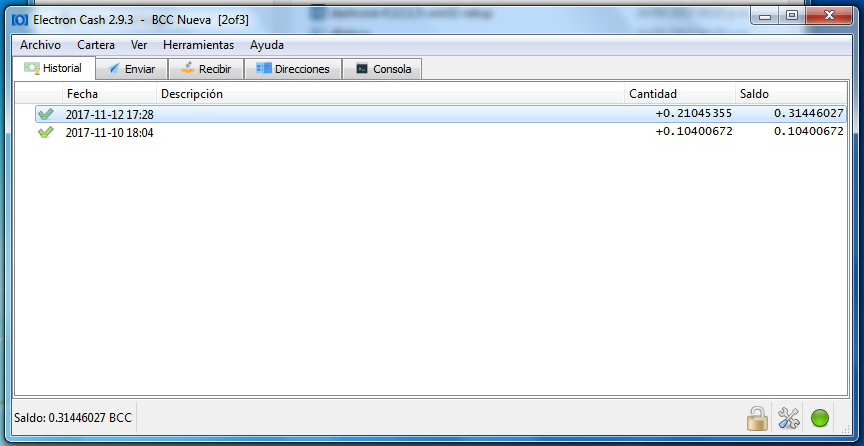
rjjerez
on 5 Dec 2017
this error does not matter
https://user-images.githubusercontent.com/33669141/32800549-4e2c9618-c983-11e7-9a7a-24153febde21.png
rjjerez
on 5 Dec 2017
look at the image, down to the bottom, the seed is not
rjjerez
on 5 Dec 2017
@rjjerez If you don't have the Recovery seed, then you'll have to contact TrustedCoin. They will ask you to send them your 2FA wallet file + password (if any). They'll use their 3rd private key to send your balance to any other BCH address you want. That's the only way to do it if you don't have your recovery seed.
You can contact TrustedCoin here: https://api.trustedcoin.com/#/contact-us
DarkLordGMS
on 6 Dec 2017
excellent friend @DarkLordGMS , I will do that and I will comment ... thank you
rjjerez
on 6 Dec 2017
I'm having trouble restoring my wallet from seed. It was a multibit hd import in electrum. I've tried 2.9.2, 2.9.3, 3.0 without luck. I can restore my wallet checking BIP39 seed but it shows zero balance. Otherwise the next button is disabled and I can't get past that. Any help will be appreciated.
Update: I solved my problem, I restored my wallet from private keys and not from seed words. Exported private keys from electrum and on the generated csv file deleted everything but private keys (second column). Then imported on electron.
 makzpj
on 13 Dec 2017
makzpj
on 13 Dec 2017
Hi Guys, would really appreciate your help re: 349... I am able to get to my electrum wallet... but I cannot proceed with electroncash installation using my seed....
Stuck....
 vologdagde
on 20 Dec 2017
vologdagde
on 20 Dec 2017
Hey, I have the same problem. Before the fork I had an Electrum 2fa wallet.
I just installed Electron Cash 3.0 and did the following:
- Click to create new wallet
- Select standard wallet
- Click I already have a seed
- Then I fill in the seed phrase and the next button remains greyed out
I checked if I could fill in the seed phrase in ElectrUM and there it is accepted and I can click next.
It does mention that it is a 2fa seed btw when I fill in into Electrum, so there's probably a problem there in Electron not accepting a 2fa seed as a usable seed.
I tried another thing, which I read was a workaround:
Recovered Electrum wallet (v3.03) from seed and disable 2fa when recovering
Then I tried to open the electrum wallet in Electron
Result is that Electron crashes (I use windows)
Same thing happens when I fill in my private keys to restore a wallet in Electron. Crash.
Thnx for reading and helping out.
 rveugelaers
on 21 Dec 2017
rveugelaers
on 21 Dec 2017
You described exactly what I have experienced. My guess it is all about 2fa seed and no support by trusted coin... very unfortunate we picked up Electrum wallet...
vologdagde
on 22 Dec 2017
You have to follow the steps I posted above to recover the coins. Step by step.
https://github.com/fyookball/electrum/issues/41#issuecomment-325228017
DarkLordGMS
on 22 Dec 2017
@DarkLordGMS:
I'm pretty happy I finally discovered the steps you posted above. I spent half a day scouring the internet for a fix for this pre-fork, Electrum-based 2FA wallet.
My only issue now is that 2.9.3 won't stay connected to any servers, which is frustrating since it's the final step towards finally recovering these coins.
This happens even if I select a server manually. It quickly connects, flashes a bunch and then disconnects.
The only fix I can find online suggests to upgrade to the newest version. But this presents a catch-22 since your steps call for using 2.9.3. I even tried following the steps using 3.0, and the client unexpectedly crashes at Step-21 when I try to open the saved wallet (which I'm guessing is maybe due to the fact that it was originally a 2FA wallet?).
Thanks for any guidance.
 TimCannady
on 4 Jan 2018
TimCannady
on 4 Jan 2018
@TimCannady I'm glad I was able to help you!
My only issue now is that 2.9.3 won't stay connected to any servers, which is frustrating since it's the final step towards finally recovering these coins.
You should only use 2.9.3 to send ALL the coins out of the 2FA wallet to a new non-2FA wallet that you control. You can make a new standard Electron Cash wallet if you want.
When you send the coins, check the TX id in a block explorer like https://www.blocktrail.com/BCC and when the transaction gets confirmed, delete Electron Cash 2.9.3 and don't use it again. That version is only needed to recover BCH from 2FA wallets. Since 2FA support was removed on v2.9.4 if you try to open a 2FA wallet in a newer version, it won't work.
DarkLordGMS
on 4 Jan 2018
@DarkLordGMS
Thanks for the prompt reply.
You should only use 2.9.3 to send ALL the coins out of the 2FA wallet to a new non-2FA wallet
To clarify, that is what I'm trying to do. But I cannot send the coins out of the 2.9.3 wallet since the client does not stay connected to the network (details outlined in the previous comment).
TimCannady
on 4 Jan 2018
To clarify, that is what I'm trying to do. But I cannot send the coins out of the 2.9.3 wallet since the client does not stay connected to the network (details outlined in the previous comment).
Gotcha. Yeah this sometimes happens but don't worry, it's easy to solve this.
First of all, are you able to see the current balance? If yes, do you see any unconfirmed transaction?
If no, this is what you're gonna do:
1) Select the "Send" tab
2) Enter your BCH receiving address (from a different wallet you control)
3) Set your custom fee (remember that you only need to use 1 or 2 sat/byte)
3) Click the "Max" button
4) Click the "Preview" button
5) You'll see a msg box showing the transaction details. Check the inputs and the output addresses (you should only see 1 output address)
6) If everything looks fine, click the "Sign" button
7) Click the "Copy" button (this will copy the transaction hex in your clipboard)
8) Go here: https://pool.viabtc.com/tools/BCH/broadcast/
9) Paste what you just copied and click "Send" to broadcast the transaction to the BCH network
Now you should be able to see the incoming transaction in the destination wallet.
Let me know if this works
DarkLordGMS
on 4 Jan 2018
Thanks @DarkLordGMS:
Believe it or not, I was able to get the network to stay connected long enough to broadcast a send from the wallet (the light was green for about five seconds). I've confirmed the receiving wallet has the funds.
Now that I had success with this wallet, I'm repeating the steps for a final wallet. Both held BTC during the split (mine and my wife's). Both are showing an unspent BCH balance on Blockchair.
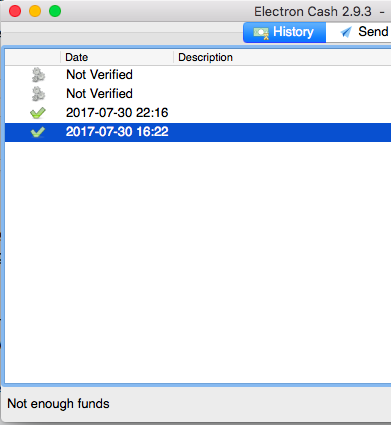
I took the same steps, however after opening the saved file (around Step-23 and Step-24), it shows the coins but is not showing a balance. Furthermore, it is showing two outgoing "Not Verified" sends, neither of which I did and am assuming is just a bug due to it not being able to connect (hopefully).
Any advise on next steps to take here? Maybe related to this? Note: I've tried manually-connecting to BCH servers to no avail.
History tab:
#### Network - Overview tab:
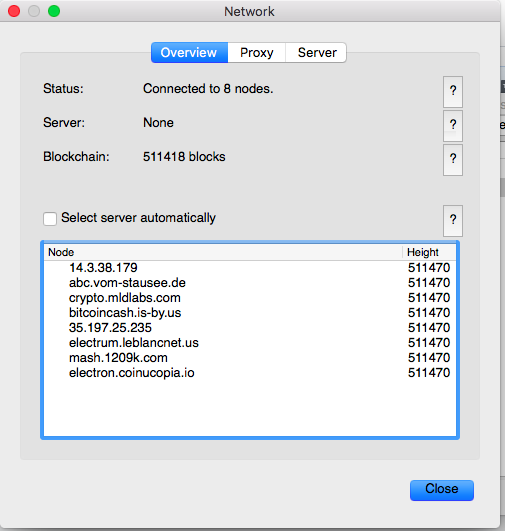
TimCannady
on 4 Jan 2018
That's because it's out of sync. Try this:
1) Download Electron Cash 3.0 and open it
2) Create a new wallet and wait about 5 minutes (this should be enough time to download the block headers)
3) Close Electron Cash 3.0
4) Open Electron Cash 2.9.3 and open your 2FA wallet
That should fix the "not verified" issue. If it doesn't, let me know.
DarkLordGMS
on 4 Jan 2018
@DarkLordGMS
Can you post a link to the steps you mentioned in your earlier comment?
"You have to follow the steps I posted above to recover the coins. Step by step.#41 (comment)"
Solved it with this solution by DarkLordGMS from Aug 28th (this comment had somehow been hidden before) #41 (comment)
Thanx!
 DivAlec
on 4 Jan 2018
DivAlec
on 4 Jan 2018
@DivAlec Here you go for future reference: https://github.com/fyookball/electrum/issues/41#issuecomment-325228017
Also here: https://www.reddit.com/r/btc/comments/6wf50x/recovering_your_bitcoin_cash_from_a_trustedcoin/
DarkLordGMS
on 4 Jan 2018
Great!, will give it a try
DivAlec
on 4 Jan 2018
Lifesaver! Many thanx @DarkLordGMS for making the effort to post #41. It worked like a charm! Claimed mij BCC from my 2fa Electrum wallet
DivAlec
on 6 Jan 2018
@DarkLordGMS: Is there also a post or proces for claiming BTG from an electrum 2fa wallet? With or without the help of an electroncash wallet??
DivAlec
on 6 Jan 2018
@DivAlec if you have the 2 private keys of your 2FA wallet I can give it a go. If successful though I will charge.
 kyuupichan
on 6 Jan 2018
kyuupichan
on 6 Jan 2018
I had some BCH in eletron cash 2.9.2 in a 2fa wallet. Today I tried to send them to another address and got an error. I have tried import 12 words seed in newer version, import private keys, etc without any luck. Any ideas?
 asuarezbravo
on 12 Jan 2018
asuarezbravo
on 12 Jan 2018
Is it a 2FA wallet? Check the address that has your coins. Does it start with 3?
DarkLordGMS
on 12 Jan 2018
Yes, it is a 2FA wallet.
asuarezbravo
on 12 Jan 2018
Hello everyone,
I just updated the instructions to recover your Bitcoin Cash from your TrustedCoin 2FA Bitcoin wallet.
Why? Because the older version required you to use an old version of Electron Cash.
That version is vulnerable to a critical exploit that can be used to steal your cryptocurrency and I don't want you to lose them. The recovery method changed a bit but the result will be the same.
As you might already know, TrustedCoin decided to not support Bitcoin Cash. Therefore, if you had a 2FA Bitcoin wallet with them and you try to send Bitcoin Cash with that same wallet after the fork, then you'll see the "signature error" message.
I will be showing you how to recover your coins and get rid of TrustedCoin for good.
To be able to do this, you will need the following:
Electron Cash (latest version) that can be downloaded by clicking this link.
Electrum (latest version) that can be downloaded by clicking this link.
Your TrustedCoin 2FA wallet 12 word recovery seed. If you don't have this, you cannot recover the funds under any circumstances
Basic file management knowledge (copying/pasting and renaming files)
Patience
If you have all that, let's get started...
1) Open Electrum.
2) On the top left corner, click the File menu. Click New/Restore.
3) You will see this window. Type a wallet name and click Next.
Please use something easy to remember. In this example we will use "TrustedCoin" as the wallet name.
4) You will see this window.
Select the second option: "Wallet with two-factor authentication" and click Next.
5) You will see the TrustedCoin disclaimer. Click Next.
6) You will see this window.
Select the second option: "I already have a seed" and click Next.
7) Type your recovery seed and click Next.
8) You will see this window.
This is very important. Select the second option: "Disable" and click Next.
9) This is also very important. DO NOT USE A PASSWORD.
Don't encrypt the wallet since we need it unencrypted to be able to open it with a Text Editor later.
11) Click the File menu again and then click "Save copy".
12) Now in the next window, it will give you the option of saving a backup of the wallet.
I recommend saving it to an easy to find location like the Desktop.
Use the same wallet name you used on the step # 3. In this case, "TrustedCoin".
Click "Save" and close Electrum.
13) Use a Text Editor like Notepad or Notepad++ and open the wallet file you just saved.
14) Don't close the wallet file. We'll use it later.
15) Open Electron Cash (always use the latest version).
16) Click the File menu and then click New/Restore.
17) You'll see this window.
Type a wallet name and click Next. In this case we'll use this name "Disabled TrustedCoin".
18) Select "Multi-signature wallet". and click Next.
19) Here you have to adjust the first slider a little bit.
It must say "From 3 cosigners" and "Require 2 signatures". Click Next.
20) For the first cosigner (1 of 3), select "Use public or private keys" and click Next.
21) Remember the wallet file you opened earlier?
Go all the way down and you'll find something like this.
See the first xpriv (x1/) key? Copy that and paste it in Electron as the first cosigner key and click Next.
It will show you the master public key (xpub) for the first cosigner. Just click Next since you don't really need this.
22) For the second cosigner (2 of 3), select "Enter cosigner keys" and click Next.
23) Look for the second xpriv (x2/) in the wallet file.
Copy that and paste it in Electron as the second cosigner key and click Next.
24) For the third cosigner (3 of 3), select "Enter cosigner keys" and click Next.
25) Look for the third xpriv (x3/).
As you can see, it's showing as "null" but below it you'll see the master public key for that cosigner. It starts with "xpub".
Copy that and paste it in Electron as the third cosigner key and click Next.
26) No password again. You won't use this wallet again after you send the coins out of it.
Now you should be able to spend the Bitcoin Cash from this new wallet.
Send all of it to another wallet address you control. Remember that you don't need to pay more than 1 sat per byte.
I hope this guide helped you. Feel free to link to this guide to anyone who needs it. :)
Sincerely,
DarkLord_GMS
DarkLordGMS
on 13 Jan 2018
This worked like a charm. Thank you so much!
asuarezbravo
on 14 Jan 2018
Hello everyone,
I have a problem with electron cash because I had a 2FA wallet, ofcourse I restored and disabled 2FA then send some Bitcoin Cash to different wallet. Unfortunately I have used the password and encrypted the wallet :( and now I can not open it !!! When I am trying to set a password Electron Cash has crashed !!!
Please anyone can help ??? especially You DarkLord_GMS ???
Best regards,
 hornet666
on 25 Jan 2018
hornet666
on 25 Jan 2018
You can only recover the funds if you have the recovery seed of the wallet you sent the BCH to. Otherwise, if you don't have the seed nor the wallet password, then you won't be able to recover the funds.
DarkLordGMS
on 25 Jan 2018
You said that you sent the funds from the 2FA wallet to another wallet and lost the password for that second wallet, no?
If that's the case, then the 2FA wallet is empty now. You need the seed or password of the new wallet you sent the funds to.
DarkLordGMS
on 25 Jan 2018
no DarkLordGMS You misunderstood me. I have ma password but when I try to open the new wallet which was encrypted I can not open. Electron Cash just crashed :(( nothing hapenning :((
P.S now I can not open 2FA wallet. Unknown wallet type. 2fa
hornet666
on 25 Jan 2018
@hornet666 I don't think that is a 2fa issue then, you may want to open an issue
 marceloneil
on 25 Jan 2018
marceloneil
on 25 Jan 2018
Follow these steps again
https://github.com/fyookball/electrum/issues/41#issuecomment-357468208
DarkLordGMS
on 25 Jan 2018
Oh wait I did not read that correctly
marceloneil
on 25 Jan 2018
DarklordGMS it is working pretty nice
Thank You so much !!!!!!!
hornet666
on 25 Jan 2018
Great! I'm glad you were able to recover your funds. :)
DarkLordGMS
on 25 Jan 2018
@DarkLordGMS and others users,
What about Bitcoin Gold is there any possibility to get funds from Electrum ??? I will be grateful for any answeres.
Best regards,
hornet666
on 26 Jan 2018
Dear Electron Cash developers, download the ELECTRUM CASH wallet more than 4 months ago and activate 2FA in version 2.9.3. to which I made 3 shipments because I wanted to protect my BCH in the long term, but for a reason that I do not know about, the error "transaction rejected by the rules of the network" 16 obligatory script verification indicator failed - the signature must be zero for the verification operation (multi) sig failed "when wanting to send out my Bitcoin cash out of this wallet so I can not use these, nor has it worked to update my wallet to a more current version and export my balance through the seed, in a previous occasion I was recommended to deactivate 2AF but this has not been possible
and by no side I have been able to find information that allows me to know how I must do it so that it does not expose my seed or my bch.
So I appeal to you with all humility to ask for your help to finally access that balance in my wallet. As you may have noticed my English is not good, which is why I painfully use google, but my knowledge about programming is even worse and with all my heart I beg to be able to advise me to get ahead of this problem since being a pensioner due to a disability of a work risk that makes it impossible for me to work, this economic resource that the BCHs represent for me and my family at this time could be a few weeks of sustenance. Beforehand I send my thanks for your work and recognition that what they do is part of this revolution that is leading humanity to an era of greater freedom. BLESSINGS FOR EVERYTHING YOU DO.
P.S.
As a reward for their help I am committed to making a video for youtube where I will explain how they helped me step by step and thus be able to help more people in Latin America that could come to present difficulties similar to mine and therefore give more confidence to the enthusiasts Latinos in the Electron Cash wallet.
Again I say goodbye and thank you in advance.
 enkigardriver
on 27 Jan 2018
enkigardriver
on 27 Jan 2018
@enkigardriver Did you follow the steps I posted here?
https://github.com/fyookball/electrum/issues/41#issuecomment-357468208
DarkLordGMS
on 28 Jan 2018
@DarkLordGMS I have an electron cash wallet with 2fa and wanted to use your method to recover my BCH funds. When I open electrum and put in my seed, am I using the seed from my electron cash wallet which contains my BCH? Thanks so much for your help!
 marshtg1
on 7 Feb 2018
marshtg1
on 7 Feb 2018
@marshtg1 Did you read the new guide I posted here?
https://github.com/fyookball/electrum/issues/41#issuecomment-357468208
You're supposed to use your 2FA seed in Electrum and then get the xprv with a text editor.
DarkLordGMS
on 7 Feb 2018
@DarkLordGMS yes I did, thanks! I was just confused as to what 2fa seed to enter in Electrum. The one from my electron cash wallet that holds my BCH funds, or the one from my original electrum wallet that held BTC when the fork occurred? Thank you!
marshtg1
on 7 Feb 2018
@marshtg1 To recover your Bitcoin Cash from a 2FA wallet you are supposed to use the 2FA recovery seed that you got when you created the 2FA wallet before August 1st in Electrum.
DarkLordGMS
on 7 Feb 2018
@DarkLordGMS thank you! It worked!!
marshtg1
on 7 Feb 2018
Great! I'm glad I was able to help you out.
DarkLordGMS
on 7 Feb 2018
Related issues
 imaginaryusername
·
5Comments
imaginaryusername
·
5Comments
 KarolTrzeszczkowski
·
4Comments
KarolTrzeszczkowski
·
4Comments
 goodc0re
·
3Comments
goodc0re
·
3Comments
 ProfessorVenkman
·
4Comments
ProfessorVenkman
·
4Comments
 Drac42
·
6Comments
Drac42
·
6Comments
Most helpful comment
Hello everyone,
I will be posting the instructions to recover your Bitcoin Cash from your TrustedCoin 2FA Bitcoin wallet.
As you might already know, TrustedCoin decided to not support Bitcoin Cash. Therefore, if you had a 2FA Bitcoin wallet with them and you try to send Bitcoin Cash with that same wallet after the fork, then you'll see the "signature error" message.
I will be showing you how to recover your coins and dump TrustedCoin for good.
To be able to do this, you will need the following:
Electron Cash (latest version) that can be downloaded by clicking this link.
Electrum (latest version) that can be downloaded by clicking this link.
Your TrustedCoin 2FA wallet 12 word recovery seed. If you don't have this, you cannot recover the funds under any circumstances
Basic file management knowledge (copying/pasting and renaming files)
Patience
If you have all that, let's get started...
1) Open Electrum.
2) On the top left corner, click the File menu. Click New/Restore.
3) You will see this window. Type a wallet name and click Next.
Please use something easy to remember. In this example we will use "TrustedCoin" as the wallet name.
4) You will see this window.
Select the second option: "Wallet with two-factor authentication" and click Next.
5) You will see the TrustedCoin disclaimer. Click Next.
6) You will see this window.
Select the second option: "I already have a seed" and click Next.
7) Type your recovery seed and click Next.
8) You will see this window.
This is very important. Select the second option: "Disable" and click Next.
9) This is also very important. DO NOT USE A PASSWORD.
Don't encrypt the wallet since we need it unencrypted to be able to open it with a Text Editor later.
10) After a few seconds, Electrum will recover your wallet using your seed and then you'll see this window.
11) Click the File menu again and then click "Save copy".
12) Now in the next window, it will give you the option of saving a backup of the wallet.
I recommend saving it to an easy to find location like the Desktop.
Use the same wallet name you used on the step # 3. In this case, "TrustedCoin".
Click "Save" and close Electrum.
13) Use a Text Editor like Notepad or Notepad++ and open the wallet file you just saved.
14) Don't close the wallet file. We'll use it later.
15) Open Electron Cash (always use the latest version).
16) Click the File menu and then click New/Restore.
17) You'll see this window.
Type a wallet name and click Next. In this case we'll use this name "Disabled TrustedCoin".
18) Select "Multi-signature wallet". and click Next.
19) Here you have to adjust the first slider a little bit.
It must say "From 3 cosigners" and "Require 2 signatures". Click Next.
20) For the first cosigner (1 of 3), select "Use public or private keys" and click Next.
21) Remember the wallet file you opened earlier?
Go all the way down and you'll find something like this.
See the first xpriv (x1/) key? Copy that and paste it in Electron as the first cosigner key and click Next.
It will show you the master public key (xpub) for the first cosigner. Just click Next since you don't really need this.
22) For the second cosigner (2 of 3), select "Enter cosigner keys" and click Next.
23) Look for the second xpriv (x2/) in the wallet file.
Copy that and paste it in Electron as the second cosigner key and click Next.
24) For the third cosigner (3 of 3), select "Enter cosigner keys" and click Next.
25) Look for the third xpriv (x3/).
As you can see, it's showing as "null" but below it you'll see the master public key for that cosigner. It starts with "xpub".
Copy that and paste it in Electron as the third cosigner key and click Next.
26) No password again. You won't use this wallet again after you send the coins out of it.
Now you should be able to spend the Bitcoin Cash from this new wallet.
Send all of it to another wallet address you control. Remember that you don't need to pay more than 1 sat per byte.
I hope this guide helped you. Feel free to link to this guide to anyone who needs it. :)
Sincerely,
DarkLord_GMS