Electron-builder: uninstaller is not signed by electron-builder reason=custom NSIS script is used
- Version: 22.1.0
- Target: NSIS
Hi. I have such config:
"build": {
    "appId": "com.electron.browsec",
    "asar": false,
    "productName": "Browsec",
    "directories": {
      "app": "appCopy"
    },
    "win": {
      "artifactName": "${productName}-setup-${version}-${arch}.${ext}",
      "publish": {
        "provider": "generic",
        "url": ""
      },
      "target": {
        "target": "nsis",
        "arch": [
          "x64",
          "ia32"
        ]
      },
      "signAndEditExecutable": false
    },
    "nsis": {
      "script": "build/installer.nsi",
      "warningsAsErrors": false
    }
  },
And just copy of default NSIS template of electron-builder.
I am getting error:
• uninstaller is not signed by electron-builder  reason=custom NSIS script is used
Error: C:\Users\Mester\AppData\Local\electron-builder\Cache\nsis\nsis-3.0.4\Bin\makensis.exe exited with code ERR_ELECTRON_BUILDER_CANNOT_EXECUTE
Output:

Output:
Command line defined: "APP_ID=com.electron.browsec"
Command line defined: "APP_GUID=1ab9e481-6fb5-55ed-96ec-40263fc4aae5"
Command line defined: "UNINSTALL_APP_KEY=1ab9e481-6fb5-55ed-96ec-40263fc4aae5"
Command line defined: "PRODUCT_NAME=Browsec"
Command line defined: "PRODUCT_FILENAME=Browsec"
Command line defined: "APP_FILENAME=browsec_desktop"
Command line defined: "APP_DESCRIPTION=Browsec for desktop"
Command line defined: "VERSION=0.9.2"
Command line defined: "PROJECT_DIR=C:\Projects\Browsec\Electron\Code"
Command line defined: "BUILD_RESOURCES_DIR=C:\Projects\Browsec\Electron\Code\build"
Command line defined: "APP_PACKAGE_NAME=browsec_desktop"
Command line defined: "APP_32=C:\Projects\Browsec\Electron\Code\dist\browsec_desktop-0.9.2-ia32.nsis.7z"
Command line defined: "APP_32_NAME=browsec_desktop-0.9.2-ia32.nsis.7z"
Command line defined: "APP_32_HASH=4371ED69B64955690D451A9F26C4CEF84ED97A6C839ECAAF3DCDF3F5D53AACDE5EFFB164149AFA0593E7C36BE34B6FD8C0DC662DDEAE18AC974168199EE04AFD"
Command line defined: "APP_64=C:\Projects\Browsec\Electron\Code\dist\browsec_desktop-0.9.2-x64.nsis.7z"
Command line defined: "APP_64_NAME=browsec_desktop-0.9.2-x64.nsis.7z"
Command line defined: "APP_64_HASH=550DED5E30A777ABEEA66590B1583B8958FB4EC094D950A14EF8E5D61C495E49414C2B47F5C4B1EA694B5B7DD9DA54AF3CE1D9DEC856C56BFDDBE00428B4D390"
Command line defined: "COMPANY_NAME=Browsec"
Command line defined: "APP_PRODUCT_FILENAME=Browsec"
Command line defined: "APP_INSTALLER_STORE_FILE=browsec_desktop-updater\installer.exe"
Command line defined: "COMPRESSION_METHOD=7z"
Command line defined: "ONE_CLICK"
Command line defined: "RUN_AFTER_FINISH"
Command line defined: "SHORTCUT_NAME=Browsec"
Command line defined: "UNINSTALL_DISPLAY_NAME=Browsec 0.9.2"
Command line defined: "ESTIMATED_SIZE=333022"
Command line defined: "COMPRESS=auto"
Processing config: C:\Users\Mester\AppData\Local\electron-builder\Cache\nsis\nsis-3.0.4\nsisconf.nsh
Processing script file: "<stdin>" (ACP)

Error output:

Error output:
File: "${UNINSTALLER_OUT_FILE}" -> no files found.
I can not understand where to get this uninstall.exe (<= main question) and how to sign it?
 lawlietmester
All 26 comments
Hey, we have similar issue.
``` • downloaded url=https://github.com/electron-userland/electron-builder-binaries/releases/download/nsis-3.0.4/nsis-3.0.4.7z duration=3.525s
• signing file=final/win-ia32-unpacked/resources/elevate.exe certificateFile=win-freeyourmusic.p12
• signing file=final/win-unpacked/resources/elevate.exe certificateFile=win-freeyourmusic.p12
• Signing NSIS uninstaller file=final/__uninstaller-nsis-STAMP.exe certificateFile=win-freeyourmusic.p12
⨯ Exit code: 255. Command failed: /Users/bimusiek/Library/Caches/electron-builder/winCodeSign/winCodeSign-2.5.0/darwin/10.12/osslsigncode -in /Users/bimusiek/Developer/StAMP/stamp.universal/final/__uninstaller-nsis-STAMP.exe -out /Users/bimusiek/Developer/StAMP/stamp.universal/final/__uninstaller-nsis-STAMP-signed-sha1.exe -t http://timestamp.digicert.com -pkcs12 win-freeyourmusic.p12 -h sha1 -n STAMP -pass ce35d751268e607bc7ddeb3660f0def2024237f655fdb044e730bb60263d5433 (sha256 hash) to open file: /Users/bimusiek/Developer/StAMP/stamp.universal/final/__uninstaller-nsis-STAMP.exe
Failed
Failed to open file: /Users/bimusiek/Developer/StAMP/stamp.universal/final/__uninstaller-nsis-STAMP.exe```
Our config for windows is:
"win": {
    "icon": "icon.ico",
    "certificateFile": "win-freeyourmusic.p12",
    "certificatePassword": "***",
    "target": [
      {
        "target": "nsis",
        "arch": [
          "x64",
          "ia32"
        ]
      }
    ]
  },
Any ideas why uninstaller does not exist?
 bimusiek
on 5 Nov 2019
bimusiek
on 5 Nov 2019
@bimusiek same issue here! The code signing works for all the other files before. But the uninstaller exe is missing for unknown reason.
 MatthiasD0
on 7 Nov 2019
MatthiasD0
on 7 Nov 2019
@MatthiasD0 I was able to fix it by... installing all updates to Windows in Parallels.
Then it happened that NSIS installer is broken on newest electron-builder so you have to use 21.2.0
bimusiek
on 7 Nov 2019
@bimusiek can you please tell me how did you get a .p12 file for EV signing on Windows? 🙏
Provider (Comodo) sent me a USB token with the certificate on it, but cert/key are not exportable to file.
 damianobarbati
on 13 Nov 2019
damianobarbati
on 13 Nov 2019
@damianobarbati I have exactly the same question.
 kzimny
on 13 Nov 2019
kzimny
on 13 Nov 2019
I bought Microsoft Authenticode from DigiCert, and I can download it in different formats. I don't remember how exactly I converted it from .p7b to .p12 as I keep it in .p12 format already. I probably used openssl command to do it.
bimusiek
on 13 Nov 2019
@bimusiek and now the most imporant question: does you .exe installer (signed with it) pass the smartscreen deathly screen?
Do your users just download the .exe from the web and installs without any stop by WIN10?
This could be the holy grail to me.
damianobarbati
on 13 Nov 2019
@damianobarbati Yes, there is no screen when installing. When running exe, it installs the app and opens it directly.
I just checked on Windows 10 (via Parallel).
If you want to verify it, you can download our app from https://freeyourmusic.com/
bimusiek
on 13 Nov 2019
Wow! I can confirm. @develar you should really mention this as a preferred way to obtain the certificate 😵
@bimusiek you are using the silent installation, did you try the same with the nsis stepped installer? Same result?
damianobarbati
on 13 Nov 2019
@damianobarbati : could you please share your experience with code signing when you get it work?
kzimny
on 13 Nov 2019
@kzimny I already code-sign my application but I have the crappy USB token Sectigo (ex Comodo) sent me.
It works but is troublesome because the developer (who releases) must have the physical device to sign the artifacts.
With a .pfx or .p12 this would not be necessary.
damianobarbati
on 13 Nov 2019
@damianobarbati We have CI that builds our app, so I cannot imagine how we could do it with physical device 😮 I can try later with assisted installer, but I don't believe it would be any different.
bimusiek
on 13 Nov 2019
@bimusiek I'd really appreciate your try and confirm on this 🙏
And yes, I think as well that kind of certificate is just as valid as the standard EV so no matter the .exe signed!
I really searched a lot about this and I didn't find a solution, then here your issue here: what a luck
damianobarbati
on 13 Nov 2019
@damianobarbati how did you signed your app? Could you please share the responsible configuration?
kzimny
on 13 Nov 2019
@damianobarbati Worked like a charm, no extra screen when running exe.

Zipped exe file for you to try:
https://www.dropbox.com/s/nzdvxh94q87qafv/STAMP%20Setup%204.15.2.exe.zip?dl=0
bimusiek
on 13 Nov 2019
@kzimny here what I have so far:
. install Parallels Desktop Pro and create a Windows 10 virtual machine with a Windows 10 image download from https://www.microsoft.com/it-it/software-download/windows10ISO (do not use the default parallels image for WIN10)
. install SafeNet Client (https://support.comodo.com/index.php?/Knowledgebase/Article/View/1211/106/safenet-download-for-ev-codesigning-certificates)
. attach the USB token permanently to the virtual machine (Device/USB settings)
. open SafeNet > config > Enable single logon (otherwise you'll be prompt for password 57862 times when signing)
Here my config (omitted the mac part):
"build": {
    "appId": "net.company-name.product-name",
    "files": [
        "./*.json",
        "./*.js",
        "./assets/*",
        "./icons/*",
        "./main/*",
        "./renderer/*",
        "./shared/*",
        "./node_modules/typeface-arimo/files/*.woff2"
    ],
    "directories": {
        "buildResources": "./icons",
        "output": "./dist"
    },
    "asar": true,
    "win": {
        "target": [
            "nsis"
        ],
        "icon": "./icons/logo.ico",
        "publisherName": [
            "company-name SRL",
            "company-name srl",
            "company-name srl"
        ],
        "certificateSubjectName": "company-name srl",
        "verifyUpdateCodeSignature": false
    },
    "nsis": {
        "oneClick": false,
        "perMachine": true,
        "allowElevation": true,
        "deleteAppDataOnUninstall": true,
        "createDesktopShortcut": "always",
        "menuCategory": "company-name - product-name",
        "installerHeaderIcon": "./icons/logo.ico",
        "installerIcon": "./icons/logo.ico",
        "uninstallerIcon": "./icons/logo.ico",
        "installerSidebar": "./icons/win-installer-sidebar.bmp",
        "installerHeader": "./icons/win-installer-header.bmp",
        "uninstallerSidebar": "./icons/win-uninstaller-sidebar.bmp",
        "license": "./assets/license.html"
    }
},
Build command:
electron-builder --win --ia32 --x64 --config.compression=maximum --config.artifactName='${productName}.${ext}' --config.win.certificateSubjectName='company-name srl' --config.extraMetadata.NODE_ENV=production
@bimusiek thanks so much, definitely the way to go !!!
damianobarbati
on 13 Nov 2019
Thank you very much @damianobarbati
kzimny
on 13 Nov 2019
@bimusiek bad news, I tried the "Microsoft Authenticode" and is not working.
First thing I noted, when I exported it from Internet Explorer it was labelled as "extendend validation".
When you exported it from the IE (or Firefox) was it as well?
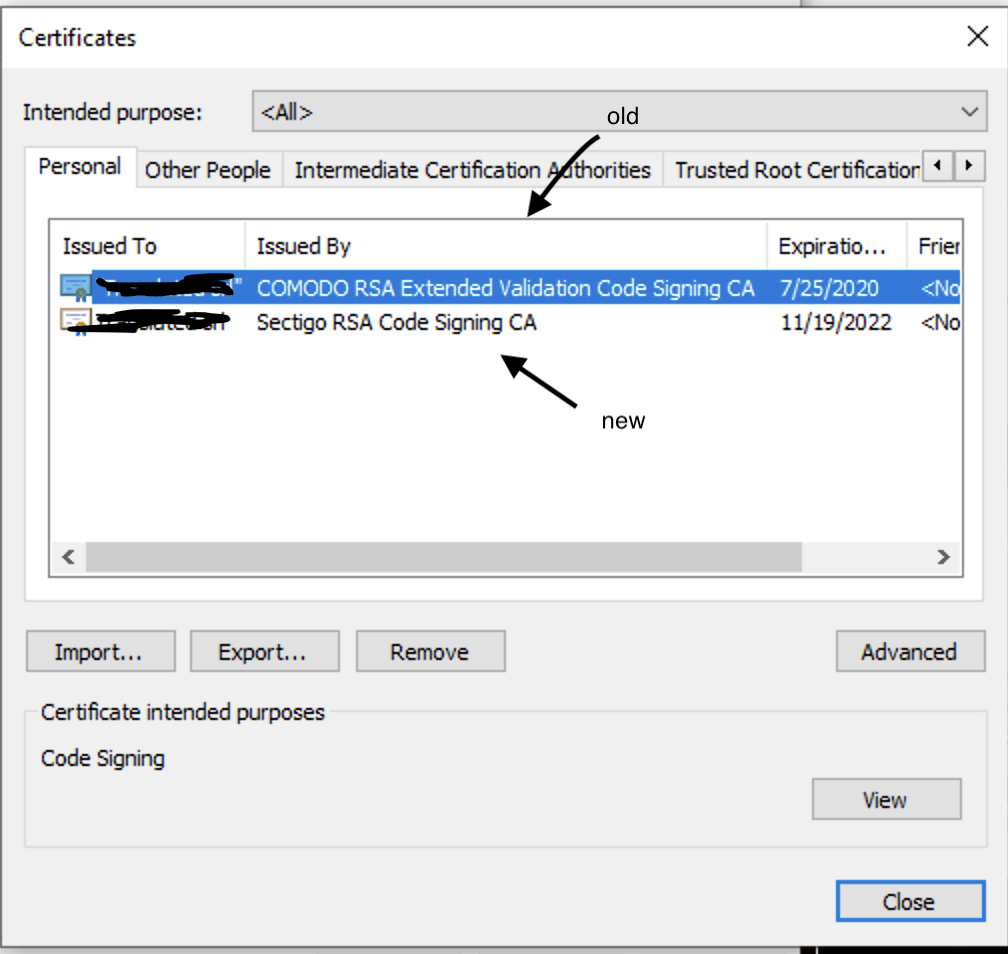
I think you've build enough trust somehow and now SmartScreen does not consider your application as a menace.
But this "reputation" thing sounds so shady to me.
So nevermind, dongle is still the only way to be 100% sure to bypass the SmartScreen of death 😔
Thanks anyway for your help.
damianobarbati
on 19 Nov 2019
Is this still relevant? If so, what is blocking it? Is there anything you can do to help move it forward?
This issue has been automatically marked as stale because it has not had recent activity. It will be closed if no further activity occurs.
![stale[bot] picture](https://avatars3.githubusercontent.com/in/1724?v=4&s=40) stale[bot]
on 18 Jan 2020
stale[bot]
on 18 Jan 2020
@MatthiasD0 I was able to fix it by... installing all updates to Windows in Parallels.
Then it happened that NSIS installer is broken on newest electron-builder so you have to use21.2.0
Seems to be the issue in my case. (I am using windows shared runners in gitlab). I was using 22.4.1 when the error occurred.
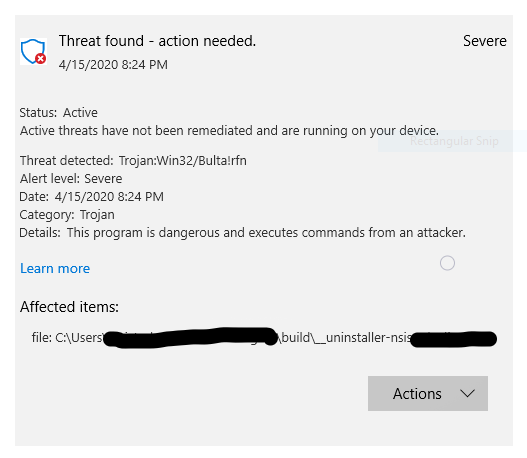
And I think I found the reason for this. Since we are running in Windows, the in-built "Microsoft Security" app (Defender? Security Essentials?) is basically identifying it as Trojan Virus.
Threat Detected : Trojan:Win32/Bulta!rfn
Not sure if this my PC or for everyone... But I do not get any Trojan errors while using 21.2.0.
 shrinidhi111
on 15 Apr 2020
shrinidhi111
on 15 Apr 2020
@bimusiek still not working for me with version 21.2.0, same with version 20.44.4
 lvbeck
on 4 May 2020
lvbeck
on 4 May 2020
@lvbeck We have created new repo with brand new code and it still worked. Did you try to install all Window updates and make sure no antivirus is blocking signing executable?
bimusiek
on 4 May 2020
@lvbeck We have created new repo with brand new code and it still worked. Did you try to install all Window updates and make sure no antivirus is blocking signing executable?
@bimusiek I have windows 10 1909 and all updates are installed, with windows defender disabled
lvbeck
on 5 May 2020
today I updated electron-builder to latest version 22.6.0, but another error occurred:
\node_modules\electron-builder\node_modules\fs-extra\lib\mkdirs\make-dir.js:86
      } catch {
              ^

SyntaxError: Unexpected token {
    at createScript (vm.js:80:10)
    at Object.runInThisContext (vm.js:139:10)
    at Module._compile (module.js:617:28)
    at Object.Module._extensions..js (module.js:664:10)
    at Module.load (module.js:566:32)
    at tryModuleLoad (module.js:506:12)
    at Function.Module._load (module.js:498:3)
    at Module.require (module.js:597:17)
    at require (internal/module.js:11:18)
    at Object.<anonymous> (\node_modules\electron-builder\node_modules\fs-extra\lib\mkdirs\index.js:3:44)
npm ERR! code ELIFECYCLE
npm ERR! errno 1
npm ERR! [email protected] build: `node .electron-vue/build.js && electron-builder`
npm ERR! Exit status 1
npm ERR!
npm ERR! Failed at the [email protected] build script.
npm ERR! This is probably not a problem with npm. There is likely additional logging output above.

npm ERR! A complete log of this run can be found in:
npm ERR!     \AppData\Roaming\npm-cache\_logs\2020-05-05T10_16_33_677Z-debug.log
yes I see that same error when upgrading to 22.6.0
 evan-coygo
on 5 May 2020
evan-coygo
on 5 May 2020
Related issues
 StickNitro
·
3Comments
StickNitro
·
3Comments
 alexstrat
·
3Comments
alexstrat
·
3Comments
 NPellet
·
3Comments
NPellet
·
3Comments
 jhg
·
3Comments
jhg
·
3Comments
 lbssousa
·
3Comments
lbssousa
·
3Comments
Most helpful comment
@MatthiasD0 I was able to fix it by... installing all updates to Windows in Parallels.
Then it happened that NSIS installer is broken on newest electron-builder so you have to use
21.2.0