Electron-builder: App needs to be authorized when auto-updating
- Version:
20.38.5
electron 1.8.6 native autoUpdater
- Target:
pkg
When app is auto updating, there will be a dialog that asks me to enter the password to authorize this updating. As the picture shows below:
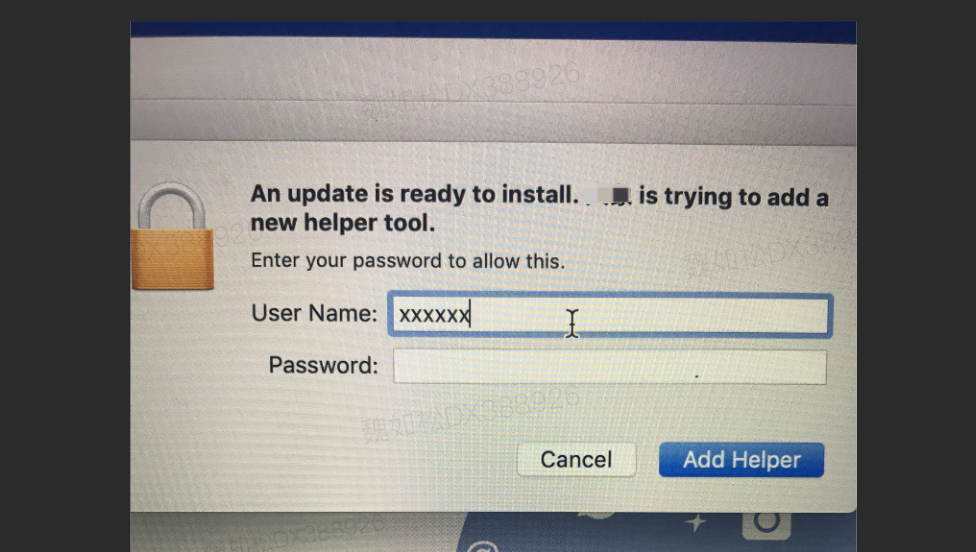
How can I avoid this?
 ervinewell
All 7 comments
Hey @ervinewell, I am still very new to electron and electron-builder in general.
But, have you signed or notrarized your packaged app before installation?
The electron-builder doc on Auto Update: https://www.electron.build/code-signing
Mentioned that code signing on macOS is required.
Some explanation on why can be found on the electron docs too:
https://electronjs.org/docs/tutorial/code-signing#code-signing
And here is one from electron-builder docs on code-signing:
https://www.electron.build/code-signing
Hope that helps.
 kevinlinv
on 29 Jul 2019
kevinlinv
on 29 Jul 2019
Hey @ervinewell, I am still very new to electron and electron-builder in general.
But, have you signed or notrarized your packaged app before installation?
Theelectron-builderdoc onAuto Update: https://www.electron.build/code-signing
Mentioned that code signing on macOS is required.Some explanation on why can be found on the
electrondocs too:
https://electronjs.org/docs/tutorial/code-signing#code-signingAnd here is one from
electron-builderdocs oncode-signing:
https://www.electron.build/code-signingHope that helps.
Thx for replying. I'll check it twice.
ervinewell
on 30 Jul 2019
Hey @ervinewell, I am still very new to electron and electron-builder in general.
But, have you signed or notrarized your packaged app before installation?
Theelectron-builderdoc onAuto Update: https://www.electron.build/code-signing
Mentioned that code signing on macOS is required.Some explanation on why can be found on the
electrondocs too:
https://electronjs.org/docs/tutorial/code-signing#code-signingAnd here is one from
electron-builderdocs oncode-signing:
https://www.electron.build/code-signingHope that helps.
I've checked twice. App has been signed, but still need to be authorized.
ervinewell
on 31 Jul 2019
Hey, unfortunately my knowledge on this is very limited.
From what I can see though, from the picture there, the app is trying to add a new helper tool, which is a separate part of your core application, which could be the problem.
kevinlinv
on 31 Jul 2019
Case closed. In my circumstances, I set .app's owner to "admin", which should be "user".
ervinewell
on 12 Aug 2019
Case closed. In my circumstances, I set .app's owner to "admin", which should be "user".
@ervinewell Would you care to elaborate on your solution? I have the same issue. But I am not sure what you mean by "set .app's owner" ? .. Is that a config option for electron-builder ?
 bobmoff
on 27 Apr 2020
bobmoff
on 27 Apr 2020
If I choose "Only for me" when installing, then I dont get the auth popup for auto updates but that puts the application inside the home folder and that brings on other issues with permissions. I also have not seen a single app being installed inside the /home/ directory so I guess its not the best choice to force.
Is there no way to install it "for all users" and not get the auth popup when app need to auto update? I mean, it works for .DMG files, what is the difference in how the auto update works?
bobmoff
on 27 Apr 2020
Related issues
 AidanNichol
·
3Comments
AidanNichol
·
3Comments
 antonycourtney
·
3Comments
antonycourtney
·
3Comments
 leo
·
3Comments
leo
·
3Comments
 Jashepp
·
3Comments
Jashepp
·
3Comments
 xingoxu
·
3Comments
xingoxu
·
3Comments
Most helpful comment
Case closed. In my circumstances, I set .app's owner to "admin", which should be "user".