Electron-builder: 'build/appx' assets not working
- Version: 20.28.4
- Target: win appx
Generated all the assets on Visual Studio, then placed them into 'build/appx' as suggested on Electron Builder - AppX - Assets
These are the assets files in build/appx
29/09/2018  08:42 AM               168 BadgeLogo.scale-100.png
29/09/2018  08:42 AM               217 BadgeLogo.scale-125.png
29/09/2018  08:42 AM               247 BadgeLogo.scale-150.png
29/09/2018  08:42 AM               276 BadgeLogo.scale-200.png
29/09/2018  08:42 AM               551 BadgeLogo.scale-400.png
29/09/2018  08:42 AM             7,909 LargeTile.scale-100.png
29/09/2018  08:42 AM            10,423 LargeTile.scale-125.png
29/09/2018  08:42 AM            13,265 LargeTile.scale-150.png
29/09/2018  08:42 AM            20,016 LargeTile.scale-200.png
29/09/2018  08:42 AM            57,263 LargeTile.scale-400.png
29/09/2018  08:42 AM             1,430 LockScreenLogo.scale-200.png
29/09/2018  08:42 AM             2,138 SmallTile.scale-100.png
29/09/2018  08:42 AM             2,745 SmallTile.scale-125.png
29/09/2018  08:42 AM             3,247 SmallTile.scale-150.png
29/09/2018  08:42 AM             4,542 SmallTile.scale-200.png
29/09/2018  08:42 AM            10,788 SmallTile.scale-400.png
29/09/2018  08:42 AM             8,311 SplashScreen.scale-100.png
29/09/2018  08:42 AM            10,925 SplashScreen.scale-125.png
29/09/2018  08:42 AM            14,018 SplashScreen.scale-150.png
29/09/2018  08:42 AM            21,458 SplashScreen.scale-200.png
29/09/2018  08:42 AM            61,399 SplashScreen.scale-400.png
29/09/2018  08:42 AM             3,420 Square150x150Logo.scale-100.png
29/09/2018  08:42 AM             4,290 Square150x150Logo.scale-125.png
29/09/2018  08:42 AM             5,308 Square150x150Logo.scale-150.png
29/09/2018  08:42 AM             7,634 Square150x150Logo.scale-200.png
29/09/2018  08:42 AM            19,305 Square150x150Logo.scale-400.png
29/09/2018  08:42 AM               776 Square44x44Logo.altform-unplated_targetsize-16.png
29/09/2018  08:42 AM            22,014 Square44x44Logo.altform-unplated_targetsize-256.png
29/09/2018  08:42 AM             1,651 Square44x44Logo.altform-unplated_targetsize-32.png
29/09/2018  08:42 AM             2,558 Square44x44Logo.altform-unplated_targetsize-48.png
29/09/2018  08:42 AM             1,755 Square44x44Logo.scale-100.png
29/09/2018  08:42 AM             2,315 Square44x44Logo.scale-125.png
29/09/2018  08:42 AM             2,915 Square44x44Logo.scale-150.png
29/09/2018  08:42 AM             3,991 Square44x44Logo.scale-200.png
29/09/2018  08:42 AM             9,204 Square44x44Logo.scale-400.png
29/09/2018  08:42 AM               596 Square44x44Logo.targetsize-16.png
29/09/2018  08:42 AM               951 Square44x44Logo.targetsize-24.png
29/09/2018  08:42 AM             1,255 Square44x44Logo.targetsize-24_altform-unplated.png
29/09/2018  08:42 AM            15,141 Square44x44Logo.targetsize-256.png
29/09/2018  08:42 AM             1,316 Square44x44Logo.targetsize-32.png
29/09/2018  08:42 AM             1,978 Square44x44Logo.targetsize-48.png
29/09/2018  08:42 AM             1,451 StoreLogo.backup.png
29/09/2018  08:42 AM             2,740 StoreLogo.scale-100.png
29/09/2018  08:42 AM             3,450 StoreLogo.scale-125.png
29/09/2018  08:42 AM             4,228 StoreLogo.scale-150.png
29/09/2018  08:42 AM             5,973 StoreLogo.scale-200.png
29/09/2018  08:42 AM            15,100 StoreLogo.scale-400.png
29/09/2018  08:42 AM             3,633 Wide310x150Logo.scale-100.png
29/09/2018  08:42 AM             4,579 Wide310x150Logo.scale-125.png
29/09/2018  08:42 AM             5,711 Wide310x150Logo.scale-150.png
29/09/2018  08:42 AM             8,311 Wide310x150Logo.scale-200.png
29/09/2018  08:42 AM            21,458 Wide310x150Logo.scale-400.png
This is build in my package.js
"build": {
    "productName": "MyApp",
    "appId": "DevName.MyApp",
    "appx": {
      "identityName": "DevName.MyApp",
      "publisher": "...",
      "publisherDisplayName": "DevName",
      "applicationId": "DevName.MyApp"
    },
    "win": {
      "target": "appx"
    }
  }
However I'm getting the following output, and it doesn't seem to find the assets.
  • electron-builder version=20.28.4
  • loaded configuration file=package.json ("build" field)
  • loaded parent configuration preset=react-cra
  • writing effective config file=dist\builder-effective-config.yaml
  • no native production dependencies
  • packaging       platform=win32 arch=x64 electron=3.0.2 appOutDir=dist\win-unpacked
  • default Electron icon is used reason=application icon is not set
  • building        target=AppX arch=x64 file=dist\MyApp-1.1.4.appx
  • AppX is not signed reason=Windows Store only build
Then of course, I see that .appx and .exe file built with the Electron default icon...
Am I missing something here? :(
 vanejung
All 8 comments
The error: "default Electron icon is used reason=application icon is not set" is caused by missing build/icon.ico icon file.
On exe applications: is used everywhere.
On appx applications: is used for the window title bar icon.
 mvbn
on 1 Oct 2018
mvbn
on 1 Oct 2018
@mvbn Thanks for the note on the 'build/icon.ico', however the issue is still happening.
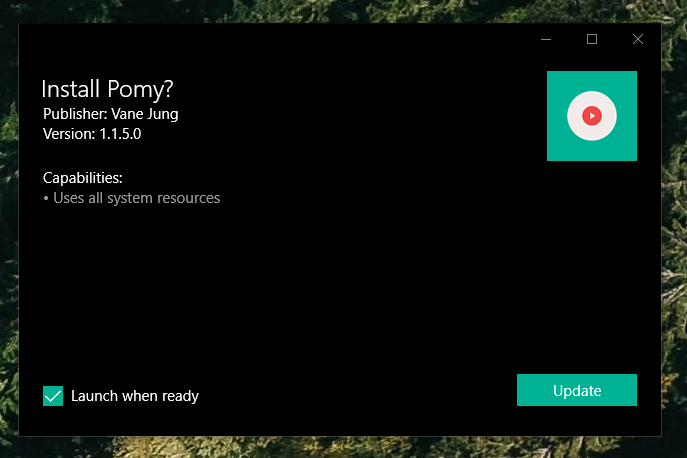
The AppX assets are still not displaying. The default Electron asset's displaying instead.
This is what's happening at the moment.

This is what's expected.
vanejung
on 2 Oct 2018
Found a solution. - CC @mvbn
It seems that the latest Electron-Builder sets buildResources default value to assets, which should be the build folder (build) actually. Hopefully the future release corrects this issue, so no one else has to pull their hair out like I did...
Had to set buildResources to build as shown below.
    "directories": {
      "buildResources": "build"
    },
Therefore, the build in my package.js is updated as below.
"build": {
    "productName": "MyApp",
    "appId": "DevName.MyApp",
    "directories": {
      "buildResources": "build"
    },
    "appx": {
      "identityName": "DevName.MyApp",
      "publisher": "CN=...",
      "publisherDisplayName": "DevName",
      "applicationId": "DevName.MyApp"
    },
    "win": {
      "target": "appx",
      "icon": "icons/icon.ico"
    }
  }
The app is currently in the progress of 'Certification'. Fingers crossed.
Will let everyone know once the app has been approved and released.
vanejung
on 3 Oct 2018
The app is all approved, and the Appx assets seem to be all correctly applied.
Therefore, going to close this ticket.
But hopefully the electron-builder team corrects buildResources default value to build instead of assets, or explain a little more with details on the documentation.
vanejung
on 6 Oct 2018
Hey, @vanejung are your logo files stored in "build/appx"? For some reason even after including the buildResources config on my package.json, my app still builds with the default electron-builder icons
 MehediH
on 15 Dec 2018
MehediH
on 15 Dec 2018
Hey, @vanejung are your logo files stored in "build/appx"? For some reason even after including the buildResources config on my package.json, my app still builds with the default electron-builder icons
Sorry for getting back to you late. @MehediH Did you manage to get a solution in the end? or still experiencing the problem?
vanejung
on 5 Feb 2019
Found a solution. - CC @mvbn
It seems that the latest Electron-Builder setsbuildResourcesdefault value toassets, which should be the build folder (build) actually. Hopefully the future release corrects this issue, so no one else has to pull their hair out like I did...
Had to setbuildResourcestobuildas shown below."directories": { "buildResources": "build" },Therefore, the
buildin mypackage.jsis updated as below."build": { "productName": "MyApp", "appId": "DevName.MyApp", "directories": { "buildResources": "build" }, "appx": { "identityName": "DevName.MyApp", "publisher": "CN=...", "publisherDisplayName": "DevName", "applicationId": "DevName.MyApp" }, "win": { "target": "appx", "icon": "icons/icon.ico" } }The app is currently in the progress of 'Certification'. Fingers crossed.
Will let everyone know once the app has been approved and released.Nice find. In the docs they suggest the
buildfolder is something you can name whatever you want...
@daniellizik Yeah.. The documentation sounded like buildResources default value is build.
My Mac version automatically picked up build folder without needing to specify buildResources like I had to on the Windows version. It was a very weird one.
vanejung
on 5 Feb 2019
@vanejung ah, awesome thank you! this worked for me
 daniellizik
on 12 Feb 2019
daniellizik
on 12 Feb 2019
Related issues
 philcockfield
·
3Comments
philcockfield
·
3Comments
 noahprince22
·
3Comments
noahprince22
·
3Comments
 talarari
·
3Comments
talarari
·
3Comments
 popod
·
3Comments
popod
·
3Comments
 alexstrat
·
3Comments
alexstrat
·
3Comments
Most helpful comment
Found a solution. - CC @mvbn
It seems that the latest Electron-Builder sets
buildResourcesdefault value toassets, which should be the build folder (build) actually. Hopefully the future release corrects this issue, so no one else has to pull their hair out like I did...Had to set
buildResourcestobuildas shown below.Therefore, the
buildin mypackage.jsis updated as below.The app is currently in the progress of 'Certification'. Fingers crossed.
Will let everyone know once the app has been approved and released.