Electron-builder: NSIS: update installers remain on disk after installation
- electron-builder Version: 20.2.0
- electron-updater Version: 2.21.3
- Target: Windows NSIS
As mentioned in the issue's title, update installers are not cleaned up after install. Every update downloads a new installer and stores it in C:\Users\%USERNAME%\AppData\Roaming\%APP_NAME% as you can see in the following screenshot:
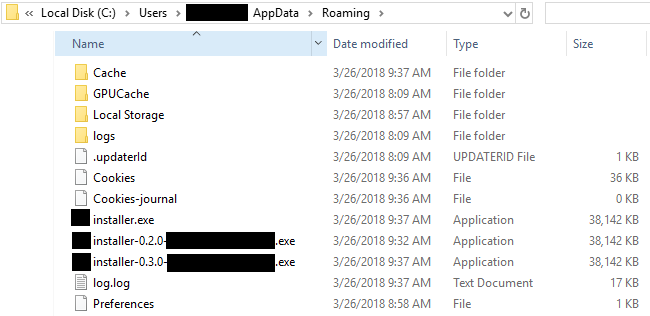 `
`
I am worried that in the long run, the directory will grow in size and users less diligent in their resource management might find their free disk space shrinking unexpectedly because of this behavior.
Is there a configuration parameter allowing to clean up previous installers (after an update, for example) or do I need to implement the clean up process inside my app?
Thank you!
 vbeausoleil
All 4 comments
One file in any case is required (for differential updates, not yet enabled by default). Other... maybe it is trace of various version of updater (code was changed).... Need to check.
 develar
on 26 Mar 2018
develar
on 26 Mar 2018
+1, we are noticing the same issue.
 petren
on 2 Apr 2018
petren
on 2 Apr 2018
Any tips on how to clean those or any workarounds? We are about to release our app to a large number of users and I am wondering if a future fix would clean leftover files or we should wait until it is fixed.
 mkoleva
on 4 Jun 2018
mkoleva
on 4 Jun 2018
Fixed, please use electron-updater 2.23.3 AND electron-builder 20.19.1
develar
on 3 Jul 2018
Related issues
 antonycourtney
·
3Comments
antonycourtney
·
3Comments
 alexstrat
·
3Comments
alexstrat
·
3Comments
 lbssousa
·
3Comments
lbssousa
·
3Comments
 ccorcos
·
3Comments
ccorcos
·
3Comments
 xingoxu
·
3Comments
xingoxu
·
3Comments