Electron-builder: Blank shortcut icon on windows, nsis
- Version: 19.46.4, 19.52.1
- Target: windows 10, windows 7
HI. I try to build package via nsis on windows 10. After installation, I see blank shortcut icon on desktop. When i click on shortcut properties, in the fieldset Start in folder I see part of description text from my package.json When I click change icon it writes System windows is unable to find "part of description here". So it seems, that the path of icon is set as part of description text. I don't know, where the problem is.
Image:
You can see the blank shortcut image and shortcut properties:

My package.json is:
```{
"name": "
"version": "1.0.0",
"description": "
"main": "index.js",
"scripts": {
"start:dev1": "node ./node_modules/webpack-dev-server/bin/webpack-dev-server.js",
"start:dev2": "node server.js",
"electron": "electron .",
"start": "electron .",
"pack": "electron-builder --dir",
"dist": "webpack && electron-builder --mac",
"build": "webpack"
},
"repository": {
"type": "git",
"url": "
},
"author": "
"license": "ISC",
"homepage": "
"build": {
"protocols": {
"name": "
"schemes": [
"
]
},
"asarUnpack": [
"*/"
],
"files": [
"build/icon.icns",
"build/icon.ico",
"build/icons/.png",
"build/nsh-plugins",
"build/installer.nsh",
"!uploads/.mp4",
"uploads/index.html",
"binaries/${os}/${arch}/node.exe",
"binaries/${os}/${arch}/node",
"dist/bundle.js",
"src",
"electron",
"nodejs_server",
".html",
".js",
".tpl",
".sh",
".json",
".md",
"*.lock"
],
"extraResources": [
"node_modules/electron"
],
"appId": "
"nsis": {
"oneClick": true,
"perMachine": true,
"artifactName": "${productName}_setup_${version}.${ext}"
},
"dmg": {
"iconSize": 80,
"contents": [
{
"x": 110,
"y": 150
},
{
"x": 240,
"y": 150,
"type": "link",
"path": "/Applications"
}
]
},
"deb": {
"afterInstall": "linux_postinstall.tpl"
},
"win": {
"icon": "build/icon.ico",
"target": "NSIS"
},
"mac": {
"category": "public.app-category.video",
"target": "dmg",
"icon": "build/icon.icns"
},
"linux": {
"icon": "build/icons",
"category": "AudioVideo",
"desktop": {
"Icon": "/opt/
},
"target": [
"deb"
]
}
},
"devDependencies": {
"electron": "^1.7.9",
"electron-builder": "^19.46.4",
"webpack": "^3.10.0"
},
"dependencies": {
"asar": "^0.14.0",
"aws-sdk": "^2.164.0",
"axios": "^0.17.1",
"babel-core": "^6.2.1",
"babel-loader": "^6.2.0",
"babel-preset-es2015": "^6.1.18",
"babel-preset-react": "^6.1.18",
"babel-preset-stage-1": "^6.1.18",
"bonjour": "^3.5.0",
"chai": "^3.5.0",
"chai-jquery": "^2.0.0",
"cross-spawn": "^5.1.0",
"domify": "^1.4.0",
"electron-is-dev": "^0.3.0",
"electron-log": "^2.2.12",
"electron-redux": "^1.3.1",
"ffmpeg-static": "^2.0.0",
"ffprobe-electron": "^1.1.2",
"ffprobe-static": "^2.0.0",
"fluent-ffmpeg": "^2.1.2",
"formidable": "^1.1.1",
"http-server": "^0.10.0",
"jquery": "^2.2.1",
"jsdom": "^8.1.0",
"lodash": "^3.10.1",
"mime": "^2.0.3",
"mocha": "^2.4.5",
"opn": "^5.1.0",
"react": "^0.14.3",
"react-addons-test-utils": "^0.14.7",
"react-dom": "^0.14.3",
"react-modal": "^3.1.2",
"react-redux": "4.3.0",
"react-router": "^4.0.0",
"react-router-dom": "^4.0.0",
"recordrtc": "^5.4.5",
"redux": "^3.1.0",
"redux-devtools": "^3.4.1",
"redux-devtools-dock-monitor": "^1.1.2",
"redux-devtools-log-monitor": "^1.4.0",
"redux-form": "^6.6.3",
"redux-promise": "^0.5.3",
"strip-ansi": "^4.0.0",
"webpack-dev-server": "^2.9.4",
"websocket": "^1.0.25"
}
}
My installer.nsh script is:
```!addplugindir "${BUILD_RESOURCES_DIR}\nsh-plugins"

!macro customInstall
  AccessControl::GrantOnFile "$INSTDIR\resources\app.asar.unpacked\uploads" "(S-1-5-32-545)" "FullAccess"

  DetailPrint "Register <deleted> URI Handler"
  DeleteRegKey HKCR "<deleted>"
  WriteRegStr HKCR "<deleted>" "" "URL:<deleted>"
  WriteRegStr HKCR "<deleted>" "URL Protocol" ""
  WriteRegStr HKCR "<deleted>\DefaultIcon" "" "$INSTDIR\${APP_EXECUTABLE_FILENAME}"
  WriteRegStr HKCR "<deleted>\shell" "" ""
  WriteRegStr HKCR "<deleted>\shell\Open" "" ""
  WriteRegStr HKCR "<deleted>\shell\Open\command" "" "$INSTDIR\${APP_EXECUTABLE_FILENAME} %1"
!macroend
Thanks,
Martin
 Matho
Matho
All 10 comments
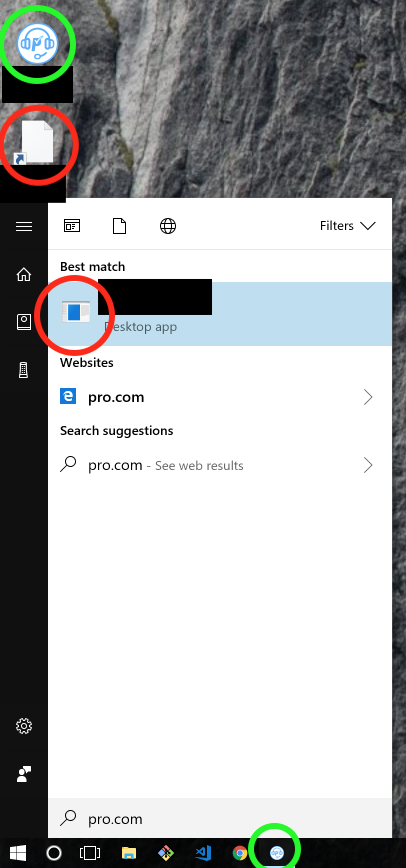
I'm also facing this issue. My electron-builder config is below:
{
    "appId": "<deleted>",
    "productName": "<deleted>",
    "copyright": "<deleted>",
    "files": [
        "static/**/*"
    ],
    "publish": {
        "provider": "s3",
        "bucket": "<deleted>",
        "path": "<deleted>"
    },
    "dmg": {
        "icon": "build/dmgIcon.icns"
    }
}
And my build folder looks like:
/build
  dmgIcon.icns
  icon.icns
  icon.ico
 ctotheameron
on 20 Jan 2018
ctotheameron
on 20 Jan 2018
Try changing
"dmg": {
        "icon": "build/dmgIcon.icns"
    }
To:
"dmg": {
        "icon": "./build/dmgIcon.icns"
    }
I also noticed that dmgIcon.icns is not in the array of files[] in your build script to package into the final asar folder.
Another trick is to extract the asar file to see what and how it's packaged to get an idea of the final folder structure:
npm install asar
asar extract ~/Path/To/Your/Resources/app.asar ~/Desktop/unpacked-asar
This will unpack the asar file onto your Desktop (I'm using a Mac). This little trick has helped me a lot to figure out how the app is packaged.
 nbcnc
on 22 Jan 2018
nbcnc
on 22 Jan 2018
@nbcnc thanks for your suggestions. To be clear, I'm not actually having any issues with the macOS build. All my app and dmg icons are working fine there.
I'm specifically only referring to the "start menu icon" and "link icon" (sorry I'm not a windows user, not familiar with terms there) for Windows.
My image above shows the 2 cases that are failing.
ctotheameron
on 22 Jan 2018
@ctotheameron Your ico file contains 256x256? Have you tried to restart Windows?
 develar
on 23 Jan 2018
develar
on 23 Jan 2018
Seems my issue was due to very long description text. Once I changed it to only one sentence, it works.
Matho
on 21 Feb 2018
@develar I am also having this issue using latest builder and electron as of time of writing. I have single click set to false and when I do admin level install icon shows up fine but on local app-data user install it similarly gives blank icon and a mangled 'start in' path in Windows 10.
 emilyplusplus
on 11 Apr 2018
emilyplusplus
on 11 Apr 2018
Should be noted that shortening my app description did in fact resolve this issue. Weird behavior and I think its still a bug but for now shortening app description works.
emilyplusplus
on 11 Apr 2018
Having similar issue with the desktop shortcut, though there's no description field set in my package.json.
{
  "appId": "…",
  "productName": "…",
  "directories": {
    "output": "electron/dist",
    "app": "electron/app",
    "buildResources": "electron/resources"
  },
  "mac": {
    "target": "dmg",
    "icon": "macos/icon.icns"
  },
  "win": {
    "icon": "windows/icon.ico",
    "publish": {  }
  },
  "nsis": {
    "installerIcon": "windows/setup-icon.ico",
    "createDesktopShortcut": "always",
    "menuCategory": "…"
  }
}
Start menu category is created as expected, the shortcut and the icon are fine. Desktop shortcut is blank with empty object path (doesn't point to .exe).
P.S. The icon is 256×256, restarting doesn't help.
 ideryabin
on 14 May 2018
ideryabin
on 14 May 2018
If anyone is testing on a Parallels Windows, it might explain the empty shortcut, see here #865
 mkoleva
on 5 Jun 2018
mkoleva
on 5 Jun 2018
If anyone is testing on a Parallels Windows, it might explain the empty shortcut, see here #865
The issue was the Parallels indeed.
ideryabin
on 5 Jun 2018
Related issues
 antonycourtney
·
3Comments
antonycourtney
·
3Comments
 popod
·
3Comments
popod
·
3Comments
 omarkilani
·
3Comments
omarkilani
·
3Comments
 githubbob42
·
3Comments
githubbob42
·
3Comments
 mstralka
·
3Comments
mstralka
·
3Comments
Most helpful comment
Seems my issue was due to very long description text. Once I changed it to only one sentence, it works.