Electron-builder: installSiderbar won't work
Version: 19.45.4
Target: nsis
The build config is :
 "nsis": {
      "oneClick": false,
      "installerLanguages": "zh_CN",
      "language": "2052",
      "allowToChangeInstallationDirectory": true,
      "installerSidebar": "installerSidebar.bmp",
      "multiLanguageInstaller": true
    },
I dig into the source code to make sure the installerSidebar would be right set
 asyncTaskManager.add((0, (_bluebirdLst || _load_bluebirdLst()).coroutine)(function* () {
                const bitmap = (yield packager.getResource(options.installerSidebar, "installerSidebar.bmp")) || "${NSISDIR}\\Contrib\\Graphics\\Wizard\\nsis3-metro.bmp";
                console.log('bitmap#####', bitmap)
                defines.MUI_WELCOMEFINISHPAGE_BITMAP = bitmap;
                defines.MUI_UNWELCOMEFINISHPAGE_BITMAP = (yield packager.getResource(options.uninstallerSidebar, "uninstallerSidebar.bmp")) || bitmap;
            }));
and the log is
shangpo.zw@MININT-HFTKDRR MINGW64 /d/boat-ide (master)
$ yarn release-win
yarn run v1.3.2
$ cross-env NPM_CONFIG_ELECTRON_MIRROR=https://npm.taobao.org/mirrors/electron/ electron-builder --win
electron-builder 19.45.4
No native production dependencies
Packaging for win32 x64 using electron 1.7.9 to release\win-unpacked
Building nsis installer (x64)
bitmap##### D:\boat-ide\build_resources\installerSidebar.bmp
options.multiLanguageInstaller true
options.multiLanguageInstaller true
options.multiLanguageInstaller true
Done in 107.80s.
It show that the picture's location is right
the picture is: https://img.alicdn.com/tfs/TB1MXAYem_I8KJjy0FoXXaFnVXa-164-314.bmp
But the result is that the installerSidebar won't work
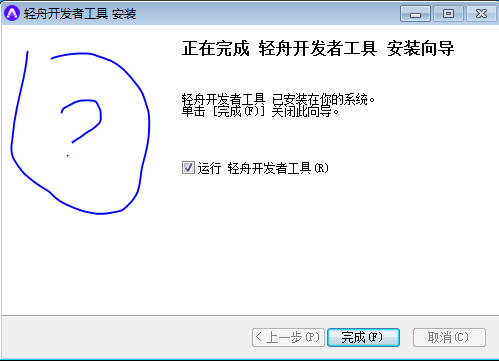
@develar
Maybe I make a wrong config ?
 frankLife
All 22 comments
@develar anything wrong ?
frankLife
on 28 Nov 2017
Same problem here...
When unzip installer file the bitmap exists with name "modern-wizard.bmp" but still does not showing
 expouic
on 21 May 2018
expouic
on 21 May 2018
same here! did you manage to solve?
 damianobarbati
on 28 May 2018
damianobarbati
on 28 May 2018
Hi, I solved it by using a 24-bit bitmap image. 32-bit works fine too. The dimensions does not matter.
 jmarioste
on 4 Jun 2018
jmarioste
on 4 Jun 2018
@jmarioste I tried convert win-installer-sidebar.png -type truecolor win-installer-sidebar.bmp but is
still not showing up 😔
@expouic did you manage to solve?
My nsis config:
        "nsis": {
            "uninstallerIcon": "./icons/logo.ico",
            "oneClick": false,
            "allowElevation": true,
            "createDesktopShortcut": "always",
            "installerSidebar": "./icons/win-installer-sidebar.bmp",
            "uninstallerSidebar": "./icons/win-uninstaller-sidebar.bmp",
            "perMachine": true,
            "deleteAppDataOnUninstall": true,
            "menuCategory": "Translated - TAV"
        },
@damianobarbati Here is my confiig.
    "nsis": {
      "oneClick": false,
      "perMachine": true,
      "allowElevation": true,
      "allowToChangeInstallationDirectory": true,
      "runAfterFinish": true,
      "installerIcon": "./build/icon.ico",
      "license": "LICENSE.md",
      "deleteAppDataOnUninstall": true
    }
I used MS paint to convert the image into a 24-bit .bmp

jmarioste
on 4 Jun 2018
@damianobarbati Thank you.
After save bitmap to 24 bit the picture are shown correctly ;)
expouic
on 4 Jun 2018
@jmarioste @expouic sorry to bother again, but how do you specify the path to the bmp? Don't you use ?
"installerSidebar": "./icons/win-installer-sidebar.bmp",
"uninstallerSidebar": "./icons/win-uninstaller-sidebar.bmp",
You need to specify from root of your app folder to the file image.
In my case, the picture was storage on assets folder
"installerSidebar" : "src/assets/images/intaller-sidebar-24bit.bmp",
"uninstallerSidebar" : "src/assets/images/intaller-sidebar-24bit.bmp"
expouic
on 4 Jun 2018
No luck guys, neither converting from native paint neither settings relative paths to 1) app folder 2) build_resources folder.
I'm out of ideas 😔
damianobarbati
on 4 Jun 2018
@damianobarbati you get a white screen same like @frankLife says on first post?
expouic
on 4 Jun 2018
@expouic yep, empty!
damianobarbati
on 4 Jun 2018
Open file NsisTarget.js inside ./node_modules/electron-builder-lib/out/targets/nsis
after line 416 add
console.log("BITMAP ", options.installerSidebar);
Run build again and watch if location of bitmap is correct.
expouic
on 4 Jun 2018
@expouic which file? (thanks for helping!)
$ pwd
/Users/damiano/Desktop/app-client/node_modules/electron-builder-lib/out/targets/nsis
$ ls -l
total 344
-rw-r--r--  1 damiano  staff   1610 May 25 13:23 NsisTarget.d.ts
-rw-r--r--  1 damiano  staff  28771 May 25 13:23 NsisTarget.js
-rw-r--r--  1 damiano  staff  41966 May 25 13:23 NsisTarget.js.map
-rw-r--r--  1 damiano  staff    554 May 25 13:23 WebInstallerTarget.d.ts
-rw-r--r--  1 damiano  staff   2275 May 25 13:23 WebInstallerTarget.js
-rw-r--r--  1 damiano  staff   3238 May 25 13:23 WebInstallerTarget.js.map
-rw-r--r--  1 damiano  staff    631 May 25 13:23 nsisLang.d.ts
-rw-r--r--  1 damiano  staff   5477 May 25 13:23 nsisLang.js
-rw-r--r--  1 damiano  staff   7126 May 25 13:23 nsisLang.js.map
-rw-r--r--  1 damiano  staff    323 May 25 13:23 nsisLicense.d.ts
-rw-r--r--  1 damiano  staff   3207 May 25 13:23 nsisLicense.js
-rw-r--r--  1 damiano  staff   3711 May 25 13:23 nsisLicense.js.map
-rw-r--r--  1 damiano  staff   8038 May 25 13:23 nsisOptions.d.ts
-rw-r--r--  1 damiano  staff     53 May 25 13:23 nsisOptions.js
-rw-r--r--  1 damiano  staff     68 May 25 13:23 nsisOptions.js.map
-rw-r--r--  1 damiano  staff    451 May 25 13:23 nsisScriptGenerator.d.ts
-rw-r--r--  1 damiano  staff   1401 May 25 13:23 nsisScriptGenerator.js
-rw-r--r--  1 damiano  staff   2754 May 25 13:23 nsisScriptGenerator.js.map
-rw-r--r--  1 damiano  staff    747 May 25 13:23 nsisUtil.d.ts
-rw-r--r--  1 damiano  staff   4645 May 25 13:23 nsisUtil.js
-rw-r--r--  1 damiano  staff   5748 May 25 13:23 nsisUtil.js.map
I tried here but nothing is logged to console
      asyncTaskManager.add((0, _bluebirdLst().coroutine)(function* () {
        const bitmap = (yield packager.getResource(options.installerSidebar, "installerSidebar.bmp")) || "${NSISDIR}\\Contrib\\Graphics\\Wizard\\nsis3-metro.bmp";
        console.log('bitmap', bitmap);
        defines.MUI_WELCOMEFINISHPAGE_BITMAP = bitmap;
        defines.MUI_UNWELCOMEFINISHPAGE_BITMAP = (yield packager.getResource(options.uninstallerSidebar, "uninstallerSidebar.bmp")) || bitmap;
      }));
I enabled DEBUG=electron-builder and I can see this:
Command line defined: "MUI_HEADERIMAGE_BITMAP=/Users/damiano/Desktop/tav-client/icons/win-installer-header.bmp"
Command line defined: "MUI_WELCOMEFINISHPAGE_BITMAP=/Users/damiano/Desktop/tav-client/icons/win-installer-sidebar.bmp"
Command line defined: "UNINSTALLER_ICON=/Users/damiano/Desktop/tav-client/icons/logo.ico"
Command line defined: "MUI_UNWELCOMEFINISHPAGE_BITMAP=/Users/damiano/Desktop/tav-client/icons/win-uninstaller-sidebar.bmp"
Command line defined: "UNINSTALLER_OUT_FILE=/Users/damiano/Desktop/tav-client/dist/.__uninstaller-nsis-tav-client.exe"
Path are correct, files are right there... but installer don't like them somehow! :)
damianobarbati
on 4 Jun 2018
install-wizard-24bits.bmp.zip
Can you try using my demo bitmap file?
expouic
on 4 Jun 2018
Yes, it shows up!!! So... what is the exact filetype/size/color/shape/width/height/depth/encoding to have this working?
damianobarbati
on 4 Jun 2018
;) you only need update your bmp to 24bits
expouic
on 4 Jun 2018
OK it works.
I can confirm: native paint on windows to export 24bit bitmap image and exact size.
Thank you all guys...
damianobarbati
on 4 Jun 2018
Thanks! I will add check — electron-builder will throw error if 24bit is not used.
 develar
on 5 Jun 2018
develar
on 5 Jun 2018
As for 09/29/2020 electron-builder does not seem to throw any error. Met the same issue and saving the sidebar image to 24bit bpm worked like a charm.
 Darkzarich
on 29 Sep 2020
Darkzarich
on 29 Sep 2020
Related issues
 StickNitro
·
3Comments
StickNitro
·
3Comments
 noahprince22
·
3Comments
noahprince22
·
3Comments
 alexstrat
·
3Comments
alexstrat
·
3Comments
 talarari
·
3Comments
talarari
·
3Comments
 leo
·
3Comments
leo
·
3Comments
Most helpful comment
@damianobarbati Thank you.
After save bitmap to 24 bit the picture are shown correctly ;)