Electron-builder: Unsupported provider: undefined
- Version: 19.35.1
- electron-updater: 2.10.1
- Target: Win
Hi there, when i execute my app i get this error "[error] Error: Error: Unsupported provider: undefined"
i clean my code and this error is throwed by autoUpdater.checkForUpdates();

 JarekSour
All 9 comments
Do you use NSIS or Squirrel.WIndows?
 develar
on 11 Oct 2017
develar
on 11 Oct 2017
@develar uhmm, apparently not
JarekSour
on 11 Oct 2017
develar
on 11 Oct 2017
@develar hi again, Yes, i'm using NSIS.
i have somethink like that "nsis": {"perMachine": true } , is necessary add other config or in other way ??
JarekSour
on 12 Oct 2017
It seems that publish configuration during build was not correct. Or GitHub repository must be, or explicit publish configuration. Please set env DEBUG=electron-builder. On Windows the environment variable is set using the set command. set DEBUG=electron-builder And build app again.
develar
on 12 Oct 2017
i set the env var, and i get the same, i can build the app and push it to github, the only problem is the updater, i test with a new app
my package.json
{
"name": "nonstop",
"productName": "NONSTOP",
"description": "Application for NONSTOP",
"repository": "[email protected]:JarekSour/nonstop.git",
"author": "NONSTOP cl",
"version": "1.0.2",
"license": "MIT",
"scripts": {
"ng": "ng",
"start": "ng serve",
"build": "ng build",
"test": "ng test",
"lint": "ng lint",
"e2e": "ng e2e",
"electron": "electron .",
"electron-build": "ng build --prod && electron .",
"pack": "electron-builder --dir",
"publish": "electron-builder -p always"
},
"main": "main.js",
"build": {
"appId": "com.nonstop.app",
"publish": {
"provider": "github"
},
"win": {
"target": [
"NSIS"
]
},
"nsis": {
"perMachine": true,
"runAfterFinish": true,
"uninstallDisplayName": "NONSTOP v1.0.2"
},
"directories": {
"output": "build"
},
"target": [
"NSIS"
]
},
"private": true,
"dependencies": {
"@angular/animations": "^4.2.4",
"@angular/common": "^4.2.4",
"@angular/compiler": "^4.2.4",
"@angular/core": "^4.2.4",
"@angular/forms": "^4.2.4",
"@angular/http": "^4.2.4",
"@angular/platform-browser": "^4.2.4",
"@angular/platform-browser-dynamic": "^4.2.4",
"@angular/router": "^4.2.4",
"core-js": "^2.4.1",
"electron-log": "^2.2.9",
"electron-updater": "^2.11.0",
"rxjs": "^5.4.2",
"zone.js": "^0.8.14"
},
"devDependencies": {
"@angular/cli": "1.4.5",
"@angular/compiler-cli": "^4.2.4",
"@angular/language-service": "^4.2.4",
"@types/jasmine": "~2.5.53",
"@types/jasminewd2": "~2.0.2",
"@types/node": "~6.0.60",
"codelyzer": "~3.2.0",
"electron": "^1.7.9",
"electron-builder": "^19.36.0",
"jasmine-core": "~2.6.2",
"jasmine-spec-reporter": "~4.1.0",
"karma": "~1.7.0",
"karma-chrome-launcher": "~2.1.1",
"karma-cli": "~1.0.1",
"karma-coverage-istanbul-reporter": "^1.2.1",
"karma-jasmine": "~1.1.0",
"karma-jasmine-html-reporter": "^0.2.2",
"protractor": "~5.1.2",
"ts-node": "~3.2.0",
"tslint": "~5.7.0",
"typescript": "~2.3.3"
}
}
JarekSour
on 12 Oct 2017
@JarekSour I just faced this issue. I had to add a file dev-app-update.yml with the following content
version: 1.15.0
provider: generic
url: https://update-server/win
 arjun-g
on 13 Oct 2017
arjun-g
on 13 Oct 2017
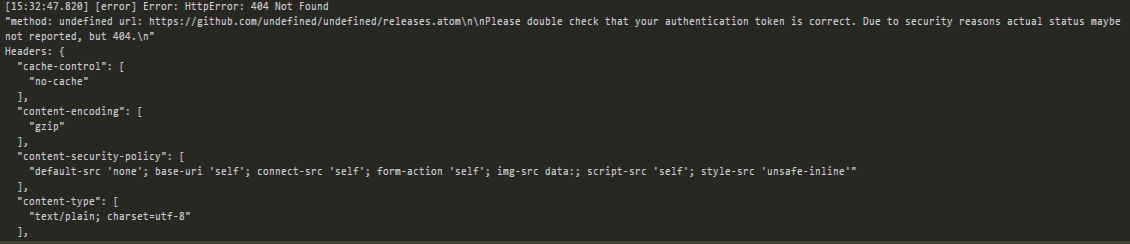
@arjun-g thanks!!, now i know why i get the provider error, but you are using "setFeedURL" ??? because i get this next error
JarekSour
on 13 Oct 2017
finally i set my dev-app-update.yml
provider: github
token: TokenGithub
owner: nameAccount
repo: nameRepoProyect
Thanks to all!!
JarekSour
on 13 Oct 2017
Related issues
 StickNitro
·
3Comments
StickNitro
·
3Comments
 talarari
·
3Comments
talarari
·
3Comments
 NPellet
·
3Comments
NPellet
·
3Comments
 iklemm
·
3Comments
iklemm
·
3Comments
 leo
·
3Comments
leo
·
3Comments
Most helpful comment
@JarekSour I just faced this issue. I had to add a file dev-app-update.yml with the following content