Electron-builder: Linux icon not showing
"electron-builder": "19.27.7"
Related issue: https://github.com/gengjiawen/desktop/issues/14.
Repro repo: https://github.com/gengjiawen/desktop.
On my Ubuntu 16.04, the issue also exists (using AppImage https://github.com/gengjiawen/desktop/releases), it this a bug or Do i miss something ? Thanks.

 gengjiawen
All 7 comments
I lost icon in Ubuntu 16.04 too.
My electron-builder configuration and version (18.6.2) did not changed.
I also tried with the last electron-builder version.
I tried both icon generated from icns and 32x32.png.
 mmouterde
on 20 Sep 2017
mmouterde
on 20 Sep 2017
I can confirm this bug.
"electron": "^1.7.8",
"electron-builder": "^19.33.0",
 ashokgelal
on 3 Oct 2017
ashokgelal
on 3 Oct 2017
Is it still an issue?
 develar
on 1 Feb 2018
develar
on 1 Feb 2018
Yes, it still exist.
gengjiawen
on 2 Feb 2018
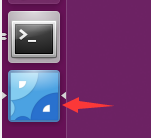
@gengjiawen Set the icon option to the BrowserWindow will fix this problem.
 Molunerfinn
on 26 Jun 2018
Molunerfinn
on 26 Jun 2018
@Molunerfinn Thanks, I will take a look.
gengjiawen
on 26 Jun 2018
This issue has been automatically marked as stale because it has not had recent activity. It will be closed if no further activity occurs. Thank you for your contributions.
![stale[bot] picture](https://avatars3.githubusercontent.com/in/1724?v=4&s=40) stale[bot]
on 2 Jul 2019
stale[bot]
on 2 Jul 2019
Related issues
 AidanNichol
·
3Comments
AidanNichol
·
3Comments
 noahprince22
·
3Comments
noahprince22
·
3Comments
 NPellet
·
3Comments
NPellet
·
3Comments
 talarari
·
3Comments
talarari
·
3Comments
 StickNitro
·
3Comments
StickNitro
·
3Comments
Most helpful comment
Yes, it still exist.