Electron-builder: Bundling Electron During Build Process | Support NightmareJS
- Version: "electron-builder": "^18.0.1",
electron-builder is amazing and thank you so much for the all the hard work in maintaining the package.
I've been building a NightmareJS Dashboard, which requires Electron as a dependency, so I have to run a post-build script to workaround for bundling an "electron" or "electron-prebuilt" dependency back into the bundled application.
From what I can gather about electron-builder it
- Performs a string comparison for electron and electron-prebuilt in the dependency chain and quits the packaging process if found.
- Therefore forking electron module and naming electron-nightmare, it's possible to bypass the warning and include Electron as a dependency.
- However, during the packaging, electron-builder will look for an Electron binary signature(?) and rebuild any dependency matching that signature during the packing process.
After peeking into the package application, it seems my new file "electron-nightmare" is transformed in the same manner Electron is, even adding it to the app.asar.unpacked folder. When this happens NightmareJS is unable to spawn a Dashboard interface, because it's expecting the original Electron binary, but can only find the new transformed Electron dependency.
Based off the current setup of electron-builder, how feasible is it to add the ability to inject a clean Electron binary, back into the dependency chain, during the build process, without interfering with electron-builder build process?
 kamescg
All 31 comments
- option to allow. Not by default because often it is an error.
- Option to ignore on sign.
If you can provide sample app — it will help. Or send PR.
 develar
on 1 Jul 2017
develar
on 1 Jul 2017
@develar Thanks for the quick response. That's really cool. Thank you.
I'm happy to submit a pull request.
Was hoping maybe someone familiar with the code could point me in the right direction? I'm totally unfamiliar with the electron-builder repo, besides of course using it to bundle my applications.
I looked at the debug information and associated code it wasn't initially apparent to me where electron-builder was finding my "electron-nightmare" dependency, transforming/bundling the forked Electron binary into the signed application.
Any insights?
kamescg
on 1 Jul 2017
You need to modify ignore function — https://github.com/electron-userland/electron-builder/blob/master/packages/electron-builder/src/macPackager.ts#L193 to exclude nightmare from code sign.
develar
on 1 Jul 2017
If you want to just pack your electron binary into resources dir — please use extraResources option. To be sure that it will be not packed into asar and will be located in convenient place (hint — use from/to form of extraResource file pattern).
develar
on 1 Jul 2017
I'll take a look at the extraResources option first, because that sounds like the best short/long term solution for this particular setup I'm using.
kamescg
on 1 Jul 2017
Code sign will be broken since we sign extraResources also. But... who knows:)
develar
on 1 Jul 2017
Packaging for OSX right now - simple enough settings it seems?
"extraResources": [
    {
      "from": "node_modules/electron-nightmare",
      "to": "electronNightmare"
    }
  ],
Yes. It will work even if nightmare in the dev deps. But! Please consider exclude nightmare package.json because all magic that electron builder applies for deps, is not applied for extra resources by design.
develar
on 1 Jul 2017
Thank You
kamescg
on 1 Jul 2017
Extra files and extra resources are copied after asar packaging.
Magic — dep package file preprocessed to remove npm/yarn/not required fields to ensure security/delta update/consistent signature.
develar
on 2 Jul 2017
For what do you want to pack it into asar file?
develar
on 2 Jul 2017
The reason it would be beneficial to include the pure Electron binary back into the app.asar file is because the current Webpack import configuration does not support stepping up the path system into the Resources files, therefore I can not require Electron as a dependency into my bundled application.
To put it simply, the Application for all intents and purposes can not require modules that aren't included in the app.asar file.
Solution
Unless, we switch Webpack to have a more "global" view of the parent Folder and it's siblings.
node: {
    __dirname: false
  },
I enabled this in my webpack.config.base.js file, which allows me to step into the Resources folder, and access the sibling appShadow folder, which contains the Electron binary required for NightmareJS to instantiate.
Of course this causes issues for Electron entry files, because it's starts looking for resources in the wrong places.
When I run my application and attempt to run NightmareJs the following error is given in the console. Essentially, it's looking in the root directory, instead of the module folder, because of switching the "__dirname" setting to false.
I haven't looked any further into issue, and it might be simple fix.
ENOENT: no such file or directory, open '/Users/kamescg/Documents/Projects/SynapseHub/app/path.txt'
So it seems we might have 2 solutions moving forward.
- Correct the forked Electron package, fixing the path/fs errors, and continue to use the extraResources option as the go-to solution
However, I'm not convinced yet, because it's most likely going to introduce bugs into the path system for everything else... So we fix one thing and potentially make it unstable for everything else.
That being said, I would totally love the idea of multiple Electron applications on my computer sharing dependencies/resources. Sharing core dependencies, like my library of React components, Firebase wrappers, and other packages amongst the multiple Electron apps I'm working on sounds intriguing.
- Create a PR to add a CLI flag or package.json setting, so we can ignore the forked Electron binary, including the "pure" Electron binary in the app.asar file.
kamescg
on 2 Jul 2017
I'm going for Option #2
From what I can gather, I need to find the code in the platformPackager.ts?
I can see all the modules being rebuilt in the yarn.ts, but I can't find where the forked Electron binary, electron-nightmare, is being transformed?
Looking in the doPack method, but I can't find explicitly where the forked Electron binary is being found and transformed?
kamescg
on 2 Jul 2017
Have you tried require('module').globalPaths.push(your path)?
To execute native binary it must be unpacked. Electron can do it for you — on each run unpack 50 mb exe .... so, I don't recommend to pack it into asar.
develar
on 2 Jul 2017
I can't find documentation for globalPaths and it's unavailable on require as a method?
That makes sense... So Electron can't be in the app.asar binary anways...
The issue remains how to get Webpack to include a module from the Resources folder?
kamescg
on 2 Jul 2017
See example https://github.com/electron-userland/electron-builder/wiki/Loading-App-Dependencies-Manually
Not clear for me ;)
develar
on 2 Jul 2017
@42cph4nzt48 The current version of Electron in my package.json is 1.6.10
"electron": "^1.6.10",
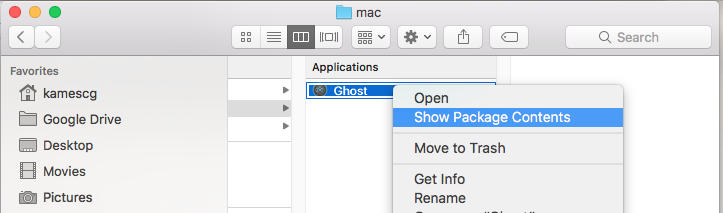
What I've been doing to publish the Electron/NightmareJS application is to run a post-build script, which unzips the app.asar folder, located in the OSX Application folder. However, I need to compile for Windows, which is why I need to solve this issue, so it runs during packaging.
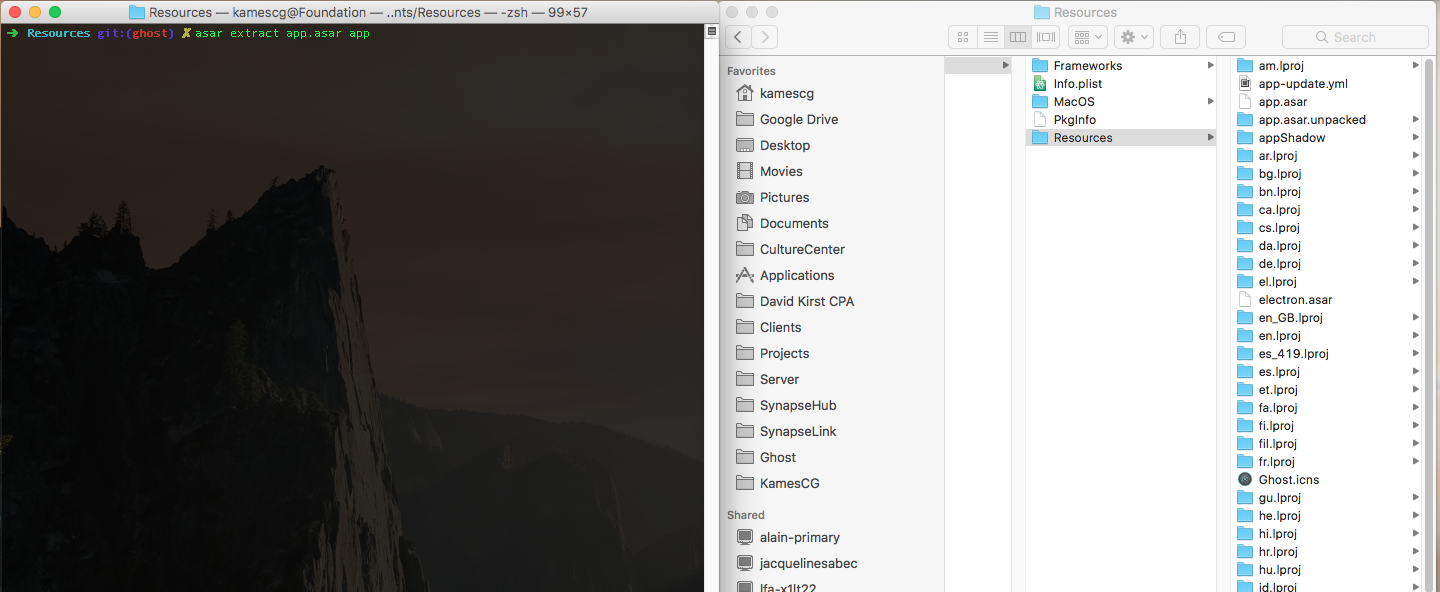
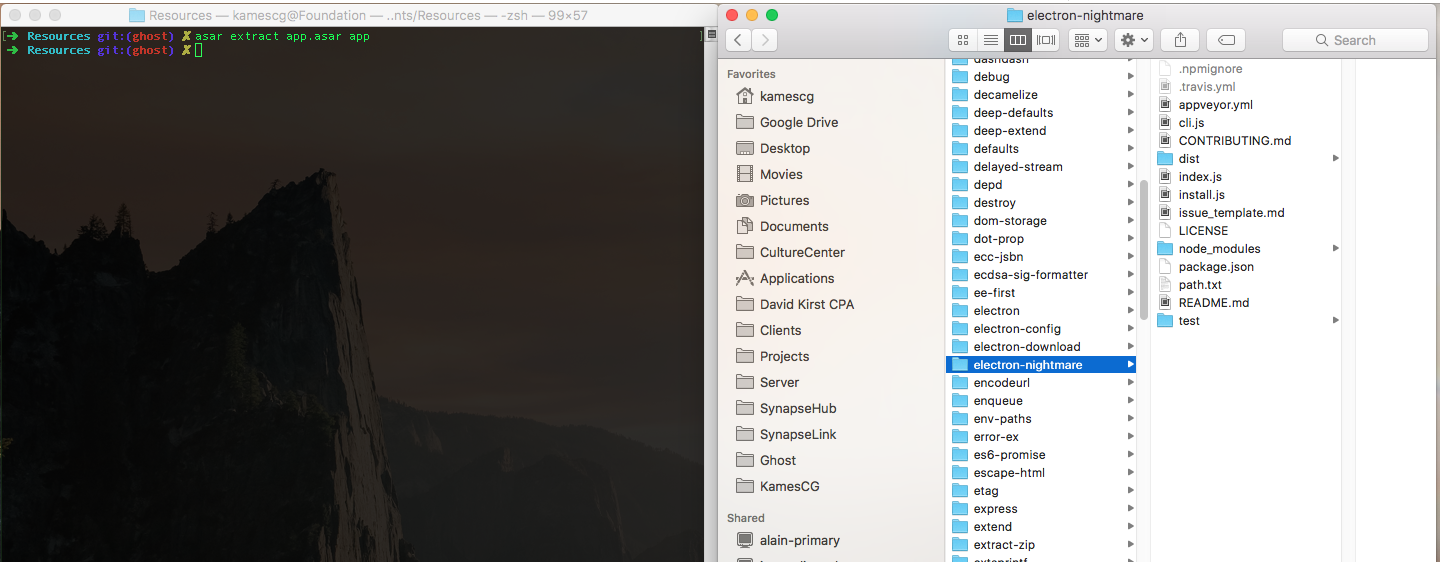
You need the asar CLI to extract the app.asar using asar extract app.asar app
Then I replace my compiled electron-nightmare Electron binary, which solves the issue running in production..
kamescg
on 3 Jul 2017
If you are not able to solve issue, you can provide link to project and I will try to fix it when i will have time.
develar
on 3 Jul 2017
@develar Thanks for the assistance - I think I have a post-build script for Windows done. In the meantime, I'll probably just use this, so I can ship the projects to clients today.
I'll get a repo ready this week to review and figure out the best steps forward :)
kamescg
on 3 Jul 2017
@KamesCG would you share your solution? I had the exact same issue (coming from here)
I want to package my electron app using electron-builder with a nightmare.js script.
That would be great! Thx
 mariodavid
on 10 Jul 2017
mariodavid
on 10 Jul 2017
Essentially I made placeholder for Electron by requiring a forked electron-prebuilt package and naming it electron-nightmare.
I want to stress...my STRATEGY is NOT the CORRECT one.
I just needed to get this shipped for a small group of people and this jankyness was fine. @mariodavid There seems to be enough people facing this problem we really need to create a better best practice for handling Electron/NightmareJS applications, bundled with ElectronBuilder/Webpack.
- Fork the
electron-prebuiltpackage, so we can circumvent theelectron-builderstring comparison and satisfy Webpack requirements with our placeholder. Electron Builder transforms the original Electron binary, and would transform the forked Electron binary as well, if we don't add the package as an extraResource.
"electron-nightmare": "https://github.com/KamesCG/electron-nightmare.git",
- Add the
electron-nightmarepackage in the extraResources setting within the top level package.json file.
electron-builder will NOT bundle electron-nightmare into the app.asar package, so we have to extract the app.asar folder into a folder named app.
"build": {
    "extraResources": [
      {
        "from": "node_modules/electron-nightmare",
        "to": "appShadow/node_modules/electron-nightmare",
        "filter": [
          "**/*"
        ]
      }
    ],
...
Extract the app.asar package in the Application Resources(osx)/resources(win/linux) folder by running
asar extract app.asar appin the Command Line.Move the untransformed,
electron-nightmaremodule package from theresources/appShadow/node_modulesfolder into theresources/app/node_modulesfolder.
As mentioned by @develar Binaries can't be run from an app.asar file, so no running asar pack app app.asar for compression of the package again.
kamescg
on 10 Jul 2017
@KamesCG great solution!
It works out in my case.
Except for the last step: compression of the package again.
I'm not sure if it is related to asar (realted asar issue) or something what I've did wrong along your instruction.
The full example is on https://github.com/Raidus/test-electron-nightmare
Do you have an idea?
My configuration
MacOS Sierra (10.12.5)
Node 6.11.0
npm 3.10.7
 Raidus
on 11 Jul 2017
Raidus
on 11 Jul 2017
@Raidus Glad it's working for other people :)
Sorry... I should have made it more clear (I reread what I wrote). We CAN NOT pack the asar back together and MUST leave it as a folder named app uncompressed.
The effect of this is we can NEVER pack Electron pack into the app.asar folder, but we can recompress everything else again and just leave Electron uncompressed, which is really the next route we route we need to take for this to be viable for people to build applications with and what develar was getting at (I think) in his responses.
This has to do more with the application bundle process and Webpack. Electron must be passed back into Nightmare as a requirement, using a relative path system, instead of a localized "app" path system using the current setup.
My first thought is Electron needs to be dynamically required in the main render process and passed to render process (BrowserWindow) when Nightmare is getting initialized.
The main issue is relying to heavily on Webpack as the "final" application bundle process. I think ultimately another abstraction layer has to built on top of our 'interface' and 'logic' bundle processes, where Desktop related requirements can be met, instead of mostly Browser'ish type requirements being met.
More distinguishing between browser/desktop requirements might help the community address issues arising from requiring more fine-tuned control over the final packaged product.
kamescg
on 11 Jul 2017
@KamesCG Thanks again for the great explanation! I really appreciate your detailed answer 👍
Raidus
on 11 Jul 2017
Did you @Raidus get it ti work as well?
 toffebjorkskog
on 11 Aug 2017
toffebjorkskog
on 11 Aug 2017
@toffebjorkskog Need any help?
kamescg
on 11 Aug 2017
I actually want to use two Electron processes in my app, which has both automated and non-automated components. I have tried Nightmare, and it will work for the automated components. However, to just show a page and ask for input, it really doesn't work. I don't see why I should have it time out. In a real life world, apps do wait infinitely for input.
 ssimo3lsuhsc
on 17 Aug 2017
ssimo3lsuhsc
on 17 Aug 2017
@ssimo3lsuhsc Javascript is asynchronous - you have to deal with execution using callbacks, promises or generator functions.
kamescg
on 17 Aug 2017
@KamesCG Thanks for this very nice solution!
Can you please let me know how to use such a solution for Windows package(installer, not unpacked version)?
Thanks
 WebPro9369
on 8 Nov 2017
WebPro9369
on 8 Nov 2017
Hey @KamesCG I followed your instructions and that didn't seem to solve my issue which I put in more detail here https://github.com/electron-userland/electron-builder/issues/2747. Not sure if it is related, but any insight you have would be greatly appreciated. Note: this happens in my dev env not only when packaging the app.
Thanks!
 JonathanKolnik
on 26 Mar 2018
JonathanKolnik
on 26 Mar 2018
Has anybody ever figured out how to repackage back into an asar archive?
 dzt
on 2 May 2018
dzt
on 2 May 2018
Related issues
 popod
·
3Comments
popod
·
3Comments
 alexstrat
·
3Comments
alexstrat
·
3Comments
 ccorcos
·
3Comments
ccorcos
·
3Comments
 talarari
·
3Comments
talarari
·
3Comments
 philcockfield
·
3Comments
philcockfield
·
3Comments
Most helpful comment
@KamesCG Thanks for this very nice solution!
Can you please let me know how to use such a solution for Windows package(installer, not unpacked version)?
Thanks