Electron-builder: Open app and pass parameters with Deep-Linking using Electron (Mac)
- Version: 17.1.2
- Target: Mac
I want to open app and pass parameters with Deep-Linking using Electron (OSX).
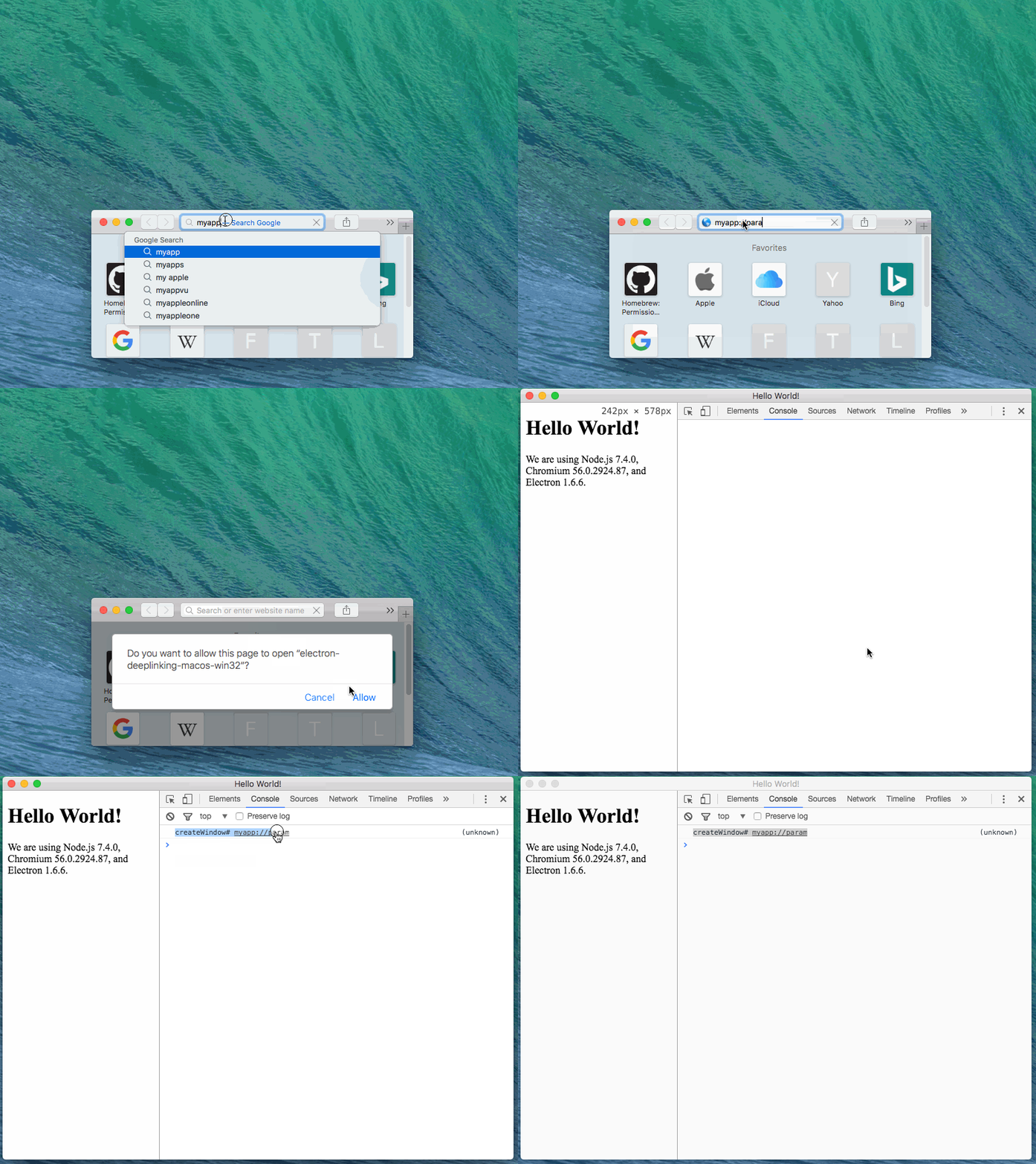
Project 'electron-deep-linking-osx' is on GitHub.
From my question at Stack Overflow: http://stackoverflow.com/questions/43912119/open-app-and-pass-parameters-with-deep-linking-using-electron-osx :
Edited package.json, following ‘electron-builder’ quick-setup-guide to produce mac installer:
{
  "name": "electron-deep-linking-osx",
  "version": "1.0.0",
  "description": "A minimal Electron application with Deep Linking (OSX)",
  "main": "main.js",
  "scripts": {
    "start": "electron .",
    "pack": "build --dir",
    "dist": "build"
  },
  "repository": "https://github.com/oikonomopo/electron-deep-linking-osx",
  "keywords": [
    "Electron",
    "osx",
    "deep-linking"
  ],
  "author": "GitHub",
  "license": "CC0-1.0",
  "devDependencies": {
    "electron": "1.6.6",
    "electron-builder": "17.1.2"
  },
  "build": {
    "appId": "your.id",
    "mac": {
      "category": "your.app.category.type"
    },
    "protocols": {
      "name": "myApp",
      "schemes": ["myApp"]
    }
  }
}
Edited main.js, appended code to register myapp url scheme protocol, listen 'open-url' events and log the arguments:
const electron = require('electron')
// Module to control application life.
const app = electron.app
// Module to create native browser window.
const BrowserWindow = electron.BrowserWindow

const path = require('path')
const url = require('url')

// Keep a global reference of the window object, if you don't, the window will
// be closed automatically when the JavaScript object is garbage collected.
let mainWindow

function createWindow () {
  // Create the browser window.
  mainWindow = new BrowserWindow({width: 800, height: 600})

  // and load the index.html of the app.
  mainWindow.loadURL(url.format({
    pathname: path.join(__dirname, 'index.html'),
    protocol: 'file:',
    slashes: true
  }))

  // Open the DevTools.
  mainWindow.webContents.openDevTools()

  // Emitted when the window is closed.
  mainWindow.on('closed', function () {
    // Dereference the window object, usually you would store windows
    // in an array if your app supports multi windows, this is the time
    // when you should delete the corresponding element.
    mainWindow = null
  })
}

// This method will be called when Electron has finished
// initialization and is ready to create browser windows.
// Some APIs can only be used after this event occurs.
app.on('ready', createWindow)

// Quit when all windows are closed.
app.on('window-all-closed', function () {
  // On OS X it is common for applications and their menu bar
  // to stay active until the user quits explicitly with Cmd + Q
  if (process.platform !== 'darwin') {
    app.quit()
  }
})

app.on('activate', function () {
  // On OS X it's common to re-create a window in the app when the
  // dock icon is clicked and there are no other windows open.
  if (mainWindow === null) {
    createWindow()
  }
})

// In this file you can include the rest of your app's specific main process
// code. You can also put them in separate files and require them here.

// The setAsDefaultProtocolClient only works on packaged versions of the application
app.setAsDefaultProtocolClient('myApp')

// Protocol handler for osx
app.on('open-url', function (event, url) {
  event.preventDefault();
  log("open-url event: " + url)
})

// Log both at terminal and at browser
function log(s) {
    console.log(s)
    if (mainWindow && mainWindow.webContents) {
        mainWindow.webContents.executeJavaScript(`console.log("${s}")`)
    }
}
Steps to come to life:-)
# Install dependencies
npm install
# Run the app
npm start
# Produce installer
npm run dist
After running the installer (electron-deep-linking-osx/dist/electron-quick-start-1.0.0.dmg), i try to open electron-deep-linking-os app with Deep-Linking, entering myapp://param at Safari address bar.
If app is opened, it activates and i can see the log
open-url event: myapp://param!If app is closed, it opens, but doesn't log anything!
**How can i passmyapp://paramtomain.jswhen there is no instance?
Would like a solution with electron-builder (which i think it contains electron-packager, so there should be a way to be done). So it should be done/is an issue? Or there is a way do be done and haven't found it yet?
Refs:
electron-api-demos:
Here works eventually, but useselectron-packager! Look specific atassets/mac/info.plist,main-process/system/protocol-handler.js,package.jsonand atscript/mas.sh
Also app starts and captures parameter with justopen-url!
 oikonomopo
All 4 comments
Solved! Close issue!
Solved for both macOS and win32 ( Updated project 'electron-deep-linking-osx' on GitHub).
package.json:
{
  "name": "electron-deeplinking-macos-win32",
  "version": "0.0.1",
  "description": "Minimal Electron application with deep inking (macOS/win32)",
  "main": "main.js",
  "scripts": {
    "start": "electron .",
    "pack": "build --dir",
    "dist": "build"
  },
  "repository": "https://github.com/oikonomopo/electron-deep-linking-osx",
  "author": "oikonomopo",
  "license": "CC0-1.0",
  "devDependencies": {
    "electron": "1.6.6",
    "electron-builder": "17.1.2"
  },
  "build": {
    "appId": "oikonomopo.electron-deeplinking-macos-win32",
    "protocols": {
      "name": "electron-deep-linking",
      "schemes": ["myapp"]
    },
    "mac": {
      "category": "public.app-category.Reference"
    },
    "win": {
    }
  }
}
main.js:
const {app, BrowserWindow} = require('electron')
// Module with utilities for working with file and directory paths.
const path = require('path')
// Module with utilities for URL resolution and parsing.
const url = require('url')

// Keep a global reference of the window object, if you don't, the window will
// be closed automatically when the JavaScript object is garbage collected.
let mainWindow

// Deep linked url
let deeplinkingUrl

// Force Single Instance Application
const shouldQuit = app.makeSingleInstance((argv, workingDirectory) => {
  // Someone tried to run a second instance, we should focus our window.

  // Protocol handler for win32
  // argv: An array of the second instance’s (command line / deep linked) arguments
  if (process.platform == 'win32') {
    // Keep only command line / deep linked arguments
    deeplinkingUrl = argv.slice(1)
  }
  logEverywhere("app.makeSingleInstance# " + deeplinkingUrl)

  if (win) {
    if (win.isMinimized()) win.restore()
        win.focus()
  }
})
if (shouldQuit) {
    app.quit()
    return
}

function createWindow () {
  // Create the browser window.
  mainWindow = new BrowserWindow({width: 800, height: 600})

  // and load the index.html of the app.
  mainWindow.loadURL(url.format({
    pathname: path.join(__dirname, 'index.html'),
    protocol: 'file:',
    slashes: true
  }))

  // Open the DevTools.
  mainWindow.webContents.openDevTools()

  // Protocol handler for win32
  if (process.platform == 'win32') {
    // Keep only command line / deep linked arguments
    deeplinkingUrl = process.argv.slice(1)
  }
  logEverywhere("createWindow# " + deeplinkingUrl)

  // Emitted when the window is closed.
  mainWindow.on('closed', function () {
    // Dereference the window object, usually you would store windows
    // in an array if your app supports multi windows, this is the time
    // when you should delete the corresponding element.
    mainWindow = null
  })
}

// This method will be called when Electron has finished
// initialization and is ready to create browser windows.
// Some APIs can only be used after this event occurs.
app.on('ready', createWindow)

// Quit when all windows are closed.
app.on('window-all-closed', function () {
  // On OS X it is common for applications and their menu bar
  // to stay active until the user quits explicitly with Cmd + Q
  if (process.platform !== 'darwin') {
    app.quit()
  }
})

app.on('activate', function () {
  // On OS X it's common to re-create a window in the app when the
  // dock icon is clicked and there are no other windows open.
  if (mainWindow === null) {
    createWindow()
  }
})

// Define custom protocol handler. Deep linking works on packaged versions of the application!
app.setAsDefaultProtocolClient('myapp')

// Protocol handler for osx
app.on('open-url', function (event, url) {
  event.preventDefault()
  deeplinkingUrl = url
  logEverywhere("open-url# " + deeplinkingUrl)
})

// Log both at dev console and at running node console instance
function logEverywhere(s) {
    console.log(s)
    if (mainWindow && mainWindow.webContents) {
        mainWindow.webContents.executeJavaScript(`console.log("${s}")`)
    }
}
main.js code description:
At
let deeplinkingUrlwe keep the provided url.At macOS platform this is captured at
'open-url'event, we set it withdeeplinkingUrl = url! (See// Protocol handler for osx)At win32 platform this is saved at
process.argvtogether with other arguments. To get only the provided url,deeplinkingUrl = argv.slice(1). (See// Protocol handler for win32)At
app.makeSingleInstancemethod we check in which platform we are and we setdeeplinkingUrlaccordingly! If we are at win32 platform, the url is located atargvvariable from callback, else at macOS should have already been set at'open-url'event! (See// Force Single Instance Application)
oikonomopo
on 19 May 2017
@oikonomopo, you sir are a rock star.
 danmo
on 28 Nov 2017
danmo
on 28 Nov 2017
@oikonomopo One question about all this.
I've now built my app and launched it, so now the production version accepts all my appName: URIs. Even when I'm running the dev version, my prod build will open alongside it.
I was able to fix this installing RCDefaultApp and modifying the default app for my protocol to <disable>

This is an improvement, because now appName: links will open in my running dev version. However, I'd like to be able to use the URI to kick off my app initially (not just respond when it's already open). That works in the production version, but if I'm not running the dev version it seems that Electron itself opens, and doesn't know it's supposed to run my code:

Perhaps that's not something that's possible to fix, though. In any case, I hope this helps someone who was having the problem where the prod version was opening during development.
Otherwise, this is working really well for me! Thanks for the clear code :)
 bgschiller
on 2 Dec 2017
bgschiller
on 2 Dec 2017
Solved! Close issue!
Solved for both macOS and win32 ( Updated project 'electron-deep-linking-osx' on GitHub).
package.json:{ "name": "electron-deeplinking-macos-win32", "version": "0.0.1", "description": "Minimal Electron application with deep inking (macOS/win32)", "main": "main.js", "scripts": { "start": "electron .", "pack": "build --dir", "dist": "build" }, "repository": "https://github.com/oikonomopo/electron-deep-linking-osx", "author": "oikonomopo", "license": "CC0-1.0", "devDependencies": { "electron": "1.6.6", "electron-builder": "17.1.2" }, "build": { "appId": "oikonomopo.electron-deeplinking-macos-win32", "protocols": { "name": "electron-deep-linking", "schemes": ["myapp"] }, "mac": { "category": "public.app-category.Reference" }, "win": { } } }
main.js:const {app, BrowserWindow} = require('electron') // Module with utilities for working with file and directory paths. const path = require('path') // Module with utilities for URL resolution and parsing. const url = require('url') // Keep a global reference of the window object, if you don't, the window will // be closed automatically when the JavaScript object is garbage collected. let mainWindow // Deep linked url let deeplinkingUrl // Force Single Instance Application const shouldQuit = app.makeSingleInstance((argv, workingDirectory) => { // Someone tried to run a second instance, we should focus our window. // Protocol handler for win32 // argv: An array of the second instance’s (command line / deep linked) arguments if (process.platform == 'win32') { // Keep only command line / deep linked arguments deeplinkingUrl = argv.slice(1) } logEverywhere("app.makeSingleInstance# " + deeplinkingUrl) if (win) { if (win.isMinimized()) win.restore() win.focus() } }) if (shouldQuit) { app.quit() return } function createWindow () { // Create the browser window. mainWindow = new BrowserWindow({width: 800, height: 600}) // and load the index.html of the app. mainWindow.loadURL(url.format({ pathname: path.join(__dirname, 'index.html'), protocol: 'file:', slashes: true })) // Open the DevTools. mainWindow.webContents.openDevTools() // Protocol handler for win32 if (process.platform == 'win32') { // Keep only command line / deep linked arguments deeplinkingUrl = process.argv.slice(1) } logEverywhere("createWindow# " + deeplinkingUrl) // Emitted when the window is closed. mainWindow.on('closed', function () { // Dereference the window object, usually you would store windows // in an array if your app supports multi windows, this is the time // when you should delete the corresponding element. mainWindow = null }) } // This method will be called when Electron has finished // initialization and is ready to create browser windows. // Some APIs can only be used after this event occurs. app.on('ready', createWindow) // Quit when all windows are closed. app.on('window-all-closed', function () { // On OS X it is common for applications and their menu bar // to stay active until the user quits explicitly with Cmd + Q if (process.platform !== 'darwin') { app.quit() } }) app.on('activate', function () { // On OS X it's common to re-create a window in the app when the // dock icon is clicked and there are no other windows open. if (mainWindow === null) { createWindow() } }) // Define custom protocol handler. Deep linking works on packaged versions of the application! app.setAsDefaultProtocolClient('myapp') // Protocol handler for osx app.on('open-url', function (event, url) { event.preventDefault() deeplinkingUrl = url logEverywhere("open-url# " + deeplinkingUrl) }) // Log both at dev console and at running node console instance function logEverywhere(s) { console.log(s) if (mainWindow && mainWindow.webContents) { mainWindow.webContents.executeJavaScript(`console.log("${s}")`) } }main.js code description:
- At
let deeplinkingUrlwe keep the provided url.- At macOS platform this is captured at
'open-url'event, we set it withdeeplinkingUrl = url! (See// Protocol handler for osx)- At win32 platform this is saved at
process.argvtogether with other arguments. To get only the provided url,deeplinkingUrl = argv.slice(1). (See// Protocol handler for win32)- At
app.makeSingleInstancemethod we check in which platform we are and we setdeeplinkingUrlaccordingly! If we are at win32 platform, the url is located atargvvariable from callback, else at macOS should have already been set at'open-url'event! (See// Force Single Instance Application)
This doesn't work for Linux. Anyone facing the issue with deep-linking for Linux (Ubuntu)?
 bhaskardabhi
on 11 Sep 2019
bhaskardabhi
on 11 Sep 2019
Related issues
 StickNitro
·
3Comments
StickNitro
·
3Comments
 omarkilani
·
3Comments
omarkilani
·
3Comments
 leo
·
3Comments
leo
·
3Comments
 JohnWeisz
·
3Comments
JohnWeisz
·
3Comments
 mstralka
·
3Comments
mstralka
·
3Comments
Most helpful comment
Solved! Close issue!
package.json:main.js:main.js code description:
At
let deeplinkingUrlwe keep the provided url.At macOS platform this is captured at
'open-url'event, we set it withdeeplinkingUrl = url! (See// Protocol handler for osx)At win32 platform this is saved at
process.argvtogether with other arguments. To get only the provided url,deeplinkingUrl = argv.slice(1). (See// Protocol handler for win32)At
app.makeSingleInstancemethod we check in which platform we are and we setdeeplinkingUrlaccordingly! If we are at win32 platform, the url is located atargvvariable from callback, else at macOS should have already been set at'open-url'event! (See// Force Single Instance Application)