Electron-builder: Support auto updating/publishing in VSTS or Azure Storage
- Electron-builder: 14.4.0
- Target: Windows
I might be confused here, but according to the wiki, the only providers that support auto-updating are:
- GitHub Releases
- Amazon S3
- Bintray
Is there any work happening in order to support any other providers? I'd like to use Visual Studio Team Services (VSTS) or Azure Storage.
 ajbeaven
All 12 comments
Publishing only to these providers, but auto update for any using generic provider.
 develar
on 14 Mar 2017
develar
on 14 Mar 2017
Are there any examples of auto-updating using a generic provider that you could point me to? I'll add to the docs when I've finished my integration.
ajbeaven
on 14 Mar 2017
{
"url": "https://foo.com"
}
https://github.com/electron-userland/electron-builder/wiki/Options#electron-builder-httpoutpublishoptionsgenericserveroptions--publishconfiguration
develar
on 14 Mar 2017
@ajbeaven got the same requirement and trying to work it out. Did you manage to update the docs / make a sample?
 euangordon
on 8 May 2018
euangordon
on 8 May 2018
Hey @euangordon, yep I got it working. My VSTS build pipeline executes the build command for various distributions (currently win and mac) and publishes the setup exe and a latest*.yml file as an artifact. The VSTS release pipeline simply uploads that artifact to Azure Storage.
On the app side, it handles updates with the following config in package.json. Check out the publish section:
"build": {
"appId": "myapp",
"artifactName": "${name}_${os}_${arch}-setup.${ext}",
"mac": {
"category": "public.app-category.business"
},
"nsis": {},
"publish": [
{
"provider": "generic",
"url": "https://mystorageaccount.blob.core.windows.net/downloads"
}
]
},
Now in-app when you call autoUpdater.checkForUpdates(), it looks in that location for the latest*.yml file, uses that to determine the location of the updated exe and downloads it.
ajbeaven
on 9 May 2018
@ajbeaven can you elaborate how you managed to do this:
"My VSTS build pipeline executes the build command for various distributions (currently win and mac) and publishes the setup exe and a latest*.yml file as an artifact. The VSTS release pipeline simply uploads that artifact to Azure Storage."
 michaelzap94
on 24 May 2018
michaelzap94
on 24 May 2018
@michaelzap94
In your package.json you should have some scripts that look like this:
"scripts", {
  ...
  "clean": "del-cli dist",
  "build-main": "cross-env NODE_ENV=production webpack --config config/webpack.electron.js --progress --profile --colors",
  "build-renderer": "cross-env NODE_ENV=production webpack --config config/webpack.production.js --progress --profile --colors",
  "build": "yarn run clean && yarn run build-main && yarn run build-renderer",
  "dist-mac": "build --mac --x64 --ia32",
  "dist-win": "build --win --x64 --ia32",
}
These scripts build the setup executables that users can use to install your app and it's what the VSTS build pipeline should be using:
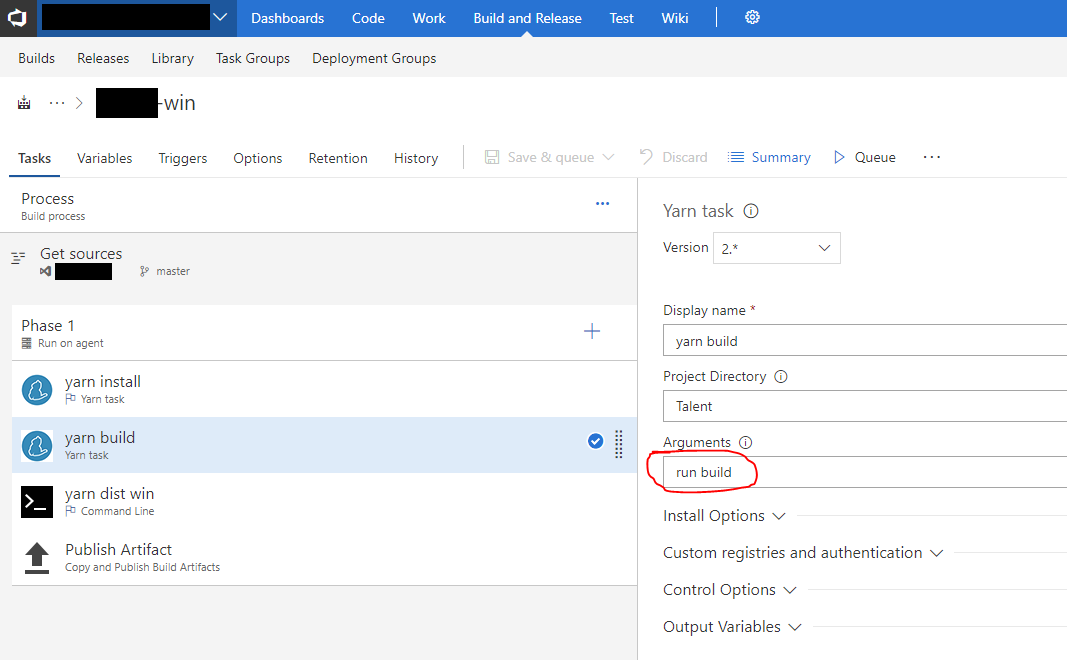
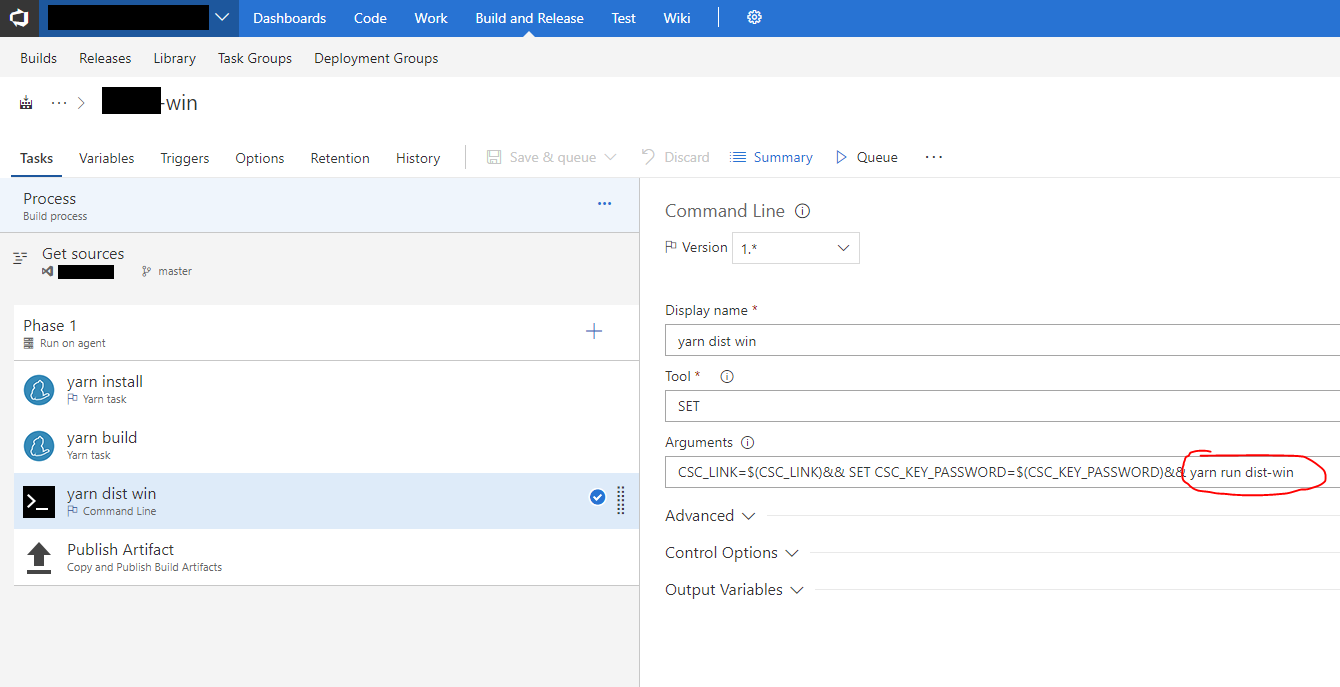
Note: I'm using yarn in my build steps (with the help of a third party build step) but you can just as easily use npm to avoid that complexity. The screenshot also shows how to handle code signing your app in VSTS. The CSC_LINK and CSC_KEY_PASSWORD variables are specified in the Variables page. CSC_LINK is a base64 encoded .p12 certificate.
You can see that these build step execute the build and dist-win script above. The following Publish Artifact step grabs the .exe and .yml files and publishes an artifact:
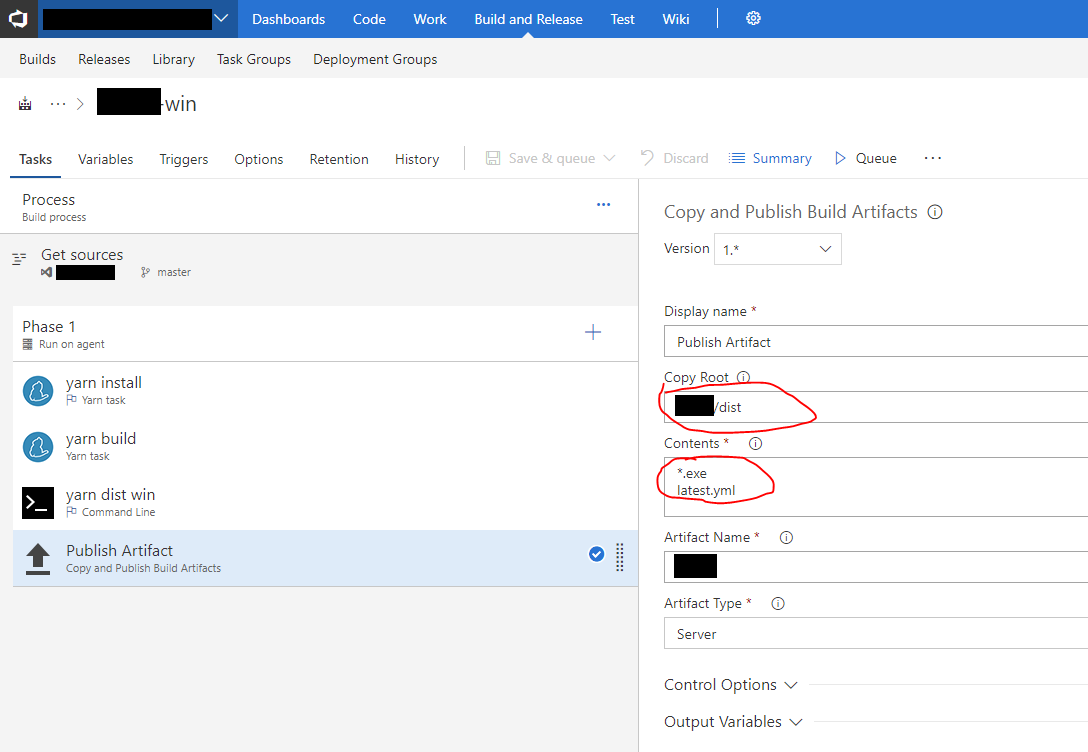
Now that the artifact has been created, the release pipeline then pushes both the setup exe and .yml update file to Azure storage (or wherever you want your users to download the executable).
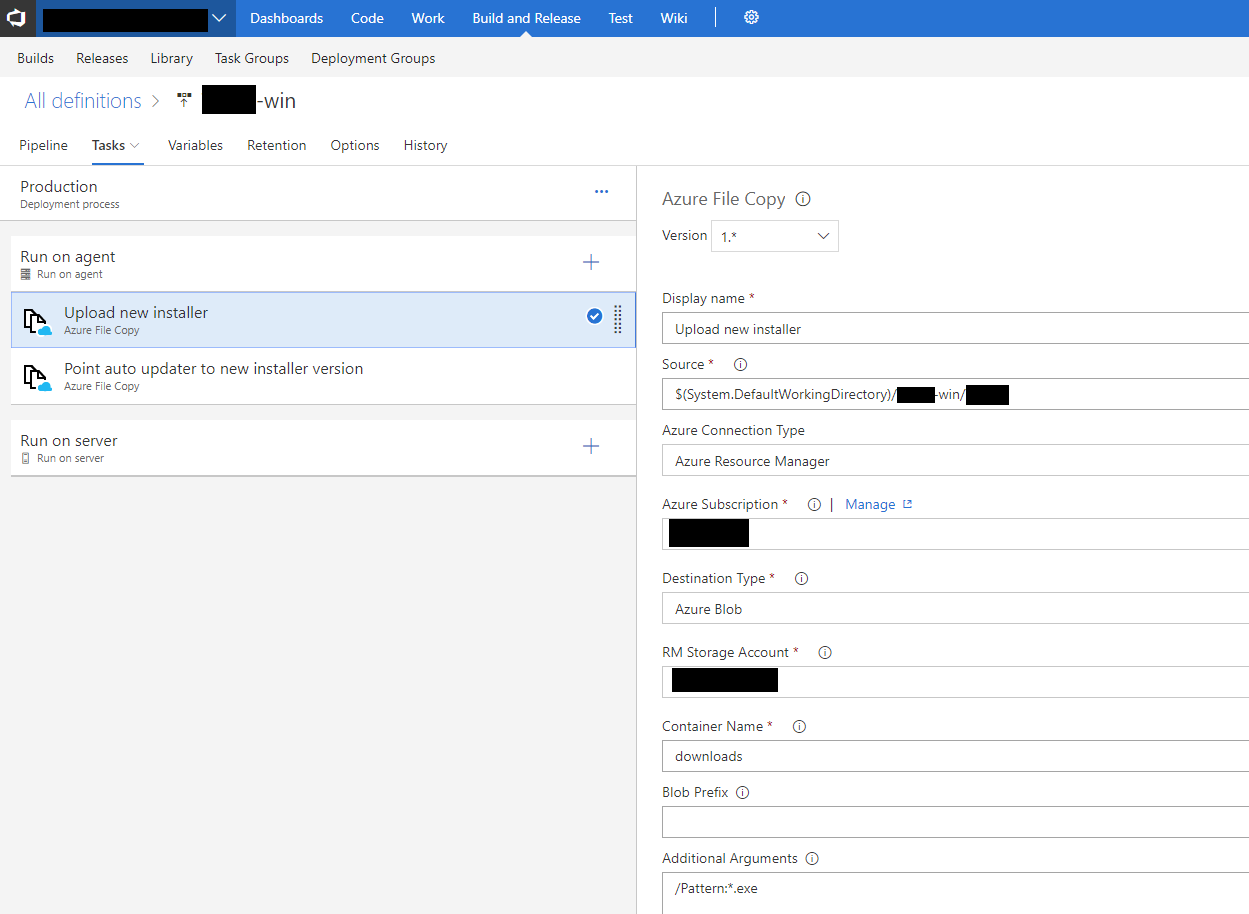
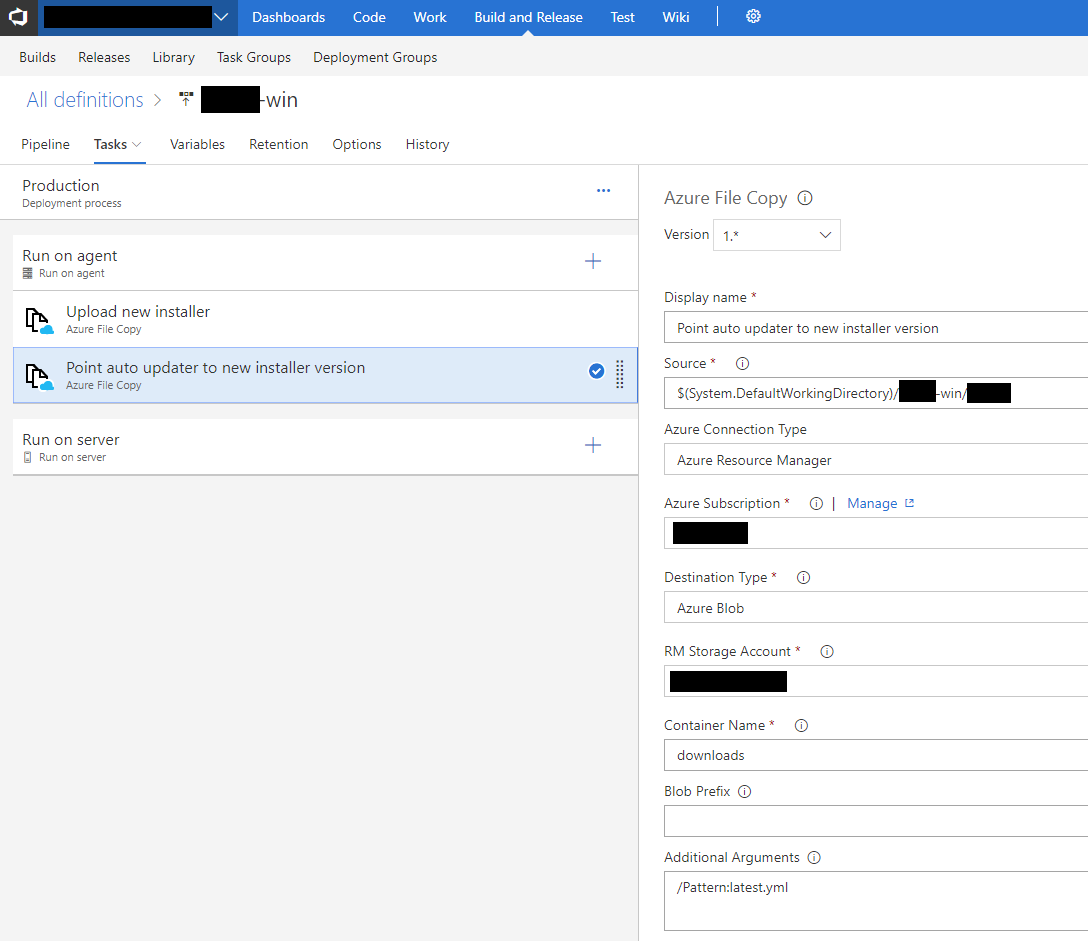
That storage location is what the code sample in my previous comment points to.
Hope this helps!
ajbeaven
on 25 May 2018
Hey @euangordon, yep I got it working. My VSTS build pipeline executes the build command for various distributions (currently win and mac) and publishes the setup exe and a latest*.yml file as an artifact. The VSTS release pipeline simply uploads that artifact to Azure Storage.
On the app side, it handles updates with the following config in
package.json. Check out thepublishsection:"build": { "appId": "myapp", "artifactName": "${name}_${os}_${arch}-setup.${ext}", "mac": { "category": "public.app-category.business" }, "nsis": {}, "publish": [ { "provider": "generic", "url": "https://mystorageaccount.blob.core.windows.net/downloads" } ] },Now in-app when you call
autoUpdater.checkForUpdates(), it looks in that location for the latest*.yml file, uses that to determine the location of the updated exe and downloads it.
So what access policy did you set on storage account. How to make it work if the container access policy is set to private ?
 AbdulMuqtadeer
on 4 Jan 2019
AbdulMuqtadeer
on 4 Jan 2019
If you want people to be able to download your executable, then it follows that the access policy be public.
ajbeaven
on 4 Jan 2019
If you want people to be able to download your executable, then it follows that the access policy be public.
I wanted to make it available only to the people from my corporate.
AbdulMuqtadeer
on 5 Jan 2019
I'm with @AbdulMuqtadeer I can do all this same work you've done with blobs (I also did the same with an Azure VM + nginx serving up latest.yml and the .exes), but I need a way to only allow my internal to download this .exe. It feels like I have to write custom logic to check that URL for updates, then login to my private blob (if I use that) or something else to control who can download the files... any thoughts/ideas?
 cdietschrun
on 22 Feb 2019
cdietschrun
on 22 Feb 2019
@AbdulMuqtadeer @cdietschrun Hey guys,
Have you managed to do this? I'm wondering if it is possible to use autoUpdater.setFeedURL and set a URL with temporary access permission (like maybe 1 hour) to allow update checks and downloads if any updates available. However, the docs says do not call setFeedURL here: https://www.electron.build/auto-update#quick-setup-guide
 gungorbudak
on 24 Aug 2020
gungorbudak
on 24 Aug 2020
Related issues
 AidanNichol
·
3Comments
AidanNichol
·
3Comments
 NPellet
·
3Comments
NPellet
·
3Comments
 noahprince22
·
3Comments
noahprince22
·
3Comments
 alexstrat
·
3Comments
alexstrat
·
3Comments
 leo
·
3Comments
leo
·
3Comments
Most helpful comment
@michaelzap94
In your
package.jsonyou should have some scripts that look like this:These scripts build the setup executables that users can use to install your app and it's what the VSTS build pipeline should be using:
Note: I'm using yarn in my build steps (with the help of a third party build step) but you can just as easily use npm to avoid that complexity. The screenshot also shows how to handle code signing your app in VSTS. The
CSC_LINKandCSC_KEY_PASSWORDvariables are specified in the Variables page.CSC_LINKis a base64 encoded .p12 certificate.You can see that these build step execute the
buildanddist-winscript above. The following Publish Artifact step grabs the .exe and .yml files and publishes an artifact:Now that the artifact has been created, the release pipeline then pushes both the setup exe and .yml update file to Azure storage (or wherever you want your users to download the executable).
That storage location is what the code sample in my previous comment points to.
Hope this helps!