Electron-builder: Builld windows build on osx using an EV code signing certificate
Version: 11.4.4
Target: mac, windows
I'm trying to build both a mac and windows version of an app on a computer running macOS and I want to sign them using an EV code signing certificate. These kind of certificates don't allow the export to .p12 or .pfx.
When signing the mac build, the builder finds the installed certificate and uses this to sign the build.
For the windows build however you need to specify a .p12 or .pfx file. It would be nice if electron-builder could also use the installed EV certificate to sign the windows build.
When using signtool on windows you can specify to automatically search for the correct certificate using the /a param.
signtool sign /a /tr http://timestamp.globalsign.com/?signature=sha2 /td SHA256 "path\to\installer.exe"
I don't think that mono signcode supports this /a parameter, but I maybe there is another way to accomplish this automatic certificate detection?
 Sambego
All 64 comments
For now, you can sign using EV only on windows using https://github.com/electron-userland/electron-builder/wiki/Options#WinBuildOptions-certificateSubjectName Is it ok for you or you want to sign app on macOS?
 develar
on 24 Feb 2017
develar
on 24 Feb 2017
It would be nice to be able to sign a windows version of the app from macOS, since electron-builder also supports the building of a windows app from macOS.
We have some scripts which build and upload both versions of the app from macOS. Without being able to sign windows apps, we have to manually sign them on windows, which interrupts our build and deployment flow.
Do you think it would be do-able to implement the windows ev certificate signing on macOS?
Sambego
on 25 Feb 2017
Theoretically it is possible. Problem is that I don't have EV cert to test. I will investigate.
develar
on 25 Feb 2017
https://github.com/SirAlex/RemoteSignTool will be used. Is it ok for you?
develar
on 1 Mar 2017
@develar that looks pretty cool! Happy to test it with appveyor and some guidance (I own an EV)!
 aeneasr
on 1 Mar 2017
aeneasr
on 1 Mar 2017
@arekkas so, for you it is possible to expose machine with token to internet (http port)?
develar
on 1 Mar 2017
Yes. Gotta check of course that no one else is able to sign stuff with my cert :D
aeneasr
on 1 Mar 2017
I'd be interested in having this as well, subscribing for updates.
 brandonhilkert
on 13 Jun 2017
brandonhilkert
on 13 Jun 2017
Relevant for me as well
 solshark
on 17 Jun 2017
solshark
on 17 Jun 2017
Relevant for me
 jonas-zipprick
on 20 Jun 2017
jonas-zipprick
on 20 Jun 2017
Hi everyone!
As now Microsoft requires to store private keys on smart cards, this will affect more people soon.
I've managed to sign windows executables with osslsigncode on mac with its private key stored on a smart card. Here's how:
- install
openssl,openscandengine_pkcs11from brew - build osslsigncode from master, here's the patch we need, I don't know why the latest release is not updated (I've opened an issue but the author doesn't care)
- call it with args:
pkcs11engine=/usr/local/lib/engines/engine_pkcs11.sopkcs11module=/usr/local/lib/opensc-pkcs11.sokey=your key slot, e.g.01-askpassor-pass=your pin code- ...other args as in usual sign
- ❗️ run
osslsigncode verifyafter sign: there's no validation by default: exe might be broken
This is working perfectly for me here: https://github.com/keeweb/keeweb/blob/develop/grunt/tasks/grunt-sign-exe.js
If anyone is interested in token model which is working on both Mac and Windows, for me it's PIVKey T800. ACS tokens will not work on mac, or I haven't managed to make it work.
 antelle
on 4 Jul 2017
antelle
on 4 Jul 2017
Great.
build osslsigncode from master, here's the patch we need, I don't know why the latest release is not updated (I've opened an issue but the author doesn't care)
@antelle because of this bug electron-builder provides version from master. But only for mac, not for Linux. I will fix it.
As now Microsoft requires to store private keys on smart cards,
Even for non-EV certs?
develar
on 5 Jul 2017
Yes, for non-ev as well: https://casecurity.org/2016/12/08/leading-certificate-authorities-and-microsoft-introduce-new-standards-to-protect-consumers-online/
For example, Certum only allows PKs on tokens, I guess, others as well.
antelle
on 5 Jul 2017
@antelle Thanks for the instructions. Thanks to this I was able to build und use a current version of osslsigncode. Some issues I had:
Building osslsigncode
After running autogen.sh I had to set the following variables in the Makefile:
LDFLAGS = -L/usr/local/opt/openssl/lib
CPPFLAGS = -I/usr/local/opt/openssl/include
Using osslsigncode
- The
pkcs11moduledepends on the hardware token used. You can check if you are using the correct module usingpkcs11-tool -module <path> -I. The token should be visible.pkcs11-toolis included inopencsand is installed at/usr/local/Cellar/opensc/0.17.0/bin/pkcs11-tool. - The ID for the
-keyparamter can also be acquired usingpkcs11-tool -module <path> -O. It is used to map private and public key, so it is the same for both and it doesn't matter which of both you are looking at. - Yes, you have to provide the
-certsparameter. This was a bit surprising since the-keyparameter could be used to get the public key from the token (if it is stored there too). - As it turns out,
osslsigncodecannot sign appx packages.
 heimpogo
on 1 Aug 2017
heimpogo
on 1 Aug 2017
Is it for AppX only? What about NSIS?
solshark
on 4 Oct 2017
@solshark For any windows code signing. Just set certificateSubjectName.
develar
on 4 Oct 2017
Thank you very much. Just tried and it works. Dealbreaker for me.
solshark
on 4 Oct 2017
I am coming from https://github.com/electron-userland/electron-builder/issues/1286,
does it mean it is possible that EV can be used for signing on a CI with smart card? What's the difference if you have the usb token.
 exiadb
on 3 Jan 2018
exiadb
on 3 Jan 2018
Guys, i want to sign my electron app with my EV Code Signing Certificates (usb token), i have tried it with win.certificateSubjectName, but it stuck while creating publish, please help
Following is my package.json code
"forceCodeSigning": false,
    "win": {
      "publisherName": "HM Developers",
      "certificateSubjectName": "HM INC"
    },
Thanks.
 Neo13Pr
on 28 Mar 2018
Neo13Pr
on 28 Mar 2018
@solshark Hello Sir, if you have succeeded in code signing with EV Cert, then please help me in this.
Thanks.
Neo13Pr
on 28 Mar 2018
@Neo13Pr I did with no special settings. I have "certificateSubjectName": "XXXXXX" in my package.json and thats it.
I'm using Parallels on Mac if it matters.
solshark
on 28 Mar 2018
@solshark if you don't mind can i see your packge.json sample.
i am using windows, it stuck here -
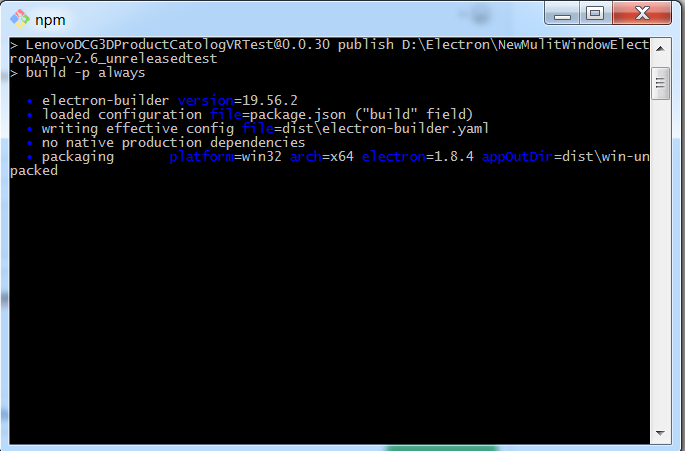
Thanks.
Neo13Pr
on 28 Mar 2018
@Neo13Pr this is a ticket for building windows apps on OSX, if you're building on Windows i'd ask in Slack or open a new ticket
 johnryan
on 28 Mar 2018
johnryan
on 28 Mar 2018
Hi all, let me share my story of getting this to work. I mostly used tips from @heimpogo and @antelle. However, there are still some challenges on the way, so to sum up:
- Get the EV signing certificate from your favourite provider. (We used DigiCert's with a discount code from windows docs. Received a
SafeNet eToken 5100device.) - Install
openssl,openscandengine_pkcs11frombrew:
brew install openssl opensc engine_pkcs11
- Build
osslsigncodefrom master, with this patch. (Clone git master, also download build from releases, copyosslsigncode.cfrom git repo to release directory, run./configure && make && make installthere) - Extract the cert from your signing device and save it to
/secure/cert.crt. (Our SafeNet device needs a "driver" for reading stuff, driver is bundled with app that can view/export certificates, available also for mac from here.) - Use
opensslto convert the certificate to/secure/cert.pemif it's not already PEM. (It likely is, even though the DigiCert app exports it with.cerextension.) - Find out what module for
pkcs11-toolsis needed for your signing device (ours was in/usr/local/lib/libeTPkcs11.dylib) and always use it withpkcs11-toolswith--module <path-to-module.dylib>parameter. (I found this by trying a lot of random stuff, finally found the driver name here.) - Find out the private key id
pkcs11-tool --module <path-to-module.dylib> -O. - run
osslsigncode
osslsigncode sign \
  -pkcs11engine /usr/local/lib/engines/engine_pkcs11.so \
  -pkcs11module <path-to-module.dylib> \
  -spc /secure/cert.pem \
  -key <private-key-id> \
  -pass <pass> \
  -n app-name \
  -t http://timestamp.verisign.com/scripts/timstamp.dll \
  -in app.exe \
  -out app-signed.exe
- Don't forget to sign everything (installer, solo executable, exe in zip, etc.)
Our use case:
We were building Electron app for win/lin/mac on our GitLab CI linux runners (in cloud). We used to have regular Windows signing certificate in the linux machine and electron-builder signed everything correctly during build. For signing mac builds, we are sending unsigned build from linux to a mac server in cloud and sign it there.
Since our new EV certificate has private key on a physical device, we're now using a local mac server for signing Windows builds where this device is plugged in. After all Windows builds (installer, zip package and squirrel bundles) are ready (unsigned) from our linux CI runner, they are sent to the local mac (via tunnel) and all parts that need signing are signed (as described above) one by one.
PS: Not sure how to scale this approach. Do all companies that use physical devices for signing stuff use only private infrastructure? Is there any best practice on connecting cloud and local servers (other than tunnelling or vpn)? But still, even for local/private infra, do the servers with plugged-in sign devices just lay around in racks or offices?
 jakubzitny
on 31 May 2018
jakubzitny
on 31 May 2018
@develar I'm prompted to enter the PIN/password for the "EV physical device USB token" about 15 times: is this normal? Anyway to prevent this or to ask it just on first usage of EV certificate?
 damianobarbati
on 19 Jul 2018
damianobarbati
on 19 Jul 2018
@damianobarbati there is a setting in the EV settings manager that lets you only be prompted once.
johnryan
on 19 Jul 2018
@johnryan Will be great if you will provide screenshots and some steps. I will transform your comment as FAQ entry in the docs ;)
develar
on 19 Jul 2018
@johnryan yes please! Because I'm using the SafeNet software and I can't find how to permanently unlock the token: or better, I see the option but it's greyed out (?!).
Maybe you are referring to "single logon" feature? Not sure.
damianobarbati
on 19 Jul 2018
@develar @damianobarbati This is the document https://www.digicert.com/code-signing/ev-authenticode-certificates.htm the option is called single logon As far as I know there's no way to permanently unlocked :/
johnryan
on 19 Jul 2018
Hi Everyone, thanks for all your help and ideas in this. I have been battling with using an EV Cert for weeks and finally made some progress today.
I have an EV Cert purchased from GlobalSign. They had absolutely no documentation on how to use it on Mac, but the docs from Digicert were useful. https://www.digicert.com/code-signing/ev-code-signing-for-mac-osx.htm
For GlobalSign step one had to be done on a Windows PC because it needs Internet Explorer to initially setup the certificate on the token.
There is a missing step from Digicert's process which cost me days. At step three after putting the token into the Mac, the certificate will only appear in KeyChain Access after doing a restart of the Mac. Following a restart it was there in "My Certificates" and usable.
So far I have managed to manually sign an exe using codesign from a terminal. It is better to add the -v parameter to codesign so you get some feedback.
Next step is to try and do this in my build process.
My mac app is currently being signed by my Apple Developer ID, so I just need to get it to also sign the Windows exe using the EV Cert. Fingers Crossed.
 euangordon
on 12 Sep 2018
euangordon
on 12 Sep 2018
@euangordon - any luck? My EV cert is from Digicert so I knew what you explained but it’s not part of the electron builder workflow. Problem is now I have to sign the windows build separately and then update latest.yml with correct checksum. And of course I can’t use the publish feature either. In the end it’s not 100% automated build and publish workflow. Let me know if you find something that can help code sign windows executeable directly from electron builder on OSX like it does with Mac builds.
 amargautam
on 29 Nov 2018
amargautam
on 29 Nov 2018
The example by @jakubzitny is working for us. The osslsigncode repo to clone is https://github.com/mtrojnar/osslsigncode, for more info see this issue.
 frederikbosch
on 7 Jan 2019
frederikbosch
on 7 Jan 2019
There is very nice summary in Mattermost dev docs by @MusikPolice on signing win builds on macos/linux.
jakubzitny
on 8 Feb 2019
### FOR FUTURE READERS: THIS SOLUTION DOES NOT WORK AS INTENDED. Boo! Still has some good info, though.
Figured I'd share what worked for me after running into this problem trying to sign the Windows executables produced by Electron Builder on macOS...
I got an EV certificate from Digicert and installed the v10.2 driver & client (be aware this is not the hardware manufacturers link--their download requires a login using a Customer ID that is only attainable when buying directly through them. _Lots of their partners have publicly accessible downloads for multiple versions of the driver, such as DigiCert hosting v9.1, or Comodo hosting v10.1...I have emailed Gemalto (the USB key manufacturer) asking for more info as to why their links are locked down_). I first installed v9.1, but the certificates would rarely show up in Keychain Access, whereas v10.2 includes Mojave support and works every time.
Anyway, after installing the driver and inserting the hardware key, a new keychain should appear in Keychain Access.
Once I got to this point, I set up my Windows build parameters in package.json simply like this:
...
    "win": {
      "target": "nsis",
      "sign": "./sign.js"
    },
...
And 'sign.js' is just:
exports.default = async function(configuration) {
  require("child_process").execSync(
    `codesign -s "YOUR_CERTIFICATE_NAME" "${configuration.path}" --force`,
    {
      stdio: "inherit"
    }
  );
};
_NOTE: If you have multiple certificates that even roughly match the same name and cause ambiguity, you can instead pass the certificate's SHA1 hash (found by running security find-identity -v -p codesigning, and used in the above function like: codesign 01020303405060708090A0B0C0D0E0F1112131415 "${configuration.path}" --force)._
The --force flag, for me, was necessary; without it, I found that signing with my EV cert failed because, at this step, the executables were already _'signed generic'_.
This solution signed the application, the installer, and the uninstaller.
Hope that helps someone, because it turned out to be a super simple way to delegate signing Windows applications with an EV certificate on macOS without going outside of the Electron Builder workflow...
 Littlebigdondon
on 12 Mar 2019
Littlebigdondon
on 12 Mar 2019
@Littlebigdondon Hi, that's very helpful. Now I can get electron builder to build and sign the .exe installer automatically. But the problem remaining is that I'm using electron builder auto-updater to publish and update my app. Even if it works with "npm run dist", it does not work with "npm run publish". The updater tried to sign .exe installer even before the installer ever existed. Are you also using electron builder auto-updater for publishing?
 todanley
on 15 Mar 2019
todanley
on 15 Mar 2019
Hi @Littlebigdondon, thanks for your explanation!
I actually did the same and codesign seems to be working properly for me, I checked generated installer with
codesign --display --verbose=4
and it showed that there is the signature. But the problem is that when I am trying to run the installer in windows the smart screen pops up warning about the lack of the signature, and there is actually none shown in file properties as well. Do you have the same? Any thoughts on how to make windows see this signature?
Also, there is a typo in your sign.js script, the command inside execSync should be inside back-ticks `codesign ...` to make the whole thingy work.
 msannikov
on 15 Mar 2019
msannikov
on 15 Mar 2019
@todanley I am using electron-builder (20.38.5) to publish, and using electron-updater (4.0.6) for installing new releases.
The updater tried to sign .exe installer
I'm not 100% sure I follow; the updater shouldn't be trying to sign anything...if electron-builder is successfully signing your executable, all you need to do is publish it to your repo/server with the --publish option.
If it helps, my publish script essentially boils down to build -mwl --publish always. This builds -> signs -> publishes, in that order.
Littlebigdondon
on 15 Mar 2019
Hey @msannikov, I don't seem to have that problem. I'm really not sure why Windows would say it isn't signed if you are in fact able to sign it with your EV certificate.
Thanks for pointing out the typo, I think markdown ate the backticks when I copy/pasted. I'll edit my post.
Littlebigdondon
on 15 Mar 2019
@Littlebigdondon this is super weird, could you please check whether you have signature in your installer properties like on the image below. I am asking because sometimes smart screen does not pop up if a file came from secure place, like copied from host to guest virtual OS, or downloaded from popular website.

msannikov
on 15 Mar 2019
@msannikov I was just about to come back and say I just double checked -- you are right, the smart screen no longer pops up with a warning, yet there is no signature listed! Investigating this now...thanks for catching that.
Littlebigdondon
on 15 Mar 2019
@Littlebigdondon Thank you. I was just confused by myself. Now the process seems to work except I'm having the same problem as @msannikov . I run codesign --display --verbose=4 and it said the installer had been signed already. Even if I manually run codesign -s [CERTFICATE_NAME] [INSTALLER_PATH], it still said the installer had been signed already and could not been signed again. However, Windows does not seem to recongize the signature. The smart screen pops up and complains that the signature is missing.
todanley
on 18 Mar 2019
@Littlebigdondon @todanley, I dropped the idea to do anything with codesign, and eventually the solution with osslsigncode works for me.
My sign.js script looks as following, I need several attempts for every signature because my token Safenet 5110 sometimes fails to sign:
~~~~
const util = require('util');
var execSync = require('child_process').execSync;
var exec = util.promisify(require('child_process').exec);
const MAX_ITER = 100;
exports.default = async function(configuration) {
console.log('---------------------------------------------------')
console.log("Signing ", configuration.path)
const signCmd = osslsigncode sign \
-h sha256 \
-pkcs11engine /usr/local/lib/engines/engine_pkcs11.so \
-pkcs11module /usr/local/lib/libeTPkcs11.dylib \
-spc ~/secure/cert.pem \
-key \cat ~/secure/key` \
-pass `cat ~/secure/pass` \
-n YOUR_APP_NAME \
-t http://timestamp.verisign.com/scripts/timstamp.dll \
-in "${configuration.path}" \
-out "${configuration.path}"`
for (let i = 0; i < MAX_ITER; ++i) {
try {
require("child_process").execSync(signCmd);
} catch(e) {
console.log('signing failed')
continue
}
console.log('signing succeeded')
const { stdout, stderr } = await exec(osslsigncode verify "${configuration.path}")
// console.log('stdout:', stdout)
// console.log('stderr:', stderr)
if (stdout.includes("Signature verification: ok")) {
console.log('signature verified')
return
}
}
console.log(All ${MAX_ITER} iterations failed.)
process.exit(1)
};
~~~~
msannikov
on 18 Mar 2019
@msannikov @todanley Yeah, I gave up on the codesign idea as well. Sorry to mislead anybody (I was mislead myself!).
Good to know the osslsigncode option works -- however, I do have one more solution that I've verified as working correctly. This option assumes your Mac has Java installed; so, if you don't want/need Java for any other reason, going the osslsigncode route would probably save some precious hard drive space... If anyone is unsure if they have Java installed, just run java -v.
The new solution:
- You will still need to install the driver for your hardware token (I'm using the SafeNet v10.2 driver).
cdinto your project's root directory and run:
 npm i -D readline-sync \
 && curl -OJL 'https://github.com/ebourg/jsign/releases/download/2.1/jsign-2.1.jar' \
 && curl -L 'https://gist.github.com/Littlebigdondon/08bab1f3936d185cdd068608689cc444/download' | tar -xvz --strip-components=1
_This will install readline-sync as a dev dependency (for prompting/obscuring your password input), download the Jsign tool, a script for invoking the signing tool, and a generic config file that points to the driver's eToken framework._- Replace
"YOUR_CERT_NAME_HERE"on line 1 ofsign.jsto be the actual name of your certificate. - Setup the Windows build parameters in package.json:
json ... "win": { "target": "nsis", "sign": "./sign.js" }, ... - That's it! You can now run your package script.
_NOTE:_ Right now, if you mistype your password, it doesn't have any retry-handling built in. I was looking for a way to differentiate the errors thrown by Jsign (e.g. incorrect password vs no hardware token found), but didn't see a solution right off the bat. If anyone wants to contribute to my gist (linked above), I'd be glad to update the script.
Whoever tries this, let me know if it works for you!
Littlebigdondon
on 19 Mar 2019
@Littlebigdondon @msannikov I just tried your Java solution and it works. I also tried osslsigncode but could not get it to work due to some problems with openssl on my Mac. Thank you all for the solutions. A side note for others: sometimes my Safenet client (10.2) fails to put certficate into my keychain even though the physical token is plugged in. To fix that, reboot Mac with the physical token plugged in. Then in the login screen, you Mac will ask you for certificate PIN/Password to log you in. After entering certificate PIN/Password, the certifcate is guaranteed to be in your Keychain Access (Not necessarily in "login" keychain though).
todanley
on 21 Mar 2019
@todanley Sweet! Glad it worked for you, too. Just curious, which SafeNet device are you using? For me, with a SafeNet 5110 and the v10.2 driver, it's been working flawlessly hot-plugging the device. I don't have to do anything for the certificate to appear in Keychain Access. Just wonder what the disparity is between our setups.
Littlebigdondon
on 21 Mar 2019
@Littlebigdondon My device is also 5110. But I downloaded v10.2 driver from This link instead of The one locked up. I'm not sure if this matters. At this point, I can't see real difference between our setups.
todanley
on 21 Mar 2019
@todanley That is the same link I provided. So we downloaded the same driver. Are you on an admin account?
By the way, I did contact Gemalto about their driver being behind a verified customer lock (which you can't get to even if you go through a vendor of theirs, such as DigiCert). I voiced my opinion on either removing the customer ID requirement, pressuring their vendors to update their drivers, or providing a hash we could use to verify their software is genuine.
Littlebigdondon
on 21 Mar 2019
Yesterday I worked on this for Mac. I got this working as follows. Also using a Safenet 5110 token. The main problem is the lack of engine pkcs 11 in brew (it is still linked to openssl 1.0 instead of openssl 1.1). Therefore you need to compile the majority of the applications yourself.
- Install some applications with brew like
autoconf,automake,libtool,pkg-configandgnu-tar. - create folder like
/usr/local/mac-dev, give it rights of your current user, use the folder as a prefix during compilation (e.g../configure --prefix=/usr/local/mac-dev) - download openssl 1.1.1 tar.gz, see link below, extract and compile:
./config --prefix=/usr/local/mac-dev && make && make install - export openssl 1.1 variables for compiling the applications below
export LDFLAGS="-L/usr/local/mac-dev/lib"export CPPFLAGS="-I/usr/local/mac-dev/include"export PATH="/usr/local/mac-dev/bin:$PATH"export PKG_CONFIG_PATH="/usr/local/mac-dev/lib/pkgconfig"
- install opensc (.dmg file)
- download libp11 .tar.gz, extract and compile:
./configure --prefix=/usr/local/mac-dev && make && make install - install safenet driver 10.2, export the .cer and convert it to pem
- download osslsigncode .tar.gz, extract and compile:
./configure --prefix=/usr/local/mac-dev && make && make install(afterwards symlink the binary to/usr/local/bin) - figure out the key ID by running
pkcs11-tool --module /usr/local/lib/libeTPkcs11.dylib -l -O - run
osslsigncodewith the correct module, engine and key id
URLs:
Full command for signing:
osslsigncode sign -verbose -pkcs11engine /usr/local/mac-dev/lib/engines-1.1/libpkcs11.dylib -pkcs11module /usr/local/lib/libeTPkcs11.dylib -h sha256 -n app-name -t https://timestamp.verisign.com/scripts/timestamp.dll -certs /link/to/cert.pem -key 'key-id-here' -pass 'password' -in /link/to/app.exe -out /link/to/app.signed.exe
Remarks:
- Make sure you use the correct engine and module. The engine I am using is
/usr/local/mac-dev/lib/engines-1.1/libpkcs11.dyliband the module is/usr/local/lib/libeTPkcs11.dylib. - You do not need to install
engine_pkcs11via brew or otherwise, it is included in libp11 since version 0.4. - If you get
no slot with a token was foundor some errors likesc connect card errorandCard is invalid or cannot be handledyou are not using the correct module, make sure you use correct one (for me it was located at/usr/local/lib/libeTPkcs11.dylib). - Use the
osslsigncodewhich is mentioned in the list of URLs. This is the actually maintained library, requires OpenSSL 1.1, includes the patch which is mentioned earlier in this thread.
frederikbosch
on 21 Mar 2019
I think I will issue a PR somewhere to have this better documented. Maybe @Littlebigdondon can confirm that what I am writing is correct.
frederikbosch
on 21 Mar 2019
@frederikbosch seems like it should work. When I have a chance I will test this unless someone else can first. One thing to note—you’re passing two -in flags to osslsigncode; that last one should be -out.
Did you try my solution using Java? I know macOS doesn’t ship with Java anymore, so maybe it would be good to document multiple solutions, but I think the Java-based route is quite simple and doesn’t require exporting certificates (and hasn’t failed to sign any of my executables yet).
Littlebigdondon
on 21 Mar 2019
Thanks, I changed that. Actually, I wanted to ask @todanley to try it. I haven't tried your Java solution. But that also seems a good solution. When I do the PR, I will also try to document your solution.
frederikbosch
on 21 Mar 2019
Where I can find the documentation anyway? I would like to create a link inside the Windows signing page here: https://www.electron.build/code-signing to a new document (e.g. code-siging-windows-on-unix).
frederikbosch
on 21 Mar 2019
@frederikbosch thanks man, sounds great. The docs are on a separate branch. They do have a note about deploying the docs in the contributing guide.
Littlebigdondon
on 21 Mar 2019
PR is there.
frederikbosch
on 21 Mar 2019
@frederikbosch Thanks a lot! Published: https://www.electron.build/tutorials/code-signing-windows-apps-on-unix
develar
on 1 Apr 2019
- If you get
no slot with a token was foundor some errors likesc connect card errorandCard is invalid or cannot be handledyou are not using the correct module, make sure you use correct one (for me it was located at/usr/local/lib/libeTPkcs11.dylib).
@frederickbosch can you explain how you identified it? which module to use? im not finding any information on how to know what module i need or if its supposed to come automatically with safenet 10.0
 HeberLemus
on 10 Jul 2019
HeberLemus
on 10 Jul 2019
Thanks for the updated docs!
Can anyone elaborate on steps 4 &5:
4) Check the library link to make sure you have the correct PKCS module. This link might be different per token. On Linux you will find it in /lib, while on Mac you can find it in /Library/Frameworks or /usr/local/lib.
5) Install token driver for Mac, export the certificate (convert it to pem when it is .cer)
Namely:
1) How do I get the correct PKCS module if i don't have it installed
2) What is "token driver for Mac" I assume this is a SafeNet client for mac but is there a recommended version?
Thanks!
John
johnryan
on 22 Jul 2019
Trying to get the latest version of SafeNet for Mac, linked here but behind a login wall that requires you to be a Thales customer (something I still haven't figured out how to do):
The version is called SafeNet Authentication Client (SAC) 10.2 for Mac (Post GA) and supposedly supports Catalina
It's found here:
https://data-protection-updates.gemalto.com/2019/10/29/safenet-authentication-client-sac-10-2-for-mac-post-ga-release-announcement/
Anyone have any luck finding this version online?
 DanielJackson-Oslo
on 1 Nov 2019
DanielJackson-Oslo
on 1 Nov 2019
Anyone been able to make this work on Catalina?
DanielJackson-Oslo
on 7 Nov 2019
Anyone been able to make this work on Catalina?
@DanielJackson-Oslo The v10.2 client I linked above, which does not require you to be a customer, does not work on Catalina. I have not yet found an open client that does :/
Littlebigdondon
on 20 Nov 2019
I am finally able to sign my Windows binaries. As already mentioned the latest authentication client for mac Catalina is not available to the public. I asked my vendor (GlobalSign) if they could me provide that application and luckily they did! I am afraid that I can not upload the SafeNet client anywhere due to licencing issues, but you should ask your vendor as well.
This is our working setup (we don't use the CLI):
- macOS
10.15.1 (19B88) - SafeNet Client
10.2.97.0 - SafeNet eToken
5110 FIPS
build configuration:
  const buildConfig = {
    win: {
      target: [
        {
          target: 'nsis',
          arch: ['ia32', 'x64'],
        },
      ],
      publisherName: 'MY ISSUED TO NAME',
      sign: (configuration: CustomWindowsSignTaskConfiguration): void =>
        signWin(configuration, tokenAlias, tokenPassword),
    }
  };
hardwareToken.cfg:
name = HardwareToken
library = /Library/Frameworks/eToken.framework/Versions/A/libeToken.dylib
slotListIndex = 0
signing:
/*
use the following command to determine the alias:
keytool -list -keystore NONE -storetype PKCS11 -providerclass sun.security.pkcs11.SunPKCS11 -providerArg hardwareToken.cfg
source: https://support.globalsign.com/customer/en/portal/articles/2722672-code-signing-in-java-token-based- for more information
*/
import { execSync } from 'child_process';
import * as path from 'path';

import { CustomWindowsSignTaskConfiguration } from 'app-builder-lib/out/codeSign/windowsCodeSign';

const jsign = path.join(__dirname, 'jsign-2.1.jar');
const keystore = path.join(__dirname, 'hardwareToken.cfg');

export default (
  configuration: CustomWindowsSignTaskConfiguration,
  alias: string,
  storepass: string
): void => {
  const { hash } = configuration;

  if (!alias) throw Error('missing argument alias');
  if (!storepass) throw Error('missing argument storepass');

  // ev token only supports SHA-256
  if (hash === 'sha1') return;
  if (hash !== 'sha256') throw Error(`unknown hashing algorithm: ${hash}`);

  console.log(`signing (${hash}): ${configuration.path}`);

  const cmd = [
    'java',
    `-jar ${jsign}`,
    `--keystore ${keystore}`,
    '--storetype PKCS11',
    '--tsaurl http://timestamp.digicert.com',
    '--alg SHA-256',
    `--alias "${alias}"`,
    `--storepass "${storepass}"`,
    `"${configuration.path}"`,
  ];

  execSync(cmd.join(' '), {
    stdio: 'inherit',
  });
};
Hopefully, this will help others.
Depending on our your token you might need a different solution for the arg --alg SHA-256
Update fixed missing publisherName
See https://github.com/electron-userland/electron-builder/issues/3667 for the reason.
 menelike
on 30 Nov 2019
menelike
on 30 Nov 2019
@frederikbosch
I practiced https://github.com/electron-userland/electron-builder/issues/1299#issuecomment-393504798 with SafeNet eToken 5110 in Ubuntu 16.04, but it failed.
First of all, I found the patch is merged into osslsigncode upstream.
Then I cloned it and built it. In addition, I installed opensc and SafenetAuthenticationClient:
sudo apt-get install -y opensc
sudo dpkg -i SafenetAuthenticationClient-9.0.43-0_amd64.deb
Finally,
pkcs11-tool --module /usr/lib/libeTPkcs11.so -r --id 'key id' --type cert > pubkey.der
openssl x509 -inform DER -in pubkey.der -pubkey > pubkey.pem
```bash
./osslsigncode sign \
-pkcs11engine /usr/lib/engines/engine_pkcs11.so \
-pkcs11module /usr/lib/libeTPkcs11.so \
-spc pubkey.pem \
-key 'key id' \
-pass 'pin' \
-in -out
It printed **error**:

```bash
Unable to enumerate certificates
PKCS11_get_private_key returned NULL
Failed to load private key <key id>:error:26096080:engine routines:ENGINE_load_private_key:failed loading private key:eng_pkey.c:124:

Failed
All the above key id are the same.
BTW,
pkcs11-tool --module /usr/lib/libeTPkcs11.so -O -l
printed (The sensitive data is replace by ...):
Using slot 0 with a present token (0x0)
Logging in to "...".
Please enter User PIN:
Private Key Object; RSA
  label:      SafeNet eToken 5110:....
  ID:         6d...ec
  Usage:      decrypt, sign, unwrap
Public Key Object; RSA 2048 bits
  label:
  ID:        6d...ec
  Usage:      encrypt, verify, wrap
Certificate Object, type = X.509 cert
  label:      SafeNet eToken 5110:...
  ID:         6d...ec
Certificate Object, type = X.509 cert
  label:
Certificate Object, type = X.509 cert
  label:
Certificate Object, type = X.509 cert
  label:
Private Key Object; RSA
  label:
  ID:         82...16
  Usage:      sign
Certificate Object, type = X.509 cert
  label:      0F...23
  ID:         82...16
 likema
on 21 Jan 2020
likema
on 21 Jan 2020
This thread was very helpful but I am still getting some errors. I am using the solution by @Littlebigdondon, trying to sign with my EV certificate on Mac and running the build command inside Docker.
I am getting this error
stderr: pesign: Failed to create a SunPKCS11 provider from the configuration file hardwareToken.cfg
Error executing command: pesign: Failed to create a SunPKCS11 provider from the configuration file hardwareToken.cfg
stderr:
java.lang.reflect.InvocationTargetException
    at sun.reflect.NativeConstructorAccessorImpl.newInstance0(Native Method)
    at sun.reflect.NativeConstructorAccessorImpl.newInstance(NativeConstructorAccessorImpl.java:62)
    at sun.reflect.DelegatingConstructorAccessorImpl.newInstance(DelegatingConstructorAccessorImpl.java:45)
    at java.lang.reflect.Constructor.newInstance(Constructor.java:423)
    at net.jsign.PESignerHelper.createSunPKCS11Provider(PESignerHelper.java:367)
    at net.jsign.PESignerHelper.build(PESignerHelper.java:258)
    at net.jsign.PESignerHelper.sign(PESignerHelper.java:377)
    at net.jsign.PESignerCLI.execute(PESignerCLI.java:109)
    at net.jsign.PESignerCLI.main(PESignerCLI.java:40)
Caused by: java.security.ProviderException: Library /Library/Frameworks/eToken.framework/Versions/A/libeToken.dylib does not exist
    at sun.security.pkcs11.SunPKCS11.<init>(SunPKCS11.java:304)
    at sun.security.pkcs11.SunPKCS11.<init>(SunPKCS11.java:103)
    ... 9 more
Try `pesign --help' for more information.
 iwiedenm
on 15 Oct 2020
iwiedenm
on 15 Oct 2020
OK I think Im making progress. I tried the osslsigncode method and I was able to run and successfully code sign for Windows on my mac OUTSIDE of Docker. Since we am using the Docker method to build for Win on Mac, how do we run osslsigncode inside docker? We get this error:
bash: osslsigncode: command not found
Any help would be greatly appreciated!
iwiedenm
on 21 Oct 2020
Related issues
 lbssousa
·
3Comments
lbssousa
·
3Comments
 JohnWeisz
·
3Comments
JohnWeisz
·
3Comments
 StickNitro
·
3Comments
StickNitro
·
3Comments
 popod
·
3Comments
popod
·
3Comments
 noahprince22
·
3Comments
noahprince22
·
3Comments
Most helpful comment
Hi everyone!
As now Microsoft requires to store private keys on smart cards, this will affect more people soon.
I've managed to sign windows executables with
osslsigncodeon mac with its private key stored on a smart card. Here's how:openssl,openscandengine_pkcs11from brewpkcs11engine=/usr/local/lib/engines/engine_pkcs11.sopkcs11module=/usr/local/lib/opensc-pkcs11.sokey=your key slot, e.g.01-askpassor-pass=your pin codeosslsigncode verifyafter sign: there's no validation by default: exe might be brokenThis is working perfectly for me here: https://github.com/keeweb/keeweb/blob/develop/grunt/tasks/grunt-sign-exe.js
If anyone is interested in token model which is working on both Mac and Windows, for me it's PIVKey T800. ACS tokens will not work on mac, or I haven't managed to make it work.