Electron-builder: Correct way to Code Signing on macOS
- Version:
10.8.1
- Target:
macOS
- I have followed the process of exporting certificates as described here and exported the Certificates.p12 to /Users/akash/cert/Certificates.p12
- Added following env from terminal -
CSC_LINK=Users/akash/cert/Certificates.p12
CSC_KEY_PASSWORD=mypassword
CSC_IDENTITY_AUTO_DISCOVERY=false
Running npm run dist still gives -
⚠️  Mac Developer is used to sign app — it is only for development and testing, not for
 production
Signing app (identity: Mac Developer: Akash Nimare (YG56YK5RU4))

Building macOS zip
Building DMG
@develar could you please tell me what I'm doing wrong? Btw I have a Apple Developer account and got this certificate form there only.
 akashnimare
All 13 comments
Please set env DEBUG=electron-builder and attach debug output.
 develar
on 25 Dec 2016
develar
on 25 Dec 2016
From https://github.com/electron-userland/electron-builder/issues/890#issuecomment-269114751
@develar yes, the certificate I bought from my Apple developer account contains both private key and cert and it's in my keychain access/My-Certificates. So as the docs says they will automatically imported and used for code sign while running npm run dist. As for as I understand my app is successfully signed and valid. In my case (since I have a mac developer certs) I should not get the above warning. The only thing I want is to code sign my app for production.
Here is the logs
```sh
[email protected] dist /Users/akka/dev/zulipwork/zulip-electron
build
Rebuilding native production dependencies for darwin:x64
[email protected] install /Users/akka/dev/zulipwork/zulip-electron/app/node_modules/keyboard-layout
node-gyp rebuild
CXX(target) Release/obj.target/keyboard-layout-manager/src/keyboard-layout-manager-mac.o
SOLINK_MODULE(target) Release/keyboard-layout-manager.node
[email protected] /Users/akka/dev/zulipwork/zulip-electron/app/node_modules/keyboard-layout
Packaging for darwin x64 using electron 1.4.7 to dist/mac
7-Zip (a) [64] 16.02 : Copyright (c) 1999-2016 Igor Pavlov : 2016-05-21
p7zip Version 16.02 (locale=utf8,Utf16=on,HugeFiles=on,64 bits,4 CPUs x64)
Scanning the drive for archives:
1 file, 42091932 bytes (41 MiB)
Extracting archive: /Users/akka/.electron/electron-v1.4.7-darwin-x64.zip
Path = /Users/akka/.electron/electron-v1.4.7-darwin-x64.zip
Type = zip
Physical Size = 42091932
Everything is Ok
Folders: 143
Files: 180
Size: 112294162
Compressed: 42091932
1) 39531B7F53DFB20AE162EF68E1F229DEB9B1E93F "Mac Developer: Akash Nimare (7SH8TN94BD)"
1 valid identities found
1) 182A592DEB89F9F4393ECA9A55A66B0DE9872FF6 "com.apple.idms.appleid.prd.5872727968476d394c6d513462534357362f316644773d3d"
2) 39531B7F53DFB20AE162EF68E1F229DEB9B1E93F "Mac Developer: Akash Nimare (7SH8TN94BD)"
2 valid identities found
Warning: Mac Developer is used to sign app — it is only for development and testing, not for production
Signing app (identity: Mac Developer: Akash Nimare (7SH8TN94BD))
Building macOS zip
Building DMG
created: /var/folders/7p/vgpm72y16_s0ltwzdf6hrzx00000gn/T/electron-builder-f2cijg/0-1-dmg/temp.dmg
/dev/disk2 GUID_partition_scheme
/dev/disk2s1 Apple_HFS /Volumes/Zulip 0.5.3
"disk2" unmounted.
"disk2" ejected.
Preparing imaging engine…
Reading Protective Master Boot Record (MBR : 0)…
(CRC32 $563FAEE1: Protective Master Boot Record (MBR : 0))
Reading GPT Header (Primary GPT Header : 1)…
(CRC32 $58B21F0A: GPT Header (Primary GPT Header : 1))
Reading GPT Partition Data (Primary GPT Table : 2)…
(CRC32 $3E837EDF: GPT Partition Data (Primary GPT Table : 2))
Reading (Apple_Free : 3)…
(CRC32 $00000000: (Apple_Free : 3))
Reading disk image (Apple_HFS : 4)…
7-Zip (a) [64] 16.02 : Copyright (c) 1999-2016 Igor Pavlov : 2016-05-21
p7zip Version 16.02 (locale=utf8,Utf16=on,HugeFiles=on,64 bits,4 CPUs x64)
Scanning the drive:
158 folders, 197 files, 132417826 bytes (127 MiB)
Creating archive: /Users/akka/dev/zulipwork/zulip-electron/dist/mac/Zulip-0.5.3-mac.zip
Items to compress: 355
Files read from disk: 197
Archive size: 48972468 bytes (47 MiB)
Everything is Ok
(CRC32 $A442649D: disk image (Apple_HFS : 4))
Reading (Apple_Free : 5)…
(CRC32 $00000000: (Apple_Free : 5))
Reading GPT Partition Data (Backup GPT Table : 6)…
(CRC32 $3E837EDF: GPT Partition Data (Backup GPT Table : 6))
Reading GPT Header (Backup GPT Header : 7)…
(CRC32 $3E525B43: GPT Header (Backup GPT Header : 7))
Adding resources…
Elapsed Time: 11.830s
File size: 46281535 bytes, Checksum: CRC32 $1EA6C8E4
Sectors processed: 267252, 262116 compressed
Speed: 10.8Mbytes/sec
Savings: 66.2%
created: /Users/akka/dev/zulipwork/zulip-electron/dist/mac/Zulip-0.5.3.dmg
hdiutil: internet-enable: disable succeeded
akashnimare
on 29 Dec 2016
Please provide output of security find-identity -v
It seems correct Developer ID Application: is not in your keychain.
develar
on 29 Dec 2016
```sh
$ security find-identity -v
1) 182A592DEB89F9F4393ECA9A55A66B0DE9872FF6 "com.apple.idms.appleid.prd.58727279
68476d394c6d513462534357362f316644773d3d"
2) 39531B7F53DFB20AE162EF68E1F229DEB9B1E93F "Mac Developer: Akash Nimare (7SH8TN
94BD)"
2 valid identities found
akashnimare
on 29 Dec 2016
So, no Developer ID Application: in your keychain. Please see Creating Signing Identities
develar
on 29 Dec 2016
@develar Thanks for debugging. Can a member of an organisation could create a Developer ID Application or only the admin can create it?
akashnimare
on 29 Dec 2016
@akashnimare Please see https://developer.apple.com/library/content/documentation/IDEs/Conceptual/AppDistributionGuide/ManagingYourTeam/ManagingYourTeam.html As you can see, Team member cannot create Create Developer ID certificates Only Team agent can.
develar
on 29 Dec 2016
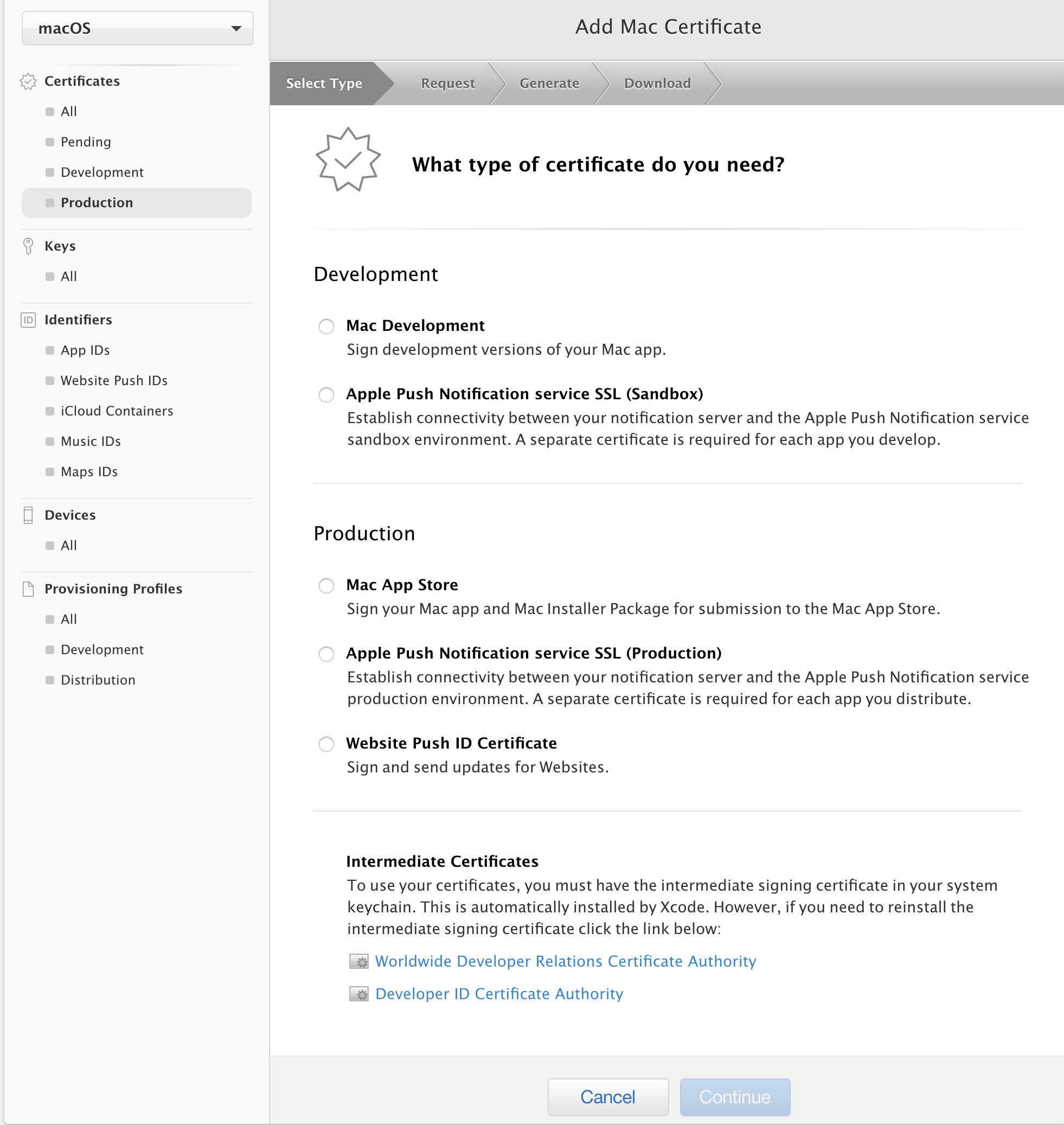
For the next guy suffering from confusion... You need to make a "Developer ID Application" cert from mac developer site:
__Select Type__ - "What type of certificate do you need?"
(•) Production > Developer ID__Select Type__ - "Select the certificates you want to generate."
(•) Developer ID Application(and 4 and 5) __Request, Generate, Download__
- Read and follow the instructions to generate CSR and upload etc...
__After downloading the result__, drag and drop it onto your KeyChain application's icon to install the cert manually.
NOTE: The resulting default filename is probably identical to another cert you have... so make sure to modify the filename so you can differentiate between your different certs.
 bobtherobot
on 2 May 2018
bobtherobot
on 2 May 2018
@bobtherobot where did you find "Developer ID Application"?
I tried now a "Mac App Distribution" certificate but nothing:
- .dmg and .dmg.zip are not signed thus I get
app.dmg can’t be opened because it is from an unidentified developer - .app is signed I get alert when opened
APP can’t be opened because it is from an unidentified developer
When building I get:
  • packaging       platform=darwin arch=x64 electron=1.8.4 appOutDir=dist/mac
  • Mac Developer is used to sign app — it is only for development and testing, not for production
  • signing         file=dist/mac/TAV.app identityName=Mac Developer: damiano barbati (VTLN96GL38) identityHash=327AF53CD2940088DADA73CD026D5040E50A62A2
Help!
 damianobarbati
on 11 Jun 2018
damianobarbati
on 11 Jun 2018
@damianobarbati, It looks like the "Developer ID" is missing for you.
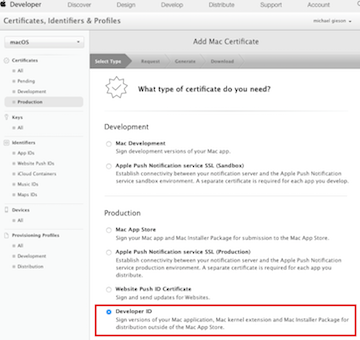
Looks like you may be missing an underlying "Developer ID Certification Authority" certificate?
Googling (yes, I'm really doing this, sorry):
apple "developer id" missing
... seemed to reveal some promising results.
bobtherobot
on 12 Jun 2018
@bobtherobot the problem is I was "team admin" but just "team agent" is the all-mighty character who can create the Developer ID.
Everything is ok now but better alerts (explaining why the used apple certificate is not valid) would be advisable :)
damianobarbati
on 12 Jun 2018
i have many certs , but i need compile with specific one , how i set this on package?
 elzurdo87
on 18 Nov 2020
elzurdo87
on 18 Nov 2020
@elzurdo87 To choose your identity for electron-builder use the terminal command security find-identity -v as mentioned above to get your list of identity hashes. Then, in your package.json file's mac build config, add the "identity" config and pass it the hash you want to use. (as documented here: https://www.electron.build/configuration/mac)
Here's where that config lives in the package.json:
{
   "name": "app",
   "version": "0.1.0",
   ...
   "build": {
     "productName": "app",
     "appId": "com.app.www",
     "mac": {
       "identity": "insertHashHere",
       ...
     }
   }
 }
 clemenger
on 2 Dec 2020
clemenger
on 2 Dec 2020
Related issues
 mstralka
·
3Comments
mstralka
·
3Comments
 leo
·
3Comments
leo
·
3Comments
 philcockfield
·
3Comments
philcockfield
·
3Comments
 antonycourtney
·
3Comments
antonycourtney
·
3Comments
 ccorcos
·
3Comments
ccorcos
·
3Comments
Most helpful comment
For the next guy suffering from confusion... You need to make a "Developer ID Application" cert from mac developer site:
__Select Type__ - "What type of certificate do you need?"
(•) Production > Developer ID
__Select Type__ - "Select the certificates you want to generate."
(•) Developer ID Application
(and 4 and 5) __Request, Generate, Download__
__After downloading the result__, drag and drop it onto your KeyChain application's icon to install the cert manually.
NOTE: The resulting default filename is probably identical to another cert you have... so make sure to modify the filename so you can differentiate between your different certs.