Electron-builder: Code sign windows app
Do I have to sign my windows app? How?
 bitomule
All 20 comments
I'm not sure I understand what you mean. Could you please explain a bit?
 stefanjudis
on 1 Oct 2015
stefanjudis
on 1 Oct 2015
I'm packaging an electron app for osx, linux and windows. My questions are:
- How do I sign my windows installer?
- Is it required by windows (will it show an alert to the user if I don't sign the app)
Thanks :)
bitomule
on 1 Oct 2015
For now we're running without signation here...
If you could do some research about this topic - this would be awesome.
I'm not sure when I can have a look into it.
We're really interested in adding this feature.
stefanjudis
on 1 Oct 2015
We've builded our app for windows without sign but hope to find a way soon. I'll post if I find a way.
bitomule
on 2 Oct 2015
@bitomule Thanks.
But let's keep this issue open then, as signation for windows apps is a nice feature. :bowtie:
stefanjudis
on 4 Oct 2015
It easy:
- Sign all *.exe in app
- Build installer with uninstaller
- Install app uninstaller for sign
- Sign uninstaller
- Build installer with signed uninstaller
- Sign installer
 ANTPro
on 6 Nov 2015
ANTPro
on 6 Nov 2015
@ANTPro
I'm a total noob in this topic. So can you maybe explain a bit more in detail...
How do I sign a *.exe at all? Is there a command for that? Or how does it work.
stefanjudis
on 7 Nov 2015
Tools for sign
Sample:
signtool sign /f "{signing}.pfx" /p {PASSWORD} "{App}.exe"
@bitomule if you are building on OS X, you can use the Mono tool signcode
You will need to get a valid code signing certificate, which likely will cost some money. After you have the certificate installed in your Mac Keychain. You can export it to a PFX/P12 file and follow these instructions to convert it to a SPC and PVK file
Once you have the SPC and PVK file, you can sign using:
signcode -spc yourfile.spc -pvk yourfile.pvk -n "Description" App-Setup.exe
You verify it got signed properly using signcode tool or on Windows, their signtool.exe which gets installed with Visual Studio Windows SDK. Signtool.exe can also sign directly like @ANTPro showed above.
With the installer signed properly the "Verified publisher" will show up cleanly on the confirm install screen.
 mkaz
on 18 Nov 2015
mkaz
on 18 Nov 2015
NSIS provides an example for Signing an Uninstaller
 demetris-manikas
on 9 Dec 2015
demetris-manikas
on 9 Dec 2015
I have created a branch https://github.com/demetris-manikas/electron-builder/tree/FEAT-win-uninstaller-separate that generates the uninstalller as a separate program and includes it in the install . Since the uninstaller is located on the development machine it can be signed by executing an external command.
eg !system "${sign command} ${UNINSTALL_EXE}" = 0
the later is not implemented yet since feedback is needed.
Send feedback.
demetris-manikas
on 10 Dec 2015
When people run our installer, they get this:
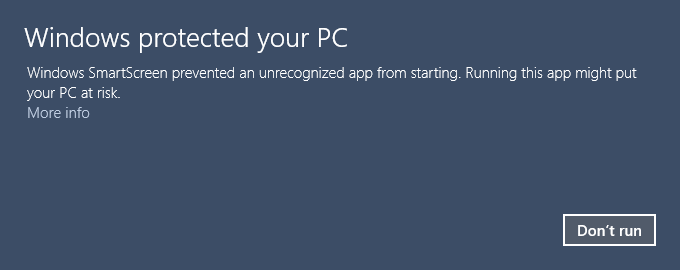
They have to click "More info" to see the "Run anyway" button:
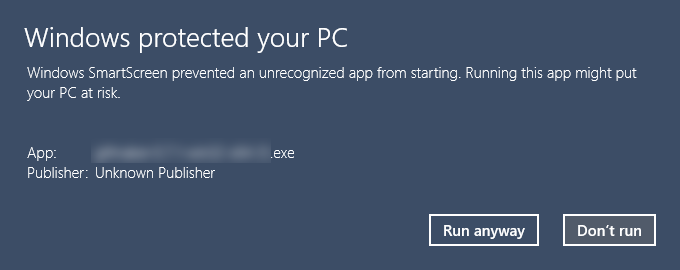
One of our customers also had a problem where their anti-virus automatically sandboxed the installer and broke it.
I assume these are happening because the installer is not signed so signing is very important for a proper experience.
While it is a solution, what @ANTPro said sounds terrible. Building an installer is already a slow process and having to do it twice would make it worse.
I think Squirrel should be investigated further before taking any action on this. My suggestion would be dropping NSIS completely and moving directly to Squirrel which would render the work done to sign NSIS uninstallers useless.
 AlicanC
on 14 Dec 2015
AlicanC
on 14 Dec 2015
I think Squirrel should be investigated further before taking any action on this. My suggestion would be dropping NSIS completely and moving directly to Squirrel which would render the work done to sign NSIS uninstallers useless.
Totally agree on investigating squirrel. :+1:
How to they solve this issue?
stefanjudis
on 14 Dec 2015
How to they solve this issue?
They say that Squirrel.exe has a signWithParams argument which makes it use SignTool.exe to sign the installer and the executables you pack in. They make it sound as easy as pie.
AFAIK, the whole Squirrel process is:
- Create a NuGet package spec (just a plain XML file)
- Create a NuGet package (just a zip containing your stuff, Squirrel and some metadata)
- Create the installer with Squirrel
- Change the name and icon of the created
Setup.exe
The process seems very similar to what electron-builder does for NSIS, but simpler if you consider signing. Even if it wasn't simpler, Squirrel would still be a winner since it provides auto update functionality and it is what Electron suggests.
AlicanC
on 14 Dec 2015
Ja I'd totally be open for that - but am not sure I can tackle that in near future.
Running with NSIS and Squirrel in parallel ( as a type option ) would be my desired way to go here. :)
stefanjudis
on 14 Dec 2015
@AlicanC - I wrote up instructions how we are signing our app, which also explains the SmartScreen
https://mkaz.wordpress.com/2015/12/09/code-signing-a-windows-application/
mkaz
on 14 Dec 2015
@mkaz you not sign UnInstaller.
It not hard:
In installer script disable all except UnInstaller(for fast build)
!ifdef UninstallOnly
...
!else
...
!system "$\"${NSISDIR}\makensis$\" /DUninstallOnly Install.nsi" = 0
!system "forsignuninstaller.exe" = 2
!system "..\Signing\signtool sign /f $\"..\Signing\signing.pfx$\" /p ${PASSWORD} uninstall.exe" = 0

!endif

!ifdef UninstallOnly
Function .onInit
  WriteUninstaller "uninstall.exe"
  Quit
FunctionEnd
!endif

!ifdef UninstallOnly
Section "${APPNAME}" MainSection
    ;Code to install app
SectionEnd

Section -FinishSection

    SetOutPath $INSTDIR
    File "uninstall.exe" ;signed uninstaller not build new

    ;WriteUninstaller "$INSTDIR\uninstall.exe"
SectionEnd
!endif

!ifndef UninstallOnly
Section "${APPNAME}" MainSection
SectionEnd

Section Uninstall

    ;Code to uninstall app

    Delete "$INSTDIR\uninstall.exe"

    RMDir /r "$INSTDIR"

SectionEnd
!endif
@ANTPro - unfortunately our build only works on OS X at this time, due to some complexity in the application itself, so the above code wouldn't quite work.
Also, I haven't seen any problems when running the Uninstaller, isn't signing it a bit overkill? I'm signing the one binary that we are distributing which cryptographically confirms that it came from us. I don't necessarily also need to sign every thing inside, since I've already proved the outer package.
Have you seen warnings or errors when Uninstalling?
mkaz
on 14 Dec 2015
Some antivirus remove all * .exe that are not signed.
I did not find confirmation of the fact that it is necessary to sign the uninstaller (Did not need to sign :))
ANTPro
on 14 Dec 2015
Code signing implemented for Squirrel.windows installer. Fixed in 2.8.
 develar
on 20 Feb 2016
develar
on 20 Feb 2016
Related issues
 JohnWeisz
·
3Comments
JohnWeisz
·
3Comments
 mstralka
·
3Comments
mstralka
·
3Comments
 omarkilani
·
3Comments
omarkilani
·
3Comments
 NPellet
·
3Comments
NPellet
·
3Comments
 philcockfield
·
3Comments
philcockfield
·
3Comments
Most helpful comment
@bitomule if you are building on OS X, you can use the Mono tool
signcodeYou will need to get a valid code signing certificate, which likely will cost some money. After you have the certificate installed in your Mac Keychain. You can export it to a PFX/P12 file and follow these instructions to convert it to a SPC and PVK file
Once you have the SPC and PVK file, you can sign using:
signcode -spc yourfile.spc -pvk yourfile.pvk -n "Description" App-Setup.exeYou verify it got signed properly using
signcodetool or on Windows, theirsigntool.exewhich gets installed with Visual Studio Windows SDK. Signtool.exe can also sign directly like @ANTPro showed above.With the installer signed properly the "Verified publisher" will show up cleanly on the confirm install screen.