Elasticsuite: Installing data... Syntax error
I have installed magento of version 2.4.1.
Elasticsearch version:7.9.2.
PHP version:7.4.11
I tried to install elasticsuite 2.10.0
Next i worked via SSH.
I followed this article:https://github.com/Smile-SA/elasticsuite/wiki/ModuleInstall step by step.
But when ran bin/magento setup:upgrade,came an error:
Module 'Smile_ElasticsuiteCore':
Module 'Smile_ElasticsuiteCatalog':
Installing data... Syntax error
when ran php bin/magento indexer:reindex
ElasticSuite Category Indexing index process unknown error:
Syntax error
ElasticSuite Thesaurus Indexing index process unknown error:
Syntax error
Can you please take a look?
Thank you.
 Joshua-Ye
All 11 comments
You need to provide more information. What PHP version are you using? What other modules do you have installed? Have you tried using the verbose flag? What is in your error logs?
 dambrogia
on 22 Oct 2020
dambrogia
on 22 Oct 2020
PHP version:7.4.11
Elasticsearch is managed.
There is no php_errorlog in my installation directory.
I just installed magento 2.4.1,i did nothing else,i hadn't installed any modules.
Joshua-Ye
on 22 Oct 2020
Hello @Joshua-Ye,
I work around your problem.
For this I used:
- Clean Magento 2.4.1 EE without any additional third-party modules
- Elasticsearch version: 7.9.2
- ElasticSuite: 2.10.0
- PHP: 7.3.19
I didn't notice any errors during the running of the next commands:
- bin/magento setup:upgrade
- bin/magento indexer:reindex
Perhaps, your problem is linked to the version of PHP, namely 7.4. To be sure and check out your test case I need to re-configure my test environment.
Best regards
 vahonc
on 22 Oct 2020
vahonc
on 22 Oct 2020
Hi @Joshua-Ye,
I went back, so I reconfigured my test environment and now it matches yours completely:
- Clean Magento 2.4.1 EE without any additional third-party modules
- PHP: 7.4.11
- Elasticsearch version: 7.9.2
- ElasticSuite: 2.10.0
Unfortunately as before I didn't notice any errors during the running of the next commands:
- bin/magento setup:upgrade
- bin/magento indexer:reindex
After clear installation of Magento and running the commands that I mentioned above I try to install ElasticSuite 2.10.0 with this command:
composer require smile/elasticsuite=2.10.0
And after that again run bin/magento setup:upgrade and bin/magento indexer:reindex commands and again didn't notice any error in the output.
So I have a few questions for you:
- Have you successfully install the ElasticSuite module? Have you noticed any errors?
- Do you use Magento Sample Data or some real data from your project?
- Did you check elasticsearch logs in
/var/log/elasticsearch
Also please check precisely your configuration according to our Wiki, maybe you something missed.
vahonc
on 23 Oct 2020
- I didn't install ElasticSuite module successfully.when in progress, ran
php bin/magento setup:upgrade,came an error:
- Module 'Smile_ElasticsuiteCore':
- Module 'Smile_ElasticsuiteCatalog':
- Installing data... Syntax error
I just installed magento 2.4.1 without sample data,i did nothing in my site then i tried to install ElasticSuite module.
(I tried to install ElasticSuite module immediately after installed magento 2.4.1)My elasticsearch is managed on elastic cloud.I have no elasticsearch logs in
/var/log/elasticsearch.I didn't installed elasticsearch on my localhost.
Joshua-Ye
on 23 Oct 2020
Hello @Joshua-Ye,
My first guess would be that the issue is that you do not have provided to Magento/Elasticsuite the location of your Elasticsearch server.
It defaults to localhost, so if it's any different, you will indeed have an error at the setup:upgrade step.
Please refer to the online documentation.
Regards,
 rbayet
on 30 Oct 2020
rbayet
on 30 Oct 2020
I found a really bad mistake:'enable_https_mode' => 0,should be changed to 'enable_https_mode' => 1.
But after i changed it, there came a new error when run bin/magento setup:upgrade:
Module 'Smile_ElasticsuiteCore':
Module 'Smile_ElasticsuiteCatalog':
Installing data...
{"error":
    {"root_cause":
         [{"type":"illegal_argument_exception",
           "reason":"Unknown filter type [phonetic] for [phonetic]"}],
          "type":"illegal_argument_exception",
           "reason":"Unknown filter type [phonetic] for [phonetic]"
      },
           "status":400
}
I've looked up relevant articles and found these caused by plugins which are required by ElasticSuite.
But i found nothing how to install analysis-phonetic and analysis-icu on Elastic Cloud.
May I please kindly ask you to provide me with steps and more information on it?
Joshua-Ye
on 31 Oct 2020
I found a really bad mistake:
'enable_https_mode' => 0,should be changed to'enable_https_mode' => 1.
[...]
I've looked up relevant articles and found these caused by plugins which are required by ElasticSuite.
indeed.
But i found nothing how to install analysis-phonetic and analysis-icu on Elastic Cloud.
May I please kindly ask you to provide me with steps and more information on it?
A streamline version is available on this issue and googling for "add plugins to elasticsearch elastic cloud" leads to https://www.elastic.co/guide/en/cloud-enterprise/current/ece-add-plugins.html with indeed the following steps mentionned in the issue
To add plugins to an existing deployment:
**Log into the Cloud UI**.

**On the Deployments page, select your deployment**.

Narrow the list by name, ID, or choose from several other filters. To further define the list, use a combination of filters.
**From your deployment menu, go to the Edit page.**
Beneath the Elasticsearch master node, expand the **Manage plugins and settings caret.**
Select the plugins that you want.
Click Save changes.
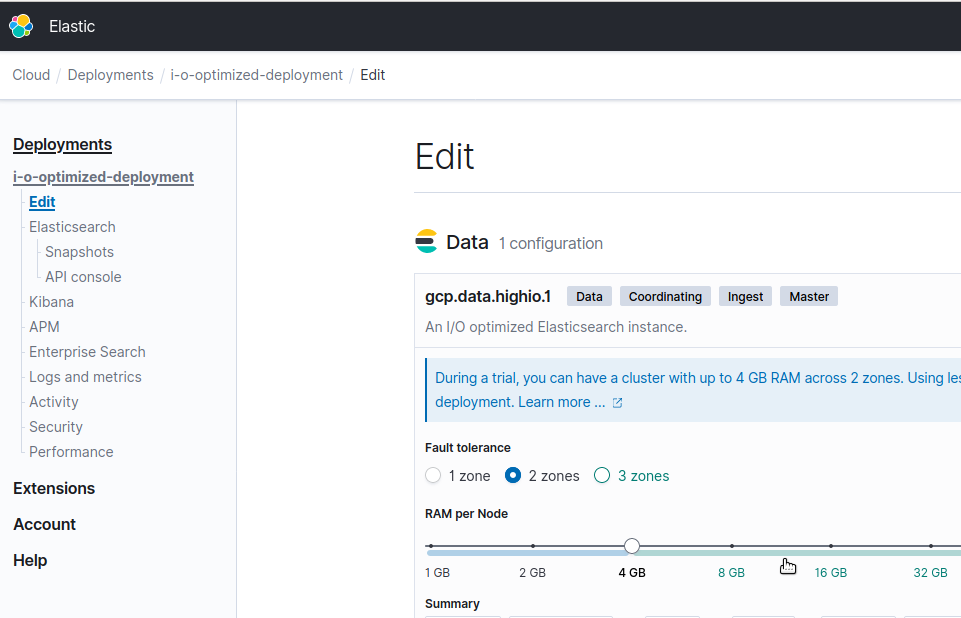
Parallel to that, I had created an optimized deployment on an Elastic Cloud trial account, so I can confirm the steps :
Edit your deployment
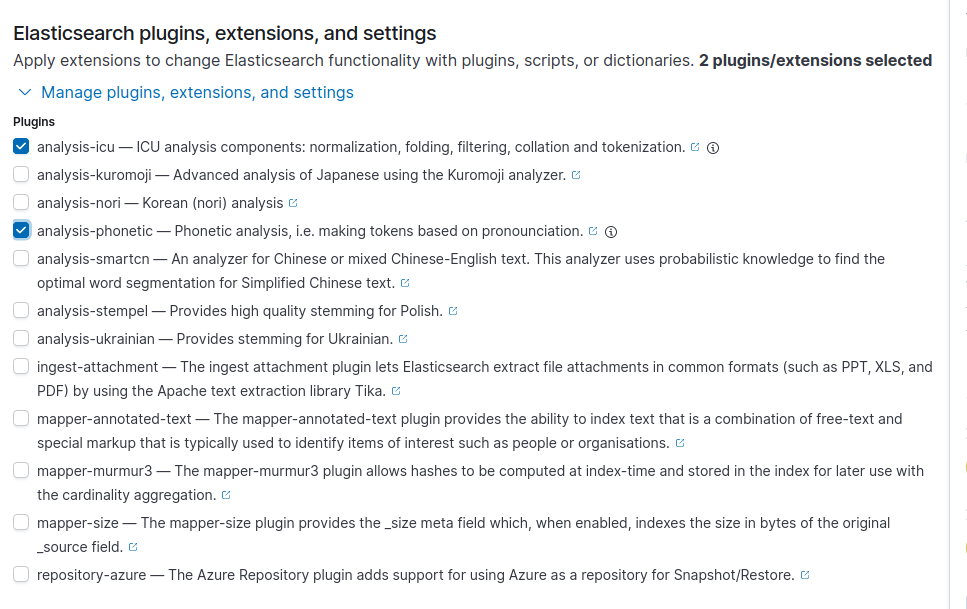
Scroll until you see the options about the plugins

Select the two required plugins (icu and phonetic)
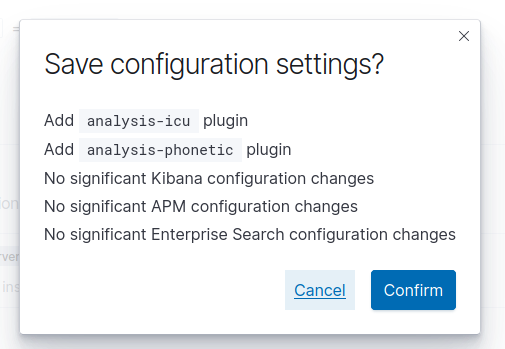
Save
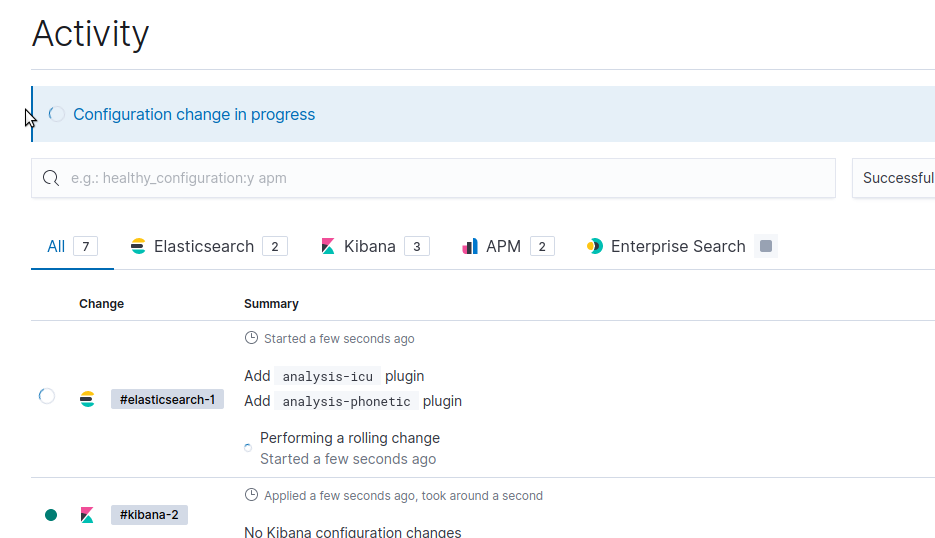
Wait for the changes to be propagated
Profit ? :)
PS: I have not yet finished my local install of 2.4.1, but I'll confirm here if "Post-Magento installation" configuration settings (as described in the issue linked above and in https://github.com/Smile-SA/elasticsuite/wiki/ModuleInstall#magento-is-already-installed- works as expected)
rbayet
on 31 Oct 2020
Can confirm that :
php bin/magento config:set -l smile_elasticsuite_core_base_settings/es_client/servers [your-deployment-host]:[port]
php bin/magento config:set -l smile_elasticsuite_core_base_settings/es_client/enable_https_mode 1
php bin/magento config:set -l smile_elasticsuite_core_base_settings/es_client/enable_http_auth 1
php bin/magento config:set -l smile_elasticsuite_core_base_settings/es_client/http_auth_user elastic
php bin/magento config:set -l smile_elasticsuite_core_base_settings/es_client/http_auth_pwd [your-elastic-cloud-password]
works as expected (ie no setup:configure error) :
- after Magento 2 install
- after having composer require'd smile/elasticsuite
- after having enabled the Elasticsuite modules
Here the result in the Elastic Cloud console after performing those steps above and adding the Magento2 sample data and reindexing :
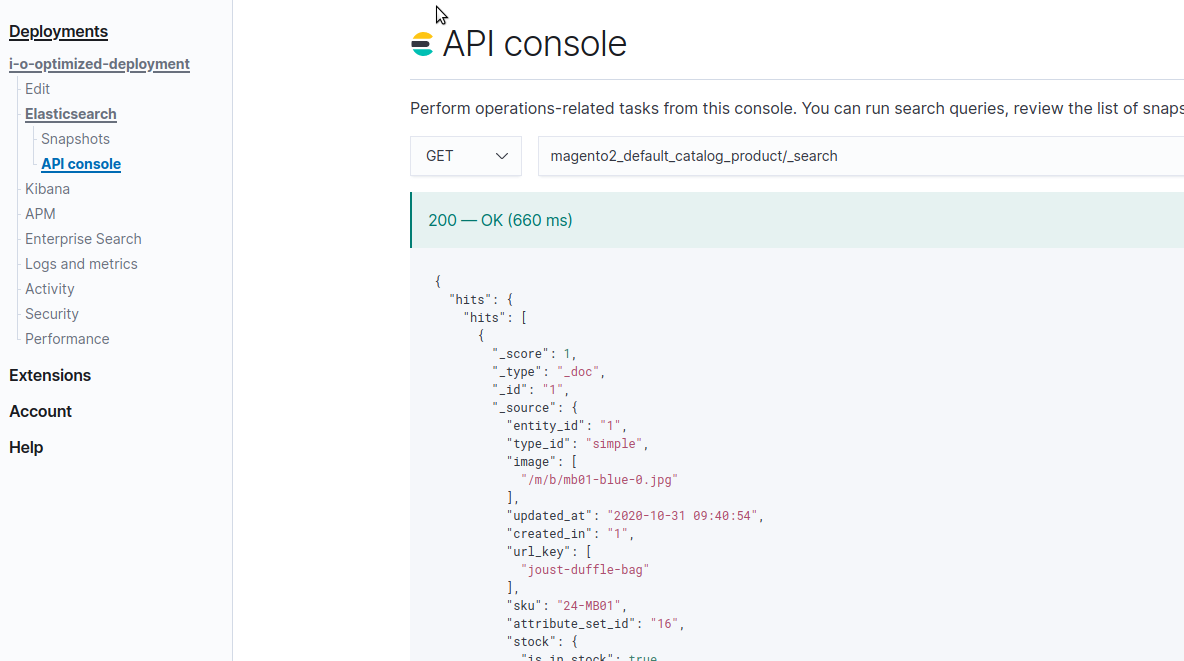
Regards,
rbayet
on 31 Oct 2020
Everything goes well now.
Thanks a million.
You guys are very much appreciated!!!
Joshua-Ye
on 31 Oct 2020
Great ! I close this issue then.
Regards
 romainruaud
on 10 Nov 2020
romainruaud
on 10 Nov 2020
Related issues
 ghost
·
4Comments
ghost
·
4Comments
 vahir2016
·
4Comments
vahir2016
·
4Comments
 susonwaiba
·
3Comments
susonwaiba
·
3Comments
 DanieliMi
·
5Comments
DanieliMi
·
5Comments
 sdasun
·
4Comments
sdasun
·
4Comments
Most helpful comment
Everything goes well now.
Thanks a million.
You guys are very much appreciated!!!