Elasticsuite: All products are displayed in each category
Hello,
I have a strange issue, all products are displayed in each category, even if they are not in it.
If I disable all the Smile* modules and reindex, it's working fine but when I enable them and reindex, all products are displayed.
FYI, I am in multi-store configuration, I don't use virtual categories and the preview displays the right products in admin.
Any idea on what can cause this issue?
 VincentMarmiesse
All 19 comments
Hello Vincent,
your issue looks like #681 . Unfortunately, we were quite unable to reproduce this issue or to obtain more details about it.
Could you please precise exactly each version of any components like it's askes in the issue template ?
Also, how are you importing the data ? Is it Magento2 sample data or real ones ?
Regards
 romainruaud
on 24 Jan 2018
romainruaud
on 24 Jan 2018
Hello Romain,
I'll try to answer with the most details possible.
Magento Version : Open Source 2.2.2
ElasticSuite Version : 2.4.3
Environment : Not sure about what you want, but I'm using PHP 7.0.25, MariaDB 10.2.9, Elasticsearch 2.4.6
Third party modules : Some third party modules and custom ones but none of them is supposed to touch this part.
I'm using real data, products are imported with FastSimpleImport2, categories are imported with the default Magento importer.
You can contact me directly if you want some access to our staging.
Thanks!
VincentMarmiesse
on 24 Jan 2018
Could you please try upgrading to latest Elasticsuite 2.4 version ? (the 2.4.4).
Little chances that it fixes your issue, but I prefer to ensure you are running the most recent version.
I will try to dig on this one since you are not the first user who is noticing it. However, we have many projects at Smile running Elasticsuite, also many "sandboxes installations" with just Elasticsuite and the sample data, and none has encountered this issue.
Could you check the following points :
- catalog_category_product table is properly populated
- catalog_category_product_index is also built properly
- what do you have on the "category" field for products into the ES index
Regards
romainruaud
on 24 Jan 2018
Ok so here are the steps I followed:
- Disable all
Smile*modules inapp/etc/config.php - Clear cache, setup upgrade, DI compilation, full reindex
- My products are correctly displayed
- Enable all
Smile*modules inapp/etc/config.php - Set Smile ElasticSuite as search engine
- Clear cache, setup upgrade, DI compilation, full reindex
- All products are displayed in each category
- Run
composer update smile/elasticsuitehas been updated from 2.4.3 to 2.4.4- Clear cache, setup upgrade, DI compilation, full reindex
- All products are still displayed in each category
catalog_category_producttable is properly populated: the category I'm checking has 40 products in this tablecatalog_category_product_indextable is properly populated: the category I'm checking has 240 rows (40 * 6 stores)- the
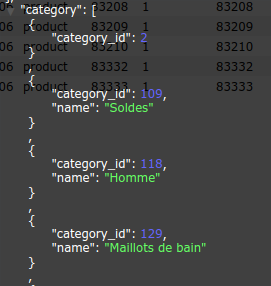
categoryfield in ES seems ok but there is the root category, maybe that's the issue? Here is the screen:
VincentMarmiesse
on 24 Jan 2018
Hi @VincentMarmiesse,
Please can you check the following :
All your categories are is_anchor
You don't have rewrite for the following class in your custom code / third party modules :
- \Magento\LayeredNavigation\Block\Navigation
- \Magento\Catalog\Model\Layer\FilterList
- \Magento\Catalog\Model\Layer\FilterList
- \Magento\Catalog\Model\Layer\Filter\Category
- more generally every class in the \Magento\Catalog\Model\Layer or \Magento\LayeredNavigation namespaces
 afoucret
on 24 Jan 2018
afoucret
on 24 Jan 2018
Hi @afoucret,
- All my categories are
is_anchor - Except Smile_ElasticSuite, no module extends the classes or namespaces you told me to check
VincentMarmiesse
on 24 Jan 2018
Hello,
Some news about this issue:
- All my products are now properly displayed in their categories. I don't know why, I didn't change anything. I just have reactivated all
Smile*modules and it worked - I have another issue which is related I think: the products position is not taken into account in front. In a category where all products are set to manual sorting, it's working fine in admin but in front products are displayed sorted by ID.
I think I may have some caching issues or something, do you know if there is something to do to clear caches? I flush cache and reindex everything everytime I change something.
Am I supposed to perform a full reindex everytime I update the products position?
Thanks!
VincentMarmiesse
on 30 Jan 2018
Hi @VincentMarmiesse,
Product position reindex should be automatic (unless your index is locked for some reason or configured to run in async mode).
Try to run :
bin/magento indexer:show-modeand verify all your index are set toUpdate on Savebin/magento indexer:statusand verify all your index are in stateReady. If not run,bin/magento indexer:reset && bin/magento indexer:reindex
afoucret
on 31 Jan 2018
Hi @afoucret,
All my index are set to Update on Save and Ready :(
I'll try some other things and get back to you.
VincentMarmiesse
on 31 Jan 2018
Hello,
we recently encountered the same problem in one of our projects, in our case it was caused by removing the catalog.leftnav-block in our custom theme.
Content of app/design/frontend/{vendor}/{theme}/Smile_ElasticsuiteCatalog/layout/catalog_category_view_type_layered.xml:
<page xmlns:xsi="http://www.w3.org/2001/XMLSchema-instance" xsi:noNamespaceSchemaLocation="urn:magento:framework:View/Layout/etc/page_configuration.xsd">
    <body>
        <referenceBlock name="catalog.leftnav" remove="true" />
    </body>
</page>
The problem was gone when we changed <referenceBlock name="catalog.leftnav" remove="true" /> to <referenceBlock name="catalog.leftnav" display="false" />.
 berwa
on 10 Feb 2018
berwa
on 10 Feb 2018
I had similar issue on our project. I confirm @berwa solution solves the problem. Thanks!
 avenicus
on 12 Feb 2018
avenicus
on 12 Feb 2018
So we close ?
afoucret
on 12 Feb 2018
Hi all,
Maybe it should be nice to write it in the documentation?
I still have the issue where the products positions are not correct in front but are in admin. The issue may be similar so it would be nice to know which blocks we shouldn't remove or rewrite.
What do you think about it?
VincentMarmiesse
on 12 Feb 2018
Hi @afoucret,
Ok my issue was causing by the case you describe here: https://github.com/Smile-SA/elasticsuite/wiki/FAQ#i-have-problems-with-the-pagination--sorting
you have a layout which is rendering the layered navigation blocks before the product listing.
So you can close this issue :+1:
VincentMarmiesse
on 13 Feb 2018
Great !!! I close.
afoucret
on 13 Feb 2018
I am having a similar issue ... probably it is also caused by moving navs and toolbars around in our layout, but actually I could not yet identify the cause yet.
Is the deeper cause for this known? Maybe it would help me in understanding the issue.
How can I debug that further to identify the block causing the problem?
Could we maybe add some warning-message in the logs then outlining the issue so people do not have to spend hours on debugging :-)
 amenk
on 12 Nov 2018
amenk
on 12 Nov 2018
I am getting
[2018-11-12 18:35:57] main.INFO: Broken reference: the 'catalog.leftnav' element cannot be added as child to 'sidebar.main', because the latter doesn't exist [] []
[2018-11-12 18:35:57] main.INFO: Broken reference: the 'copyright_container' tries to reorder itself towards 'mainFooter-imprint', but their parents are different: 'footer-wrapper' and '' respectively. [] []
[2018-11-12 18:35:57] main.INFO: Broken reference: the 'my.link' tries to reorder itself towards 'club.link', but their parents are different: 'meta.nav.wrapper' and '' respectively. [] []
[2018-11-12 18:35:57] main.INFO: Broken reference: the 'div.sidebar.additional' tries to reorder itself towards 'sidebar.main', but their parents are different: 'columns' and '' respectively. [] []
[2018-11-12 18:35:57] main.INFO: Broken reference: the 'catalog.leftnav' tries to reorder itself towards '', but their parents are different: 'sidebar.main' and '' respectively. [] []
This seems to be important. Especially the first one. I was able to solve that first one by switching the layout from 1-column to 2-column, But still getting all products displayed after a full cache flush (in developer mode).
Can't be related to indexing, right?
amenk
on 12 Nov 2018
@amenk You need "catalog.leftnav" block shown on the category pages. It's required for the elasticsuite to filter in products.
avenicus
on 12 Nov 2018
We had this issue as well and narrowed down all our modules to core Magento stuff. But it looks like we have now found the bug. It happens when at Settings > Catalog > Layered Navigation > Display Category Filter is set to No.
 PHProDreamy
on 12 Feb 2021
PHProDreamy
on 12 Feb 2021
Related issues
 wouter-toppy
·
4Comments
wouter-toppy
·
4Comments
 sdasun
·
4Comments
sdasun
·
4Comments
 DanieliMi
·
5Comments
DanieliMi
·
5Comments
 shamoon
·
3Comments
shamoon
·
3Comments
 rvitaliy
·
3Comments
rvitaliy
·
3Comments
Most helpful comment
Hello,
we recently encountered the same problem in one of our projects, in our case it was caused by removing the
catalog.leftnav-block in our custom theme.Content of
app/design/frontend/{vendor}/{theme}/Smile_ElasticsuiteCatalog/layout/catalog_category_view_type_layered.xml:The problem was gone when we changed
<referenceBlock name="catalog.leftnav" remove="true" />to<referenceBlock name="catalog.leftnav" display="false" />.