Elasticsearch: [JDBC] DBeaver fails to lookup versions as artifacts.elastic.co doesn't list versions
Description of the problem including expected versus actual behavior:
In the documentation (at this page), it's detailed how to upgrade the Elasticsearch JDBC Driver via DBeaver UI.
It unfortunately fails as it tries to lookup to artifacts.elastic.co/maven/org/elasticsearch/plugin/x-pack-sql-jdbc/, which returns Not Found.
The download works with the version pre-filled in the UI.
As a workaround:
1) it's possible to add the jar manually downloading it via the website (as explained here)
2) It's possible to customize the Maven repositories or add new ones to DBeaver. Adding a mirror which lists versions will make it work
Steps to reproduce:
- Open
DBeaver - Add a
Elasticsearch connection - Go to
Edit Driver 'Elasticsearch' - Go to
Download/Update - Click on the version
If the artifacts.elastic.co/maven behavior cannot be changed, it is necessary to update the documentation.
 lucabelluccini
All 9 comments
Pinging @elastic/es-search
 elasticmachine
on 22 Aug 2019
elasticmachine
on 22 Aug 2019
@elastic/es-core-infra is this something we can improve regarding our Maven repo?
 astefan
on 23 Aug 2019
astefan
on 23 Aug 2019
Some extra notes on how's this triggered: DBeavers has a built-in version of the Elasticsearch JDBC driver (DBeavers 6.3.0 knows of 7.4.0 ES/JDBC) and so it knows how to build the download path of the JAR file for that version in the Maven repo. So configuring DBeaver with ES/JDBC will always work fine, but only for the hardwired version.
If one clicks on the version field, DBeaver will try listing the Maven repo URL for ES/JDBC, to find out which other versions might be available. This request is rejected by the server with the 404 (Not found) as noted above.
So I believe either artifacts.elastic.co would have to allow listing of /maven/org/elasticsearch/plugin/x-pack-sql-jdbc/ (=preferred solution?), or the application configured to have this functionality disabled (i.e. only work with the built-in version).
 bpintea
on 10 Dec 2019
bpintea
on 10 Dec 2019
The Elastic maven repository is backed by s3, and not a "real" maven repo. This limitation of not providing maven-metadata.xml is by design, as that would require updating the xml file on each release, while the goal was to be write once to ensure artifacts do not accidentally get clobbered. Updating that file can lead to issues as we have had with yum/apt repos where simultaneous releases clobber the known previous releases because two different version lists were generated by each parallel release process.
Generally I've seen the metadata is primarily used to depend on "latest", which is often a bad practice, and in the ES just won't work much of the time since there are strict compatibility requirements between clients and the server.
Is there a problem with entering this version in the field directly? Is the main issue the usability aspect in that it is surprising to users with no clear message that this feature is unsupported?
 rjernst
on 10 Dec 2019
rjernst
on 10 Dec 2019
Is there a problem with entering this version in the field directly? Is the main issue the usability aspect in that it is surprising to users with no clear message that this feature is unsupported?
If we document those steps (I can edit the documentation), I think it could be easier for the users.
lucabelluccini
on 10 Dec 2019
@rjernst we can probably update the documentation and provide workarounds and warning messages, but this will not be a seamless user experience with DBeaver+Elasticsearch JDBC driver.
DBeaver has support for 60+ DB providers and we managed to get on that list by default when DBeaver releases a new version. Those DB providers that have public JDBC artifacts available (us being one of them) do offer access to real Maven repos and from my tests with some of them, listing the available versions is not an issue. So, from a user experience point of view (a user who is used to using DBeaver to access various databases), the Elasticsearch JDBC driver experience is broken. If a new version of Elasticsearch is released they cannot use the driver right away in a transparent and seamless way, but have to download the jar manually and provide that to DBeaver or input additional details in DBeaver (group id, artifact id, version) to have the new version downloaded by DBeaver itself.
_Side note: the latest DBeaver release offers ES 7.4.0 driver and if users want to test the latest driver they have to go through the manual steps above anyway_
In short, the DBeaver+ES JDBC driver experience looks professional and seamless, but in reality it's broken and needs workarounds.
astefan
on 11 Dec 2019
Is there a problem with entering this version in the field directly?
The tool doesn't offer an editable field. It will trigger the "version discovery" procedure as soon as one clicks on the version field.
bpintea
on 16 Dec 2019
I solved it | 我搞定了这个问题,maven 仓库根本都打不开,需要手动下载驱动
step first:| 第一步
download driver from:https://www.elastic.co/cn/downloads/past-releases#jdbc-client | 先下载官网提供的驱动
then next | 接下来看图一顿操作猛如虎🤞

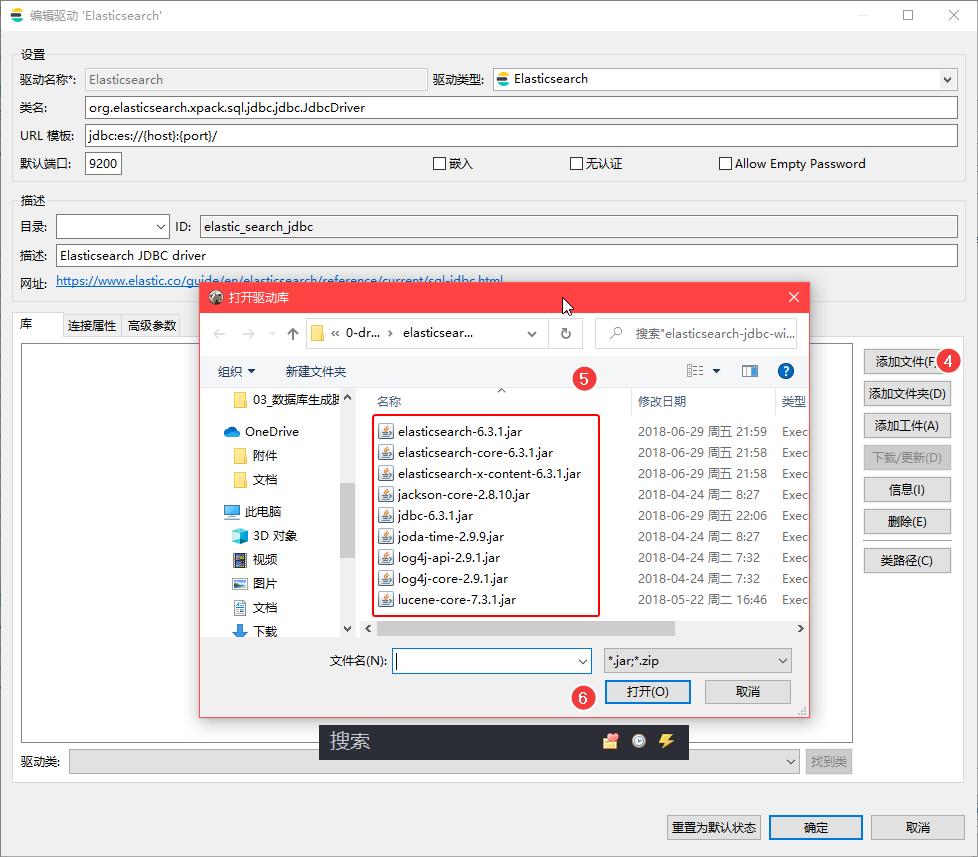


please vote for me,memeda | 赞我么么哒😘
 geekyouth
on 28 Dec 2019
geekyouth
on 28 Dec 2019
I've removed the discuss label as we would like to provide better behavior here, but it is really outside the scope of the Elasticsearch project as it has to do with how releases work across Elastic. The infrastructure team is aware of the ask and looking into ways to provide maven metadata. I will leave this issue open for now, but mark it as stalled as there is nothing we (Elasticsearch team) can do.
rjernst
on 23 Jan 2020
Related issues
 makeyang
·
3Comments
makeyang
·
3Comments
 malpani
·
3Comments
malpani
·
3Comments
 abrahamduran
·
3Comments
abrahamduran
·
3Comments
 jasontedor
·
3Comments
jasontedor
·
3Comments
 clintongormley
·
3Comments
clintongormley
·
3Comments
Most helpful comment
I solved it | 我搞定了这个问题,maven 仓库根本都打不开,需要手动下载驱动
step first:| 第一步
download driver from:https://www.elastic.co/cn/downloads/past-releases#jdbc-client | 先下载官网提供的驱动
then next | 接下来看图一顿操作猛如虎🤞
please vote for me,memeda | 赞我么么哒😘