Elasticsearch: Elasticsearch doesn't find bundled JDK
Elasticsearch version (bin/elasticsearch --version):
7.1.1 and 7.2.0.
Version: 7.1.1, Build: default/zip/7a013de/2019-05-23T14:04:00.380842Z, JVM: 12.0.1
Version: 7.2.0, Build: default/zip/508c38a/2019-06-20T15:54:18.811730Z, JVM: 12.0.1
Plugins installed: []
Nothing extra. Just vanilla Elasticsearch.
JVM version (java -version):
Whatever is bundled with the respective versions (see Elasticsearch version output above).
OS version (uname -a if on a Unix-like system):
Windows 10 Home
Build 17134.829
Description of the problem including expected versus actual behavior:
Even though the JDK is bundled with Elasticsearch as from version 7.0, I still have to set JAVA_HOME for it to work. Elasticsearch complains that it can't find Java bundled at the directory where it actually exists. See the thread I posted at Discuss Elastic which shows the output with Elasticsearch 7.1.1.
Steps to reproduce:
- Open cmd.exe
- Navigate to the Elasticsearch bin folder
- Run
elasticsearch.bat
Provide logs (if relevant):
N/A
 dandago
All 10 comments
Pinging @elastic/es-core-infra
 elasticmachine
on 10 Jul 2019
elasticmachine
on 10 Jul 2019
@dandago Can you please check you do not already have a JAVA_HOME set? Something like echo %JAVA_HOME% just before running elasticsearch.bat. If that is not set, can you then try running from the elasticsearch home directory instead of within the bin directory? I'm trying to narrow down where this issue might be, but I rely on our windows packaging tests, which are passing, so I'm hoping to get some more data points to help in crafting a test that would fail.
 rjernst
on 10 Jul 2019
rjernst
on 10 Jul 2019
@rjernst You are right, I did have JAVA_HOME set to a directory that no longer exists. It works if I clear it.
In this case, I'm afraid the error:
could not find java in JAVA_HOME or bundled at C:toolselasticsearch-7.1.1jdk
...is misleading. I would have thought that if it fails to find the JDK in JAVA_HOME then it would look for the bundled one (which exists at the directory it is mentioning), but it seems to be relying entirely on JAVA_HOME if it is set.
dandago
on 10 Jul 2019

this is my problem , i can't figure it out...
 1044886782
on 26 Jul 2019
1044886782
on 26 Jul 2019
this is my problem , i can't figure it out...
I finally find a way to slove this probem: the url is:https://stackoverflow.com/questions/49012969/could-not-find-java-home-elastcisearch
execute this command: set JAVA_HOME=D:java
1044886782
on 26 Jul 2019
This is still an issue (Windows 10) ES 7.3.0:
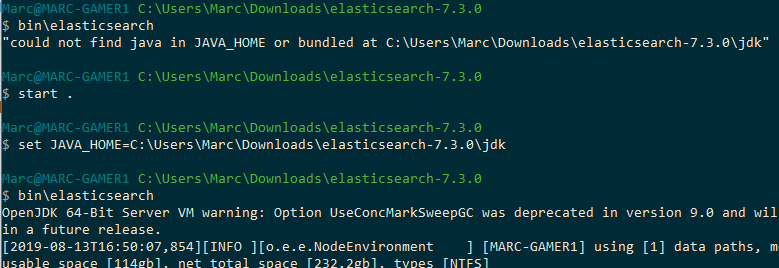
As you can see it can find java (where it says it can't) only if we set JAVA_HOME.
In my case JAVA_HOME was already set to a JRE path so, if ES doesn't like that, it should find it's own packaged JDK.
 cawoodm
on 13 Aug 2019
cawoodm
on 13 Aug 2019
@cawoodm If JAVA_HOME is set, Elasticsearch will use that. There is no attempt to discern whether the version of is meant to be used with Elasticsearch. If you don't mean to use that java with Elasticsearch, unset JAVA_HOME when starting ES.
rjernst
on 14 Aug 2019
@cawoodm If JAVA_HOME is set, Elasticsearch will use that. There is no attempt to discern whether the version of is meant to be used with Elasticsearch. If you don't mean to use that java with Elasticsearch, unset JAVA_HOME when starting ES.
Yes,I've sloved this problem by setting this PATH,thanks.
1044886782
on 14 Aug 2019
@rjernst
@cawoodm If JAVA_HOME is set, Elasticsearch will use that. There is no attempt to discern whether the version of is meant to be used with Elasticsearch. If you don't mean to use that java with Elasticsearch, unset JAVA_HOME when starting ES.
If this is the behaviour, then the error shouldn't claim that it checked for the bundled JDK.
dandago
on 14 Aug 2019
If this is the behaviour, then the error shouldn't claim that it checked for the bundled JDK.
I agree. The existing error message is a result of only slightly changing the old error message where we looked for JAVA_HOME and on the PATH. I will separate this out so it is clear when JAVA_HOME was used and that the path does not exist.
rjernst
on 14 Aug 2019
Related issues
 malpani
·
3Comments
malpani
·
3Comments
 rbayliss
·
3Comments
rbayliss
·
3Comments
 jpountz
·
3Comments
rjernst
·
3Comments
jpountz
·
3Comments
rjernst
·
3Comments
 jasontedor
·
3Comments
jasontedor
·
3Comments
Most helpful comment
This is still an issue (Windows 10) ES 7.3.0:

As you can see it can find java (where it says it can't) only if we set JAVA_HOME.
In my case JAVA_HOME was already set to a JRE path so, if ES doesn't like that, it should find it's own packaged JDK.