Elasticsearch-py: AttributeError: module 'certifi' has no attribute 'where'
Hello,
I found the following issue when using elasticsearch==5.0.0
It seems to be a problem when setting up the connection due to the module 'certifi' because it has no attribute 'where'
Thanks for your help on beforehand.
/opt/conda/lib/python3.5/site-packages/elasticsearch/__init__.py in <module>()
     15     logger.addHandler(logging.NullHandler())
     16
---> 17 from .client import Elasticsearch
     18 from .transport import Transport
     19 from .connection_pool import ConnectionPool, ConnectionSelector, \

/opt/conda/lib/python3.5/site-packages/elasticsearch/client/__init__.py in <module>()
      2 import logging
      3
----> 4 from ..transport import Transport
      5 from ..exceptions import TransportError
      6 from ..compat import string_types, urlparse

/opt/conda/lib/python3.5/site-packages/elasticsearch/transport.py in <module>()
      2 from itertools import chain
      3
----> 4 from .connection import Urllib3HttpConnection
      5 from .connection_pool import ConnectionPool, DummyConnectionPool
      6 from .serializer import JSONSerializer, Deserializer, DEFAULT_SERIALIZERS

/opt/conda/lib/python3.5/site-packages/elasticsearch/connection/__init__.py in <module>()
      1 from .base import Connection
      2 from .http_requests import RequestsHttpConnection
----> 3 from .http_urllib3 import Urllib3HttpConnection

/opt/conda/lib/python3.5/site-packages/elasticsearch/connection/http_urllib3.py in <module>()
      8 try:
      9     import certifi
---> 10     CA_CERTS = certifi.where()
     11 except ImportError:
     12     pass

AttributeError: module 'certifi' has no attribute 'where'
 jvalhondo
All 10 comments
Thanks for the report, unfortunately I cannot replicate it - where is the documented API of certifi: https://github.com/certifi/python-certifi#usage Could you please verify what version of certifi you have?
Thank you!
 HonzaKral
on 25 Oct 2016
HonzaKral
on 25 Oct 2016
after manually installing 'certifi' latest version (2016.9.26) everything work fine.
pip install -U certifi
It seems that upgrading 'elasticsearch' module didn't install 'certifi' module, and I just had to install it manually. Then, don't know if 'certifi' should be a requirement.
To get it working it did:
pip install -U elasticsearch
pip install -U certifi
Thanks @HonzaKral, should I close this issue?
jvalhondo
on 25 Oct 2016
If you didn't have certifi installed then the import would have thrown an ImportError and the relevant code line would have been skipped. Something else happened there.
I will close the issue for now, if you, or anybody else of course, come up across this again please feel free to reopen with new information.
Thanks!
HonzaKral
on 25 Oct 2016
Hi,
I encountered this as well.
For a minimal reproduction, run:
docker run -it jupyter/minimal-notebook /bin/bash
$ pip install elasticsearch
$ python -c "import elasticsearch"
Traceback (most recent call last):
  File "<string>", line 1, in <module>
  File "/opt/conda/lib/python3.5/site-packages/elasticsearch/__init__.py", line 17, in <module>
    from .client import Elasticsearch
  File "/opt/conda/lib/python3.5/site-packages/elasticsearch/client/__init__.py", line 4, in <module>
    from ..transport import Transport
  File "/opt/conda/lib/python3.5/site-packages/elasticsearch/transport.py", line 4, in <module>
    from .connection import Urllib3HttpConnection
  File "/opt/conda/lib/python3.5/site-packages/elasticsearch/connection/__init__.py", line 3, in <module>
    from .http_urllib3 import Urllib3HttpConnection
  File "/opt/conda/lib/python3.5/site-packages/elasticsearch/connection/http_urllib3.py", line 10, in <module>
    CA_CERTS = certifi.where()
AttributeError: module 'certifi' has no attribute 'where'
What happen is that import certifi give a weird namespace, which has nothing:
>>> import certifi
>>> certifi
<module 'certifi' (namespace)>
>>> dir(certifi)
['__doc__', '__loader__', '__name__', '__package__', '__path__', '__spec__']
I think you should just add certifi to your install_requires (or improve the check using hasattr).
For now I can use the workaround of pip install -U certifi, but it's annoying.
 ohadravid
on 8 Nov 2016
ohadravid
on 8 Nov 2016
right @ohadravid I also keep facing the same issue and it seems to be due to the namespace.
I install 'certifi' with pip, and get rid of it, but it would be nice a more consistent approach.
jvalhondo
on 28 Nov 2016
I just had the same problem here. Installing certifi (using pip) fixed the problem as mentioned above.
I'm using both conda and pip. Maybe that's the problem, because before reinstalling certifi it wasn't being displayed in the pip freeze listing. Maybe the conda version is somehow broken.
I'll try and investigate it further later.
 braunmagrin
on 24 Jan 2017
braunmagrin
on 24 Jan 2017
I'm also having this issue, except that the workaround is not working for me! Has anybody managed to resolve this?
 valmunos
on 7 May 2017
valmunos
on 7 May 2017
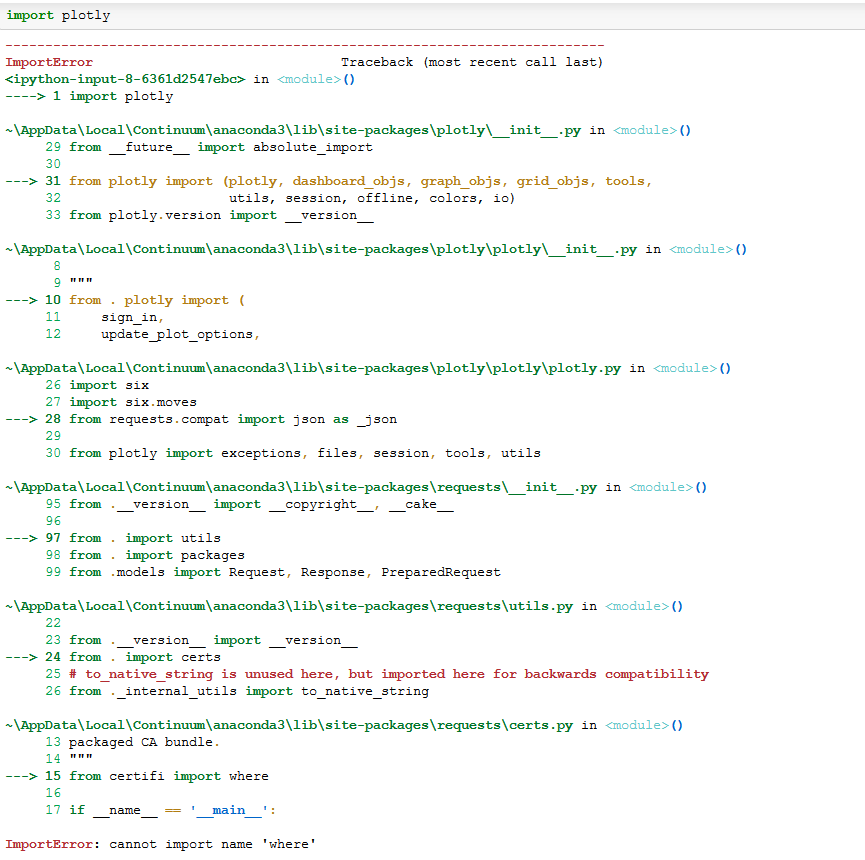
Tried reinstalling CERTI using pip and got the error.
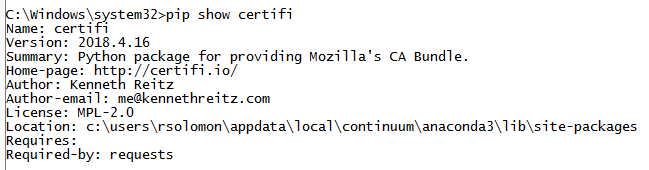

Error i get while importing:
 rohithsolomon
on 19 Sep 2018
rohithsolomon
on 19 Sep 2018
@valmunos, did you find the solution for this issue? I have tried uinstalling and installing certifi using:
sudo pip3 install -U certifi , but I still have the same issue. Any way to fix this?
Also I have checked in my Python3.6, inside /usr/local/lib/python3.6/dist-packages for certifi package installation, and it exists. Certifi = "2019.03.09".
 kazizi-dev
on 3 Jun 2019
kazizi-dev
on 3 Jun 2019
What happen is that
import certifigive a weirdnamespace, which has nothing:>>> import certifi >>> certifi <module 'certifi' (namespace)> >>> dir(certifi) ['__doc__', '__loader__', '__name__', '__package__', '__path__', '__spec__']
I experienced this also. My Lib/site-packages directory contained an empty certifi directory, which incorrectly allowed python to import the "module" without throwing a ModuleNotFoundError.
 cowlinator
on 28 Oct 2019
cowlinator
on 28 Oct 2019
Related issues
 ApproximateIdentity
·
5Comments
ApproximateIdentity
·
5Comments
 RitterHou
·
3Comments
RitterHou
·
3Comments
 peta15
·
6Comments
peta15
·
6Comments
 gcornut
·
5Comments
gcornut
·
5Comments
 pandaadb
·
6Comments
pandaadb
·
6Comments
Most helpful comment
Hi,
I encountered this as well.
For a minimal reproduction, run:
What happen is that
import certifigive a weirdnamespace, which has nothing:I think you should just add
certifito yourinstall_requires(or improve the check usinghasattr).For now I can use the workaround of
pip install -U certifi, but it's annoying.