Elasticsearch-js: DeserializationError: Unexpected end of JSON input
🐛 Bug Report
We are making Elasticsearch queries in a test file. The test file has multiple tests, each performing a query. We tried reordering the tests in the file and found that the first test in the file will be the only one that fails. Even with a stripped down body for the query, we are still inconsistently getting the following error:

Text: "DeserializationError: Unexpected end of JSON input"
To Reproduce
Run the following test multiple times (it takes a variable number of attempts to get the failure):
import { Client } from '@elastic/elasticsearch

const defaultClient = new Client({
    node: host,
    sniffOnStart: true
})

describe('elastic test', () => {
    test('it should not have deserialization errors', async () => {
        await defaultClient.search({
            index: 'common',
            type: '_doc',
            body: {
                query: {
                    match_all: {}
                }
            }
        })
    })
})
Expected behavior
The test should be passing consistently.
Your Environment
- node version: 10.11.0
@elastic/elasticsearchversion: ^7.5.1- os: Mac
- Elasticsearch instance version: 7.4.2
Please let me know if you need any additional information!
 msisti
All 32 comments
Hello!
Unfortunately, the test you have provided does not help to understand what the issue is.
Given that the error is a serialization error, it means that the response body is an invalid JSON.
For figure out what's going wrong, you have two ways:
- Enable debug mode:
DEBUG=elasticsearch node test.js
- Use a custom serializer and inspect the JSON string:
const { Client, Serializer, errors } = require('@elastic/elasticsearch')

class DebugSerializer extends Serializer {
  deserialize (json) {
    try {
      var object = JSON.parse(json)
    } catch (err) {
      console.dir(json) // add a log here
      throw new errors.DeserializationError(err.message)
    }
    return object
  }
}

const client = new Client({
  node: 'http://localhost:9200',
  Serializer: DebugSerializer
})

client.search({
  index: 'test',
  body: {
    query: {
      match_all: {}
    }
  }
}, (err, res) => {
  console.log(err || res)
})
Both methods are fine, the first will print many logs in the console, so you might want to use the second.
 delvedor
on 13 Feb 2020
delvedor
on 13 Feb 2020
Hello! Thank you for your quick response. We implemented the second solution that you suggested. We found that when the test fails, the JSON result is cut off in the middle. i.e. {"key": "Some string val or {"key":
Is this helpful?
msisti
on 14 Feb 2020
It means that the body you are getting back is broken for some reason.
Can you paste it here?
delvedor
on 14 Feb 2020
Because it is company data, I can't share it. However, some helpful information about the payload results:
- We should receive the same JSON payload on each run of the test.
- The JSON payload deserializes successfully on most attempts.
- When the JSON payload fails to deserialize, it is broken in different places (like the examples from my last comment).
Do you have any ideas why the same payload would randomly break and in different places?
msisti
on 14 Feb 2020
Sorry, but I want to be sure that I've understood the issue correctly.
You are sending multiple times the following request:
client.search({
  index: 'test',
  body: {
    query: {
      match_all: {}
    }
  }
}, (err, res) => {
  console.log(err || res)
})
And sometimes it fails when deserializing the body?
Furthermore, can you tell me in which parts of the body the data is broken? It's only the documents (the content of hits.hits[n]._source) or also other metadata?
delvedor
on 14 Feb 2020
Yes -- we send it multiple times by re-running the test. In the case of our original test file, the request was sent in each test in the file, but only the first request would fail (if at all). Reordering the tests in the file produced the same result: only the first test would occasionally fail when deserializing the body.
It is only failing in the contents of hits.hit[n]._source, but where in source and in which hit is variable.
msisti
on 14 Feb 2020
It is only failing in the contents of hits.hit[n]._source, but where in source and in which hit is variable.
So the problem is in the document and not in the metadata. This makes me think that there was an issue during the data ingestion.
How are you ingesting the data into Elasticsearch?
If you log the entire body, you should be able to see the _id field of each document, can you take that id and then run a get?
client.get({
  index: 'test',
  id: 'id of the broken document'
}, (err, res) => {
  console.log(err || res)
})
If this call is failing as well, I kindly ask you to run one of the following:
Open Kibana dev tools and run:
GET test/_doc/id_of_the_broken_document
or you can use curl:
curl localhost:9200/test/_doc/id_of_the_broken_document
And check if the document is also broken there. If so, then there should be an error during the data ingestion.
delvedor
on 14 Feb 2020
I used client.get() for the two _id's that contained the deserialization error, and both came back successfully with the data fully formatted in a JSON. For example, for the field that had a string value cut off in the middle, I can see the full string. However, after running the test many (~15) times, I eventually got the Deserialization error - this time in a different place in the _source than the errors I saw before.
I also ran the GET command in Kibana, and the data for the two documents came back fine every time.
This makes me think it isn't an issue with our data - it's well-formatted, and can be returned in full (and often is). It is just occasionally being cut off in the payload.
msisti
on 14 Feb 2020
How are you running Elasticsearch?
Can you create an example that I can run to reproduce the issue?
If you like, you can use https://github.com/delvedor/es-reproduce-issue.
delvedor
on 14 Feb 2020
Elastic is running clustered in AWS. We will try reproducing an environment for you next week and will keep you posted! Thanks again for your help & responsiveness!
msisti
on 14 Feb 2020
I am facing the exact similar issue from some days now, the configuration is exactly identical and the bug is also the same as well. The JSON response is broken inside the _source field from random places.
 apoorvHearth
on 23 Feb 2020
apoorvHearth
on 23 Feb 2020
Hi @apoorvHearth, our team has had to prioritize other action items, so we haven't had time to reproduce our Elasticsearch environment for @delvedor to test in yet. Would you be able to create an example that they could test in?
msisti
on 24 Feb 2020
I'll try to do so, @msisti
apoorvHearth
on 26 Feb 2020
Thanks, @apoorvHearth!
msisti
on 3 Mar 2020
Hi @apoorvHearth, do you have any update for this?
msisti
on 13 Mar 2020
I don't have time to put together a test either, but running into the same issue with an AWS 5.6 non-VPC cluster and the latest 5 series @elastic/elasticsearch client. Happens periodically in long-running scroll searches.
 austince
on 28 Mar 2020
austince
on 28 Mar 2020
We understand that this might be important for you, but this issue has been automatically marked as stale because it has not had recent activity either from our end or yours.
It will be closed if no further activity occurs, please write a comment if you would like to keep this going.
Note: in the past months we have built a new client, that has just landed in master. If you want to open an issue or a pr for the legacy client, you should do that in https://github.com/elastic/elasticsearch-js-legacy
![stale[bot] picture](https://avatars.githubusercontent.com/in/1724?v=4&s=40) stale[bot]
on 12 Apr 2020
stale[bot]
on 12 Apr 2020
We encounter this issue as well on prod and it doesn't always happens. We are using AWS ElasticSearch 6.x but we are not issuing a scroll.
Regardless, if the changes from v7 error handling at https://github.com/elastic/elasticsearch-js/blob/v7.7.1/lib/Serializer.js#L28 is applied into v6.x release at https://github.com/elastic/elasticsearch-js/blob/v6.8.7/lib/Serializer.js#L28, that would help people debug the issue better.
 faizhasim
on 19 May 2020
faizhasim
on 19 May 2020
In https://github.com/nodejs/node/issues/10358 NodeJS suspects a similar symptom could be a docker bug. @msisti @apoorvHearth @austince @faizhasim are you noticing this issue in a docker environment?
 rudolf
on 16 Oct 2020
rudolf
on 16 Oct 2020
Not in docker. We are running it in AWS lambda environment.
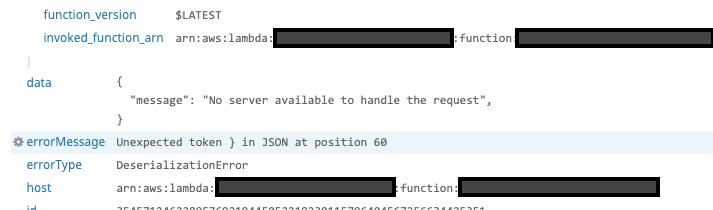
We can absolutely confirm that the response come from ElasticSearch because we use a modified version of Serializer.js from the links above (by specifying custom serializer).
faizhasim
on 16 Oct 2020
We originally noticed the error when running tests in a docker container, but I believe we were able to reproduce it in a local node environment with this issue's sample code in "To Reproduce."
msisti
on 16 Oct 2020
It would be incredibly helpful if someone could do a tcpdump or wireshark capture of the request on the server where the client code is being run. If this data is confidential we don't need the actual capture, but it would be useful to compare a few things:
- Is the response body valid JSON or is it already cut off at the network layer?
- What are the response headers?
- Does the response body match the content-length header?
rudolf
on 19 Oct 2020
I've been digging this error, and very likely is a connection error in the infrastructure.
You are getting the json parsing problem because the client has already started reading the body, but it can't detect that the socket has failed.
For addressing this problem the client needs to check the Content-Length header and throw the proper error if the body length does not match.
We can try to figure out if the connection has been prematurely closed by combining different events, but I need to check the compatibility of this solution between different Node.js versions.
To be clear, the bug is that the client is not signaling the error correctly, but even if it does, the problem is still present out there.
delvedor
on 20 Oct 2020
We are also facing that kind of errors (DeserializationError) randomly, along Econn reset. The two may be related.
I had opened an issue about Econn reset in the past, but I was not able to make it reproducible.
Environment:
- NodeJs 10.x on Google App Engine
- Elasticsearch Cloud 7.6.1
- @elastic/elasticsearch: 7.7.1 using default authentication (not Cloud auth)
 tomsquest
on 27 Oct 2020
tomsquest
on 27 Oct 2020
As per the log that we have (no details), it seems that DeserializationError and Econnreset are linked. I found that we got a Deserialization error at the same time than another Econnreset.
I don't know if it brings some valuable information/hints.

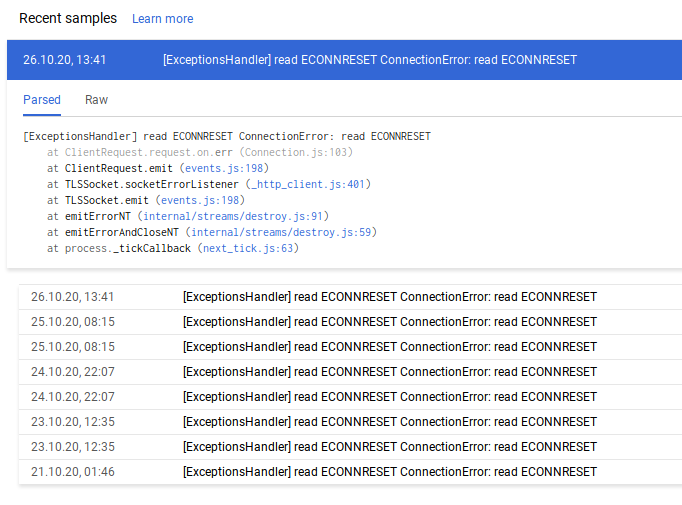
tomsquest
on 27 Oct 2020
Thanks @tomsquest, this is really helpful, it also confirms my findings, that the SerializationError is only hiding the connection error.
delvedor
on 28 Oct 2020
@delvedor We had an Econnreset error yesterday. We were able to get the full response. I am not able to know if this is useful or not. Are you interested in it ? (I will need an email as it contains sensitive information).
tomsquest
on 5 Nov 2020
@tomsquest Did your capture result in a DeserializationError?
rudolf
on 5 Nov 2020
@rudolf hum, no it's a ConnectionError as per the JS code.
But the error message is read ECONNRESET.
tomsquest
on 5 Nov 2020
When a Econnreset results in a ConnectionError everything is working as it should, so I don't think we'll be able to learn anything from that capture. If you're able to capture the network packets that cause a DeserializationError that would be helpful :+1:
rudolf
on 9 Nov 2020
Hello! #1343 has landed, it will be available in 7.10 soon :)
delvedor
on 10 Nov 2020
Hello! #1343 has landed, it will be available in
7.10soon :)
@delvedor The patch does not seem to be deployed for v6 !?
 cbm-abera
on 16 Dec 2020
cbm-abera
on 16 Dec 2020
Related issues
 jvonniedapn
·
11Comments
jvonniedapn
·
11Comments
 villasv
·
15Comments
villasv
·
15Comments
 NassiHarel
·
10Comments
NassiHarel
·
10Comments
 nexflo
·
70Comments
nexflo
·
70Comments
 kulakowka
·
10Comments
kulakowka
·
10Comments
Most helpful comment
I am facing the exact similar issue from some days now, the configuration is exactly identical and the bug is also the same as well. The JSON response is broken inside the _source field from random places.