Elasticpress: WPML: create separate index for every language
Have you searched for similar issues before submitting this one?
I have found a temporary solution at https://wordpress.org/support/topic/wpml-and-custom-post-types/ but it doesn't work (maybe because of current wp version incompatibility.
Is this a bug, question or feature request?
It's a feature request
Describe the issue you encountered:
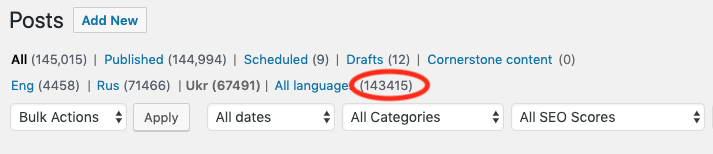
I have a site with 3 languages. Current EP plugin indexes ONLY ONE language (current WPML language in top menu). Every language requires its own analyzer. Therefore plugin need to create an index for every language, moreover, it needs a panel to edit ElasticSearch analyzer settings - including settings of hunspell dictionaries, stop words and other features.
The way described in issue #477 is not a solution because doesn't work for similar languages such as Russian, Ukrainian, Belorussian, Bulgarian or GB/US English
Therefore – it's essential feature for many website developers.
Maybe it needs a separate ES server for every language? In this case, the each index should be processed separately and described in EP plugin settings page linked to a proper ES server.
Current WordPress version:
5.1.1
Current ElasticPress version:
3.0a (2.8 - gives the same results)
Current Elasticsearch version:
6.3.2
Where do you host your Elasticsearch server:
self-hosted
Other plugins installed (WooCommerce, Simple Redirect Manager, etc..):
WPML, Display Posts, Fastest Cache, Webcraftic Cyr2Lat Reloaded, Monarch, CyberSEO Pro 8
(all can be disabled, without Cyr2Lat and WPML Multilingual CMS with any changes)
Steps to reproduce:
- I can give you full adm credentials for the site, and ssh root access for the test server
3.
Screenshots, if needed:

 vadimbk
All 25 comments
This could be accomplished with the indexables API in version 3.0.
 tlovett1
on 14 May 2019
tlovett1
on 14 May 2019
When you plan to launch ver.3.0?
vadimbk
on 15 May 2019
I find a work around
add_filter( 'ep_index_posts_args', 'index_posts_args');
function index_posts_args($arg)
  {
    $arg['suppress_filters'] = true;
    return $arg;
  }
This will index all other languages too.
But it have a bug, its will index permalink of English language.
 maidulcu
on 29 May 2019
maidulcu
on 29 May 2019
Also if i index multiple custom post, some post did not index.
maidulcu
on 29 May 2019
Sadly the above fix is broken since elasticpress 3.1
 Christophvh
on 16 Sep 2019
Christophvh
on 16 Sep 2019
Any news on this?
 danielslyman
on 25 Oct 2019
danielslyman
on 25 Oct 2019
For some reason, this makes it work for me. I am new to Elasticsearch and Elasticsearch. Could someone explain why this works afterwards?
function ep_fine_tuning_ep_formatted_args( $formatted_args, $args ) {
$search_fields = array(
    'post_title^4',
    'post_excerpt^2',
    'post_content',
);

$query = array(
    'bool' => array(
        'should' => array(
            array(
                'multi_match' => array(
                    'query'                => $args['s'],
                    'type'                 => 'phrase',
                    'fields'               => $search_fields,
                    'fuzziness'            => 'AUTO',
                    'minimum_should_match' => '2<-25%',
                ),
            ),
            array(
                'multi_match' => array(
                    'query'     => $args['s'],
                    'fields'    => $search_fields,
                    'operator'  => 'and',
                    'fuzziness' => 'AUTO',
                ),
            ),
        ),
    ),
);

$formatted_args['query'] = $query;

return $formatted_args;
}
add_filter( 'ep_formatted_args', 'ep_fine_tuning_ep_formatted_args', 10, 2 );
EDIT: However, when on a product, switching language, a 404 error is returned.
danielslyman
on 25 Oct 2019
Hi Guy'z,
If you still wondering how to make ElasticPress works fine with WPML, here what i've learned :
Currently there's two bugs that make it impossible to use WPML v4.3.1 with ElasticPress v3.2.1.
Indexing : after indexing you get only custom post type in current language. To get all language indexed, you have to add this code :
add_filter('ep_index_posts_args', array($this, 'ep_index_wpml'), 20 );

function ep_index_wpml($args) {
  return array_merge($args, ['suppress_filters' => true]);
}
Search Results : WPML is using the wrong filter to pass language filter on query. To fix that you have to change the setup() function in WPML, like this :
public function set_up() {
  add_filter( 'ep_post_sync_args', array( $this->lang_integration, 'add_lang_info' ), 10, 2 );
  add_filter( 'ep_formatted_args', array( $this->lang_integration, 'filter_by_lang' ), 10, 2 );
}
changing the second call, the good filter is 'ep_formatted_args'.
this modification has an impact, on function filter_by_lang(), that become :
public function filter_by_lang( $formatted_args, $args  ) {
  $formatted_args['post_filter']['bool']['must'][] = array(
                                                                          'term' => array(
                                                                          'post_lang' => $this->get_query_lang(),
                                                             ),
                                                             );

  return $formatted_args;
}
After that you'll get all your content indexed with all language et results per language.
 khelil
on 4 Nov 2019
khelil
on 4 Nov 2019
Thanks for the input, I am getting PHP errors when trying to add this to the functions.php, any idea where I should put this?
danielslyman
on 12 Nov 2019
@danielslyman you can put the first function (indexing) on your theme or plugin...for search results you have to modify the functions directly on WPML plugin files. This is not a stable solution, that's sure. I noticed the WPML team about that, so i suppose it will be soon patched...
khelil
on 12 Nov 2019
Thanks for your reply!
- When adding the indexing function I receive this error:
Your PHP code changes were rolled back due to an error on line 86 of file wp-content/plugins/query-monitor/collectors/php_errors.php. Please fix and try saving again.

Uncaught Error: Using $this when not in object context in wp-content/themes/astra/functions.php:160
Stack trace:
#0 wp-settings.php(499): include()
#1 wp-config.php(110): require_once('/var/www/vhosts...')
#2 wp-load.php(37): require_once('/var/www/vhosts...')
#3 wp-admin/admin.php(34): require_once('/var/www/vhosts...')
#4 wp-admin/theme-editor.php(10): require_once('/var/www/vhosts...')
#5 {main}

Next Exception: Using $this when not in object context in wp-content/plugins/query-monitor/collectors/php_errors.php:86
Stack trace:
#0 [internal function]: QM_Collector_PHP_Errors->exception_handler(Object(Error))
#1 {main}
  thrown
- Could you tell me which files you added this to?
Thanks so much,
Daniel
danielslyman
on 12 Nov 2019
That's because in my example, ep_index_wpml is declared in a class.
In your case, you should try this :
add_filter('ep_index_posts_args', 'ep_index_wpml', 20 );

function ep_index_wpml($args) {
  return array_merge($args, ['suppress_filters' => true]);
}
Thanks! That worked, could you now tell me where I would put this?
public function set_up() {
add_filter( 'ep_post_sync_args', array( $this->lang_integration, 'add_lang_info' ), 10, 2 );
add_filter( 'ep_formatted_args', array( $this->lang_integration, 'filter_by_lang' ), 10, 2 );
}
thank you for your help!
danielslyman
on 13 Nov 2019
@danielslyman you have to search in WPML folder : plugins/sitepress-cms/sitepress-multilingual-cms for both functions : set_up() and filter_by_lang() and do the changes...
khelil
on 13 Nov 2019
@khelil seems to work beautifully, thanks a lot!
Did you notify the WPML team, so they can fix this in a future release?
 maartenhunink
on 19 Jan 2020
maartenhunink
on 19 Jan 2020
You're welcome @maartenhunink happy to help !
I did notify the WPML Team, but still waiting for the fix. Looks like they have plenty to fix ;)
khelil
on 20 Jan 2020
@khelil Thank you for your solution!
We have multiple language variants, for example en and en_UK. With this solution the search results of these two languages are combined (so you'll see duplicates).
To fix this I've added .keyword to the post_lang term:
$formatted_args['post_filter']['bool']['must'][] = array(
    'term' => array(
        'post_lang.keyword' => $this->get_query_lang(),
    ),
 );
 wespiremedia
on 4 Mar 2020
wespiremedia
on 4 Mar 2020
You're welcome @wespiremedia and thanks for sharing this subtle tips ;)
khelil
on 11 Mar 2020
You're welcome @maartenhunink happy to help !
I did notify the WPML Team, but still waiting for the fix. Looks like they have plenty to fix ;)
We're in June now and WPML still have not budged even the slightest on the patch.
Also, none of these solutions seem to be working for me anyway... ...I still get English posts loading on all French language pages in both the admin and the front end. Pages, CPTs all work perfectly, it's only posts that seem the be effected.
 tonydjukic
on 4 Jun 2020
tonydjukic
on 4 Jun 2020
I created two support tickets on the WPML forum. It doesn't look like they are planning to fix this any time soon, if at all, since not enough people are using the plugin. For more info see here:
https://wpml.org/forums/topic/2-bugs-causing-elasticpress-and-wpml-not-to-work-together/
https://wpml.org/forums/topic/no-responses-anymore-to-support-request/
It's kinda strange that within ElasticPress there was a settings toggle to support WPML for a while (which didn't seem to make a difference). But now it's gone. I guess there is no support coming for this. Might need to look into other solutions, maybe Jetpack Search? It's also using elasticsearch, but I haven't tested it for WPML support yet.
maartenhunink
on 5 Jun 2020
I've always found JetPack in general to be a bit too cumbersome and have even had updates crash sites. This is unfortunate. Am I right in understanding that WPML even removed the compatibility directory for EP in one of the recent updates? So even those of us that want to apply the work-around fix can't?
tonydjukic
on 5 Jun 2020
Well... they removed their official compatibility (and probably support), but the compatibility files are still there. So at the moment you can apply the fix. I just tested it and it's still working.
maartenhunink
on 5 Jun 2020
Ah, I was wrong. They actually removed the elasticpress compatibility files in version 4.3.15 of WPML.
maartenhunink
on 5 Jun 2020
Just a followup on the paper trail for those looking for an answer you can find a full post here with WPML https://wpml.org/documentation/plugins-compatibility/using-elasticpress-on-your-multilingual-site/ and they posted a plugin in Github here https://github.com/OnTheGoSystems/wpml-elasticpress/releases
 shaneonabike
on 27 Nov 2020
shaneonabike
on 27 Nov 2020
@shaneonabike really appreciated. Big thanks!
 HansVanEijsden
on 27 Nov 2020
HansVanEijsden
on 27 Nov 2020
Related issues
 blindpet
·
7Comments
blindpet
·
7Comments
 jakejackson1
·
8Comments
jakejackson1
·
8Comments
 diwakhat1603
·
3Comments
diwakhat1603
·
3Comments
 mihaijoldis
·
6Comments
mihaijoldis
·
6Comments
 tamara-m
·
3Comments
tamara-m
·
3Comments
Most helpful comment
You're welcome @maartenhunink happy to help !
I did notify the WPML Team, but still waiting for the fix. Looks like they have plenty to fix ;)