Elasticpress: Your Elasticsearch version is below the minimum required Elasticsearch version 1.7. ElasticPress may or may not work properly.
Have you searched for similar issues before submitting this one?
Yes
Is this a bug, question or feature request?
Bug
Describe the issue you encountered:
When installed I receive Your Elasticsearch version is below the minimum required Elasticsearch version 1.7. ElasticPress may or may not work properly. and I am unable to use Elasticsearch via Wordpress.
Current WordPress version:
4.9.8
Current ElasticPress version:
2.6.1
Current Elasticsearch version:
 curl -XGET 'http://localhost:9200'
{
  "name" : "ub1CwNw",
  "cluster_name" : "elasticsearch",
  "cluster_uuid" : "3iEpRm4RSQysg8fLvIppDw",
  "version" : {
    "number" : "5.6.13",
    "build_hash" : "4d5320b",
    "build_date" : "2018-10-30T19:05:08.237Z",
    "build_snapshot" : false,
    "lucene_version" : "6.6.1"
  },
  "tagline" : "You Know, for Search"
}
Where do you host your Elasticsearch server:
On same server as Wordpress
Other plugins installed (WooCommerce, Simple Redirect Manager, etc..):
Nothing major
Steps to reproduce:
- Running Centos 7, Java 8 and Elasticsearch 5.6.13
Screenshots, if needed:
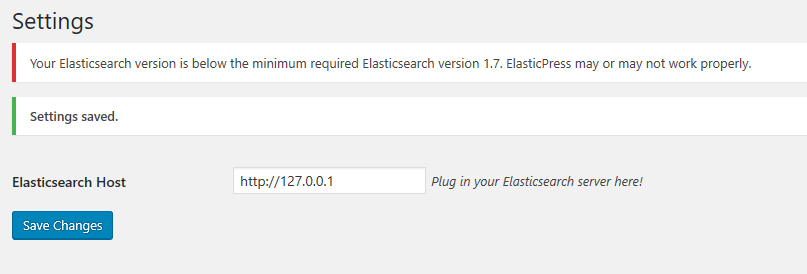
 BamaStangGuy
All 27 comments
Hi @BamaStangGuy ,
This seems odd, could you please check with another version like 5.6.5 ? This is what I'm currently using and I have no issues.
Maybe this is a bug with this specific version of ES in which case, we will have to address, but I'd like to first confirm you do not have problems with another version.
Thanks for raising the issue
 oscarssanchez
on 28 Nov 2018
oscarssanchez
on 28 Nov 2018
If that version is correct, there may be a bug in this code - https://github.com/10up/ElasticPress/blob/develop/classes/class-ep-dashboard.php#L273
 tlovett1
on 30 Nov 2018
tlovett1
on 30 Nov 2018
If that version is correct, there may be a bug in this code - https://github.com/10up/ElasticPress/blob/develop/classes/class-ep-dashboard.php#L273
It is correct version. Latest version of 5.6: https://www.elastic.co/guide/en/elasticsearch/reference/5.6/rpm.html
BamaStangGuy
on 30 Nov 2018
Hi @BamaStangGuy ,
I actually tested this with ES 5.6.13:
{
"name": "ZJpsUAV",
"cluster_name": "elasticsearch",
"cluster_uuid": "MdxOZQ3-Q1OTFZvUG-KJoQ",
"version": {
"number": "5.6.13",
"build_hash": "4d5320b",
"build_date": "2018-10-30T19:05:08.237Z",
"build_snapshot": false,
"lucene_version": "6.6.1"
},
"tagline": "You Know, for Search"
}
I have no issues so far on ElasticPress 2.6.1
Is there any more info you could give us to help troubleshoot this? Did you try another version ?
Thanks!
oscarssanchez
on 1 Dec 2018
Same thing occurs with 5.6.5:
curl -XGET 'http://localhost:9200'
{
"name" : "ub1CwNw",
"cluster_name" : "elasticsearch",
"cluster_uuid" : "3iEpRm4RSQysg8fLvIppDw",
"version" : {
"number" : "5.6.5",
"build_hash" : "6a37571",
"build_date" : "2017-12-04T07:50:10.466Z",
"build_snapshot" : false,
"lucene_version" : "6.6.1"
},
"tagline" : "You Know, for Search"
}
I have disabled every plugin except ElasticPress but same results.
BamaStangGuy
on 1 Dec 2018
Is there a way I can disable the check so that I can at least test to see that it is working?
BamaStangGuy
on 1 Dec 2018
Yes @BamaStangGuy , you can modify these constants at will to test this out locally (as I see you ES is on your localhost). Bear in mind you should not touch this on a production environment as they will get overriden if you update the plugin:
https://github.com/10up/ElasticPress/blob/develop/elasticpress.php#L36
https://github.com/10up/ElasticPress/blob/develop/elasticpress.php#L37
Additionally, you can use ep_get_elasticsearch_version() to debug and see which version the plugin is thinking you are running, maybe ElasticPress is thinking you are running another version.
oscarssanchez
on 1 Dec 2018
Where would I use ep_get_elasticsearch_version() to get it to print out the version number? I have changed the min constant to just about everything but it still shows the error message and prevents me from using the settings page.
BamaStangGuy
on 3 Dec 2018
Hi @BamaStangGuy , if you are using a debugger, you can just evaluate that function. If not, you can print it anywhere you'd want to to check that.
oscarssanchez
on 10 Dec 2018
It simply doesn't echo anything out.
BamaStangGuy
on 11 Dec 2018
I've same problem. My development placed in Google cloud platform.
It's my response:
{
  "name" : "instance-0000000002",
  "cluster_name" : "41fdaa9abfb246d0b049336a3bdcc762",
  "cluster_uuid" : "hDqemj2hQTSXErDTJu1JmA",
  "version" : {
    "number" : "6.5.2",
    "build_flavor" : "default",
    "build_type" : "tar",
    "build_hash" : "9434bed",
    "build_date" : "2018-11-29T23:58:20.891072Z",
    "build_snapshot" : false,
    "lucene_version" : "7.5.0",
    "minimum_wire_compatibility_version" : "5.6.0",
    "minimum_index_compatibility_version" : "5.0.0"
  },
  "tagline" : "You Know, for Search"
}
I tried change EP_ES_VERSION_MIN and EP_ES_VERSION_MAX but it hasn't effect.
I even changed so:
define( 'EP_ES_VERSION_MAX', '6.9.0' );
define( 'EP_ES_VERSION_MIN', '0.0.1' );
Tried and without minor version too.
 MrEfrem
on 11 Dec 2018
MrEfrem
on 11 Dec 2018
I see @BamaStangGuy ,
Is there any chance you could write some steps to reproduce the local environment you are currently working on? As this seems it is a very specific case and I can't reproduce with what I am running locally.
Thanks @MrEfrem for adding your data to confirm this is an issue. Hopefully we can solve this :)
oscarssanchez
on 12 Dec 2018
@oscarssanchez in my case I found and fixed the problem so (elasticpress/classes/class-ep-api.php):
public function get_elasticsearch_info( $force = false ) {
...
$response_body_raw = wp_remote_retrieve_body( $request );
$response_body = WP_Http_Encoding::decompress( $response_body_raw );
...
Because my server respond in deflate encoding, but your source code don't decompress the response.
MrEfrem
on 12 Dec 2018
@oscarssanchez in my case I found and fixed the problem so (
elasticpress/classes/class-ep-api.php):public function get_elasticsearch_info( $force = false ) { ... $response_body_raw = wp_remote_retrieve_body( $request ); $response_body = WP_Http_Encoding::decompress( $response_body_raw ); ...Because my server respond in
deflateencoding, but your source code don't decompress the response.
God bless you. This was perfect.
BamaStangGuy
on 12 Dec 2018
Sorry, didn't mean to close and open again, but thanks. This was driving me nuts.
BamaStangGuy
on 12 Dec 2018
Now I am having problems with wp_remote_retrieve_body loading the landing page for my default nginx host. Why would that happen?
BamaStangGuy
on 12 Dec 2018
If I setup a new linode instance where I can reproduce problem above, who can I send the credentials to for troubleshooting? I can reproduce the issue on a clean install based on my server setup.
BamaStangGuy
on 12 Dec 2018
Bump. I can reproduce this bug and give you a complete open server to debug.
BamaStangGuy
on 16 Dec 2018
I think it would be great if we can have this EP info in the dashboard, so things like this can be easily solved/tracked.
 turtlepod
on 11 Jan 2019
turtlepod
on 11 Jan 2019
What is the status of this bug? I haven't been able to use this plugin since installing it and can reproduce it across different servers.
BamaStangGuy
on 11 Jan 2019
Hi @BamaStangGuy. Sorry for the delays getting back to you.
Looking at the original issue encountered, it appears that the plugin is getting an empty string instead of the Elasticsearch version. If the version number was retreived, it would be displayed in the error message. (e.g. Your Elasticsearch version 0.5.1 is below the minimum required Elasticsearch version 1.7. ElasticPress may or may not work properly.)
Just to get some more info on a hunch, could you run the following curl command?
curl -XGET 'http://localhost:9200/_nodes/plugins?pretty'
In regard to the server issue, I'm wondering if you can't use the http_response filter to run WP_Http_Encoding::decompress() on the response body. (https://developer.wordpress.org/reference/hooks/http_response/)
 allan23
on 14 Jan 2019
allan23
on 14 Jan 2019
Hi @BamaStangGuy. Sorry for the delays getting back to you.
Looking at the original issue encountered, it appears that the plugin is getting an empty string instead of the Elasticsearch version. If the version number was retreived, it would be displayed in the error message. (e.g.
Your Elasticsearch version 0.5.1 is below the minimum required Elasticsearch version 1.7. ElasticPress may or may not work properly.)Just to get some more info on a hunch, could you run the following curl command?
curl -XGET 'http://localhost:9200/_nodes/plugins?pretty'In regard to the server issue, I'm wondering if you can't use the
http_responsefilter to runWP_Http_Encoding::decompress()on the response body. (https://developer.wordpress.org/reference/hooks/http_response/)
curl -XGET 'http://localhost:9200/_nodes/plugins?pretty'
{
  "_nodes" : {
    "total" : 1,
    "successful" : 1,
    "failed" : 0
  },
  "cluster_name" : "elasticsearch",
  "nodes" : {
    "hvdXtZrUS-m4a0EpslVHFA" : {
      "name" : "hvdXtZr",
      "transport_address" : "127.0.0.1:9300",
      "host" : "127.0.0.1",
      "ip" : "127.0.0.1",
      "version" : "5.6.14",
      "build_hash" : "f310fe9",
      "roles" : [
        "master",
        "data",
        "ingest"
      ],
      "plugins" : [ ],
      "modules" : [
        {
          "name" : "aggs-matrix-stats",
          "version" : "5.6.14",
          "description" : "Adds aggregations whose input are a list of numeric fields and output includes a matrix.",
          "classname" : "org.elasticsearch.search.aggregations.matrix.MatrixAggregationPlugin",
          "has_native_controller" : false
        },
        {
          "name" : "ingest-common",
          "version" : "5.6.14",
          "description" : "Module for ingest processors that do not require additional security permissions or have large dependencies and resources",
          "classname" : "org.elasticsearch.ingest.common.IngestCommonPlugin",
          "has_native_controller" : false
        },
        {
          "name" : "lang-expression",
          "version" : "5.6.14",
          "description" : "Lucene expressions integration for Elasticsearch",
          "classname" : "org.elasticsearch.script.expression.ExpressionPlugin",
          "has_native_controller" : false
        },
        {
          "name" : "lang-groovy",
          "version" : "5.6.14",
          "description" : "Groovy scripting integration for Elasticsearch",
          "classname" : "org.elasticsearch.script.groovy.GroovyPlugin",
          "has_native_controller" : false
        },
        {
          "name" : "lang-mustache",
          "version" : "5.6.14",
          "description" : "Mustache scripting integration for Elasticsearch",
          "classname" : "org.elasticsearch.script.mustache.MustachePlugin",
          "has_native_controller" : false
        },
        {
          "name" : "lang-painless",
          "version" : "5.6.14",
          "description" : "An easy, safe and fast scripting language for Elasticsearch",
          "classname" : "org.elasticsearch.painless.PainlessPlugin",
          "has_native_controller" : false
        },
        {
          "name" : "parent-join",
          "version" : "5.6.14",
          "description" : "This module adds the support parent-child queries and aggregations",
          "classname" : "org.elasticsearch.join.ParentJoinPlugin",
          "has_native_controller" : false
        },
        {
          "name" : "percolator",
          "version" : "5.6.14",
          "description" : "Percolator module adds capability to index queries and query these queries by specifying documents",
          "classname" : "org.elasticsearch.percolator.PercolatorPlugin",
          "has_native_controller" : false
        },
        {
          "name" : "reindex",
          "version" : "5.6.14",
          "description" : "The Reindex module adds APIs to reindex from one index to another or update documents in place.",
          "classname" : "org.elasticsearch.index.reindex.ReindexPlugin",
          "has_native_controller" : false
        },
        {
          "name" : "transport-netty3",
          "version" : "5.6.14",
          "description" : "Netty 3 based transport implementation",
          "classname" : "org.elasticsearch.transport.Netty3Plugin",
          "has_native_controller" : false
        },
        {
          "name" : "transport-netty4",
          "version" : "5.6.14",
          "description" : "Netty 4 based transport implementation",
          "classname" : "org.elasticsearch.transport.Netty4Plugin",
          "has_native_controller" : false
        }
      ]
    }
  }
}
BamaStangGuy
on 17 Jan 2019
@BamaStangGuy, it looks like it's not the plugin versions causing the issue.
Does using the http_response filter running WP_Http_Encoding::decompress() on the response body fix this issue?
allan23
on 21 Jan 2019
@BamaStangGuy, it looks like it's not the plugin versions causing the issue.
Does using the
http_responsefilter runningWP_Http_Encoding::decompress()on the response body fix this issue?
It did not on this particular server or other servers setup in the exact manner. The server is Centos 7 running https://www.centminmod.com with Elasticsearch installed via https://www.elastic.co/guide/en/elasticsearch/reference/5.6/rpm.html
BamaStangGuy
on 22 Jan 2019
@BamaStangGuy, can you email me with your site info and possibly set me up as an admin user?
My email is allan.[email protected]
Also, if you don't mind, could you please recap the steps to reproduce your issue?
What theme and plugins you currently have activated, etc.
Also just for sanity's sake, did you try running ElasticPress with a default WordPress theme and no other plugins activated?
allan23
on 28 Jan 2019
@BamaStangGuy, can you email me with your site info and possibly set me up as an admin user?
My email is allan.[email protected]
Also, if you don't mind, could you please recap the steps to reproduce your issue?
What theme and plugins you currently have activated, etc.Also just for sanity's sake, did you try running ElasticPress with a default WordPress theme and no other plugins activated?
Absolutely. Give me 24 hours and I can set you up. Thanks!
As for your last question, yes I did.
BamaStangGuy
on 31 Jan 2019
@BamaStangGuy, can you email me with your site info and possibly set me up as an admin user?
My email is allan.[email protected]
Also, if you don't mind, could you please recap the steps to reproduce your issue?
What theme and plugins you currently have activated, etc.
Also just for sanity's sake, did you try running ElasticPress with a default WordPress theme and no other plugins activated?Absolutely. Give me 24 hours and I can set you up. Thanks!
As for your last question, yes I did.
Sorry for delay but email sent with everything. Hope you can figure it out!
BamaStangGuy
on 14 Feb 2019
Related issues
 JJJ
·
5Comments
JJJ
·
5Comments
 blindpet
·
7Comments
blindpet
·
7Comments
 vnmedeiros
·
3Comments
vnmedeiros
·
3Comments
 psorensen
·
7Comments
psorensen
·
7Comments
 brunocrosier
·
3Comments
brunocrosier
·
3Comments
Most helpful comment
I've same problem. My development placed in Google cloud platform.
It's my response:
I tried change
EP_ES_VERSION_MINandEP_ES_VERSION_MAXbut it hasn't effect.I even changed so:
Tried and without minor version too.