Elastalert: Certificate alerting using elastalert with heartbeat indices
Hi Team
We are using "heartbeat" to pull out the certificate details in to elasticsearch indices. We planned to use elast alert to trigger an email whenever the certificates is going to expire within 90 days. When checking the heartbeat data, we can see the certificate created/valid date as the following.
"tls.certificate_not_valid_after" and "tls.certificate_not_valid_before"
_Example form "heartbeat":
tls.certificate_not_valid_after | Feb 1, 2021 @ 17:29:12.000
tls.certificate_not_valid_before | Dec 4, 2019 @ 13:16:47.000_
Is it possible using elastalert rules to write some login as the following?
Value of "tls.certificate_not_valid_after" - "Current date" | If the value is lessthan 90 then trigger an alert.
Reagrds,
Sai
 saiprathapdp
All 10 comments
I think it can be done if you can search with elasticsearch or kibana. Because you can write it in the alert condition
 nsano-rururu
on 20 Nov 2020
nsano-rururu
on 20 Nov 2020
we have tried using that option but we are not getting appropriate values like customer name or domain url name in the index values
saiprathapdp
on 20 Nov 2020
I don't know what you're talking about.
What kind of Elasticsearch index, what kind of key, what value do you want to be alerted?
What did you write about the alert rule?
nsano-rururu
on 20 Nov 2020
What kind of key does the target index have?
nsano-rururu
on 20 Nov 2020
we have configured url monitoring in heartbeat YAML like below example.
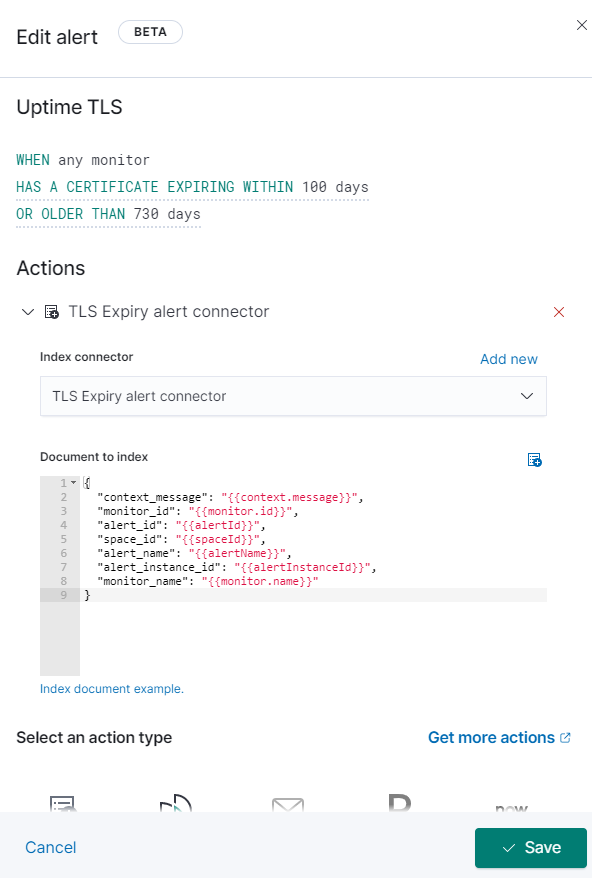
we are trying to configure certificate alert from kibana as like the following "Document to index" and we would like to expect the id or the name "MMT CMC" in to the index.
Example:
type:http
hosts: ["https://mmt-cmc.com"]
id: MMT CMC
Name: MMT CMC
Schedule:: "@every 10s"
we have created alert for that in kibana "Document to index" with below configuration.
{
"context_message": "{{context.message}}",
"monitor_id": "{{monitor.id}}",
"alert_id": "{{alertId}}",
"space_id": "{{spaceId}}",
"alert_name": "{{alertName}}",
"alert_instance_id": "{{alertInstanceId}}",
"monitor_name": "{{monitor.name}}"
}
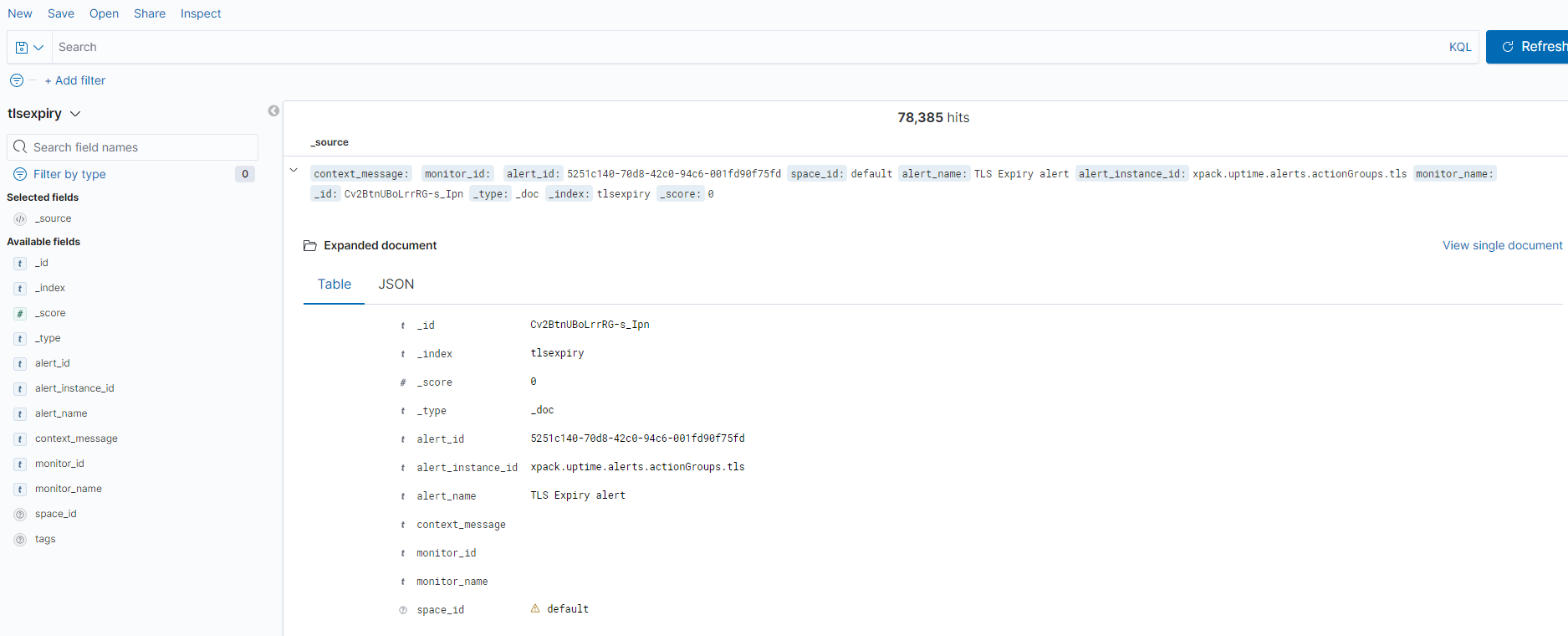
In index we can see only few details not the monitor_id and monitor_name
_id Cv2BtnUBoLrrRG-s_Ipn
_index tlsexpiry
_score 0
_type _doc
alert_id 5251c140-70d8-42c0-94c6-001fd90f75fd
alert_instance_id xpack.uptime.alerts.actionGroups.tls
alert_name TLS Expiry alert
context_message
monitor_id
monitor_name
space_id default
please let us know how to achieve this.
saiprathapdp
on 23 Nov 2020
We also recommend asking questions on the Gitter channel
https://gitter.im/Yelp/elastalert
nsano-rururu
on 23 Nov 2020
The following information may be helpful
Query a specific time-range and alert at specific time of the day
https://stackoverflow.com/questions/37855146/query-a-specific-time-range-and-alert-at-specific-time-of-the-day
nsano-rururu
on 23 Nov 2020
Thanks for your quick response
saiprathapdp
on 24 Nov 2020
The following information may be helpful
Query a specific time-range and alert at specific time of the day
https://stackoverflow.com/questions/37855146/query-a-specific-time-range-and-alert-at-specific-time-of-the-day
saiprathapdp
on 24 Nov 2020
how to alert Certificate alerting using elastalert with heartbeat indices without elastalert kibana plugin?
Can you share yaml file?
 bbatmandakh
on 22 Jan 2021
bbatmandakh
on 22 Jan 2021
Related issues
 PMDubuc
·
3Comments
PMDubuc
·
3Comments
 abhishekjiitr
·
3Comments
abhishekjiitr
·
3Comments
 chihhanyu
·
3Comments
chihhanyu
·
3Comments
 aromualdo
·
4Comments
aromualdo
·
4Comments
 shaohk
·
4Comments
shaohk
·
4Comments