Elastalert: Alert email based on percentage
@Qmando
I would like to create an alert if the percentage is > 25%. Is there any options in elastalert to write a rule to match the %. I'm using graylog for log collection. Also, let me know if this can be achieved using spike ?
 sathishdsgithub
All 5 comments
 Qmando
on 25 Aug 2017
Qmando
on 25 Aug 2017
@Dmitry1987
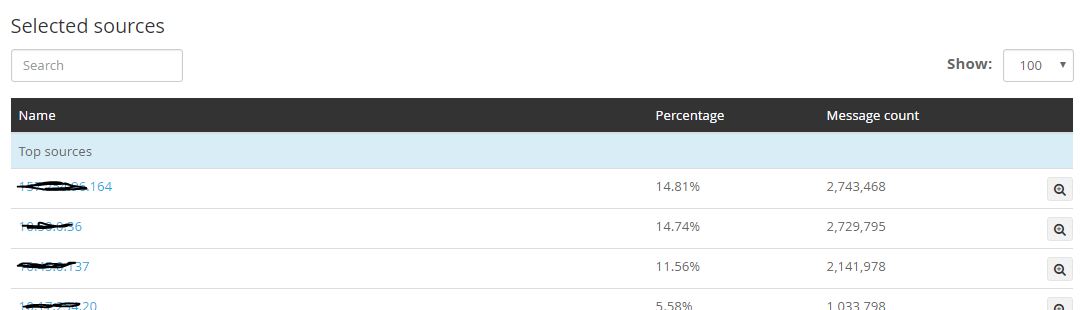
I need your help to start creating a query rule for the percentage match. In graylog we have an options to see the top source that is sending the logs. You can refer the above screen for reference. I would like to know which log _type I should query in graylog and what is the .yam rule format to be created to send an alert email if the percentage is >25% .
sathishdsgithub
on 25 Aug 2017
That percentage is how much of the total logs come from each source IP? Hmm, this may actually not be possible without either
a. hardcoding a threshold
b. creating alerts for each source IP
Qmando
on 25 Aug 2017
Hi @sathishdsgithub , what you describe is an aggregation of all sources with count of documents coming from each one, and later a percentage calculation of total? it's not possible with ElastAlert I afraid... I can't think of an existing rule that will allow to calculate that.
A percentage_match for example can only make 1 big query, and 1 sub-query (bucket aggregation) of total. This way you can find for example what is % of 1 particular source, out of 'all'. And it will need a rule per each source.
I can suggest for you to write a script that periodically runs and saves aggregation results into separate elasticsearch index (like "my_aggregations_hourly") in a format that will allow you to query by "count" of field. So you have "percentage" field, represented as clear number without "%". And the rule you set is a "threshold" of 25. If any found item has its "counter" > 25. You alert on it. That's complicated, but I have no other ideas to suggest.
 Dmitry1987
on 26 Aug 2017
Dmitry1987
on 26 Aug 2017
@Qmando @Dmitry1987
Below is the Elasticsearch Query for the top source IP address. Is there any options to use the below query in elastalert and alert for the top source IP address ?
The tricky part is below query search only based on specific IP address 192.168.96.141, .
{
  "from": 0,
  "size": 150,
  "query": {
    "bool": {
      "must": {
        "query_string": {
          "query": "source:192.168.96.141",
          "allow_leading_wildcard": false
        }
      },
      "filter": {
        "bool": {
          "must": {
            "range": {
              "timestamp": {
                "from": "2017-09-02 14:10:14.429",
                "to": "2017-09-02 15:10:14.429",
                "include_lower": true,
                "include_upper": true
              }
            }
          }
        }
      }
    }
  },
  "sort": [
    {
      "timestamp": {
        "order": "desc"
      }
    }
  ]
}
Related issues
 MaximilianKaltner
·
3Comments
MaximilianKaltner
·
3Comments
 PMDubuc
·
3Comments
PMDubuc
·
3Comments
 shortstack
·
3Comments
shortstack
·
3Comments
 abhishekjiitr
·
3Comments
abhishekjiitr
·
3Comments
 aromualdo
·
4Comments
aromualdo
·
4Comments
Most helpful comment
@Qmando @Dmitry1987
Below is the Elasticsearch Query for the top source IP address. Is there any options to use the below query in elastalert and alert for the top source IP address ?
The tricky part is below query search only based on specific
IP address 192.168.96.141, .