Eksctl: [0.26.0-rc.1] Instances failed to join the kubernetes cluster
What happened?
When creating a nodegroup which need the ARM AMI, nodes can't join the cluster
What you expected to happen?
The node to join the cluster
How to reproduce it?
eksctl create nodegroup --config-file=the_file_below.yaml
apiVersion: eksctl.io/v1alpha5
kind: ClusterConfig

metadata:
  name: foo
  region: eu-central-1

managedNodeGroups:
  - name: bar
    instanceType: r6g.medium
    desiredCapacity: 1
Anything else we need to know?
The doc is pretty clear for most of the case, but the error hapenning here is not self-explaining. The problem is in fact caused by many factors like the instance type not available in the current region, STS disabled, or some AMI problem like ARM which were not supported before but now are in the 0.26, yet node still can't join.
As i can't even make them join through the console i'm discussing this right now with the AWS support but i think eksctl should be more precise on the errors regardless of what the aws api give back, which could help us pin pointing those problems more easily.
:point_down: This doesn't even work, nodes can't join
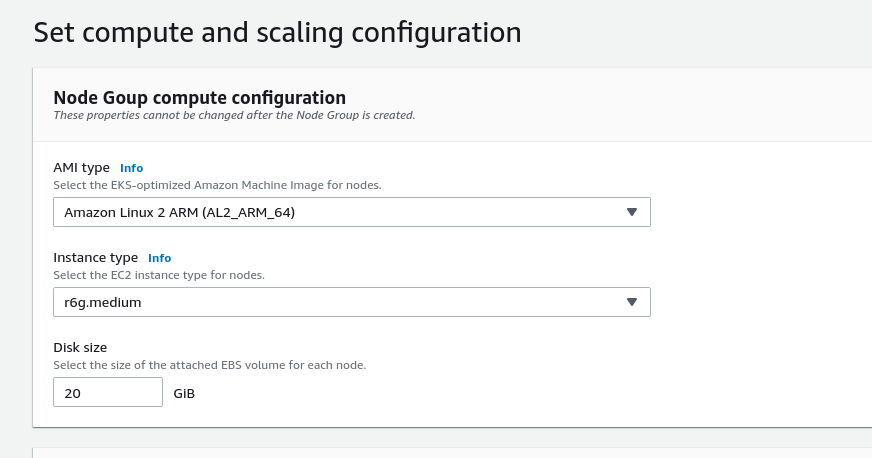
This issue is related to #1482 which is getting quite blurry
Versions
# eksctl version
0.26.0-rc.1
# kubectl version --short
Client Version: v1.18.5
Server Version: v1.17.9-eks-4c6976
logs are just the cloudformation errors logs stating node failed to join the instance
 Sceat
Sceat
All 7 comments
Same for me with both eksctl version 0.25.0:
[ℹ]  eksctl version 0.25.0
[ℹ]  using region ap-south-1
[ℹ]  setting availability zones to [ap-south-1b ap-south-1c ap-south-1a]
[ℹ]  subnets for ap-south-1b - public:xxx.xxx.xxx.0/19 private:xxx.xxx.xxx.0/19
[ℹ]  subnets for ap-south-1c - public:xxx.xxx.xxx.0/19 private:xxx.xxx.xxx.0/19
[ℹ]  subnets for ap-south-1a - public:xxx.xxx.xxx.0/19 private:xxx.xxx.xxx.0/19
[ℹ]  using Kubernetes version 1.17
[ℹ]  creating EKS cluster "india" in "ap-south-1" region with managed nodes
[ℹ]  1 nodegroup (ng-1) was included (based on the include/exclude rules)
[ℹ]  will create a CloudFormation stack for cluster itself and 0 nodegroup stack(s)
[ℹ]  will create a CloudFormation stack for cluster itself and 1 managed nodegroup stack(s)
[ℹ]  if you encounter any issues, check CloudFormation console or try 'eksctl utils describe-stacks --region=ap-south-1 --cluster=india'
[ℹ]  CloudWatch logging will not be enabled for cluster "india" in "ap-south-1"
[ℹ]  you can enable it with 'eksctl utils update-cluster-logging --region=ap-south-1 --cluster=india'
[ℹ]  Kubernetes API endpoint access will use default of {publicAccess=true, privateAccess=false} for cluster "india" in "ap-south-1"
[ℹ]  2 sequential tasks: { create cluster control plane "india", 2 sequential sub-tasks: { no tasks, create managed nodegroup "ng-1" } }
[ℹ]  building cluster stack "eksctl-india-cluster"
[ℹ]  deploying stack "eksctl-india-cluster"
[ℹ]  building managed nodegroup stack "eksctl-india-nodegroup-ng-1"
[ℹ]  deploying stack "eksctl-india-nodegroup-ng-1"
[✖]  unexpected status "ROLLBACK_IN_PROGRESS" while waiting for CloudFormation stack "eksctl-india-nodegroup-ng-1"
[ℹ]  fetching stack events in attempt to troubleshoot the root cause of the failure
[!]  AWS::EKS::Nodegroup/ManagedNodeGroup: DELETE_IN_PROGRESS
[✖]  AWS::EKS::Nodegroup/ManagedNodeGroup: CREATE_FAILED – "Nodegroup ng-1 failed to stabilize: [{Code: NodeCreationFailure,Message: Instances failed to join the kubernetes cluster,ResourceIds: []}]"
[!]  1 error(s) occurred and cluster hasn't been created properly, you may wish to check CloudFormation console
[ℹ]  to cleanup resources, run 'eksctl delete cluster --region=ap-south-1 --name=india'
[✖]  waiting for CloudFormation stack "eksctl-india-nodegroup-ng-1": ResourceNotReady: failed waiting for successful resource state
Error: failed to create cluster "india"
 montanaflynn
on 19 Aug 2020
montanaflynn
on 19 Aug 2020
@montanaflynn It's hard to know if your issue has any connection with the OP. Can you please post your config?
 michaelbeaumont
on 19 Aug 2020
michaelbeaumont
on 19 Aug 2020
@Sceat Do you have any trouble creating non ARM clusters? It's very difficult for eksctl to get any more information about what went wrong than what Cloudformation gives us (i.e. the errors we already show)
michaelbeaumont
on 19 Aug 2020
@montanaflynn Verify that you enabled STS in ap-south-1 and that the type of instance you try to deploy works with the base AMI
@michaelbeaumont I currently run on t3.medium which use a non ARM AMI and it works. I suspect that it's on AWS end, i'll see what the guy from the support is saying and i'll update here
Sceat
on 19 Aug 2020
@michaelbeaumont
# cluster.yaml
---
apiVersion: eksctl.io/v1alpha5
kind: ClusterConfig

metadata:
  name: india
  region: ap-south-1

managedNodeGroups:
  - name: ng-1
    instanceType: t2.medium
    minSize: 1
    maxSize: 3
    desiredCapacity: 1
    iam:
      withAddonPolicies:
        autoScaler: true
        certManager: true
        albIngress: true
        cloudWatch: true
        appMesh: true
@Sceat changing the global STS fixed it.
https://console.aws.amazon.com/iam/home#/account_settings

A bit confusing since the region was already active:

Also I didn't see anything about STS on https://eksctl.io/
montanaflynn
on 20 Aug 2020
I got news from AWS support, this problem come from the August 17 upgrade. Cluster created before this date needs criticals update on add-on manifests. This issue is now solved, for anyone comming accross this problem try those steps:
- Make sure STS is enabled
- Make sure the instance type is available in your region
- Make sure your cluster is up to date if created before august 17
Also update your cni plugin with https://raw.githubusercontent.com/aws/amazon-vpc-cni-k8s/release-1.7/config/v1.7/aws-k8s-cni.yaml
Resources:
- Amazon EKS optimized Arm Amazon Linux AMIs:
https://docs.aws.amazon.com/eks/latest/userguide/eks-optimized-ami.html#arm-ami - Updating cluster:
https://docs.aws.amazon.com/eks/latest/userguide/update-cluster.html#update-existing-cluster
Sceat
on 23 Aug 2020
Related issues
 nimbusscale
·
22Comments
nimbusscale
·
22Comments
 BernhardLenz
·
31Comments
BernhardLenz
·
31Comments
 christopherhein
·
21Comments
christopherhein
·
21Comments
 NunoPinheiro
·
37Comments
NunoPinheiro
·
37Comments
 tigerwings
·
41Comments
tigerwings
·
41Comments
Most helpful comment
@Sceat changing the global STS fixed it.
https://console.aws.amazon.com/iam/home#/account_settings
A bit confusing since the region was already active:
Also I didn't see anything about STS on https://eksctl.io/