Eksctl: create cluster hangs on waiting for nodes to become ready
What happened?
When creating a new cluster, nodes fail to join the cluster. eksctl times out waiting for nodes after 25minutes.
What you expected to happen?
A cluster stood up and ready.
How to reproduce it?
Create new aws account, create iam with admin access and api credentials.
export aws credentials with envvars (aws_access_key... etc).
run following command:
eksctl create cluster \                                                                                                                                                                      adp-ip 2.3.8
--name my-super-cluster \
--vpc-cidr 10.180.0.0/16 \
--zones us-west-2a,us-west-2b,us-west-2c \
--nodegroup-name standard-1-14 \
--node-type m5n.large \
--nodes 3 \
--nodes-min 3 \
--nodes-max 6 \
--region us-west-2 \
--version 1.14 \
--asg-access \
--external-dns-access \
--node-ami auto
Anything else we need to know?
What OS are you using, are you using a downloaded binary or did you compile eksctl, what type of AWS credentials are you using (i.e. default/named profile, MFA) - please don't include actual credentials though!
Using mac os catalina.
eksctl installed through curl one liner
I've tried this with eksctl v 0.7.0 too. also failed.
Versions
Please paste in the output of these commands:
$ eksctl version
[ℹ]  version.Info{BuiltAt:"", GitCommit:"", GitTag:"0.6.0"}
$ kubectl version
Client Version: version.Info{Major:"1", Minor:"15", GitVersion:"v1.15.4", GitCommit:"67d2fcf276fcd9cf743ad4be9a9ef5828adc082f", GitTreeState:"clean", BuildDate:"2019-09-18T14:51:13Z", GoVersion:"go1.12.9", Compiler:"gc", Platform:"darwin/amd64"}
Server Version: version.Info{Major:"1", Minor:"14+", GitVersion:"v1.14.7-eks-e9b1d0", GitCommit:"e9b1d0551216e1e8ace5ee4ca50161df34325ec2", GitTreeState:"clean", BuildDate:"2019-09-21T08:33:01Z", GoVersion:"go1.12.9", Compiler:"gc", Platform:"linux/amd64"}
Logs
Include the output of the command line when running eksctl. If possible, eksctl should be run with debug logs. For example:
eksctl get clusters -v 4
Make sure you redact any sensitive information before posting.
If the output is long, please consider a Gist.
eksctl create cluster \                                                                                                                                                                      adp-ip 2.3.8
--name my-super-cluster \
--vpc-cidr 10.180.0.0/16 \
--zones us-west-2a,us-west-2b,us-west-2c \
--nodegroup-name standard-1-14 \
--node-type m5n.large \
--nodes 3 \
--nodes-min 3 \
--nodes-max 6 \
--region us-west-2 \
--version 1.14 \
--asg-access \
--external-dns-access \
--node-ami auto
[ℹ]  using region us-west-2
[ℹ]  subnets for us-west-2a - public:10.180.0.0/19 private:10.180.96.0/19
[ℹ]  subnets for us-west-2b - public:10.180.32.0/19 private:10.180.128.0/19
[ℹ]  subnets for us-west-2c - public:10.180.64.0/19 private:10.180.160.0/19
[ℹ]  nodegroup "standard-1-14" will use "ami-05d586e6f773f6abf" [AmazonLinux2/1.14]
[ℹ]  using Kubernetes version 1.14
[ℹ]  creating EKS cluster "my-super-cluster" in "us-west-2" region
[ℹ]  will create 2 separate CloudFormation stacks for cluster itself and the initial nodegroup
[ℹ]  if you encounter any issues, check CloudFormation console or try 'eksctl utils describe-stacks --region=us-west-2 --name=my-super-cluster'
[ℹ]  CloudWatch logging will not be enabled for cluster "my-super-cluster" in "us-west-2"
[ℹ]  you can enable it with 'eksctl utils update-cluster-logging --region=us-west-2 --name=my-super-cluster'
[ℹ]  2 sequential tasks: { create cluster control plane "my-super-cluster", create nodegroup "standard-1-14" }
[ℹ]  building cluster stack "eksctl-my-super-cluster-cluster"
[ℹ]  deploying stack "eksctl-my-super-cluster-cluster"
[ℹ]  building nodegroup stack "eksctl-my-super-cluster-nodegroup-standard-1-14"
[ℹ]  deploying stack "eksctl-my-super-cluster-nodegroup-standard-1-14"
[✔]  all EKS cluster resource for "my-super-cluster" had been created
[✔]  saved kubeconfig as "/Users/ivanp/.kube/config"
[ℹ]  adding role "arn:aws:iam::xxxxxxxx:role/eksctl-my-super-cluster-nodegroup-sta-NodeInstanceRole-CG2DJOYVDFWV" to auth ConfigMap
[ℹ]  nodegroup "standard-1-14" has 0 node(s)
[ℹ]  waiting for at least 3 node(s) to become ready in "standard-1-14"
[✖]  timed out (after 25m0s) waiting for at least 3 nodes to join the cluster and become ready in "standard-1-14"
 i5okie
All 44 comments
Quick update:
I've tried creating kubernetes 1.13 cluster with otherwise same values.
I've tried creating a cluster without specifying node group name. I've tried small node-type.
Last thing I've tried was spinning up a new ubuntu 18.04 ec2 instance, installing kubectl, latest eksctl, and running the above command there. the end result was the same. cluster and node group cloudformation stacks successfully finished creating everything. But nodes never joined the cluster.
I did not encounter any errors, or otherwise reasons or clues as to what is causing this issue.
i5okie
on 24 Oct 2019
A similar issue found here as well. One node is joined while the other won't
 asadmehmoodch
on 25 Oct 2019
asadmehmoodch
on 25 Oct 2019
➜  ~ kubectl get svc
NAME         TYPE        CLUSTER-IP   EXTERNAL-IP   PORT(S)   AGE
kubernetes   ClusterIP   10.100.0.1   <none>        443/TCP   33m

➜  ~ kubectl get nodes
NAME                                                STATUS   ROLES    AGE   VERSION
ip-192-168-33-171.ap-southeast-2.compute.internal   Ready    <none>   28m   v1.14.7-eks-1861c5
➜  ~
looks like you're at least getting one node.. i got none
i5okie
on 25 Oct 2019
➜  bin git:(master) ✗ eksctl version
[ℹ]  version.Info{BuiltAt:"", GitCommit:"", GitTag:"0.7.0"}
yes, that is true. at least one node has joined the cluster.
asadmehmoodch
on 25 Oct 2019
➜  bin git:(master) ✗ eksctl create cluster --name=demo-eks-cluster --nodes=2 --region=ap-southeast-2
[ℹ]  eksctl version 0.7.0
[ℹ]  using region ap-southeast-2
[ℹ]  setting availability zones to [ap-southeast-2a ap-southeast-2c ap-southeast-2b]
[ℹ]  subnets for ap-southeast-2a - public:192.168.0.0/19 private:192.168.96.0/19
[ℹ]  subnets for ap-southeast-2c - public:192.168.32.0/19 private:192.168.128.0/19
[ℹ]  subnets for ap-southeast-2b - public:192.168.64.0/19 private:192.168.160.0/19
[ℹ]  nodegroup "ng-57e2e37a" will use "ami-082bdeda2726e4fff" [AmazonLinux2/1.14]
[ℹ]  using Kubernetes version 1.14
[ℹ]  creating EKS cluster "demo-eks-cluster" in "ap-southeast-2" region
[ℹ]  will create 2 separate CloudFormation stacks for cluster itself and the initial nodegroup
[ℹ]  if you encounter any issues, check CloudFormation console or try 'eksctl utils describe-stacks --region=ap-southeast-2 --name=demo-eks-cluster'
[ℹ]  CloudWatch logging will not be enabled for cluster "demo-eks-cluster" in "ap-southeast-2"
[ℹ]  you can enable it with 'eksctl utils update-cluster-logging --region=ap-southeast-2 --name=demo-eks-cluster'
[ℹ]  2 sequential tasks: { create cluster control plane "demo-eks-cluster", create nodegroup "ng-57e2e37a" }
[ℹ]  building cluster stack "eksctl-demo-eks-cluster-cluster"
[ℹ]  deploying stack "eksctl-demo-eks-cluster-cluster"
[ℹ]  building nodegroup stack "eksctl-demo-eks-cluster-nodegroup-ng-57e2e37a"
[ℹ]  --nodes-min=2 was set automatically for nodegroup ng-57e2e37a
[ℹ]  --nodes-max=2 was set automatically for nodegroup ng-57e2e37a
[ℹ]  deploying stack "eksctl-demo-eks-cluster-nodegroup-ng-57e2e37a"
[✔]  all EKS cluster resources for "demo-eks-cluster" have been created
[✔]  saved kubeconfig as "/Users/asadmehmood/.kube/config"
[ℹ]  adding identity "arn:aws:iam::xxxxxxxxxxxxxx:role/eksctl-demo-eks-cluster-nodegroup-NodeInstanceRole-QVVD5QIHI3A1" to auth ConfigMap
[ℹ]  nodegroup "ng-57e2e37a" has 0 node(s)
[ℹ]  waiting for at least 2 node(s) to become ready in "ng-57e2e37a"
@asadmehmoodch have you made any progress?
i5okie
on 31 Oct 2019
I'm facing the same problem
 pedrobuzzi
on 31 Oct 2019
pedrobuzzi
on 31 Oct 2019
This is literally a brand new, vanilla AWS account.
Still having this issue today.
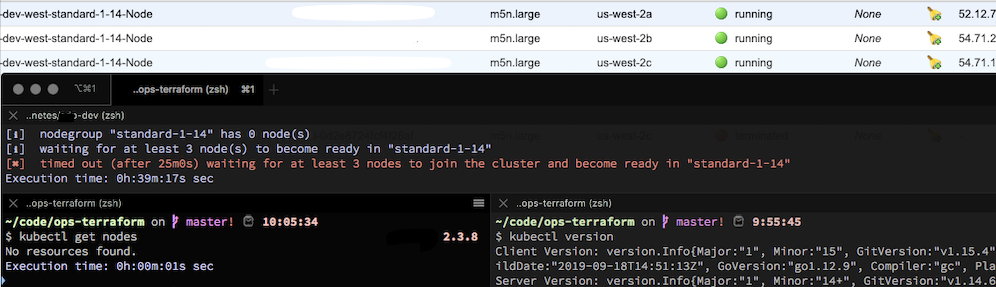
i5okie
on 31 Oct 2019
This is literally a brand new, vanilla AWS account.
Still having this issue today.
I've been using an existing VPC and facing the same problem. I'm wondering if you are trying to use a new VPC.
You can add --timeout 120m0s to wait more, but anyway, it doesn't solve the problem.
pedrobuzzi
on 31 Oct 2019
@pedrobuzzi I'm letting it create a new VPC for me.
i5okie
on 1 Nov 2019
@asadmehmoodch have you made any progress?
Second node was still not joining for some reason to eks cluster. Then I deleted that eks cluster and created about 3 more eks cluster and with those new clusters all nodes joined successfully. Since I was testing eks out therefore deleting and recreating eks cluster wasn't an issue. Still not sure why second node wasn't joining.
asadmehmoodch
on 2 Nov 2019
Yeah, you're having a lot more success than I am. Though I have 3 more EKS clusters which are totally fine and we're using in production.
It is this one new account that I am just unable to create a working cluster in. I've tried over 10 times now. EKS cluster is created, but none of the nodes ever join.
i5okie
on 3 Nov 2019
I have a similar issue. Any node using m5n.large instance type never joins the cluster - the problem is specific to nodes using this instance type, otherwise all nodes are joining with problems.
As you are using --node-type m5n.large, this may be an issue related to this instance type
 PierreBeucher
on 12 Nov 2019
PierreBeucher
on 12 Nov 2019
Nope, I'm trying to create a cluster with t3.small-s and they never join the cluster. :(
 Skarlso
on 14 Nov 2019
Skarlso
on 14 Nov 2019
Tried with a desiredCapacity of 1 too and a single node group. The instances aren't joining. I can see that tags look okay. Also the supposed IAM role is also okay. I have no idea what the problem is. But I think it isn't actually eksctl's fault. I think AWS is doing something wrong or wants something that isn't present at this point. Maybe the subnet is incorrect or the vpc or the combination of it. :/
Skarlso
on 14 Nov 2019
OMG it just worked.
This is my config:
apiVersion: eksctl.io/v1alpha5
kind: ClusterConfig

metadata:
  name: basic-cluster-3
  region: us-west-2

nodeGroups:
  - name: ng-1
    instanceType: t3.small
    desiredCapacity: 1
    ssh:
      allow: true # will use ~/.ssh/id_rsa.pub as the default ssh key
  - name: ng-2
    instanceType: t3.small
    desiredCapacity: 1
    ssh:
      allow: true # will use ~/.ssh/id_rsa.pub as the default ssh key
As you can see it's basic, has to node groups, desiredCap is 1 and I should have SSH access.
Skarlso
on 14 Nov 2019
Running into this problem too - anyone have a suggestion?
Trying to go through this tutorial which contains this command that creates a node-group that never joins the EKS cluster:
aws eks update-kubeconfig --name eks-spinnaker --region us-east-2 \
  --alias eks-spinnaker
 markhopson
on 4 Jan 2020
markhopson
on 4 Jan 2020
I am facing with the same issue. In my case, it happens when I create a new nodegroup with instance type g4dn.xlarge. But for some reason, I can create nodegroup with different instance type (p2.xlarge, g3s.xlarge). The command is exactly the same except for instance type. Is it an instance type peculiar issue?
g4dn.xlarge
$ eksctl create nodegroup \
> --cluster test-cluster \
> --region ap-northeast-1 \
> --version 1.13 \
> --name gpu \
> --node-type g4dn.xlarge \
> --nodes 1 \
> --nodes-min 1 \
> --nodes-max 1 \
> --node-volume-size 200 \
> --ssh-access \
> --ssh-public-key key \
> --node-ami=auto \
> --node-private-networking \
> --node-security-groups sg-xxxxxxxxxxx \
> --node-labels purpose=gpu \
> --asg-access \
> --external-dns-access \
> --full-ecr-access \
> --alb-ingress-access
[ℹ]  using region ap-northeast-1
[ℹ]  nodegroup "gpu" will use "ami-091dd4fc36f238059" [AmazonLinux2/1.13]
[ℹ]  using EC2 key pair "key"
[ℹ]  1 nodegroup (gpu) was included
[ℹ]  exclude rules: test-cluster
[ℹ]  no nogroups were excluded by the filter
[ℹ]  will create a CloudFormation stack for each of 1 nodegroups in cluster "test-cluster"
[ℹ]  1 task: { create nodegroup "gpu" }
[ℹ]  building nodegroup stack "eksctl-test-cluster-nodegroup-gpu"
[ℹ]  deploying stack "eksctl-test-cluster-nodegroup-gpu"
[ℹ]  adding role "arn:aws:iam::yyyyyyyy:role/eksctl-test-cluster-nodegroup-gpu-NodeInstanceRole-ZZZZZZZZZZ" to auth ConfigMap
[ℹ]  nodegroup "gpu" has 0 node(s)
[ℹ]  waiting for at least 1 node(s) to become ready in "gpu"
[✖]  timed out (after 25m0s) waiting for at least 1 nodes to join the cluster and become ready in "gpu"
p2.xlarge
$ eksctl create nodegroup \
> --cluster test-cluster \
> --region ap-northeast-1 \
> --version 1.13 \
> --name gpu \
> --node-type p2.xlarge \
> --nodes 1 \
> --nodes-min 1 \
> --nodes-max 1 \
> --node-volume-size 200 \
> --ssh-access \
> --ssh-public-key key \
> --node-ami=auto \
> --node-private-networking \
> --node-security-groups sg-xxxxxxxxxxx \
> --node-labels purpose=gpu \
> --asg-access \
> --external-dns-access \
> --full-ecr-access \
> --alb-ingress-access
[ℹ]  using region ap-northeast-1
[ℹ]  nodegroup "gpu" will use "ami-091dd4fc36f238059" [AmazonLinux2/1.13]
[ℹ]  using EC2 key pair "key"
[ℹ]  1 nodegroup (gpu) was included
[ℹ]  exclude rules: test-cluster
[ℹ]  no nogroups were excluded by the filter
[ℹ]  will create a CloudFormation stack for each of 1 nodegroups in cluster "test-cluster"
[ℹ]  1 task: { create nodegroup "gpu" }
[ℹ]  building nodegroup stack "eksctl-test-cluster-nodegroup-gpu"
[ℹ]  deploying stack "eksctl-test-cluster-nodegroup-gpu"
[ℹ]  adding role "arn:aws:iam::yyyyyyyy:role/eksctl-test-cluster-nodegroup-gpu-NodeInstanceRole-ZZZZZZZZZZ" to auth ConfigMap
[ℹ]  nodegroup "gpu" has 0 node(s)
[ℹ]  waiting for at least 1 node(s) to become ready in "gpu"
[ℹ]  nodegroup "gpu" has 1 node(s)
[ℹ]  node "ip-xx-xx-xx-xx.ap-northeast-1.compute.internal" is ready
[ℹ]  as you are using a GPU optimized instance type you will need to install NVIDIA Kubernetes device plugin.
[ℹ]      see the following page for instructions: https://github.com/NVIDIA/k8s-device-plugin
[✔]  created 1 nodegroup(s) in cluster "test-cluster"
[ℹ]  checking security group configuration for all nodegroups
[ℹ]  all nodegroups have up-to-date configuration
 yuto425
on 21 Jan 2020
yuto425
on 21 Jan 2020
Hi @yuto425 I had the same issue and fixed it by running:
kubectl apply -f https://raw.githubusercontent.com/aws/amazon-vpc-cni-k8s/release-1.5.5/config/v1.5/cni-metrics-helper.yaml
Turns out the AWS VPC CNI running on my eks cluster was 1.5.3, but support for g4dn.x instances was only added in version 1.5.4 (see https://github.com/aws/amazon-vpc-cni-k8s/releases and scroll to release 1.5.4), so since the latest version is 1.5.5, I just upgraded to that and the node was instantly added. Hope this helps!
 thecooltechguy
on 22 Jan 2020
thecooltechguy
on 22 Jan 2020
@thecooltechguy Thank you for the message. I upgraded cni version to 1.5.5. But I still have the same issue.
$ kubectl apply -f https://raw.githubusercontent.com/aws/amazon-vpc-cni-k8s/release-1.5.5/config/v1.5/cni-metrics-helper.yaml
clusterrole.rbac.authorization.k8s.io/cni-metrics-helper created
serviceaccount/cni-metrics-helper created
clusterrolebinding.rbac.authorization.k8s.io/cni-metrics-helper created
deployment.extensions/cni-metrics-helper created
$ kubectl describe daemonset aws-node --namespace kube-system | grep Image | cut -d "/" -f 2
amazon-k8s-cni:v1.5.5
i too have the same issue. do we have any solution ??
 cool-raj
on 24 Jan 2020
cool-raj
on 24 Jan 2020
I was encountering the same problem, until I made the following change (set privateAccess: true):
 vpc:
   clusterEndpoints:
-    privateAccess: false
+    privateAccess: true
 mmikitka
on 31 Jan 2020
mmikitka
on 31 Jan 2020
i too have the same issue. do we have any solution ??
Finally i managed to fix the problem.The issue was the unavailability of the worked nodes in the vpn to connect to ECR repo.hence none of the pods were able to run that's why the nodes were not able to join the cluster.In our case worker nodes were in private subnet hence they were not able to connect to ECR as we do not had Natgateway to conncet to ECR service. I had created a VPC endpoint to conncet for ECR then my worker nodes were able to install the pods and then successfully able to join the cluster.
cool-raj
on 7 Feb 2020
I'm still facing this issue as well with both public and private subnet flags set:
--vpc-private-subnets="blah" \
--vpc-public-subnets="blah" \
Anybody found a solution to this issue yet?
 joelfogue
on 3 Mar 2020
joelfogue
on 3 Mar 2020
I am also facing the same issue.. i see that whenever i go with existing VPC, the problem happens.
I tried this too
vpc:
clusterEndpoints:
privateAccess: true
I made sure the VPC and subnets are as per the recommendations including the tags. The issue happened when i went for private worker nodes.
 prabhushan
on 18 Mar 2020
prabhushan
on 18 Mar 2020
OMG it just worked.
This is my config:
apiVersion: eksctl.io/v1alpha5
kind: ClusterConfig

metadata:
  name: basic-cluster-3
  region: us-west-2

nodeGroups:
  - name: ng-1
    instanceType: t3.small
    desiredCapacity: 1
    ssh:
      allow: true # will use ~/.ssh/id_rsa.pub as the default ssh key
  - name: ng-2
    instanceType: t3.small
    desiredCapacity: 1
    ssh:
      allow: true # will use ~/.ssh/id_rsa.pub as the default ssh key
As you can see it's basic, has to node groups, desiredCap is 1 and I should have SSH access.
I think it works for public nodes.. but not if it is private networking.
prabhushan
on 19 Mar 2020
I'm facing the same issue with "eksctl create nodegroup", but when using AWS GUI console I can create nodegroups easily.
Are you guys also able to create nodegroups from the GUI?
 glerman
on 6 Apr 2020
glerman
on 6 Apr 2020
I am facing the same issue
eksctl version - 0.18.0
node group instance type used - m5n.xlarge
Any updates on what might be causing the issue
 chethananilkumar
on 3 May 2020
chethananilkumar
on 3 May 2020
FYI, The nodegroup creation works well with "aws eks create-nodegroup" command
glerman
on 3 May 2020
@chethananilkumar - i think it is not just reason - for me.. i had used my custom AMI.. Think that did not go well.. At this point in time, I think trial and error is the best option. Can you paste your yaml file after removing sensitive info.
prabhushan
on 3 May 2020
I think this issue may be the same as https://github.com/weaveworks/eksctl/issues/2054
For me, when I add:
vpc:
  publicAccessCIDRs:
    - "1.2.3.4/32"
then, I get the timeout:
$ eksctl create cluster -f cluster.yaml
# some output omitted
[✔]  all EKS cluster resources for "eks-testing" have been created
[ℹ]  adding identity "arn:aws:iam::976184668068:role/eksctl-eks-testing-nodegroup-ng-1-NodeInstanceRole-8VB5IDO1Z4KQ" to auth ConfigMap
[ℹ]  nodegroup "ng-1" has 0 node(s)
[ℹ]  waiting for at least 1 node(s) to become ready in "ng-1"
Error: timed out (after 25m0s) waiting for at least 1 nodes to join the cluster and become ready in "ng-1"
Without the vpc.publicAccessCIDRs set, the cluster gets created successfully.
Full cluster.yaml:
apiVersion: eksctl.io/v1alpha5
kind: ClusterConfig

metadata:
  name: eks-testing
  region: eu-west-1
  version: "1.16"
  tags:
    deployment: eks-testing

vpc:
  publicAccessCIDRs:
    - "1.2.3.4/32"

cloudWatch:
  clusterLogging:
    enableTypes: ["api", "audit", "authenticator", "controllerManager", "scheduler"]

nodeGroups:
  - name: ng-1
    labels: { role: worker, cluster: eks-testing }
    instanceType: t2.nano
    desiredCapacity: 1
    ssh:
      allow: true
$ eksctl version
0.20.0
 xmik
on 4 Jun 2020
xmik
on 4 Jun 2020
I think this issue may be the same as #2054
For me, when I add:
vpc:
  publicAccessCIDRs:
    - "1.2.3.4/32"
then, I get the timeout:
$ eksctl create cluster -f cluster.yaml
# some output omitted
[✔]  all EKS cluster resources for "eks-testing" have been created
[ℹ]  adding identity "arn:aws:iam::976184668068:role/eksctl-eks-testing-nodegroup-ng-1-NodeInstanceRole-8VB5IDO1Z4KQ" to auth ConfigMap
[ℹ]  nodegroup "ng-1" has 0 node(s)
[ℹ]  waiting for at least 1 node(s) to become ready in "ng-1"
Error: timed out (after 25m0s) waiting for at least 1 nodes to join the cluster and become ready in "ng-1"
Without the
vpc.publicAccessCIDRsset, the cluster gets created successfully.Full cluster.yaml:
apiVersion: eksctl.io/v1alpha5
kind: ClusterConfig

metadata:
  name: eks-testing
  region: eu-west-1
  version: "1.16"
  tags:
    deployment: eks-testing

vpc:
  publicAccessCIDRs:
    - "1.2.3.4/32"

cloudWatch:
  clusterLogging:
    enableTypes: ["api", "audit", "authenticator", "controllerManager", "scheduler"]

nodeGroups:
  - name: ng-1
    labels: { role: worker, cluster: eks-testing }
    instanceType: t2.nano
    desiredCapacity: 1
    ssh:
      allow: true
$ eksctl version 0.20.0
Same here,
update to 0.0.0.0/0 and the nodes joined.
 haimari
on 28 Jun 2020
haimari
on 28 Jun 2020
what is the cause for this timeout issue. Since cluster creation time through the eksctl will take more time, Please provide accurate solution for this.No solution provided still in any of the duplicate ticket as well.
waiting for at least 3 node(s) to become ready in "nodegroup-1"
Error: timed out (after 25m0s) waiting for at least 3 nodes to join the cluster and become ready in "nodegroup-1"
 99pavan
on 17 Aug 2020
99pavan
on 17 Aug 2020
@99pavan Exactly which commands and config are you using? Please try increasing the timeout using the --timeout switch mentioned earlier in this issue.
 michaelbeaumont
on 17 Aug 2020
michaelbeaumont
on 17 Aug 2020
Hi @michaelbeaumont ! I am using the command 'eksctl create cluster -f cluster.yml --timeout 30m' Still i'm facing the same issue. Below is the config file which i was trying...
kind: ClusterConfig
apiVersion: eksctl.io/v1alpha5
metadata:
  name: cluster
  region: ap-south-1
  version: "1.17"
  tags:
    creator: Producer
    environment: dev
  nodeGroups:
     name: nodegroup-1
      ami: XXXXXXXXXX
      labels:
        name: dev
    instanceType: t2.large
    availabilityZones: [ "ap-south-1a", "ap-south-1b", "ap-south-1c" ]
    volumeSize: 20
    volumeType: gp2
    volumeEncrypted: true
    desiredCapacity: 3
    minSize: 3
    maxSize: 5
    ssh:
      allow: true
      publicKeyName: key1
    amiFamily: AmazonLinux2
    tags:
      Name: svc1
      k8s.io/cluster-autoscaler/node-template/label/k8s.dask.org/name: dev
    privateNetworking: true
Hi @michaelbeaumont , I have tried with timeout flag for 30 mins. even still getting same error.Below is my cluster file and executing command like "eksctl create cluster -f cluster.yml --timeout 30m"
kind: ClusterConfig
apiVersion: eksctl.io/v1alpha5
metadata:
name: cluster-dev
region: ap-south-1
version: "1.17"
tags:
creator: Pavan kumar
environment: dev
nodeGroups:
name: nodegroup-1
ami: ami-003456c5f0f757d37
labels:
name: dev-env
instanceType: t2.large
availabilityZones: [ "ap-south-1a", "ap-south-1b", "ap-south-1c" ]
volumeSize: 80
volumeType: gp2
volumeEncrypted: true
desiredCapacity: 3
minSize: 3
maxSize: 5
ssh:
allow: true
publicKeyName: key1
amiFamily: AmazonLinux2
tags:
Name: dev-svc-cluster
k8s.io/cluster-autoscaler/node-template/label/k8s.dask.org/name: dev-env
privateNetworking: true
Please provide me the info if any unsupported file/params are existed but I could able to spin the cluster with managedNodegroups successfully
99pavan
on 20 Aug 2020
Thanks Sceat for the link. Enabling STS in the deployment region fixed this issue for me.
 lukesterg
on 1 Sep 2020
lukesterg
on 1 Sep 2020
I can verify that increasing the timeout WON'T help.
This issue can be found because of many reasons sadly (and the eksctl logs absolutely won't help find out why exactly).
It seems related to the actual node's preparation & installations, and if it fails to do so - we will get this time out error.
I figured that out after iv got 'Error: timed out (after 25m0s)' and removed the newly created eks node group.
After changing something random in my yaml, I tried to re-deploy only the eks node group, and it was at that point where i have got a new error message:

I want to mention that only after i have executed the node-group part, this error popped up.
After a short read, I could change the settings that were missing and re-deploy.
This solved my issue with the timeout, I can strongly recommend to who ever is stuck on that issue to divide the 'create cluster' command with the 'create node group' command, this will increase the odds to recieve an informative error message
 gimpiron
on 23 Sep 2020
gimpiron
on 23 Sep 2020
This issue still persist with cluster file. waited for hours and hours
➜ amazon-web-services-linux-operations-master eksctl create cluster -f cluster.yaml
[ℹ] eksctl version 0.35.0
[ℹ] using region eu-west-2
[✔] using existing VPC (vpc-00440b4e5xxxxxx) and subnets (private:[subnet-xxxxxxxxx subnet-xxxxxxxsubnet-xxxxxxxx] public:[])
[!] custom VPC/subnets will be used; if resulting cluster doesn't function as expected, make sure to review the configuration of VPC/subnets
[ℹ] nodegroup "cluster-nodes" will use "ami-0107478b0b67378c8" [AmazonLinux2/1.18]
[ℹ] using Kubernetes version 1.18
[ℹ] creating EKS cluster "test2-cluster" in "eu-west-2" region with un-managed nodes
[ℹ] 1 nodegroup (cluster-nodes) was included (based on the include/exclude rules)
[ℹ] will create a CloudFormation stack for cluster itself and 1 nodegroup stack(s)
[ℹ] will create a CloudFormation stack for cluster itself and 0 managed nodegroup stack(s)
[ℹ] if you encounter any issues, check CloudFormation console or try 'eksctl utils describe-stacks --region=eu-west-2 --cluster=test2-cluster'
[ℹ] Kubernetes API endpoint access will use default of {publicAccess=true, privateAccess=false} for cluster "test2-cluster" in "eu-west-2"
[ℹ] 2 sequential tasks: { create cluster control plane "test2-cluster", 3 sequential sub-tasks: { update CloudWatch logging configuration, create addons, create nodegroup "cluster-nodes" } }
[ℹ] building cluster stack "eksctl-test2-cluster-cluster"
[ℹ] deploying stack "eksctl-test2-cluster-cluster"
[✔] configured CloudWatch logging for cluster "test2-cluster" in "eu-west-2" (enabled types: api, audit, authenticator, controllerManager & disabled types: scheduler)
[ℹ] building nodegroup stack "eksctl-test2-cluster-nodegroup-cluster-nodes"
[ℹ] deploying stack "eksctl-test2-cluster-nodegroup-cluster-nodes"
[ℹ] waiting for the control plane availability...
[✔] saved kubeconfig as "/Users/arunjagga/.kube/config"
[ℹ] no tasks
[✔] all EKS cluster resources for "test2-cluster" have been created
[ℹ] adding identity "arn:aws:iam::555100224779:role/eksctl-test2-cluster-nodegroup-cl-NodeInstanceRole-PBMMF2Q8UOG6" to auth ConfigMap
[ℹ] nodegroup "cluster-nodes" has 0 node(s)
[ℹ] waiting for at least 3 node(s) to become ready in "cluster-nodes"
here is my cluster.yaml
apiVersion: eksctl.io/v1alpha5
kind: ClusterConfig
metadata:
name: test2-cluster
region: eu-west-2
vpc:
id: "vpc-xxxxxx"
cidr: "10.0.0.0/21"
nat:
gateway: HighlyAvailable
subnets:
private:
eu-west-2c:
id: "subnet-0xxxxxxxxxx"
cidr: "10.0.5.0/24"
eu-west-2b:
id: "subnet-0c6xxxxxxxxxxxx"
cidr: "10.0.4.0/24"
eu-west-2a:
id: "subnet-0xxxxxxx"
cidr: "10.0.3.0/24"
nodeGroups:
- name: cluster-nodes
instanceType: t2.micro
minSize: 3
desiredCapacity: 3
maxSize: 5
privateNetworking: true
volumeSize: 10
subnets:
- eu-west-2c
- eu-west-2b
- eu-west-2a
cloudWatch:
clusterLogging:
# enable specific types of cluster control plane logs
enableTypes: ["api", "audit", "authenticator", "controllerManager"]
# all supported types: "api", "audit", "authenticator", "controllerManager", "scheduler"
# supported special values: "*" and "all"
 jags06
on 24 Dec 2020
jags06
on 24 Dec 2020
Hi, I have a very similar issue. I am able to create a cluster with CPU nodegroups. However any GPU nodegroups get stuck in the [ℹ] waiting for at least 2 node(s) to become ready in "ng-train" status.
Cluster creation with CPU only works. Cluster creation with GPU only gets the same error. Cluster creation with GPU+CPU gets the same error after succesful creation of the CPU nodegroup.
Creating a Cluster through the AWS dashboard and adding GPUs works.
For reference, here is my config.yaml:
apiVersion: eksctl.io/v1alpha5
kind: ClusterConfig

metadata:
    name: testcluster
    region: us-east-2

nodeGroups:
    - name: ng-app
      labels:
          role: app
      instanceType: m4.large
      desiredCapacity: 2
    - name: ng-train
      labels:
          role: train
      instanceType: p2.xlarge
      desiredCapacity: 2
 henripal
on 11 Jan 2021
henripal
on 11 Jan 2021
I can give you workaround for this (if your goal is just to create node group)
Do it using Console. It has most of the options to add node group. It never fails. I tried many times.
 deval-graymatics
on 15 Jan 2021
deval-graymatics
on 15 Jan 2021
Thank you! The workaround was actually the one here: https://github.com/weaveworks/eksctl/issues/3005#issuecomment-752898871
henripal
on 15 Jan 2021
Related issues
 richardcase
·
22Comments
richardcase
·
22Comments
 albertmichaelj
·
22Comments
albertmichaelj
·
22Comments
 NunoPinheiro
·
37Comments
NunoPinheiro
·
37Comments
 ejsmith
·
24Comments
ejsmith
·
24Comments
 aparamon
·
20Comments
aparamon
·
20Comments
Most helpful comment
i too have the same issue. do we have any solution ??