Eksctl: Allow encryption of EBS volumes
Why do you want this feature?
To be able to adhere to corporate security policies regarding encryption of certain datasets.
What feature/behavior/change do you want?
A method by which the CloudFormation that is created for the NodeGroups includes encryption options for the BlockDeviceMappings in the LaunchConfiguration, e.g.:
NodeLaunchConfig:
    Type: AWS::AutoScaling::LaunchConfiguration
    Properties:
      ....
      BlockDeviceMappings:
        - DeviceName: /dev/xvda
          Ebs:
            VolumeSize: 100
            VolumeType: gp2
            DeleteOnTermination: true
            Encrypted: true
            kmsKeyID: arn:aws:kms:.......
I see that volumeSize and volumeType are already options in a YAML configuration file, perhaps two new options, e.g.:
volumeEncryption: <true|false>
volumekmsKeyID: <only required if above is true>
 TommyKTheDJ
All 14 comments
We do have volumeEncrypted field already, but we haven't documented it yet. We are working on docs at the moment.
If you supply an encrypted AMI, root volume should get encryption enabled automatically:
Does this work for you? If not, we will need to review this and see what options maybe missing here.
 errordeveloper
on 28 Jun 2019
errordeveloper
on 28 Jun 2019
Thanks @errordeveloper - to clarify, does this expect the EBS snapshot backing the AMI to already be encrypted?
Or does the volumeEncrypted option mean the EBS volume is encrypted on launch as per this flow (from here):
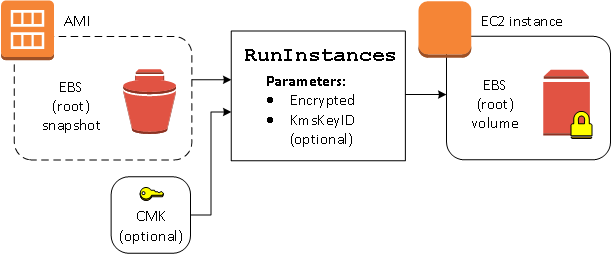
If the former (already encrypted), then it would mean I need to manage a process of taking the native EKS AMIs (which aren't encrypted), creating custom AMIs that are backed by a snapshot that is encrypted using my CMK and then specifying those in the config file for eksctl - that might work, yes. I will try it.
However, a solution to allow a non-encrypted ami to be encrypted using a key I specify (as per the above image) as part of an eksctl config file / cli would be ideal. It's an option in CloudFormation for both ASG LaunchConfigurations and EC2 LaunchTemplates but I'm not clear on how the CF json is formed by your code.
TommyKTheDJ
on 28 Jun 2019
Thanks @TommyKTheDJ, this is very helpful. We will discuss it with the team, and I'd hope someone will look into this soon!
errordeveloper
on 28 Jun 2019
Thanks @errordeveloper !
TommyKTheDJ
on 28 Jun 2019
@errordeveloper, I am happy to look into this.
 adamjohnson01
on 28 Jun 2019
adamjohnson01
on 28 Jun 2019
@adamjohnson01 sure, if you have a moment! I'll assign it to you for now, if you don't find the time - please be sure to un-assign yourself :)
errordeveloper
on 28 Jun 2019
@errordeveloper, @TommyKTheDJ, I have tested this and if you just add "volumeEncrypted: true" to the nodegroup config it will encrypt the volume for you using the default KMS key.
adamjohnson01
on 28 Jun 2019
@adamjohnson01 @errordeveloper just been looking at in more detail and it looks like LaunchTemplate>BlockDeviceMapping>EBS does support the specifying of a CMK (see this).
However, an ASG LaunchConfiguration>BlockDeviceMapping>EBS does not support a CMK - only the default KMS key as you have mentioned above. (See this)
Thanks for the info so far, really helpful!
TommyKTheDJ
on 28 Jun 2019
@adamjohnson01 @errordeveloper just been looking at in more detail and it looks like LaunchTemplate>BlockDeviceMapping>EBS _does_ support the specifying of a CMK (see this).
However, an ASG LaunchConfiguration>BlockDeviceMapping>EBS does _not_ support a CMK - only the default KMS key as you have mentioned above. (See this)
Thanks for the info so far, really helpful!
I think that they only way you will be able to use your CMK is if you encrypt the AMI yourself and use that AMI in the nodegroup config, if you are happy to use the default then all you need to do is add the "volumeEncrypted: true" config to your nodegroup.
@errordeveloper, as the encryption functionality already exists and it will not be possible to specify a kmsKeyID. I assume that adding volumeEncrypted option to the docs is all that is required for this issue?
adamjohnson01
on 28 Jun 2019
For now, yes I agree.
Seeing as Launch Templates can be used by ASGs as well (found this since my last comment) I think it might be possible with eksctl (as before, not sure if eksctl could potentially do anything CF can do, or if it's more complicated than that). What I could do is provide some CF templates that show how what I'm after is achieved manually and then see if it can be engineered into eksctl - would that help?
TommyKTheDJ
on 28 Jun 2019
Apologies, I did not read your previous comment correctly, eksctl already uses launch templates so this should not be difficult to implement.
adamjohnson01
on 28 Jun 2019
I have got this working. I have found that if you use a CMK you will need to make sure that the policy attached to it has the following config as documented here
{
   "Sid": "Allow use of the CMK",
   "Effect": "Allow",
   "Principal": {
       "AWS": [
           "arn:aws:iam::123456789012:role/aws-service-role/autoscaling.amazonaws.com/AWSServiceRoleForAutoScaling"
       ]
   },
   "Action": [
       "kms:Encrypt",
       "kms:Decrypt",
       "kms:ReEncrypt*",
       "kms:GenerateDataKey*",
       "kms:DescribeKey"
   ],
   "Resource": "*"
}
{
   "Sid": "Allow attachment of persistent resources",
   "Effect": "Allow",
   "Principal": {
       "AWS": [
           "arn:aws:iam::123456789012:role/aws-service-role/autoscaling.amazonaws.com/AWSServiceRoleForAutoScaling"
       ]
   },
   "Action": [
       "kms:CreateGrant"
   ],
   "Resource": "*",
   "Condition": {
       "Bool": {
           "kms:GrantIsForAWSResource": true
       }
    }
}
Should we be checking that this has been configured? I have referenced it in the example for the moment.
adamjohnson01
on 1 Jul 2019
Thanks @adamjohnson01 I have got there too just now.
TommyKTheDJ
on 1 Jul 2019
Closed via #961.
errordeveloper
on 2 Jul 2019
Related issues
 coderiseio
·
24Comments
coderiseio
·
24Comments
 gatesjd
·
21Comments
gatesjd
·
21Comments
 BernhardLenz
·
31Comments
errordeveloper
·
45Comments
BernhardLenz
·
31Comments
errordeveloper
·
45Comments
 i5okie
·
44Comments
i5okie
·
44Comments
Most helpful comment
I have got this working. I have found that if you use a CMK you will need to make sure that the policy attached to it has the following config as documented here
Should we be checking that this has been configured? I have referenced it in the example for the moment.