如题:
如何在egg里启用https?
在哪里写,怎么写?
 Fantasy9527
All 31 comments
https://eggjs.org/zh-cn/core/deployment.html#%E5%90%AF%E5%8A%A8%E5%91%BD%E4%BB%A4
egg-scripts start --https --key=xx --cert=xxx 支持传递 egg-cluster 的 options,具体看问题。
PS:更推荐是在前面的 nginx 等来卸载证书。
 atian25
on 25 Dec 2017
atian25
on 25 Dec 2017
exports.cluster = {
  listen: {
    port: 8443,
    hostname: '127.0.0.1',
  },
  https: true,
  key: 'certificate/server.key',
  cert: 'certificate/server.cer',
};
这样的配置并没有生效https,端口号倒是生效了.
因为测试环境跟生产环境配置不一样,想写在config里面.
Fantasy9527
on 25 Dec 2017
cluster 这个配置现在应该只支持 listen
atian25
on 25 Dec 2017
这个确实可以支持
 popomore
on 25 Dec 2017
popomore
on 25 Dec 2017
"dev": "egg-bin dev --https --key=./config/ssl/key.pem --cert=./config/ssl/cert.pem",
这里传的不是路径???而是完整的值???
上面的命令报错了:
2018-01-14 00:47:00,143 INFO 58703 [master] node version v8.9.0
2018-01-14 00:47:00,145 INFO 58703 [master] egg version 2.2.0
2018-01-14 00:47:00,539 INFO 58703 [master] agent_worker#1:58704 started (390ms)
2018-01-14 00:47:01,130 ERROR 58705 [app_worker] exit with code:1
_tls_common.js:104
      c.context.setKey(options.key, options.passphrase);
                ^

Error: error:0907B068:PEM routines:PEM_READ_BIO_PRIVATEKEY:bad password read
    at Object.createSecureContext (_tls_common.js:104:17)
    at Server (_tls_wrap.js:803:25)
    at new Server (https.js:59:14)
    at Object.createServer (https.js:80:10)
    at startServer (.../node_modules/egg-cluster/lib/app_worker.js:38:31)
    at process.nextTick (.../node_modules/get-ready/index.js:73:53)
    at _combinedTickCallback (internal/process/next_tick.js:131:7)
    at process._tickCallback (internal/process/next_tick.js:180:9)
[2018-01-14 00:47:01.137] [cfork:master:58703] worker:58705 disconnect (exitedAfterDisconnect: false, state: disconnected, isDead: false, worker.disableRefork: true)
[2018-01-14 00:47:01.137] [cfork:master:58703] don't fork, because worker:58705 will be kill soon
2018-01-14 00:47:01,137 INFO 58703 [master] app_worker#1:58705 disconnect, suicide: false, state: disconnected, current workers: ["1"]
[2018-01-14 00:47:01.138] [cfork:master:58703] worker:58705 exit (code: 1, exitedAfterDisconnect: false, state: dead, isDead: true, isExpected: false, worker.disableRefork: true)
2018-01-14 00:47:01,140 ERROR 58703 nodejs.AppWorkerDiedError: [master] app_worker#1:58705 died (code: 1, signal: null, suicide: false, state: dead), current workers: []
    at Master.onAppExit (.../node_modules/egg-cluster/lib/master.js:384:21)
    at emitOne (events.js:116:13)
    at Master.emit (events.js:211:7)
    at Messenger.sendToMaster .../node_modules/egg-cluster/lib/utils/messenger.js:122:17)
    at Messenger.send (.../node_modules/egg-cluster/lib/utils/messenger.js:87:12)
    at EventEmitter.cluster.on (.../node_modules/egg-cluster/lib/master.js:263:22)
    at emitThree (events.js:141:20)
    at EventEmitter.emit (events.js:217:7)
    at ChildProcess.worker.process.once (internal/cluster/master.js:185:13)
    at Object.onceWrapper (events.js:317:30)
name: 'AppWorkerDiedError'
pid: 58703
hostname: localhost

2018-01-14 00:47:01,141 ERROR 58703 [master] app_worker#1:58705 start fail, exiting with code:1
2018-01-14 00:47:01,141 ERROR 58703 [master] exit with code:1
2018-01-14 00:47:01,145 ERROR 58704 [agent_worker] receive disconnect event on child_process fork mode, exiting with code:110
2018-01-14 00:47:01,145 ERROR 58704 [agent_worker] exit with code:110
⚠️  Error: .../node_modules/egg-bin/lib/start-cluster {"https":true,"key":"./config/ssl/key.pem","cert":"./config/ssl/cert.pem","baseDir":"...","framework":".../node_modules/egg","workers":1} exit with code 1
⚠️  Command Error, enable `DEBUG=common-bin` for detail
 anchengjian
on 13 Jan 2018
anchengjian
on 13 Jan 2018
> egg-bin dev --https --key="`cat ./config/ssl/key.pem`" --cert="`cat ./config/ssl/cert.pem`"

assert.js:42
  throw new errors.AssertionError({
  ^

AssertionError [ERR_ASSERTION]: options.key should exists
    at module.exports (.../node_modules/egg-cluster/lib/utils/options.js:40:5)
    at new Master (.../node_modules/egg-cluster/lib/master.js:40:20)
    at Object.exports.startCluster (.../node_modules/egg-cluster/index.js:20:3)
    at Object.<anonymous> (.../node_modules/egg-bin/lib/start-cluster:8:28)
    at Module._compile (module.js:635:30)
    at Object.Module._extensions..js (module.js:646:10)
    at Module.load (module.js:554:32)
    at tryModuleLoad (module.js:497:12)
    at Function.Module._load (module.js:489:3)
    at Function.Module.runMain (module.js:676:10)
⚠️  Error: .../node_modules/egg-bin/lib/start-cluster {"https":true,"key":"-----BEGIN ENCRYPTED PRIVATE KEY-----\nMIIJjjBAB...something...87d5\nYHo=\n-----END ENCRYPTED PRIVATE KEY-----","cert":"-----BEGIN CERTIFICATE-----\nMIIFeTC...something...4A==\n-----END CERTIFICATE-----","baseDir":"...","framework":".../node_modules/egg","workers":1} exit with code 1
⚠️  Command Error, enable `DEBUG=common-bin` for detail
看起来应该是内部某部分也出了偏差
anchengjian
on 13 Jan 2018
atian25
on 14 Jan 2018
昨晚没注意看,刚看了一下是我的 ssl 是有 passphrase 的😂,
// https://github.com/eggjs/egg-cluster/blob/master/lib/app_worker.js#L38-L41 改成这样成功启动
    server = require('https').createServer({
      key: fs.readFileSync(options.key),
      cert: fs.readFileSync(options.cert),
      passphrase: '123456789',
    }, app.callback());
现在问题成了 passphrase 咋传进去?
anchengjian
on 14 Jan 2018
@anchengjian 最新版已经支持,你更新下依赖即可。
{
  https: {
    key,
    cert,
    passphrase,
  }
}
@popomore @atian25
大佬,能不能更新一下官网API的文档
 xland
on 14 May 2019
xland
on 14 May 2019
@xland 来 PR~
atian25
on 14 May 2019
@atian25 ,我看了这个issue还是配不成,惭愧,所以才来请求更新文档呢;
//config.prod.js
module.exports = {
    cluster: {
        listen: {
            port: 80   //改成443也无效
        },
        https: {
            key: '/root/web/ssl/www.key',   //阿里云买域名送的证书,nginx版本
            cert: '/root/web/ssl/www.pem',
        }
    }
};
@atian25 , 我如果能搞明白,愿意提交PR呀
xland
on 14 May 2019
重新安装下依赖再试试。
https://github.com/eggjs/egg-cluster/pull/57/files 这个 PR 应该是已经支持的了。
$ # reinstall deps and never lock it.
$ rm -rf node_modules yarn.lock package-lock.json
$ npm i --no-package-lock
@atian25
重新安装了,还是不行;
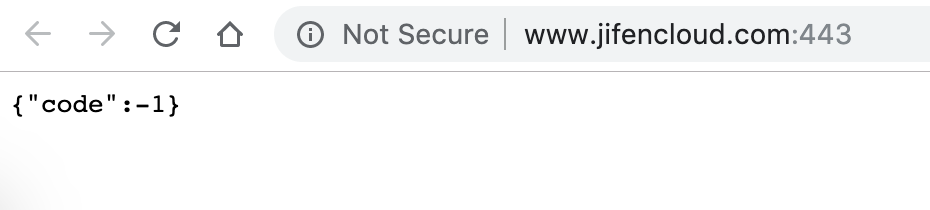
非HTTPS的请求可以正确响应:http://www.jifencloud.com:443
HTTPS的请求响应结果是:https://www.jifencloud.com/
此网站无法提供安全连接 www.jifencloud.com 发送的响应无效。
ERR_SSL_PROTOCOL_ERROR
是不是我的证书有问题?
xland
on 14 May 2019
atian25
on 14 May 2019
@atian25
对,
HTTP的请求是正确的(我的程序正确的响应了一个{code:-1})
HTTPS的请求是有问题的:https://www.jifencloud.com/
xland
on 14 May 2019
@atian25
我看了一点点源码,感觉是我的配置没有传进去
config.default.js里配置这些,感觉没起作用,传不到cluster里去
config.cluster = {
    https: {
      key: '/root/web/jifen/ssl/www.key',
      cert: '/root/web/jifen/ssl/www.pem',
    }
  };
@xland 抱歉,上下文不一致。
我那个回复是支持了 startCluster 里面支持了 passphrase,是命令行参数。
而不是说 config.cluster 配置,这个还没支持。
atian25
on 14 May 2019
@atian25
命令行,我试过这样:
"start": "egg-scripts start --port=443 --https --key=/root/web/jifen/ssl/www.key --cert=/root/web/jifen/ssl/www.pem --daemon --title=egg-server-jifen",
提示说:
Please use
https: { key, cert }instead ofhttps: true
我改成这样:
"start": "egg-scripts start --https={key='/root/web/jifen/ssl/www.key',cert:'/root/web/jifen/ssl/www.pem'} --daemon --title=egg-server-jifen",
提示说:
Run node /root/web/jifen/node_modules/egg-scripts/lib/start-cluster {"https":"{key=/root/web/jifen/ssl/www.key,cert:/root/web/jifen/ssl/www.pem}","title":"egg-server-jifen","baseDir":"/root/web/jifen","framework":"/root/web/jifen/node_modules/egg"} --title=egg-server-jifen
AssertionError [ERR_ASSERTION]: options.https.key should exists
xland
on 14 May 2019
试试 --https.key=xxx --https.cert=xxx
--https --key 这个只是 warning,应该是可以用的
atian25
on 14 May 2019
@atian25
不行的,我把所有的输出都发上来,(我马上去试试你刚说的这个新的命令行)
> [email protected] start /root/web/jifen
> egg-scripts start --https --key=/root/web/jifen/ssl/www.key  --cert=/root/web/jifen/ssl/www.pem  --daemon --title=egg-server-jifen

[egg-scripts] Starting egg application at /root/web/jifen
[egg-scripts] Run node /root/web/jifen/node_modules/egg-scripts/lib/start-cluster {"https":true,"key":"/root/web/jifen/ssl/www.key","cert":"/root/web/jifen/ssl/www.pem","title":"egg-server-jifen","baseDir":"/root/web/jifen","framework":"/root/web/jifen/node_modules/egg"} --title=egg-server-jifen
[egg-scripts] Save log file to /root/logs
[egg-scripts] Wait Start: 1...
[egg-scripts] tail -n 100 /root/logs/master-stderr.log
[egg-scripts] Got error when startup:
[egg-scripts] Tue, 14 May 2019 13:26:29 GMT egg deprecated [master] Please use `https: { key, cert }` instead of `https: true` at node_modules/egg-cluster/lib/master.js:44:20
[egg-scripts]
[egg-scripts] Start got error, see /root/logs/master-stderr.log
[egg-scripts] Or use `--ignore-stderr` to ignore stderr at startup.
npm ERR! code ELIFECYCLE
npm ERR! errno 1
npm ERR! [email protected] start: `egg-scripts start --https --key=/root/web/jifen/ssl/www.key  --cert=/root/web/jifen/ssl/www.pem  --daemon --title=egg-server-jifen`
npm ERR! Exit status 1
npm ERR!
npm ERR! Failed at the [email protected] start script.
npm ERR! This is probably not a problem with npm. There is likely additional logging output above.

npm ERR! A complete log of this run can be found in:
npm ERR!     /root/.npm/_logs/2019-05-14T13_26_30_980Z-debug.log
@atian25 ,
搞定了,你最后说的这个方案是对的,完美的启动命令如下(后来者少走点弯路):
"start": "egg-scripts start --port=443 --https.key=/root/web/jifen/ssl/www.key --https.cert=/root/web/jifen/ssl/www.pem --daemon --title=egg-server-jifen",
(框架默认的端口是8443)
xland
on 14 May 2019
@atian25 , 官网文档有开源吗?需要的话,我提个PR补充一下文档(指南-核心功能-应用部署章节)
xland
on 14 May 2019
就在 egg 的 docs 目录下
atian25
on 14 May 2019
@atian25 提交了两个PR(中文、英文)
xland
on 15 May 2019
一个 PR 就好了
atian25
on 15 May 2019
嗯嗯,这次是在网页操作的,下次用GIT
xland
on 15 May 2019
页面也是可以的,多次编辑,2 个 commit 到一个 branch 即可
atian25
on 15 May 2019
哈~下次好好研究一下
xland
on 16 May 2019
 darrenliuwei
Related issues
 zhaofinger
·
3Comments
zhaofinger
·
3Comments
 whlsxl
·
3Comments
whlsxl
·
3Comments
 xcstream
·
3Comments
popomore
·
3Comments
xcstream
·
3Comments
popomore
·
3Comments
 wujianling
·
3Comments
wujianling
·
3Comments
Most helpful comment
@atian25 ,
搞定了,你最后说的这个方案是对的,完美的启动命令如下(后来者少走点弯路):
(框架默认的端口是8443)