我已经安装了 egg-cors插件,并在 config/plugin.js里禁用了cors,
security: {
    csrf: false,
    debug: 'csrf-disable',
    domainWhiteList: [ 'http://localhost:3000' ]
  }
同时设置了header,
fetch(API_URL + '/entities/' + entity + '?label=' + label + '&page=' + page, {headers: { 'Content-Type': 'application/json', 'x-csrf-token': cookies.csrfToken}});
可是还是返回 405 (Method Not Allowed),我用postman 是可以调用这个API的,但是用代码就是不行。
请教一下我哪里缺了一环吗?
我只是禁用所有的csrf, cors等安全特性,该如何做? 这个安全方面的东西太影响开发效率了
 soulmachine
All 20 comments
并在 config/config.default.js里禁用了cors,
啥意思?禁用插件是在 plugin.{env}.js
另外,CORS 是一个浏览器行为,POSTMAN 不一定遵循的。
 atian25
on 8 Jul 2017
atian25
on 8 Jul 2017
笔误,我是在 config/plugin.js 里设置,试图禁用csrf和cors等安全机制
soulmachine
on 8 Jul 2017
我后来用Flask重写了这几个api,网页端没变化,Flask的这个版本的api调用起来非常顺畅,egg.js 版本的api卡在了405错误这里
soulmachine
on 8 Jul 2017
『安装了 egg-cors插件,并在 config/plugin.js里禁用了cors』这个没太看懂。安装了,为啥要禁用。直接别安装不就好了吗?安装不是为了打开使用吗。
 ngot
on 8 Jul 2017
ngot
on 8 Jul 2017
@ngot 按照你说的,把 egg-cors 插件卸载了,依旧是 405错误
soulmachine
on 8 Jul 2017
用 egg-init 一个可复现的最小示例上传下
发自我的 iPhone
在 2017年7月8日,15:27,Frank Dai notifications@github.com 写道:
@ngot 按照你说的,把 egg-cors 插件卸载了,依旧是 405错误
—
You are receiving this because you commented.
Reply to this email directly, view it on GitHub, or mute the thread.
atian25
on 8 Jul 2017
我建议先搞清楚 “csrf” 和 “cors” 这两个概念,405是正常的,因为你的cors插件没生效。。看起来你是想发起一个跨域请求,但是被egg拦截了。
本身egg内部是不允许随便发跨域请求的,你必须开启 cors插件,,正确的做法是
1.重新开启你的cors插件
2.配置安全白名单
    security: {
        domainWhiteList: [ 'http://localhost:7001' ] // 这个端口一定要跟你实际的一致
      }
类似的issue也可以搜索下,比如 https://github.com/eggjs/egg/issues/725 . https://github.com/eggjs/egg/issues?utf8=%E2%9C%93&q=%E8%B7%A8%E5%9F%9F
 jtyjty99999
on 9 Jul 2017
jtyjty99999
on 9 Jul 2017
以下是我的 config/plugin.js 所有内容:
'use strict';
// config/plugin.js
exports.validate = {
  enable: true,
  package: 'egg-validate',
};
exports.static = true;

exports.cors = {
  enable: true,
  package: 'egg-cors',
};

exports.security = {
  domainWhiteList: [ 'http://localhost:3000' ],
};
然鹅还是405 Not allowed,不起作用啊,我的 rest api server是用 egg来写的,默认端口是7001, 我的网页是用 next.js 来写的,默认端口是3000
soulmachine
on 11 Jul 2017
domainWhiteList 应该在 config.default.js ...
atian25
on 11 Jul 2017
@atian25 现在终于改好了,谢谢!
config/config.default.js:
security: {
    csrf: false,
    debug: 'csrf-disable',
    domainWhiteList: [ 'http://localhost:3000' ]
  }
config/plugin.js:
exports.cors = {
  enable: true,
  package: 'egg-cors',
};
@soulmachine 我按照你的配置,还是OPTIONS 405
 hodgevk
on 17 Jul 2017
hodgevk
on 17 Jul 2017
http:// 这个不属于域名的部分吧
ngot
on 17 Jul 2017
我遇到的情况是安全插件 不允许 options 的请求所以抛出了405错误,
但是文档不齐全,让人只能对着代码看问题。
    config.security = {
        methodnoallow: {
            enable: false,
        },
    };
文档不全的事情还是应该重视
 chianquan
on 30 Jul 2017
chianquan
on 30 Jul 2017
@chianquan 没有任何一行文档让你配置 config.security = { methodnoallow: { enable: false, }, }; 请再仔细阅读 egg-cors 插件文档。
jtyjty99999
on 31 Jul 2017
@jtyjty99999 这里我并没有使用egg-cors,而是直接使用了kcors,methodnoallow 这个中间件是属于安全模块的,说明文档应该是属于security模块才对。
chianquan
on 3 Aug 2017
@jtyjty99999 看了一下egg-cors现在了解了,我在挂载kcors的时候应该直接挂在security前面就好了,突然觉得自己好傻。
chianquan
on 3 Aug 2017
// config.default.js 需要安装egg-cors
'use strict';

module.exports = appInfo => {
  const config = exports = {};

  // use for cookie sign key, should change to your own and keep security
  config.keys = appInfo.name + '_1522122181138_2955';

  // add your config here
  config.middleware = [];

  config.security = {
    xframe: {
      enable: false
    },
    csrf: {
      enable: false
    },
    domainWhiteList: [ 'http://localhost:8080', 'http://localhost:7001' ]
  };

  return config;
};
 bhaltair
on 28 Mar 2018
bhaltair
on 28 Mar 2018
@jtyjty99999 请问 security 插件里面的 methodnoallow 这个中间件为什么把 options 的请求拒绝哦.
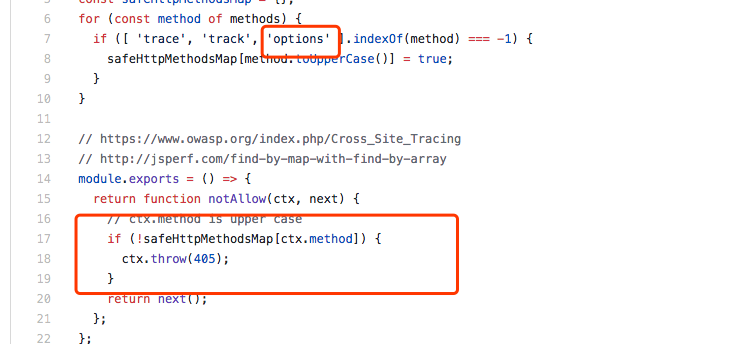
代码地址: https://github.com/eggjs/egg-security/blob/master/lib/middlewares/methodnoallow.js#L7
 Onlylonger
on 2 Aug 2018
Onlylonger
on 2 Aug 2018
@Onlylonger 同问
现在需要在file协议中发mock请求,然后都被拒绝了。。。。。
exports.cors = {
origin: '*',
allowMethods: 'GET,HEAD,PUT,POST,DELETE,PATCH,OPTIONS'
};
 wilsonIs
on 9 Aug 2018
wilsonIs
on 9 Aug 2018
vue + egg, 浏览器通过页面访问 api 就是 405,postman 直接访问 api 就是通的,已经开了 egg-cors,求教是什么原因?
 EryouHao
on 23 Oct 2018
EryouHao
on 23 Oct 2018
Related issues
 Ailein
·
3Comments
Ailein
·
3Comments
 Leungkingman
·
3Comments
Leungkingman
·
3Comments
 Webjiacheng
·
3Comments
Webjiacheng
·
3Comments
 Quekie
·
3Comments
Quekie
·
3Comments
 kylezhang
·
3Comments
kylezhang
·
3Comments
Most helpful comment
我建议先搞清楚 “csrf” 和 “cors” 这两个概念,405是正常的,因为你的cors插件没生效。。看起来你是想发起一个跨域请求,但是被egg拦截了。
本身egg内部是不允许随便发跨域请求的,你必须开启 cors插件,,正确的做法是
1.重新开启你的cors插件
2.配置安全白名单
类似的issue也可以搜索下,比如 https://github.com/eggjs/egg/issues/725 . https://github.com/eggjs/egg/issues?utf8=%E2%9C%93&q=%E8%B7%A8%E5%9F%9F