Efcore: Filtered index requires QUOTED_IDENTIFIER in generated scripts
Creating a filtered index in SQL Server requires enabling the QUOTED_IDENTIFIER database options. _dotnet ef migrations script_ doesn't currently generate the SQL statements to enable it.
Steps to reproduce
This problem sneaked up on me when I tried to add a unique index to a nullable column. That creates a filtered index behind the curtains. Executing the migration script then fails when QUOTED_IDENTIFIER is off.
csproj (notice that Nullable Reference Types are enabled):
<Project Sdk="Microsoft.NET.Sdk">

  <PropertyGroup>
    <OutputType>Exe</OutputType>
    <TargetFramework>netcoreapp3.1</TargetFramework>
    <Nullable>Enable</Nullable>
  </PropertyGroup>

  <ItemGroup>
    <PackageReference Include="Microsoft.EntityFrameworkCore" Version="3.1.4" />
    <PackageReference Include="Microsoft.EntityFrameworkCore.Design" Version="3.1.4">
      <IncludeAssets>runtime; build; native; contentfiles; analyzers; buildtransitive</IncludeAssets>
      <PrivateAssets>all</PrivateAssets>
    </PackageReference>
    <PackageReference Include="Microsoft.EntityFrameworkCore.SqlServer" Version="3.1.4" />
  </ItemGroup>

</Project>
Entity model:
public class Product
{
    public Product(int id, string name, string? barCode)
    {
        Id = id;
        Name = name;
        BarCode = barCode;
    }

    public int Id { get; private set; }

    public string Name { get; private set; }

    public string? BarCode { get; private set; }
}
DbContext:
using Microsoft.EntityFrameworkCore;

public class WarehouseContext : DbContext
{
    public WarehouseContext()
    {
    }

    public DbSet<Product> Products { get; set; } = default!;

    protected override void OnConfiguring(DbContextOptionsBuilder optionsBuilder)
    {
        optionsBuilder.UseSqlServer("Server=(local);Database=Warehouse;Trusted_Connection=True;");
    }

    protected override void OnModelCreating(ModelBuilder modelBuilder)
    {
        modelBuilder.Entity<Product>().HasIndex(product => product.BarCode).IsUnique();
    }
}
With everything in place, create the first migration and then generate a script.
dotnet ef migrations add InitialCreate
dotnet ef migrations script
Output:
IF OBJECT_ID(N'[__EFMigrationsHistory]') IS NULL
BEGIN
    CREATE TABLE [__EFMigrationsHistory] (
        [MigrationId] nvarchar(150) NOT NULL,
        [ProductVersion] nvarchar(32) NOT NULL,
        CONSTRAINT [PK___EFMigrationsHistory] PRIMARY KEY ([MigrationId])
    );
END;

GO

CREATE TABLE [Products] (
    [Id] int NOT NULL IDENTITY,
    [Name] nvarchar(max) NOT NULL,
    [BarCode] nvarchar(450) NULL,
    CONSTRAINT [PK_Products] PRIMARY KEY ([Id])
);

GO

CREATE UNIQUE INDEX [IX_Products_BarCode] ON [Products] ([BarCode]) WHERE [BarCode] IS NOT NULL;

GO

INSERT INTO [__EFMigrationsHistory] ([MigrationId], [ProductVersion])
VALUES (N'20200528154701_InitialCreate', N'3.1.4');

GO
Executing this script against a clean database then fails with an error:
Msg 1934, Level 16, State 1
CREATE INDEX failed because the following SET options have incorrect settings: 'QUOTED_IDENTIFIER'. Verify that SET options are correct for use with indexed views and/or indexes on computed columns and/or filtered indexes and/or query notifications and/or XML data type methods and/or spatial index operations.
Further technical details
EF Core version: 3.1.4
Database provider: Microsoft.EntityFrameworkCore.SqlServer
Target framework: .NET Core 3.1.201
 StevenLiekens
All 11 comments
@StevenLiekens It looks like SQL Server has a lot of limitations when QUOTED_IDENTIFIER is changed--see the docs here: https://docs.microsoft.com/en-us/sql/t-sql/statements/set-quoted-identifier-transact-sql?view=sql-server-ver15
What is your reason for wanting to do this?
 ajcvickers
on 1 Jun 2020
ajcvickers
on 1 Jun 2020
Creating a filtered index requires QUOTED_IDENTIFIER ON for some reason. The docs point this out but don't explain why.
StevenLiekens
on 1 Jun 2020
@StevenLiekens That would be a question for the SQL Server folks.
Closing this as an EF issue given that it isn't supported by SQL Server.
ajcvickers
on 1 Jun 2020
@ajcvickers please reconsider; my motivation for raising this issue is that the error goes away when you enable the option. I'm asking if you'd consider changing the generated script.
SET QUOTED_IDENTIFIER ON; -- required for the next statement

CREATE UNIQUE INDEX [IX_Products_BarCode] ON [Products] ([BarCode]) WHERE [BarCode] IS NOT NULL;

SET QUOTED_IDENTIFIER OFF; -- reset to initial state
This seems important to me because as a developer using EF migrations, you might create filtered indexes without even realizing it (see _OnModelCreating_ in steps to reproduce).
StevenLiekens
on 2 Jun 2020
@StevenLiekens Why does your database need to use QUOTED_IDENTIFIER OFF?
ajcvickers
on 2 Jun 2020
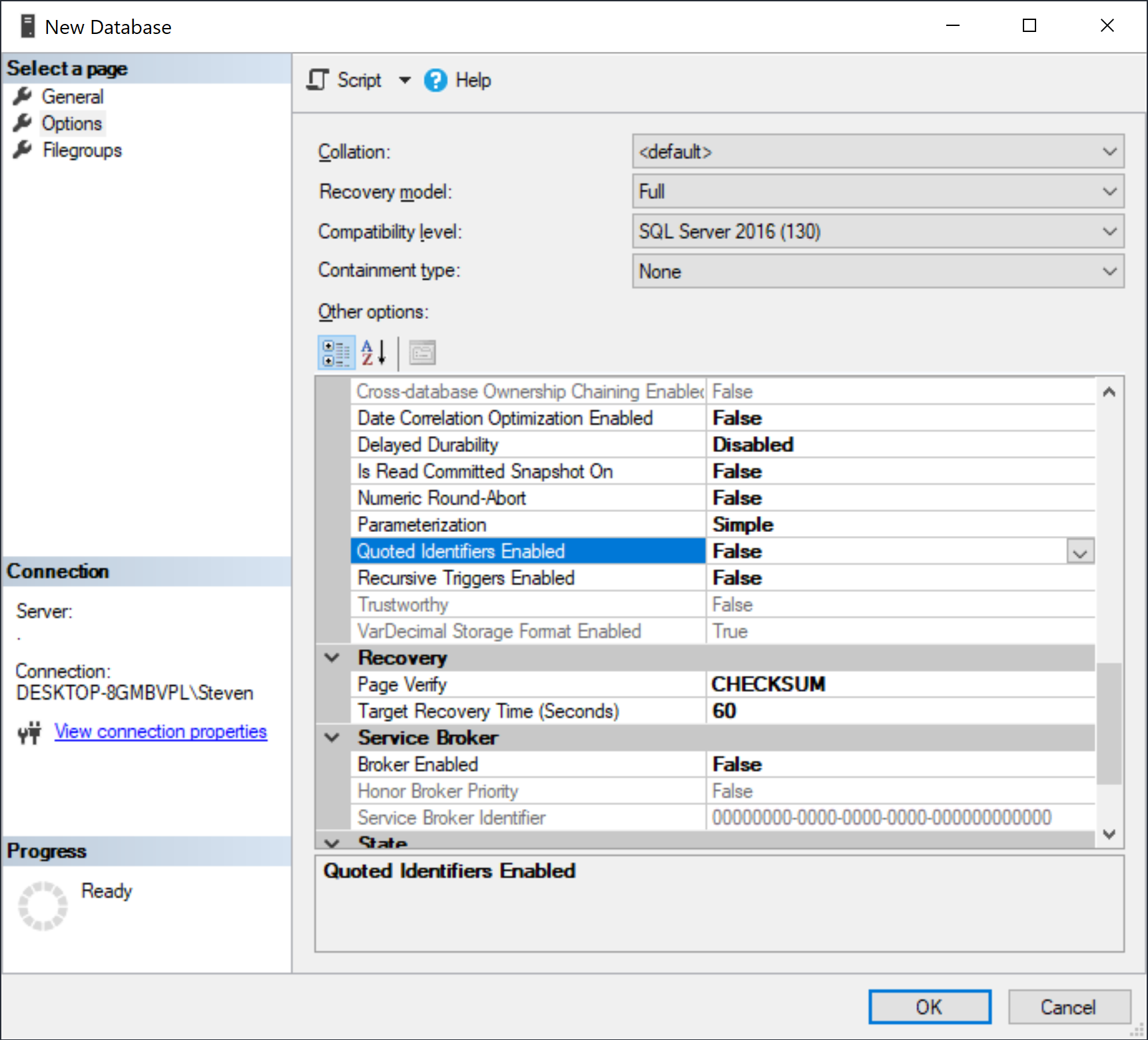
@ajcvickers it doesn't need to be, but it's off by default when I create a database in SSMS.
StevenLiekens
on 2 Jun 2020
@StevenLiekens - According to T-Sql documentation here, default is ON in SqlServer. I checked that SSMS has that OFF by default, but I am not aware of reasons why it is the default selected for SSMS. Probably only SSMS team answer that.
 smitpatel
on 2 Jun 2020
smitpatel
on 2 Jun 2020
This is a session level setting, and always set to on by SqlClient, see #3742
 ErikEJ
on 2 Jun 2020
ErikEJ
on 2 Jun 2020
@StevenLiekens - re-reading your initial post - assuming you use sqlcmd to execute the script, the use the -I option to set QUOTED_IDENTIFIERS ON:
sqlcmd -S myserver -d mydb -i script.sql -E -I
Thanks @ErikEJ, I wasn't aware of that option and it should solve my issue.
StevenLiekens
on 2 Jun 2020
@ajcvickers
We just ran across this issue on my current project.
We have added a unique index on a nullable string column using the fluent api.
entity.HasIndex(e => e.AccountType).IsUnique();
That caused the migration builder to add a filter onto the migrationBuilder.CreateIndex call - filter: "[AccountType] IS NOT NULL"
We are generating a script from our migrations which we then use sqlcmd to execute inside of an Azure devops pipeline.
It should be documented somewhere that if you are using sqlcmd you might need the -I flag.
 pmiddleton
on 3 Aug 2020
pmiddleton
on 3 Aug 2020
Related issues
 julienshepherd
·
3Comments
julienshepherd
·
3Comments
 ghost
·
3Comments
ghost
·
3Comments
 TPJ11
·
3Comments
TPJ11
·
3Comments
 ericvb
·
3Comments
ericvb
·
3Comments
 mohsin91
·
3Comments
mohsin91
·
3Comments
Most helpful comment
@StevenLiekens - re-reading your initial post - assuming you use sqlcmd to execute the script, the use the -I option to set QUOTED_IDENTIFIERS ON: