Efcore: Different Instances of ILIST<SelectListData>Getting Incorrectly Merged in .NET Core 3.1 When Key Is The Same Value
I have run into a strange issue which is whereby I am declaring and populating two instances of ILIST<SelectListData> but if the key for 1 appears in the second then the descriptions of the second are replaced with the description from the first which would seem to be some sort of bug in .NET Core. I have already restarted the project again with a new .NET Core Web Application but hit exactly the same issue again.
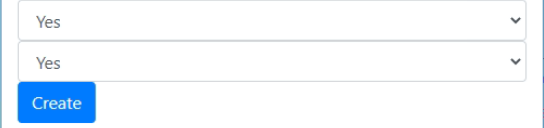
If the stored procedure returns the key of 1 and a value of Yes for the first drop down and the key of 1 and a value of No for the second then the value is changed to Yes to match that of the first one (so both drop-downs display a single option of "Yes" on the web page)
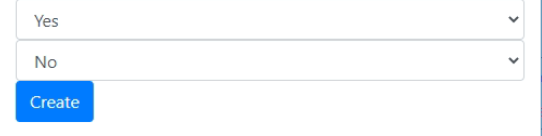
If I change the stored procedure to return a key of 2 then the second drop-down correctly reads a single option of "No" as it should.
Output when description for second drop-down is No but ID is 1 (i.e. incorrect description):
Output if I change the ID to 2 (now description is correct):
Here is the code for the main page
@page
@model OnlineApplications.CreateModel
@{
    ViewData["Title"] = "Create";
}
<form method="post">
    <select asp-for="Application.VisaType" class="form-control" asp-items="ViewBag.VisaTypeID"></select>
    <select asp-for="Application.DisabilityCategoryID" class="form-control" asp-items="ViewBag.DisabilityCategoryID"></select>
    <input type="submit" value="Create" class="btn btn-primary" />
</form>
Here is the code from the code behind page:
public IList<SelectListData> VisaData { get; set; }
public IList<SelectListData> DisabilityCategoryData { get; set; }

public async Task<PageResult> OnGetAsync()
{
   string selectListDomain = null;
   selectListDomain = "VISA";
   VisaData = await _context.SelectListData
       .FromSqlInterpolated($"EXEC SPR_OLA_SelectListData @Domain={selectListDomain}")
       .ToListAsync();
   ViewData["VisaTypeID"] = new SelectList(VisaData, "Code", "Description");

   selectListDomain = "DISABILITY_CATEGORY";
   DisabilityCategoryData = await _context.SelectListData
       .FromSqlInterpolated($"EXEC SPR_OLA_SelectListData @Domain={selectListDomain}")
       .ToListAsync();
   ViewData["DisabilityCategoryID"] = new SelectList(DisabilityCategoryData, "Code", "Description");
   return Page();
}
Here is the SQL script:
ALTER PROCEDURE [dbo].[SPR_OLA_SelectListData]
  @Domain NVARCHAR(255)
AS
BEGIN
  SET NOCOUNT ON;

  DECLARE @SQLString NVARCHAR(MAX);
  DECLARE @SQLParams NVARCHAR(MAX);

  IF @Domain = 'VISA'
    SET @SQLString =
    N'SELECT
        Code = ''1'',
        Description = ''Yes''';
  ELSE IF @Domain = 'DISABILITY_CATEGORY'
    SET @SQLString =
    N'SELECT
      Code = ''1'',
      Description = ''No''';
 SET @SQLParams = N'';
  EXECUTE sp_executesql @SQLString, @SQLParams;
END
As you can see above DISABILITY_CATEGORY should return "No" in the drop-down yet it returns "Yes" in error as takes the values of the first select where the keys are the same. If the keys are different for each drop-down then this bug/issue does not occur and the output appears correctly.
As these are different instances of ILIST<SelectListData>, the values in one should not affect the other.
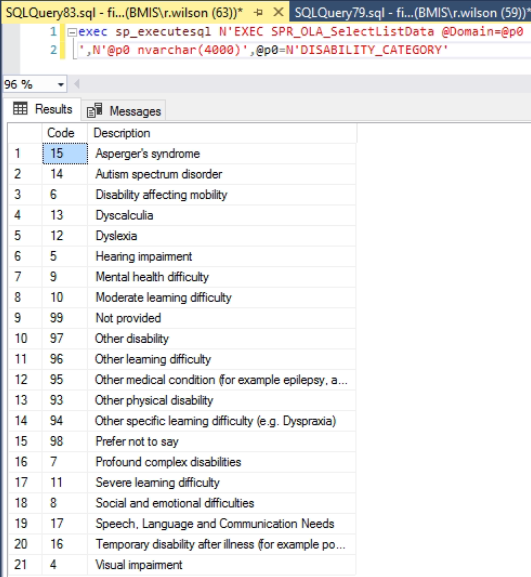
In the full project the second drop-down returns the list of learning difficulties ordered by description and using SQL Query Analyser this confirms the stored procedure is being correctly executed and returning correct output:
But the drop-down values are getting replaced with those from the Visa drop-down where the keys have the same values so my form makes no sense:
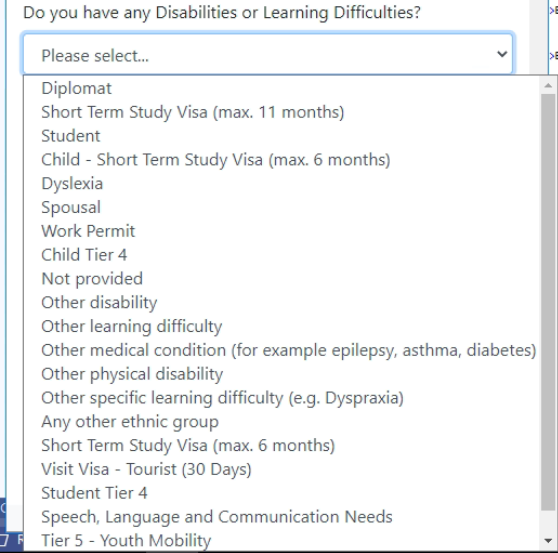
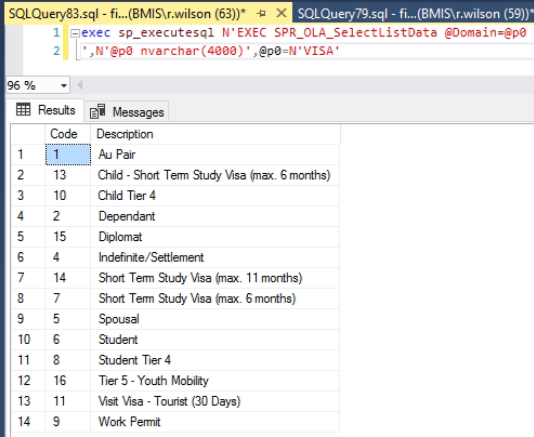
The visa drop-down output is as follows and as you can see code 15 from the disability drop-down is getting its description replaced with the one from the visa drop-down (as are the others). Code 12 remains as "Dyslexia" as there is no code 12 in the other list.
I have built a few systems using this approach but I now realise they all had different sets of keys so the issue did not occur.
 robinwilson16
All 5 comments
@robinwilson16, I can be wrong, but it is how Change Tracker works. EF is trying to find record in Change Tracker using the same key (Code) as in previous result set and replaces objects/values or even do not load new value.
- You can disable Change Tracker using
AsNoTracking()(preferred in your case) - Or add Domain as the second key in class
SelectListDataand return Domain in stored proc.
 sdanyliv
on 17 Feb 2020
sdanyliv
on 17 Feb 2020
@robinwilson16 Entity Framework can only track a single entity instance with any given key value. Doing otherwise results in ambiguity in identity resolution and relationship tracking. You can use keyless entity types for data that really doesn't have a unique key. However, in your case it looks like it would be better to define and use an entity type where each instance has a unique key value. See the modeling documentation for more details: https://docs.microsoft.com/en-us/ef/core/modeling/
 ajcvickers
on 17 Feb 2020
ajcvickers
on 17 Feb 2020
Thanks @sdanyliv and @ajcvickers for the help.
This makes perfect sense now and I can confirm that adding the AsNoTracking() line fixed the issue.
Is it possible to give more information about the domain option? Do you mean load in all drop-downs as a single object and then filter within each call to the object?
I should have added the model definition which is currently:
```
public class SelectListData
{
[StringLength(10)]
public string Code { get; set; }
[StringLength(255)]
public string Description { get; set; }
}
protected override void OnModelCreating(ModelBuilder modelBuilder)
{
base.OnModelCreating(modelBuilder);
modelBuilder.Entity<SelectListData>()
    .HasKey(d => new { d.Code });
}
robinwilson16
on 18 Feb 2020
@robinwilson16
Is it possible to give more information about the domain option?
I'm not sure what you mean by "the domain option?"
ajcvickers
on 22 Feb 2020
@ajcvickers it was from the response from @sdanyliv where he offered two options. I understand the first and have implemented this and it worked but I would like to understand the second option as well. I did Google it but couldn't really work out what would be required unless this would be to alter the primary key to be a composite key including a domain/drop-down type value and then run a single query to obtain all data and then filter each drop-down based on the domain field:
You can disable Change Tracker using AsNoTracking() (preferred in your case)
Or add Domain as the second key in class SelectListData and return Domain in stored proc.
If so would one be advised over the other - e.g. is it better to perform one query and then filter each selectlist or run each as separate queries. I was planning to use the same stored procedure throughout the system to load any drop-down though so I think the second option would make it harder to abstract.
robinwilson16
on 22 Feb 2020
Related issues
 RehanSaeed
·
3Comments
RehanSaeed
·
3Comments
 HappyNomad
·
3Comments
HappyNomad
·
3Comments
 pachecosoftware
·
3Comments
pachecosoftware
·
3Comments
 HeMinzhang
·
3Comments
HeMinzhang
·
3Comments
 miguelhrocha
·
3Comments
miguelhrocha
·
3Comments