Efcore: Can't install any version of dotnet ef for ef core 3.1
When I try to install a nuget _dotnet ef 3.1.1_ package using the package explorer I get an exception:
Package dotnet-ef 3.1.1 is not compatible with netcoreapp3.1 (.NETCoreApp,Version=v3.1). Package dotnet-ef 3.1.1 supports: netcoreapp3.1 (.NETCoreApp,Version=v3.1) / any
Invalid project-package combination for dotnet-ef 3.1.1. DotnetToolReference project style can only contain references of the DotnetTool type
Package 'dotnet-ef 3.1.1' has a package type 'DotnetTool' that is not supported by project 'ProjectName'.
NuGet.Packaging.Core.PackagingException: Package 'dotnet-ef 3.1.1' has a package type 'DotnetTool' that is not supported by project 'ProjectName'.
   at JetBrains.ProjectModel.NuGet.Operations.NuGetPatchedInstallationCompatibility.EnsurePackageCompatibility(NuGetProject nuGetProject, PackageIdentity packageIdentity, NuspecReader nuspecReader)
   at JetBrains.ProjectModel.NuGet.Operations.NuGetPatchedInstallationCompatibility.EnsurePackageCompatibility(NuGetProject nuGetProject, INuGetPathContext pathContext, IEnumerable`1 nuGetProjectActions, RestoreResult restoreResult)
   at NuGet.PackageManagement.NuGetPackageManager.<PreviewBuildIntegratedProjectActionsAsync>d__77.MoveNext()
--- End of stack trace from previous location where exception was thrown ---
   at System.Runtime.ExceptionServices.ExceptionDispatchInfo.Throw()
   at System.Runtime.CompilerServices.TaskAwaiter.HandleNonSuccessAndDebuggerNotification(Task task)
   at NuGet.PackageManagement.NuGetPackageManager.<PreviewInstallPackageAsync>d__68.MoveNext()
--- End of stack trace from previous location where exception was thrown ---
   at System.Runtime.ExceptionServices.ExceptionDispatchInfo.Throw()
   at System.Runtime.CompilerServices.TaskAwaiter.HandleNonSuccessAndDebuggerNotification(Task task)
   at NuGet.PackageManagement.NuGetPackageManager.<InstallPackageAsync>d__48.MoveNext()
--- End of stack trace from previous location where exception was thrown ---
   at System.Runtime.ExceptionServices.ExceptionDispatchInfo.Throw()
   at System.Runtime.CompilerServices.TaskAwaiter.HandleNonSuccessAndDebuggerNotification(Task task)
   at NuGet.PackageManagement.NuGetPackageManager.<InstallPackageAsync>d__47.MoveNext()
--- End of stack trace from previous location where exception was thrown ---
   at System.Runtime.ExceptionServices.ExceptionDispatchInfo.Throw()
   at System.Runtime.CompilerServices.TaskAwaiter.HandleNonSuccessAndDebuggerNotification(Task task)
   at JetBrains.ProjectModel.NuGet.Operations.NuGetInstallOperation.<>c__DisplayClass5_0.<<InstallAsync>b__0>d.MoveNext()
--- End of stack trace from previous location where exception was thrown ---
   at System.Runtime.ExceptionServices.ExceptionDispatchInfo.Throw()
   at System.Runtime.CompilerServices.TaskAwaiter.HandleNonSuccessAndDebuggerNotification(Task task)
   at JetBrains.ProjectModel.NuGet.Operations.NuGetInstallOperation.<InstallInternal>d__8.MoveNext()

@ Installing dotnet-ef in ProjectName finished (0.123 sec)
[Notification][Install] Install failed (project:ProjectName, package: dotnet-ef v3.1.1)
Package 'dotnet-ef 3.1.1' has a package type 'DotnetTool' that is not supported by project
If I use the CLI command:
dotnet tool install --global dotnet-ef --version 3.1.1
I get the exception text:
Failed to install tool package 'dotnet-ef': Could not find a part of the path 'C:\Users\username\.dotnet\tools\.store\.stage\dxqgbjmz.0kj\dotnet-ef'.
Tool 'dotnet-ef' failed to install. This failure may have been caused by:

* You are attempting to install a preview release and did not use the --version option to specify the version.
* A package by this name was found, but it was not a .NET Core tool.
* The required NuGet feed cannot be accessed, perhaps because of an Internet connection problem.
* You mistyped the name of the tool.

For more reasons, including package naming enforcement, visit https://aka.ms/failure-installing-tool
dotnet info:
.NET Core SDK (reflecting any global.json):
 Version:   3.1.101
 Commit:    b377529961

Runtime Environment:
 OS Name:     Windows
 OS Version:  10.0.18362
 OS Platform: Windows
 RID:         win10-x64
 Base Path:   C:\Program Files\dotnet\sdk\3.1.101\

Host (useful for support):
  Version: 3.1.1
  Commit:  a1388f194c

.NET Core SDKs installed:
  3.1.100 [C:\Program Files\dotnet\sdk]
  3.1.101 [C:\Program Files\dotnet\sdk]

.NET Core runtimes installed:
  Microsoft.AspNetCore.All 2.1.4 [C:\Program Files\dotnet\shared\Microsoft.AspNetCore.All]
  Microsoft.AspNetCore.All 2.1.5 [C:\Program Files\dotnet\shared\Microsoft.AspNetCore.All]
  Microsoft.AspNetCore.All 2.1.6 [C:\Program Files\dotnet\shared\Microsoft.AspNetCore.All]
  Microsoft.AspNetCore.All 2.1.7 [C:\Program Files\dotnet\shared\Microsoft.AspNetCore.All]
  Microsoft.AspNetCore.All 2.1.9 [C:\Program Files\dotnet\shared\Microsoft.AspNetCore.All]
  Microsoft.AspNetCore.All 2.1.11 [C:\Program Files\dotnet\shared\Microsoft.AspNetCore.All]
  Microsoft.AspNetCore.All 2.2.1 [C:\Program Files\dotnet\shared\Microsoft.AspNetCore.All]
  Microsoft.AspNetCore.All 2.2.3 [C:\Program Files\dotnet\shared\Microsoft.AspNetCore.All]
  Microsoft.AspNetCore.App 2.1.4 [C:\Program Files\dotnet\shared\Microsoft.AspNetCore.App]
  Microsoft.AspNetCore.App 2.1.5 [C:\Program Files\dotnet\shared\Microsoft.AspNetCore.App]
  Microsoft.AspNetCore.App 2.1.6 [C:\Program Files\dotnet\shared\Microsoft.AspNetCore.App]
  Microsoft.AspNetCore.App 2.1.7 [C:\Program Files\dotnet\shared\Microsoft.AspNetCore.App]
  Microsoft.AspNetCore.App 2.1.9 [C:\Program Files\dotnet\shared\Microsoft.AspNetCore.App]
  Microsoft.AspNetCore.App 2.1.11 [C:\Program Files\dotnet\shared\Microsoft.AspNetCore.App]
  Microsoft.AspNetCore.App 2.2.1 [C:\Program Files\dotnet\shared\Microsoft.AspNetCore.App]
  Microsoft.AspNetCore.App 2.2.3 [C:\Program Files\dotnet\shared\Microsoft.AspNetCore.App]
  Microsoft.AspNetCore.App 3.0.1 [C:\Program Files\dotnet\shared\Microsoft.AspNetCore.App]
  Microsoft.AspNetCore.App 3.1.0 [C:\Program Files\dotnet\shared\Microsoft.AspNetCore.App]
  Microsoft.AspNetCore.App 3.1.1 [C:\Program Files\dotnet\shared\Microsoft.AspNetCore.App]
  Microsoft.NETCore.App 2.0.5 [C:\Program Files\dotnet\shared\Microsoft.NETCore.App]
  Microsoft.NETCore.App 2.0.6 [C:\Program Files\dotnet\shared\Microsoft.NETCore.App]
  Microsoft.NETCore.App 2.0.7 [C:\Program Files\dotnet\shared\Microsoft.NETCore.App]
  Microsoft.NETCore.App 2.0.9 [C:\Program Files\dotnet\shared\Microsoft.NETCore.App]
  Microsoft.NETCore.App 2.1.4 [C:\Program Files\dotnet\shared\Microsoft.NETCore.App]
  Microsoft.NETCore.App 2.1.5 [C:\Program Files\dotnet\shared\Microsoft.NETCore.App]
  Microsoft.NETCore.App 2.1.6 [C:\Program Files\dotnet\shared\Microsoft.NETCore.App]
  Microsoft.NETCore.App 2.1.7 [C:\Program Files\dotnet\shared\Microsoft.NETCore.App]
  Microsoft.NETCore.App 2.1.9 [C:\Program Files\dotnet\shared\Microsoft.NETCore.App]
  Microsoft.NETCore.App 2.1.11 [C:\Program Files\dotnet\shared\Microsoft.NETCore.App]
  Microsoft.NETCore.App 2.2.1 [C:\Program Files\dotnet\shared\Microsoft.NETCore.App]
  Microsoft.NETCore.App 2.2.3 [C:\Program Files\dotnet\shared\Microsoft.NETCore.App]
  Microsoft.NETCore.App 3.0.1 [C:\Program Files\dotnet\shared\Microsoft.NETCore.App]
  Microsoft.NETCore.App 3.1.0 [C:\Program Files\dotnet\shared\Microsoft.NETCore.App]
  Microsoft.NETCore.App 3.1.1 [C:\Program Files\dotnet\shared\Microsoft.NETCore.App]
  Microsoft.WindowsDesktop.App 3.0.1 [C:\Program Files\dotnet\shared\Microsoft.WindowsDesktop.App]
  Microsoft.WindowsDesktop.App 3.1.0 [C:\Program Files\dotnet\shared\Microsoft.WindowsDesktop.App]
  Microsoft.WindowsDesktop.App 3.1.1 [C:\Program Files\dotnet\shared\Microsoft.WindowsDesktop.App]

To install additional .NET Core runtimes or SDKs:
  https://aka.ms/dotnet-download
The exception message matches for any version of _dotnet ef_, no matter what I try, nothing helps.
What might be the problem and how can I fix it ? Thanks!
Further technical details
EF Core version: Microsoft.EntityFrameworkCore 3.1.1
Target framework: .NET Core 3.1.1
Operating system: Windows 10
IDE: Rider 2019.3.1
 ExcpOccured
All 32 comments
@ExcpOccured I have tried to reproduce this, but not having any luck. Can you post a small project that reproduces on your machine. That way I can eliminate project differences in trying to reproduce this.
 ajcvickers
on 27 Jan 2020
ajcvickers
on 27 Jan 2020
@ajcvickers Yes, of course, at the moment I'm working on a project, the branch is _develop_, you can try to reproduce the problem on it
@ExcpOccured I have tried to reproduce this, but not having any luck. Can you post a small project that reproduces on your machine. That way I can eliminate project differences in trying to reproduce this.
ExcpOccured
on 27 Jan 2020
@dotnet/aspnet-build @bricelam I can't reproduce this on my machine. Any ideas?
ajcvickers
on 27 Jan 2020
No idea. Maybe delete C:\Users\username\.dotnet\tools\.store\.stage\dxqgbjmz.0kj and try again.
 bricelam
on 27 Jan 2020
bricelam
on 27 Jan 2020
No idea. Maybe delete
C:\Users\username\.dotnet\tools\.store\.stage\dxqgbjmz.0kjand try again.
Unfortunately, this file doesnt exist and in the system has enabled the display of hidden files, so we can exclude the fact that its hidden.
I created a file with this extension manually in the specified directory, now the CLI gave me an exception message:
Found the .NET Core SDK, but did not find dotnet.dll at [C:\Program Files\dotnet\sdk\3.1.100\dotnet.dll]
I can notice that the specified path for the sdk doesnt match the net core version used, but I can probably solve it !
ExcpOccured
on 27 Jan 2020
@ajcvickers could this be related to reported problems (that I can't find in GitHub) with the dotnet ef tool in 3.1.1 -- or was that 3.1.0?
If not, this sounds like an issue in the .NET Core SDK or NuGet. The following part of the error doesn't sound like anything within efcore:
Package 'dotnet-ef 3.1.1' has a package type 'DotnetTool' that is not supported by project
 dougbu
on 28 Jan 2020
dougbu
on 28 Jan 2020
@ajcvickers could this be related to reported problems (that I can't find in GitHub) with the
dotnet eftool in 3.1.1 -- or was that 3.1.0?If not, this sounds like an issue in the .NET Core SDK or NuGet. The following part of the error doesn't sound like anything within efcore:
Package 'dotnet-ef 3.1.1' has a package type 'DotnetTool' that is not supported by project
Does it make sense to create an issue in these reps with a link to this one ?
ExcpOccured
on 28 Jan 2020
@ExcpOccured Possibly, but without a way for this to be reproduced it's going to be hard for isolate the problem. I discussed this with the team, and this looks like possibly a corrupt install on your machine. Can you try uninstalling and reinstalling the SDK? Also, can you post the version(s) of Visual Studio installed, if any?
ajcvickers
on 28 Jan 2020
@ExcpOccured Possibly, but without a way for this to be reproduced it's going to be hard for isolate the problem. I discussed this with the team, and this looks like possibly a corrupt install on your machine. Can you try uninstalling and reinstalling the SDK? Also, can you post the version(s) of Visual Studio installed, if any?
Thank you for your attention to the problem!
Information about visual studio:
Microsoft Visual Studio Professional 2019
Version 16.4.3
VisualStudio.16.Release/16.4.3+29709.97
Microsoft .NET Framework
Version 4.8.03752

Installed Version: Professional

ASP.NET and Web Tools 2019   16.4.457.38025
ASP.NET and Web Tools 2019

ASP.NET Web Frameworks and Tools 2019   16.4.457.38025
For additional information, visit https://www.asp.net/

Azure App Service Tools v3.0.0   16.4.457.38025
Azure App Service Tools v3.0.0

Azure Functions and Web Jobs Tools   16.4.457.38025
Azure Functions and Web Jobs Tools

C# Tools   3.4.1-beta4-19610-02+c4e5d138903b899477649a17f197abd2bcb22f9e
C# components used in the IDE. Depending on your project type and settings, a different version of the compiler may be used.

Common Azure Tools   1.10
Provides common services for use by Azure Mobile Services and Microsoft Azure Tools.

IntelliCode Extension   1.0
IntelliCode Visual Studio Extension Detailed Info

Microsoft Azure Tools   2.9
Microsoft Azure Tools for Microsoft Visual Studio 2019 - v2.9.21016.1

Microsoft Continuous Delivery Tools for Visual Studio   0.4
Simplifying the configuration of Azure DevOps pipelines from within the Visual Studio IDE.

Microsoft JVM Debugger   1.0
Provides support for connecting the Visual Studio debugger to JDWP compatible Java Virtual Machines

Microsoft Library Manager   2.0.87+gbb515bf382
Install client-side libraries easily to any web project

Microsoft MI-Based Debugger   1.0
Provides support for connecting Visual Studio to MI compatible debuggers

Microsoft Visual Studio Tools for Containers   1.1
Develop, run, validate your ASP.NET Core applications in the target environment. F5 your application directly into a container with debugging, or CTRL + F5 to edit & refresh your app without having to rebuild the container.

NuGet Package Manager   5.4.0
NuGet Package Manager in Visual Studio. For more information about NuGet, visit https://docs.nuget.org/

ProjectServicesPackage Extension   1.0
ProjectServicesPackage Visual Studio Extension Detailed Info

ResXManager   1.38.3034.0
Manage localization of all ResX-Based resources in one place. Shows all resources of a solution and let's you edit the strings and their localizations in a well-arranged data grid.

SQL Server Data Tools   16.0.61912.09160
Microsoft SQL Server Data Tools

TypeScript Tools   16.0.11031.2001
TypeScript Tools for Microsoft Visual Studio

Visual Basic Tools   3.4.1-beta4-19610-02+c4e5d138903b899477649a17f197abd2bcb22f9e
Visual Basic components used in the IDE. Depending on your project type and settings, a different version of the compiler may be used.

Visual F# Tools 10.4 for F# 4.6   16.4.0-beta.19556.5+e7597deb7042710a7142bdccabd6f92b0840d354
Microsoft Visual F# Tools 10.4 for F# 4.6

Visual Studio Code Debug Adapter Host Package   1.0
Interop layer for hosting Visual Studio Code debug adapters in Visual Studio

Visual Studio Container Tools Extensions (Preview)   1.0
View, manage, and diagnose containers within Visual Studio.

Visual Studio Tools for Containers   1.0
Visual Studio Tools for Containers
I performed the _Repair_ procedure for _.Net Core 3.1.1_ for _Windows x64_, but it didnt give any results and the problem is remained.
Could this be due to the fact that versions of the .Net Core SDK may have implicit dependencies on previous versions of the build ?
ExcpOccured
on 28 Jan 2020
@ExcpOccured I uninstalled the 16.5 preview and installed VS 16.4.3, but it still works for me.
With regard to @dougbu's comments. We accidentally built the 3.1.1 tool such that it depends on .NET Core 3.1.1. It is supposed to depend on 3.1.0 since its a very thin wrapper that should work with any patch version. However, that only means that the tool won't work if .NET Core 3.1.1 is not installed. Since you have runtimes and SDKs for both 3.1.0 and 3.1.1 I don't think this is the problem here.
One more thing to try--uninstall any existing dotnet ef tool and try again:
dotnet tool uninstall --global dotnet-ef
@ExcpOccured I uninstalled the 16.5 preview and installed VS 16.4.3, but it still works for me.
With regard to @dougbu's comments. We accidentally built the 3.1.1 tool such that it depends on .NET Core 3.1.1. It is supposed to depend on 3.1.0 since its a very thin wrapper that should work with any patch version. However, that only means that the tool won't work if .NET Core 3.1.1 is not installed. Since you have runtimes and SDKs for both 3.1.0 and 3.1.1 I don't think this is the problem here.
One more thing to try--uninstall any existing dotnet ef tool and try again:
dotnet tool uninstall --global dotnet-ef
The main problem is that I don't have dotnet ef installed and when I try to install any version starting from _2.1.0_ and ending with _3.1.1_, I get the exception that was specified earlier.
Let me make another assumption, it doesn't exactly apply to EF core, but can it be related to system environment variables or user rights ?
I want to say that I was having problems with loading the solution in IDE(latest versions) Rider or Visual Studio, the IDE couldn't resolve the PATH to msbuild.dll, after searching for information, I found a solution by manually setting MSBuildSDKsPath and it helped, can this be related for my issue ?
ExcpOccured
on 29 Jan 2020
@ExcpOccured I'm out of ideas.
@Pilchie Any ideas who may be able to help here?
ajcvickers
on 29 Jan 2020
@ExcpOccured have you tried on another machine?
 ErikEJ
on 29 Jan 2020
ErikEJ
on 29 Jan 2020
@wli3 - Any ideas?
 Pilchie
on 29 Jan 2020
Pilchie
on 29 Jan 2020
When I try to install a nuget dotnet ef 3.1.1 package using the package explorer I get an exception:
The error is expected. Using package explorer means you will add a packagereference to the tool in the project which is not supported (it is installed globally or to a manifest file)
dotnet tool install --global dotnet-ef --version 3.1.1
Failed to install tool package 'dotnet-ef': Could not find a part of the path 'C:\Users\username.dotnet\tools.store.stage\dxqgbjmz.0kj\dotnet-ef'.
This should work. From the error message I suspect your C:\Users\username\.dotnet\tools\.store\.stage is not accessible. Could you ensure it is writable by dotnet?
 wli3
on 2 Feb 2020
wli3
on 2 Feb 2020
I apologize for coming back so late to discuss the conversation, I was on vacation ⚆ _ ⚆
ExcpOccured
on 6 Feb 2020
@ExcpOccured have you tried on another machine?
Unfortunately, but not
ExcpOccured
on 6 Feb 2020
When I try to install a nuget dotnet ef 3.1.1 package using the package explorer I get an exception:
The error is expected. Using package explorer means you will add a packagereference to the tool in the project which is not supported (it is installed globally or to a manifest file)
dotnet tool install --global dotnet-ef --version 3.1.1
Failed to install tool package 'dotnet-ef': Could not find a part of the path 'C:\Users\username.dotnet\tools.store.stage\dxqgbjmz.0kj\dotnet-ef'.This should work. From the error message I suspect your
C:\Users\username\.dotnet\tools\.store\.stageis not accessible. Could you ensure it is writable by dotnet?
When I try to install a nuget dotnet ef 3.1.1 package using the package explorer I get an exception:
The error is expected. Using package explorer means you will add a packagereference to the tool in the project which is not supported (it is installed globally or to a manifest file)
dotnet tool install --global dotnet-ef --version 3.1.1
Failed to install tool package 'dotnet-ef': Could not find a part of the path 'C:\Users\username.dotnet\tools.store.stage\dxqgbjmz.0kj\dotnet-ef'.This should work. From the error message I suspect your
C:\Users\username\.dotnet\tools\.store\.stageis not accessible. Could you ensure it is writable by dotnet?
Thank you for the answer, my current user is the administrator and for this directory have _Full control_(all I/O operations).
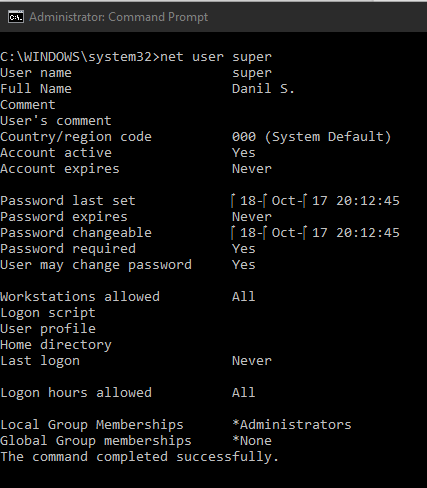

Please specify what you mean by "it is writable by dotnet?" How can I verify this fact ?
ExcpOccured
on 6 Feb 2020
I don't have an easy way to verify that. How did you install SDK? Using the exe or zip? Did you change your dotnet.exe permission afterwards?
Another thing we could try is to back up C:\Users\username\.dotnet\tools folder's content first, then delete it, and rerun install command
wli3
on 6 Feb 2020
I don't have an easy way to verify that. How did you install SDK? Using the exe or zip? Did you change your dotnet.exe permission afterwards?
Another thing we could try is to back up
C:\Users\username\.dotnet\toolsfolder's content first, then delete it, and rerun install command
I used exe, I didn't change any permission, except that, as I said earlier, manually set the MSBuildSDKsPath and added C:\Program Files\dotnet into the Path
I tried to use your advice, but the problem still persists, other suggestions ?
ExcpOccured
on 6 Feb 2020
I think it will probably be easier for me to change the boot sector to Linux or choose a different ORM (._.)
ExcpOccured
on 6 Feb 2020
Try this workaround by installing it to a different location
dotnet tool install dotnet-ef --tool-path c:\Users\username\tools (c:\Users\username\tools could be anywhere)
and run
c:\Users\wul\tools\dotnet-ef.exe
Later you could put c:\Users\username\tools on your path, so you can just run dotnet ef
wli3
on 6 Feb 2020
Try this workaround by installing it to a different location
dotnet tool install dotnet-ef --tool-path c:\Users\username\tools(c:\Users\username\tools could be anywhere)
and run
c:\Users\wul\tools\dotnet-ef.exeLater you could put
c:\Users\username\toolson your path, so you can just rundotnet ef
The idea was interesting, but also didnt bring any results, sadly
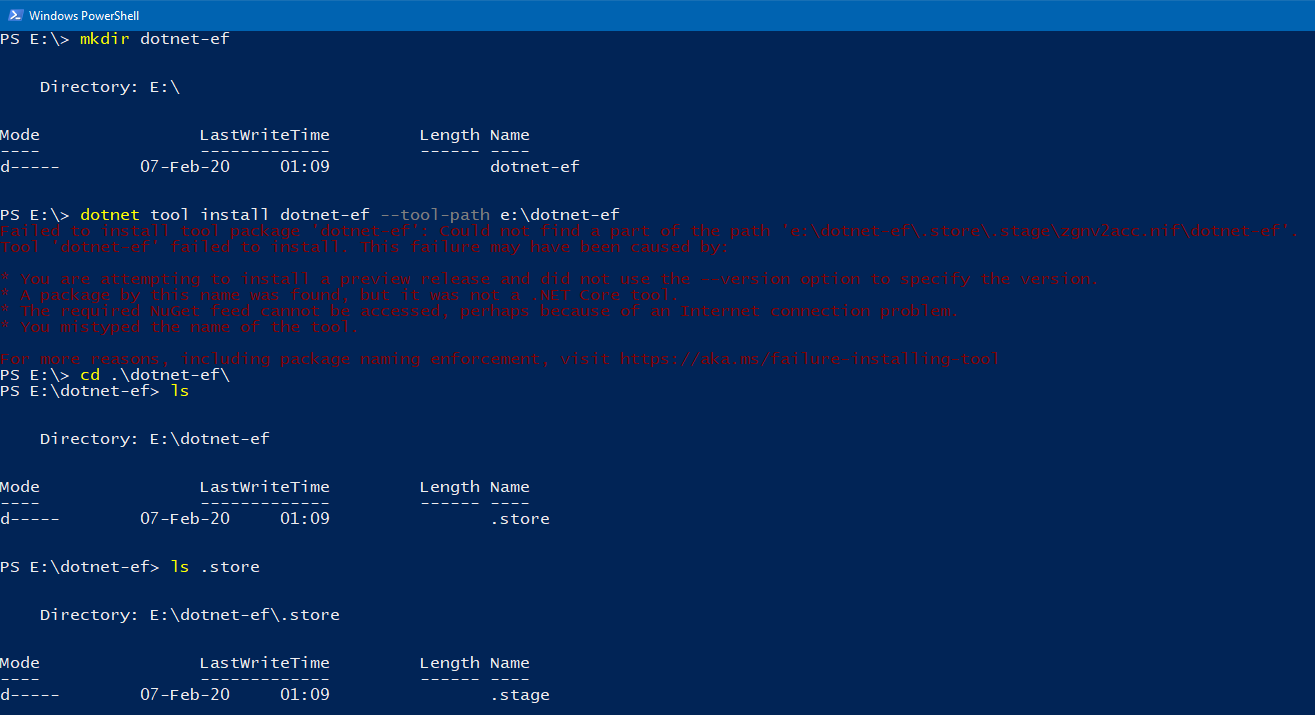
ExcpOccured
on 6 Feb 2020
I should also note that probably I can't seem to install any of the available _dotnet core cli tools_

I have idea, about a month ago I ran this script, could it affect something ?
ExcpOccured
on 6 Feb 2020
The script should be fine. Although do you have special anti virus software running? Or indexer? It may lock the file.
Maybe try local tools. It does not have the rename step which could be locked by other program (implementation detail).
Under your project's folder (or any directory you want the tool to be available) run
dotnet new tool-manifest
dotnet tool install dotnet-ef
dotnet ef
For the bug investigation, could you try to disable the scanning for a moment? And see if dotnet tool install dotnet-ef -g works?
wli3
on 7 Feb 2020
The script should be fine. Although do you have special anti virus software running? Or indexer? It may lock the file.
Maybe try local tools. It does not have the rename step which could be locked by other program (implementation detail).
Under your project's folder (or any directory you want the tool to be available) run
dotnet new tool-manifest
dotnet tool install dotnet-ef
dotnet ef
For the bug investigation, could you try to disable the scanning for a moment? And see if
dotnet tool install dotnet-ef -gworks?
No, malware isnt detected on my PC, the system uses only Windows Security
I think we are close to solving the problem, because now there is a stack trace:

ExcpOccured
on 7 Feb 2020
Thank you all for working on this issue, it was fixed by reinstalling the OS Windows ¯_(ツ)_/¯
ExcpOccured
on 10 Feb 2020
Here's what fixed the problem for me:
https://github.com/dotnet/sdk/issues/10295
 bferguson-sentek
on 18 Mar 2020
bferguson-sentek
on 18 Mar 2020
@bferguson-sentek Thank you, In my case, MSBuildSDKsPath was defined but, The defined SDKsPath(3.0.0) was mis-matched with currently installed.NET Core version(3.1.0). :'(

Please, I hope this comment help for someone.. 😇
 enif-lee
on 24 Mar 2020
enif-lee
on 24 Mar 2020
Reading through this to find some answers. I am having the same issue. Unfortunately, it is hard to define the environment or what might be causing it. :(
 t-eckert
on 18 Apr 2020
t-eckert
on 18 Apr 2020
I started having the same issue on a Mac. weirdly enough it's started happening to other packages like System.Drawing.Common and some extensions.
 titonton
on 6 Jun 2020
titonton
on 6 Jun 2020
I have found my nuget package source is point to wrong URL that is https://www.nuget.org/packages
You might wanna update this to https //api.nuget.org/v3/index.json
 akshayverma91
on 28 Jun 2020
akshayverma91
on 28 Jun 2020
Related issues
 pachecosoftware
·
3Comments
pachecosoftware
·
3Comments
 ryanwinter
·
3Comments
ryanwinter
·
3Comments
 mohsin91
·
3Comments
mohsin91
·
3Comments
 iberodev
·
3Comments
iberodev
·
3Comments
 januszj
·
3Comments
januszj
·
3Comments