Efcore: Database First code generation won't trigger if project can't compile
Hello,
I just had an issue with the generation for the entity classes as well as the context class.
Mostly I am working with database first and while testing out the new ef core I had multiple issues.
1) The ef tool is no longer default in the dotnetcore sdk. Took me some time to undestand the fact that it has been moved out and needs to be installed additionally.
2) if you are working on an project which is in a state where it can not be compiled successfully you
can not generate the entity class or the context because currently a success build seems to be a requirement before he generates those files.
Sometimes I have changes in the database and need to sync it with my code again. I do not see a valid reason why a successful build is required in order to generate code classes out of a database.
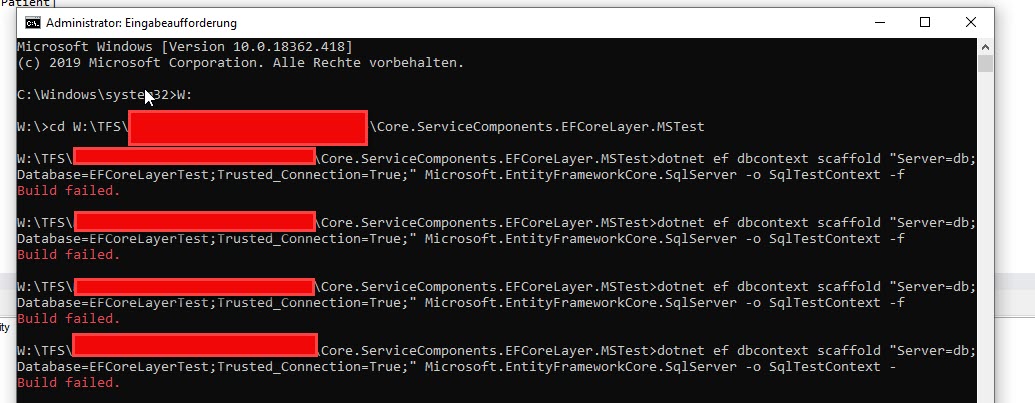

Add another parameter for the ef tool which allows to generate the files without the requirement for a successful build. Maybe there is already something similiar and I wasn't able to find it.
 Q-Tec90
All 17 comments
Just use EF Core Power Tools (disclaimer: I am the author)
 ErikEJ
on 6 Nov 2019
ErikEJ
on 6 Nov 2019
Related to #9716
/cc @bricelam
 ajcvickers
on 6 Nov 2019
ajcvickers
on 6 Nov 2019
We load the provider, design, and plugin assemblies via the project and give you a hook to customize the design-time services (e.g. use a custom pluralizer or code generator).
Without this, we’d need to duplicate a lot of the work of NuGet and MSBuild.
I love that the Power Tools don’t need to build the project, but it comes at a cost—they have to include all the provider and plugin assemblies and there is no hook to customize the services.
 bricelam
on 6 Nov 2019
bricelam
on 6 Nov 2019
No hook? You can customize some services via the configuration UI / JSON file
ErikEJ
on 6 Nov 2019
I just mean you can’t, for example use a custom implementation of IPluralizer. All the extensibility has to be implemented in the Power Tools
bricelam
on 7 Nov 2019
Thank you all for the responses.
@ErikEJ Thank you. It does look solid.
I really do miss the the edmx designer which is using t4 for generation. It sure had its own issues but overall an awesome utility for Database First Models. One click and he generated everything new regardless of the project he was in.
Q-Tec90
on 7 Nov 2019
Re-opening. I want to discuss some possibilities with the team
bricelam
on 7 Nov 2019
For example, there is a hidden --no-build option that will probably just work most of the time with dbcontext scaffold. We could document it for that command explaining the caveats
bricelam
on 7 Nov 2019
Note from triage: document --no-build and it caveats in the --help for the command, and also add update the doc page.
ajcvickers
on 8 Nov 2019
Not sure if this should be a separate issue, so I'm starting here.
I can imagine it being helpful to be able to specify a minimalist project that simply provides custom implementation code like an IPluralizer or an IConfiguration with a connection string to support Name=ConnectionStringName. It would not take a dependency on the project that the database context and models are scaffolded into. This would be to ensure it could build and be used by the scaffolder even when the scaffolded project can't compile.
 jeremycook
on 28 Feb 2020
jeremycook
on 28 Feb 2020
@jeremycook That should be possible today:
dotnet ef dbcontext scaffold ... --startup-project ../MinimalistProject/

# or

cd MinimalistProject/
dotnet ef dbcontext scaffold ... --output-dir ../ActualProject/
@bricelam So close...one side effect is the namespace is the project name, in this case it ends up as "MinimalistProject". I can hack around it by naming the minimalist project ActualProject.Data where my output directory will be ../ActualProject/Data if ran from within the MinimalistProject folder. That definitely feels hacky and would be confusing to someone unfamiliar with why the project got that name since it doesn't actually hold the data models and context. I looked through the docs but don't see an option for customizing the namespace.
jeremycook
on 28 Feb 2020
Ah, we have an issue somewhere to let you specify the namespace in the command
bricelam
on 29 Feb 2020
@jeremycook EF Core Power Tools solves all the issues you describe...
ErikEJ
on 29 Feb 2020
The Power Tools let you provide your own implementation of IPluralizer and read connection strings from configuration?
bricelam
on 29 Feb 2020
@bricelam sorry, missed that part. Only solves the namespace part.
ErikEJ
on 29 Feb 2020
EF Core Power Tools provides 2 pluralizers, the EF6 one and Humanizer.Core
ErikEJ
on 1 Mar 2020
Related issues
 leak
·
3Comments
leak
·
3Comments
 RehanSaeed
·
3Comments
RehanSaeed
·
3Comments
 ghost
·
3Comments
ghost
·
3Comments
 spottedmahn
·
3Comments
spottedmahn
·
3Comments
 miguelhrocha
·
3Comments
miguelhrocha
·
3Comments
Most helpful comment
Just use EF Core Power Tools (disclaimer: I am the author)