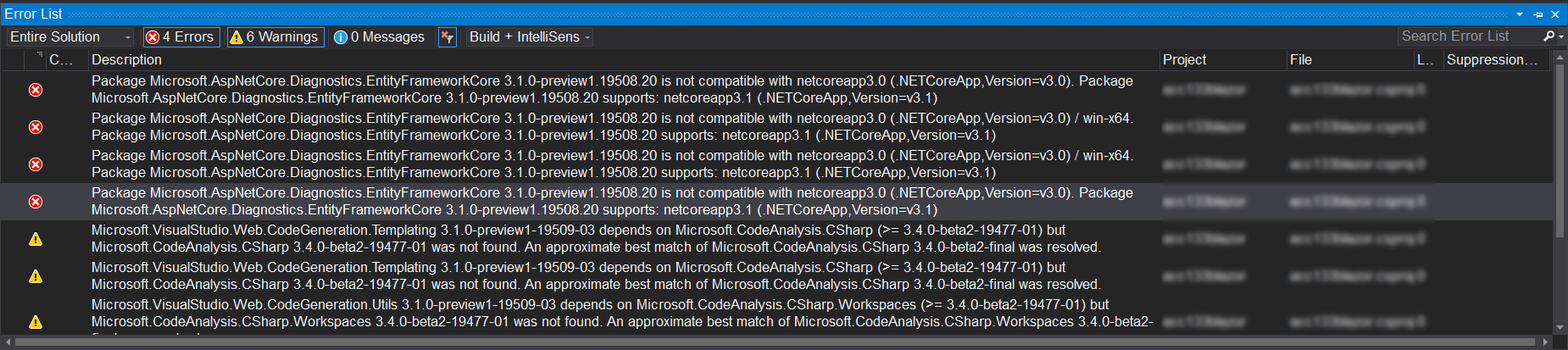
Efcore: Package Microsoft.AspNetCore.Diagnostics.EntityFrameworkCore 3.1.0-preview1.19508.20 is not compatible with netcoreapp3.0 (.NETCoreApp,Version=v3.0).
Describe the bug
Upgrade framework, all Nuget packages to 3.1, but fail when Publish.
To Reproduce
Steps to reproduce the behavior:
Development environment
C:\Users\xxxxxxxx>dotnet --info
.NET Core SDK (reflecting any global.json):
 Version:   3.1.100-preview1-014459
 Commit:    ac3b59712d

Runtime Environment:
 OS Name:     Windows
 OS Version:  10.0.18362
 OS Platform: Windows
 RID:         win10-x64
 Base Path:   C:\Program Files\dotnet\sdk\3.1.100-preview1-014459\

Host (useful for support):
  Version: 3.1.0-preview1.19506.1
  Commit:  bbf5542781

.NET Core SDKs installed:
  2.2.401 [C:\Program Files\dotnet\sdk]
  3.0.100 [C:\Program Files\dotnet\sdk]
  3.1.100-preview1-014459 [C:\Program Files\dotnet\sdk]

.NET Core runtimes installed:
  Microsoft.AspNetCore.All 2.1.13 [C:\Program Files\dotnet\shared\Microsoft.AspNetCore.All]
  Microsoft.AspNetCore.All 2.2.6 [C:\Program Files\dotnet\shared\Microsoft.AspNetCore.All]
  Microsoft.AspNetCore.App 2.1.13 [C:\Program Files\dotnet\shared\Microsoft.AspNetCore.App]
  Microsoft.AspNetCore.App 2.2.6 [C:\Program Files\dotnet\shared\Microsoft.AspNetCore.App]
  Microsoft.AspNetCore.App 3.1.0-preview1.19508.20 [C:\Program Files\dotnet\shared\Microsoft.AspNetCore.App]
  Microsoft.NETCore.App 2.1.13 [C:\Program Files\dotnet\shared\Microsoft.NETCore.App]
  Microsoft.NETCore.App 2.2.6 [C:\Program Files\dotnet\shared\Microsoft.NETCore.App]
  Microsoft.NETCore.App 3.1.0-preview1.19506.1 [C:\Program Files\dotnet\shared\Microsoft.NETCore.App]
  Microsoft.WindowsDesktop.App 3.1.0-preview1.19506.1 [C:\Program Files\dotnet\shared\Microsoft.WindowsDesktop.App]

To install additional .NET Core runtimes or SDKs:
  https://aka.ms/dotnet-download

C:\Users\xxxxxxxx>
Tools: Microsoft Visual Studio Community 2019 Preview. Version 16.4.0 Preview 2.0
Type of webapp: ASP.NET Core 3.1 Blazor Server.
File csproj
<Project Sdk="Microsoft.NET.Sdk.Web">

  <PropertyGroup>
    <TargetFramework>netcoreapp3.1</TargetFramework>
    <UserSecretsId>aspnet-foo-4E53EF45-B3BE-4943-81BE-2449DC5AA2BC</UserSecretsId>
    <BlazorLinkOnBuild>false</BlazorLinkOnBuild>
  </PropertyGroup>

  <ItemGroup>
    <PackageReference Include="DevExpress.Blazor" Version="19.1.9" />
    <PackageReference Include="Microsoft.AspNetCore.Diagnostics.EntityFrameworkCore" Version="3.1.0-preview1.19508.20" />
    <PackageReference Include="Microsoft.AspNetCore.Identity.EntityFrameworkCore" Version="3.1.0-preview1.19508.20" />
    <PackageReference Include="Microsoft.AspNetCore.Identity.UI" Version="3.1.0-preview1.19508.20" />
    <PackageReference Include="Microsoft.EntityFrameworkCore.SqlServer" Version="3.1.0-preview1.19506.2" />
    <PackageReference Include="Microsoft.EntityFrameworkCore.Tools" Version="3.1.0-preview1.19506.2">
      <PrivateAssets>all</PrivateAssets>
      <IncludeAssets>runtime; build; native; contentfiles; analyzers; buildtransitive</IncludeAssets>
    </PackageReference>
    <PackageReference Include="Microsoft.Extensions.Hosting" Version="3.1.0-preview1.19506.1" />
    <PackageReference Include="Microsoft.Extensions.Logging.Debug" Version="3.1.0-preview1.19506.1" />
    <PackageReference Include="Microsoft.VisualStudio.Web.CodeGeneration.Design" Version="3.1.0-preview1-19509-03" />
    <BlazorLinkerDescriptor Include="Linker.xml" />
  </ItemGroup>

  <ItemGroup>
    <ProjectReference Include="..\DevExpress.Blazor.DocumentMetadata\DevExpress.Blazor.DocumentMetadata.csproj" />
  </ItemGroup>

</Project>
Expected behavior
In Visual Studio, can publishing web-app success.
Screenshots
Additional context
...
If you need more information for resolving issue, let's me know.
 donhuvy
All 10 comments
@Pilchie Are ASP.NET Core 3.1 middleware packages intended to run on .NET Core 3.0, or do they require .NET Core 3.1?
 ajcvickers
on 30 Oct 2019
ajcvickers
on 30 Oct 2019
@donhuvy I confirmed that ASP.NET Core 3.1 packages require .NET Core 3.1.
ajcvickers
on 31 Oct 2019
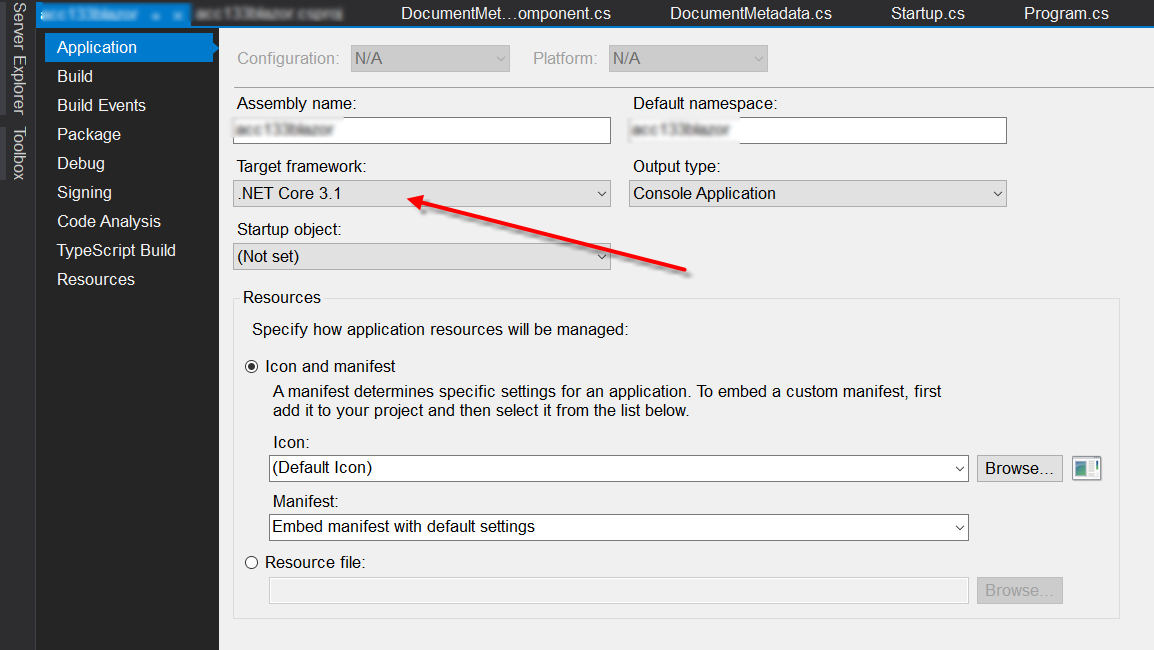
@ajcvickers Please help me clear problem! I already installed .NET Core 3.1 3.1.100-preview1-014459 .
donhuvy
on 1 Nov 2019
@donhuvy Do you have a global.json file anywhere in your solution? It could be pinning the older SDK.
ajcvickers
on 1 Nov 2019
Thank @ajcvickers , I use this dependency in my solution.
donhuvy
on 1 Nov 2019
@donhuvy Can you explain the relevance of that dependency?
ajcvickers
on 1 Nov 2019
@ajcvickers My solution has 2 projects (1 project created by me, 1 project is DevExpress.Blazor.DocumentMetadata . In the second project, it used something related to version 3.0.0 ( https://github.com/DevExpress/Blazor/blob/master/tools/DevExpress.Blazor.DocumentMetadata/DevExpress.Blazor.DocumentMetadata.csproj#L16 ). Indeed, as a commercial services, they use stable version only (3.0.0) .
donhuvy
on 2 Nov 2019
@donhuvy If you have a dependency that _requires_ .NET Core 3.0 but doesn't work on .NET Core 3.1, then it's likely you will have to wait until it is updated. However, this should be rare for anything outside of the .NET Core shared framework itself, so it might be worth following with that dependency to find out why it has this limitation.
ajcvickers
on 4 Nov 2019
same here when publishing:
Package Microsoft.AspNetCore.Diagnostics.EntityFrameworkCore 3.1.0 is not compatible with netcoreapp3.0 (.NETCoreApp,Version=v3.0). Package Microsoft.AspNetCore.Diagnostics.EntityFrameworkCore 3.1.0 supports: netcoreapp3.1 (.NETCoreApp,Version=v3.1)
Everything is set to 3.1 but...
when looking at publishprofiles FolderProfile.pubxml the TargetFramework is still set to 3.0 while going to the publish screen it shows 3.1 !!! and not 3.0 !! but the setting in the pubxml file is 3.0: <TargetFramework>netcoreapp3.0</TargetFramework>
I think the issue is in the publish profiles…
Changing it to netcoreapp3.1 in pubxml fixes everything!
 wstaelens
on 12 Dec 2019
wstaelens
on 12 Dec 2019
I'm getting the same error just with: <TargetFramework>netcoreapp3.1</TargetFramework>
Package Microsoft.Extensions.Diagnostics.HealthChecks.EntityFrameworkCore 3.1.1 is not compatible with netcoreapp3.1 (.NETCoreApp,Version=v3.1). Package Microsoft.Extensions.Diagnostics.HealthChecks.EntityFrameworkCore 3.1.1 supports: netstandard2.1 (.NETStandard,Version=v2.1)
 LazloBodi
on 17 Jan 2020
LazloBodi
on 17 Jan 2020
Related issues
 yukozh
·
3Comments
yukozh
·
3Comments
 HappyNomad
·
3Comments
HappyNomad
·
3Comments
 MontyGvMC
·
3Comments
MontyGvMC
·
3Comments
 iberodev
·
3Comments
iberodev
·
3Comments
 ra0o0f
·
3Comments
ra0o0f
·
3Comments