Efcore: OutOfMemoryException when calling SaveChanges
I get an OOM when saving LOTS of data (in a loop) to the DB with EF Core 2.2.6:
System.OutOfMemoryException: Exception of type 'System.OutOfMemoryException' was thrown.
at System.Text.StringBuilder..ctor(String value, Int32 startIndex, Int32 length, Int32 capacity)
at Microsoft.EntityFrameworkCore.Metadata.Internal.ConstraintNamer.Truncate(String name, Nullable1 uniquifier, Int32 maxLength)
at Microsoft.EntityFrameworkCore.Metadata.Internal.ConstraintNamer.GetDefaultName(IProperty property)
at Microsoft.EntityFrameworkCore.Metadata.RelationalPropertyAnnotations.get_ColumnName()
at Microsoft.EntityFrameworkCore.Update.ColumnModification..ctor(IUpdateEntry entry, IProperty property, IRelationalPropertyAnnotations propertyAnnotations, Func1 generateParameterName, Boolean isRead, Boolean isWrite, Boolean isKey, Boolean isCondition, Boolean isConcurrencyToken)
at Microsoft.EntityFrameworkCore.Update.ModificationCommand.GenerateColumnModifications()
at Microsoft.EntityFrameworkCore.Update.ModificationCommand.<>c.
at Microsoft.EntityFrameworkCore.Internal.NonCapturingLazyInitializer.EnsureInitializedTParam,TValue
at Microsoft.EntityFrameworkCore.Update.Internal.CommandBatchPreparer.TopologicalSort(IEnumerable1 commands)
at Microsoft.EntityFrameworkCore.Update.Internal.CommandBatchPreparer.<BatchCommands>d__14.MoveNext()
at Microsoft.EntityFrameworkCore.Update.Internal.BatchExecutor.Execute(DbContext _, ValueTuple2 parameters)
at Microsoft.EntityFrameworkCore.Storage.Internal.NoopExecutionStrategy.ExecuteTState,TResult
at Microsoft.EntityFrameworkCore.Update.Internal.BatchExecutor.Execute(IEnumerable1 commandBatches, IRelationalConnection connection)
at Microsoft.EntityFrameworkCore.Storage.RelationalDatabase.SaveChanges(IReadOnlyList1 entries)
at Microsoft.EntityFrameworkCore.ChangeTracking.Internal.StateManager.SaveChanges(IReadOnlyList`1 entriesToSave)
at Microsoft.EntityFrameworkCore.ChangeTracking.Internal.StateManager.SaveChanges(Boolean acceptAllChangesOnSuccess)
at Microsoft.EntityFrameworkCore.DbContext.SaveChanges(Boolean acceptAllChangesOnSuccess)
at Microsoft.EntityFrameworkCore.DbContext.SaveChanges()
The loop basically news up 1 DbContext and keeps adding entities to it. The DB (SQLite) is brand new and empty. The SaveChanges() method is called every 250 entities added. After several tens of thousands the OOM appears.
Ideas?
 adrianhara
All 22 comments
Sounds like the objects are not being disposed. Maybe you can show the code? it will be much easier :)
 gornikp
on 8 Aug 2019
gornikp
on 8 Aug 2019
Which objects do you mean exactly? The code is like so:
- New up some entity
- DbContext.Add(entity)
- (every 250 entities) DbContext.SaveChanges()
Change tracking is off on the DbContext.
adrianhara
on 8 Aug 2019
@adrianhara sounds like you need bulk insert. See here : https://github.com/borisdj/EFCore.BulkExtensions
 fschlaef
on 8 Aug 2019
fschlaef
on 8 Aug 2019
@fschlaef I cannot use that because it doesn't support SQLite.
adrianhara
on 8 Aug 2019
Dispose the context at intervals?
 ErikEJ
on 8 Aug 2019
ErikEJ
on 8 Aug 2019
The inserts need to run transactionally that's why I used 1 DbContext for everything. I guess I could start a transaction manually and commit it at the end, but it feels hackish...
adrianhara
on 8 Aug 2019
@adrianhara The steps you posted, assuming you're not doing other things not listing in those steps, will result in a new transaction for each call to SaveChanges. This would not change if you created a short-lived context instance (as suggested by @ErikEJ) for each 250 entities.
If you actually need all the inserts to be made before the transaction is committed, then that's a slightly different problem, but I can give some ideas if needed.
 ajcvickers
on 8 Aug 2019
ajcvickers
on 8 Aug 2019
@ajcvickers I'm sorry, I forgot to say that before starting the loop and after newing up the DbContext I do dbContext.Database.BeginTransaction() and after the loop I commit it. I guess that means that no other transactions are created. So, let me restate my case/need:
- Create DbContext
- Start a transaction
- Add many entities to the DbContext (but one by one)
- Call
SaveChanges()every 250 entities added (can be changed to whatever number, I just don't think I can call it at the very end, after adding all entities, because we're talking about tens of thousands potentially) - Commit transaction
Any idea why this would throw an OOM? As the exception comes from StringBuilder I assume it has something to do with memory fragmentation going on when so many entities are added one after the other. Is this assumption correct? Is there anything I can do about it?
adrianhara
on 9 Aug 2019
@adrianhara See below for one approach to doing this. The idea is:
- Create the connection outside of the context
- Start a transaction on the connection
- Use EF to save in batches without committing the transaction
- Commit the transaction at the end
In the tests below I was able to insert > 400,000 reasonable sized entities in one transaction with stable memory usage throughout the process.
```C#
public class Program
{
public static void Main()
{
using var connection = new SqliteConnection("Data Source = blogs.db");
    using (var context = new BloggingContext(connection))
    {
        context.Database.EnsureDeleted();
        context.Database.EnsureCreated();
    }

    connection.Open();
    var transaction = connection.BeginTransaction();

    for (var batch = 1; batch <= 200; batch++)
    {
        Console.WriteLine($"Batch {batch}");

        using (var context = new BloggingContext(connection))
        {
            context.Database.UseTransaction(transaction);

            for (var i = 0; i < 20; i++)
            {
                var posts = new List<Post>();

                for (var j = 0; j < 100; j++)
                {
                    posts.Add(new Post
                    {
                        Stuff1 = new string((char)('A' + (i % 10)), 200),
                        Stuff2 = new string((char)('B' + (i % 10)), 200),
                        Stuff3 = new string((char)('C' + (i % 10)), 200),
                        Stuff4 = new string((char)('D' + (i % 10)), 200),
                        Stuff5 = new string((char)('E' + (i % 10)), 200)
                    });
                }

                context.Add(new Blog
                {
                    Stuff1 = new string((char)('A' + (i % 10)), 200),
                    Stuff2 = new string((char)('B' + (i % 10)), 200),
                    Stuff3 = new string((char)('C' + (i % 10)), 200),
                    Stuff4 = new string((char)('D' + (i % 10)), 200),
                    Stuff5 = new string((char)('E' + (i % 10)), 200),
                    Posts = posts
                });
            }

            Console.WriteLine($"Before SaveChanges: {GC.GetTotalMemory(true)}");

            context.SaveChanges();

            Console.WriteLine($"After SaveChanges: {GC.GetTotalMemory(true)}, Saved {101 * 20 * batch} entities");
        }
    }

    transaction.Commit();
    connection.Close();
}
}
public class Blog
{
public int Id { get; set; }
public string Stuff1 { get; set; }
public string Stuff2 { get; set; }
public string Stuff3 { get; set; }
public string Stuff4 { get; set; }
public string Stuff5 { get; set; }
public ICollection
}
public class Post
{
public int Id { get; set; }
public string Stuff1 { get; set; }
public string Stuff2 { get; set; }
public string Stuff3 { get; set; }
public string Stuff4 { get; set; }
public string Stuff5 { get; set; }

public Blog Blog { get; set; }
}
public class BloggingContext : DbContext
{
private readonly DbConnection _connection;
public BloggingContext(DbConnection connection)
{
    _connection = connection;
}

protected override void OnConfiguring(DbContextOptionsBuilder optionsBuilder)
    => optionsBuilder.UseSqlite(_connection);

protected override void OnModelCreating(ModelBuilder modelBuilder)
{
    modelBuilder.Entity<Blog>();
}
}
```
ajcvickers
on 9 Aug 2019
@ajcvickers Thanks for the answer! It is actually what I'm doing. The SQLite connection is opened before the DbContext is created (otherwise it would open/close it for every db operation which is very slow in this case). The transaction is also committed at the end. I'll try profiling the app a bit to hopefully find where the memory pressure comes from.
One question though: which version of EF Core did you use? 2.2.x or 3.x? Also, which version of .Net? Core? Full framework? How was you test app compiled? AnyCpu, x32, x64?
adrianhara
on 12 Aug 2019
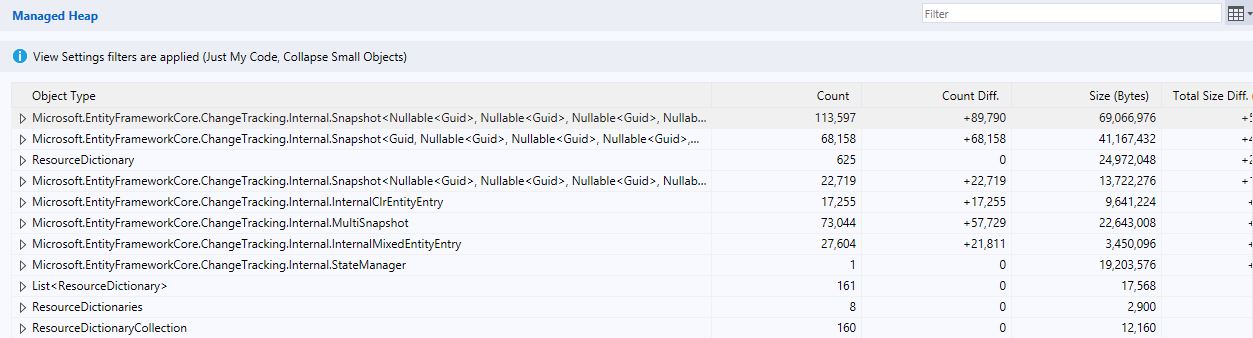
I profiled the app a bit, both VS tooling and dotMemory. Both show a growing number of these objects between memory snapshots. The DbContext has ChangeTracker.AutoDetectChangesEnabled = false. Ideas?
adrianhara
on 12 Aug 2019
@adrianhara Maybe you should post a repro project?
ErikEJ
on 12 Aug 2019
@adrianhara Erik beat me to it! Yes, at this point we need a small, runnable project/solution or complete code listing that demonstrates what you are seeing so we can fully investigate.
ajcvickers
on 12 Aug 2019
We'll try to reproduce our issue in a sandbox and post it. In the meantime we were able to get rid of the OOM by using @ajcvickers 's suggestion of using "smaller" DbContexts, thanks! Stay tuned for more information (either a repro or maybe we find out why change tracking's holding on to stuff)
adrianhara
on 13 Aug 2019
Hi!
I created a repro project and I uploaded it to https://github.com/sandrohanea/ProfilingDemoEFCore
Thanks!
Have a nice day!
 sandrohanea
on 13 Aug 2019
sandrohanea
on 13 Aug 2019
@sandrohanea The repo code is still using a single context instance. It's running out of memory because...it's running out of memory! See my example above for how to use multiple context instances so the code is not trying to track all the entities at once.
ajcvickers
on 13 Aug 2019
@ajcvickers.
As @adrianhara said, we were able to get rid of the OOM using your suggestion but what @adrianhara and I reported with that issue is that the AutoDetectChangesEnabled was set to false but the DbContext still tracked changes and it's running out of memory.
Thanks!
sandrohanea
on 14 Aug 2019
@ErikEJ @ajcvickers I guess what my colleague @sandrohanea is trying to say, we'd be interested to know why AutoDetectChangesEnabled false still makes the DbContext keep those objects in memory. We managed to reproduce it in @sandrohanea 's repo. It would be great if you guys could have a look at it, maybe it helps also others or is an optimization point for the future.
adrianhara
on 14 Aug 2019
@adrianhara AutoDetectChangesEnabled controls whether or not EF will automatically detect changes in tracked entities. It doesn't have any influence on whether or not entities are tracked. Also, in this case you need entities to be tracked--otherwise EF would not be able to insert them when SaveChanges is called.
ajcvickers
on 14 Aug 2019
@ajcvickers thanks for the answer, makes sense.
adrianhara
on 14 Aug 2019
Im having same trouble.
Efcore 3.1.1
Insert 1k entities
If i run all in a single run, memory gets to 1GB
If i break down to batches of 100, it stays at 400mb during the whole process, however in commit. Memory suddenly goes up to 700mb :/
 lixaotec
on 12 Sep 2020
lixaotec
on 12 Sep 2020
https://github.com/dotnet/efcore/issues/9118 might help
 AndriySvyryd
on 12 Sep 2020
AndriySvyryd
on 12 Sep 2020
Related issues
 HappyNomad
·
3Comments
HappyNomad
·
3Comments
 TPJ11
·
3Comments
TPJ11
·
3Comments
 miguelhrocha
·
3Comments
miguelhrocha
·
3Comments
 HeMinzhang
·
3Comments
HeMinzhang
·
3Comments
 divega
·
3Comments
divega
·
3Comments