Efcore: Named connection strings are only supported when using 'IConfiguration' and a service provider
could you please tel me what i am doing wrong?
SCAFOLD DBCONTEXT
Scaffold-DbContext -Connection name=DbAsp Microsoft.EntityFrameworkCore.SqlServer -OutputDir Models -f
CONFIGURESERVICES
```C#
public void ConfigureServices(IServiceCollection services)
{
services.Configure
{
// This lambda determines whether user consent for non-essential cookies is needed for a given request.
options.CheckConsentNeeded = context => true;
options.MinimumSameSitePolicy = SameSiteMode.None;
});
        services.AddDbContext<aspContext>(options =>
            options.UseSqlServer(Configuration.GetConnectionString("DbAsp")));

        services.AddMvc().SetCompatibilityVersion(CompatibilityVersion.Version_2_2);
    }
ASPCONTEXT.CS
```C#
public partial class aspContext : DbContext
    {
        public aspContext()
        {
        }

        public aspContext(DbContextOptions<aspContext> options)
            : base(options)
        {
        }

        ...
}
EXCEPTION
InvalidOperationException: A named connection string was used, but the name 'DbAsp' was not found in the application's configuration. Note that named connection strings are only supported when using 'IConfiguration' and a service provider, such as in a typical ASP.NET Core application. See https://go.microsoft.com/fwlink/?linkid=850912 for more information.
APPSETTINGS.JSON
{
  "Logging": {
    "LogLevel": {
      "Default": "Warning"
    }
  },

  "AllowedHosts": "*",

  "ConnectionStrings": {
    "DbAsp": "Server=xxx;Database=xyz;integrated security=True;"
  }
}
Exception message:
Stack trace:
A named connection string was used, but the name 'DbAsp' was not found in the application's configuration. Note that named connection strings are only supported when using 'IConfiguration' and a service provider, such as in a typical ASP.NET Core application. See https://go.microsoft.com/fwlink/?linkid=850912 for more information
Further technical details
EF Core version: (found in project.csproj or packages.config)
Database Provider: (e.g. Microsoft.EntityFrameworkCore.SqlServer)
Operating system:
IDE: (e.g. Visual Studio 15.7.2)
.NET CORE 2.2 release 3
 mucciols
All 20 comments
@mucciols We have not been able to reproduce this. Can you post a runnable project/solution or complete code listing that demonstrates the issue you are seeing.
 ajcvickers
on 25 Oct 2018
ajcvickers
on 25 Oct 2018
Hi, thank you for your reply. Now i have injected the dbcontext in the constructor and Now it work.
Best wishes.
Simone
mucciols
on 25 Oct 2018
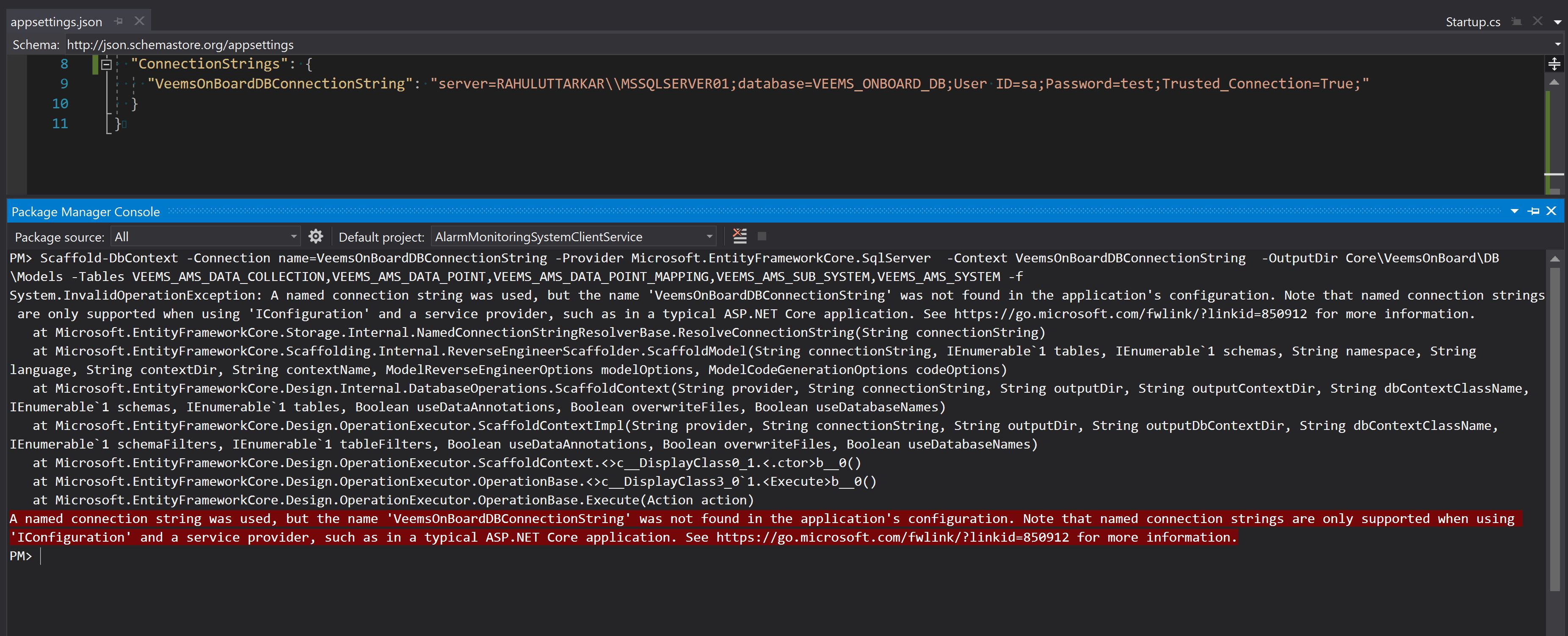
We are still facing these issue in dotnetcore console application.
Steps to reproduce:
Create console app ( core 2.1) (I have not did any modification to default created project)
Add Entity frameworks from package-manager console
Use database first approach
Scaffold-DbContext -Connection name=DbAsp Microsoft.EntityFrameworkCore.SqlServer -OutputDir Models -f
We are getting this same error as soon as we run this command.
.
 rahul-uttarkar
on 17 Jun 2019
rahul-uttarkar
on 17 Jun 2019
@drua By default, a console application created in Visual Studio or by dotnet doesn't have any EF code, so when you say that you did not make any modifications to the default created project, that doesn't seem to align with the exception you are seeing. Given this, I think I am misunderstanding what you mean by "default console app". Can you post the "default console app" that you created so we can take a look, and also be specific about how/where it was created.
ajcvickers
on 17 Jun 2019
Is there a workaround for this if I wish to use EF Core in a separate .NET standard class library?
My current project structure is like this:
EFCore.Library (.NET standard class library)
-Models
-Data
DummyStartUp (console application)
Program.cs
Scaffold-DbContext -Connection name=DefaultConnection -OutputDir Models -ContextDir Data Microsoft.EntityFrameworkCore.SqlServer -Context UEIOSContext -Project DummyStartup -StartupProject DummyStartup -Force
ERROR
A named connection string was used, but the name 'DefaultConnection' was not found in the application's configuration. Note that named connection strings are only supported when using 'IConfiguration' and a service provider, such as in a typical ASP.NET Core application. See https://go.microsoft.com/fwlink/?linkid=850912 for more information.
I want to use a named connection string to avoid the connection string being written into the dbcontext file. https://github.com/aspnet/EntityFrameworkCore/issues/10432
I've tried adding this to my dummy startup project program.cs, but no luck:
```
internal class Program
{
private static void Main(string[] args)
{
IConfigurationRoot configuration = new Microsoft.Extensions.Configuration.ConfigurationBuilder()
.SetBasePath(Directory.GetCurrentDirectory())
.AddJsonFile("appsettings.json", optional: true, reloadOnChange: true)
.AddUserSecrets(typeof(Program).GetTypeInfo().Assembly)
.Build();
IServiceCollection services = new ServiceCollection();
services.AddLogging(options =>
{
options.AddDebug();
options.AddConsole();
}
);
}
}```
 weirdyang
on 12 Aug 2019
weirdyang
on 12 Aug 2019
@captmomo It should be possible to wire up everything to make this work outside of an ASP.NET Core application, but I doubt it would be worth it. Instead just use whatever mechanism works for you to load the connection string from wherever you have it stored, and then pass it to EF.
ajcvickers
on 12 Aug 2019
@ajcvickers thanks. I ended up using a dummy mvc project instead and it worked as expected
weirdyang
on 13 Aug 2019
Still does not work in .net core 3.xx web api projects
 sibeliuz
on 28 Nov 2019
sibeliuz
on 28 Nov 2019
@sibeliuz Same here, I couldn't manage to make this work in my web API 3.0 project. I tried with a brand new Web API solution, created with VS 2019, it still doesn't work.
 BlackMush
on 6 Feb 2020
BlackMush
on 6 Feb 2020
The main thing is to have your web api project reference the class library and Ensure you have a named connectionstring for your web api project. I have used this method for both .net core 3* and 2* projects.
weirdyang
on 6 Feb 2020
@captmomo I'm not sure to understand what you mean by "to have your web api project reference the class library"
Do you mean this (in Startup.cs) :
services.AddDbContext<TradeoDataContext>(x => x.UseSqlServer(Configuration.GetConnectionString("TradeoConnectionString")));
And this, in appSettings.json :
"ConnectionStrings": {
"TradeoConnectionString": "Server=xxx;Database=Tradeo;Trusted_Connection=False; User Id=xxx; Password=xxx"
},
BlackMush
on 6 Feb 2020
No. Right click the web project, select add reference, select the projects
tab, select your class library project
Scaffold-DbContext -Connection name=DefaultConnection -OutputDir Models -ContextDir Data Microsoft.EntityFrameworkCore.SqlServer -Context TradeoContext -Project MyClassLibrary -StartupProject DummyStartup -Force
Replace MyClassLibrary with the name of your class library
Replace DummyStartup with the name of your web api project
Replace default connection with the name of your connection string
Ensure there’re a named connection string in the appsettings of your web api project
to clarify, my previous instructions is for the instance where you wish to have your EF Core stuff in a separate .NET standard library.
On Thu, 6 Feb 2020 at 7:37 PM, BlackMush notifications@github.com wrote:
@captmomo https://github.com/captmomo I'm not sure to understand what
you mean by "to have your web api project reference the class library"
Do you mean this (in Startup.cs) :
services.AddDbContext(x =>
x.UseSqlServer(Configuration.GetConnectionString("TradeoConnectionString")));
And this, in appSettings.json :
"ConnectionStrings": { "TradeoConnectionString":
"Server=xxx;Database=Tradeo;Trusted_Connection=False; User Id=xxx;
Password=xxx" },—
You are receiving this because you were mentioned.
Reply to this email directly, view it on GitHub
https://github.com/dotnet/efcore/issues/13726?email_source=notifications&email_token=AGDEEVRK6OHJQBNZ6LV52RTRBPY5ZA5CNFSM4F6VK2UKYY3PNVWWK3TUL52HS4DFVREXG43VMVBW63LNMVXHJKTDN5WW2ZLOORPWSZGOEK646AQ#issuecomment-582864642,
or unsubscribe
https://github.com/notifications/unsubscribe-auth/AGDEEVQZ7J3O5AIYVCMELCTRBPY5ZANCNFSM4F6VK2UA
.
weirdyang
on 6 Feb 2020
Okay, thanks for the clarification. I didn't figure out you were talking about your previous comments. I'll try that, but that's only a workaround. Maybe I should re-open an issue, I reproduced the problem very easily on a new solution.
BlackMush
on 6 Feb 2020
Ok now I’m confused
What exactly is the issue you’re facing ?
On Thu, 6 Feb 2020 at 9:45 PM, BlackMush notifications@github.com wrote:
Okay, thanks for the clarification. I didn't figure out you were talking
about your previous comments. I'll try that, but that's only a workaround.
Maybe I should re-open an issue, I reproduced the problem very easily on a
new solution.—
You are receiving this because you were mentioned.
Reply to this email directly, view it on GitHub
https://github.com/dotnet/efcore/issues/13726?email_source=notifications&email_token=AGDEEVSBI7GBKWPH4HAITBLRBQH6ZA5CNFSM4F6VK2UKYY3PNVWWK3TUL52HS4DFVREXG43VMVBW63LNMVXHJKTDN5WW2ZLOORPWSZGOEK7IP4Q#issuecomment-582911986,
or unsubscribe
https://github.com/notifications/unsubscribe-auth/AGDEEVTYVXLDHZUITLTGHFTRBQH6ZANCNFSM4F6VK2UA
.
weirdyang
on 6 Feb 2020
Very precisely the one described in the first comment :)
BlackMush
on 6 Feb 2020
Very precisely the one described in the first comment :)
** to clarify, my previous instructions is for the instance where you wish to have your EF Core stuff in a separate .NET standard library.
Can you post the solution that you created so we can take a look, and also be specific about how/where it was created. And the command you used?
@BlackMush fwiw, I also tried what the first comment said, and I couldn't reproduce it. I could attach my project for your reference if it helps.
weirdyang
on 6 Feb 2020
I could attach my project for your reference if it helps.
I believe you, I cannot reproduce the problem on the new solution anymore ! It's still not working on my real API project though. I'll definitely try your solution.
Thanks for your time 👍
BlackMush
on 6 Feb 2020
protected override void OnConfiguring(DbContextOptionsBuilder optionsBuilder)
{
if (!optionsBuilder.IsConfigured)
{
// add IConfigurationRoot to get connection string
IConfigurationRoot configuration = new ConfigurationBuilder()
.SetBasePath(AppDomain.CurrentDomain.BaseDirectory)
.AddJsonFile("appsettings.json")
.Build();
optionsBuilder.UseSqlServer(configuration.GetConnectionString("DefaultConnection"), x => x.UseNetTopologySuite());
}
}
 zanyar3
on 15 May 2020
zanyar3
on 15 May 2020
I had this problem with a new Core 3.1 project and a Scaffold-DbContext. Startup.cs has a IConfiguration.
Adding the DdContext to startup.cs solved the problem
    public void ConfigureServices(IServiceCollection services)
    {
        ........
        services.AddDbContext<StipContext>(options =>
            options.UseSqlServer(Configuration.GetConnectionString("StipDatabase")));
    }
 mmu69
on 10 Jun 2020
mmu69
on 10 Jun 2020
I had this problem with a new Core 3.1 project and a Scaffold-DbContext. Startup.cs has a IConfiguration.
Adding the DdContext to startup.cs solved the problempublic void ConfigureServices(IServiceCollection services) { ........ services.AddDbContext<StipContext>(options => options.UseSqlServer(Configuration.GetConnectionString("NameOfYourConnectionStringParameter"))); }
Yes, that's the correct answer.
When we use connectionstring as a parameter inside "appsettings.json" file, then we need to add that code to specify the connectionstring parameter name
 Yan9080
on 14 Jul 2020
Yan9080
on 14 Jul 2020
Related issues
 HappyNomad
·
3Comments
HappyNomad
·
3Comments
 MontyGvMC
·
3Comments
MontyGvMC
·
3Comments
 ryanwinter
·
3Comments
ryanwinter
·
3Comments
 pachecosoftware
·
3Comments
pachecosoftware
·
3Comments
 yukozh
·
3Comments
yukozh
·
3Comments
Most helpful comment
I had this problem with a new Core 3.1 project and a Scaffold-DbContext. Startup.cs has a IConfiguration.
Adding the DdContext to startup.cs solved the problem