Efcore: Prevent Collection Nav Props from Loading Unspecified Sub-Props
When including a navigation property, the associated navigation collection is loaded with data that is loaded from the initial query, even when ThenInclude is not specified.
Per the docs:
Entity Framework Core will automatically fix-up navigation properties to any other entities that were previously loaded into the context instance. So even if you don't explicitly include the data for a navigation property, the property may still be populated if some or all of the related entities were previously loaded.
Steps to reproduce
Consider the following entity structure:
public class Item
{
    public int Id { get; set; }
    public int CategoryId { get; set; }
    public string Name { get; set; }
    public Category Category { get; set; }
}
public class Category
{
    public int Id { get; set; }
    public string Name { get; set; }
    public List<Item> Items { get; set; }
}
If I want to retrieve all Items with their Category property populated, I unfortunately also get Item.Category.Items populated as well when a .ThenInclude was not specified:
public static async Task<List<Item>> GetItems(this AppDbContext db)
{
    var items = await db.Items
        .Include(x => x.Category)
        .OrderBy(x => x.Name)
        .ToListAsync();

    return items;
}
The default behavior should be to only load the navigation props specified. When using Entity Framework in conjunction with Web API, this creates unnecessarily bloated data structures received by the client and makes performance very slow.
My current workaround for large collections is as follows:
public static async Task<List<Item>> GetItems(this AppDbContext db)
{
    var items = await db.Items
        .Include(x => x.Category)
        .OrderBy(x => x.Name)
        .ToListAsync();

    Parallel.ForEach(items, i =>
    {
        i.Category.Items = null;
    });

    return items;
}
Further technical details
EF Core version: 2.1.1
Database Provider: Microsoft.EntityFrameworkCore.SqlServer
Operating system: Windows 10 Pro
IDE: Visual Studio 2017 Pro 15.8.1 and Visual Studio Code 1.27.2
 JaimeStill
All 22 comments
As docs says, we do fixup hence you get data. The general way to deal with such issues is to configure your JSON serializer to ignore cycles
 smitpatel
on 10 Oct 2018
smitpatel
on 10 Oct 2018
I already have ReferenceLoopHandling.Ignore set, but it's still populating this data. Beside the point, this is an unexpected and unintuitive behavior. If I wanted that data, then I would have used ThenInclude() to specify it as part of my query.
JaimeStill
on 10 Oct 2018
@JaimeStill You're only getting the data (i.e. rows from the database) that you are requesting. EF is not pulling back any extra data. It's just that this data is being connected up as defined by the relationships of the model. It, the relationships are being set _between objects you are already getting_.
 ajcvickers
on 10 Oct 2018
ajcvickers
on 10 Oct 2018
@ajvickers There should at least be an opt-in or opt-out configuration for this as it is undesirable in cases where you want a minimal dataset size.
JaimeStill
on 10 Oct 2018
@JaimeStill The size of the dataset is not being changed in any way.
ajcvickers
on 10 Oct 2018
Or to try to explain in a different way, the JSON serializer is duplicating data, and hence it is taking the dataset that EF is returning and creating duplicates of many of the returned entities. This is why the data in JSON is bigger. The dataset that EF is returning is not bigger.
ajcvickers
on 10 Oct 2018
It is when it's serialized as JSON in Web API. Every Item conains a Category (which I asked for), and unexpectedly, each Category has an array of Items that I didn't ask for. The Category.Items should be null unless I specify that I wanted them with .ThenInclude(), or as proposed, I configure EF to attach the loaded data into the nav prop tree (as is default now).
JaimeStill
on 10 Oct 2018
@JaimeStill Yes. This is because the serializer is duplicating instances.
ajcvickers
on 11 Oct 2018
My biggest issue is that even before it gets to the serializer, that data is included in the C# model. Data I did not ask for, and data that I do not need. If I had wanted that data in the first place, I would have queried for it, and EF could have optimized reusing already retrieved data. I don't see how it's on the serializer to know not to include data I didn't ask for in the first place? I already have it ignoring self-referencing loops.
JaimeStill
on 11 Oct 2018
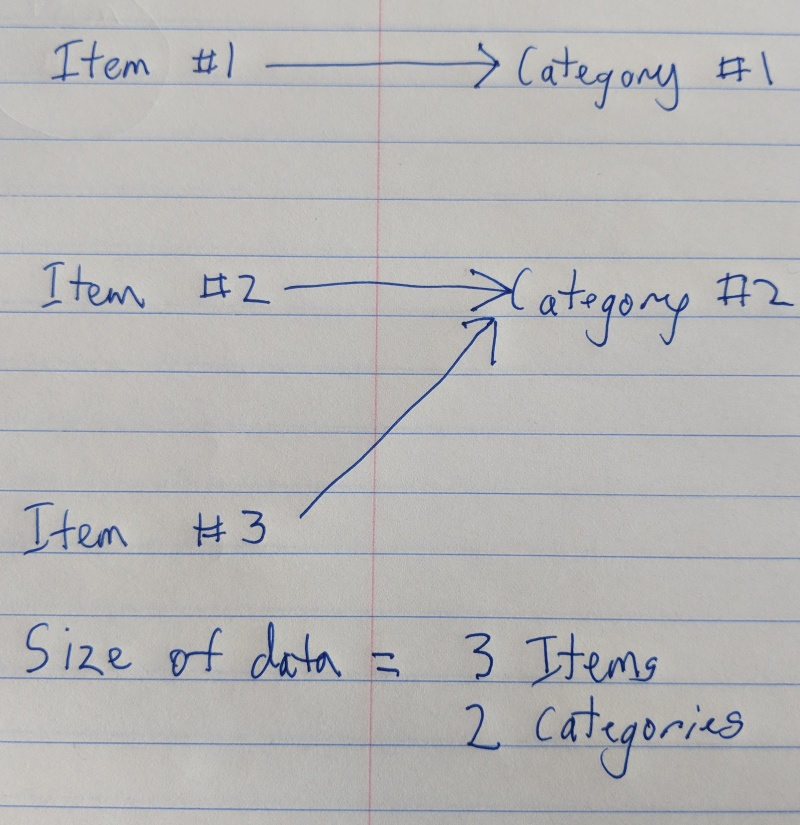
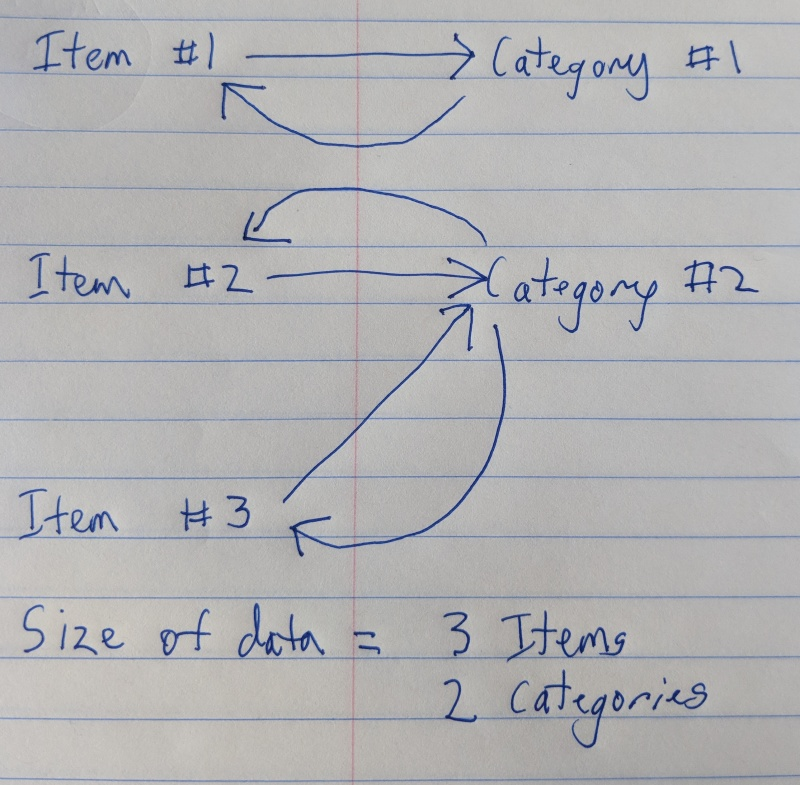
@JaimeStill I understand what you are saying--that you want the data in a graph that can be easily serialized without duplicates. There is value in that--it's something we are considering. However, this is specifically not about the data size.
ajcvickers
on 11 Oct 2018
I understand that having those values available doesn't impact the technical size of the data, but it does impact the shape of the data in a way that you wouldn't expect if you didn't understand what's happening. And that generates big implications for the size of serialized data being sent to the client side using Web API.
If I have a collection of 800 items with 800 categories, and each of those categories then has an entire array of items, that's a very crushing size once it becomes a JavaScript array.
It would be preferable to at least have the option to turn off this behavior to keep the shape of the data minimal when it is time for it to be serialized.
JaimeStill
on 11 Oct 2018
@JaimeStill Agreed!
ajcvickers
on 11 Oct 2018
@JaimeStill Of course, I am assuming that you know that if you _never_ want to navigate that direction in your model, then you can just remove the navigation property:
```C#
public class Item
{
public int Id { get; set; }
public int CategoryId { get; set; }
public string Name { get; set; }
public Category Category { get; set; }
}
public class Category
{
public int Id { get; set; }
public string Name { get; set; }
}
```
Everything else should work the same.
ajcvickers
on 11 Oct 2018
@ajcvickers of course! Most of the time in these cases, the nav prop is preferred for the inverse (which items belong to a category). I understand you could manually query this, but I feel this is more in line with why we have nav props to begin with.
With this in mind, would there be a better workaround than manually setting the undesired values to null (as shown in the original issue)?
JaimeStill
on 11 Oct 2018
@JaimeStill I may have missed this if it was mentioned in the thread before, but are you aware that most serializers recognize “ignore” attributes that you can use to skip traversing specific navigation properties during serialization?
This is the simplest way to handle this that I am aware of, and possible the most common. It has the advantage that it can be used to eliminate cycles completely, so no extra configuration on the serializer is needed, and it solves it without introducing knobs on O/RMs (a good thing, IMO, because this is actually a serialization concern independent of how the object graph was produced).
 divega
on 11 Oct 2018
divega
on 11 Oct 2018
@divega, please see my response to the first comment. This data (in this case, each Item.Category.Items array) is still serialized in aspnet core using ReferenceLoopHandling.Ignore.
JaimeStill
on 11 Oct 2018
@ajcvickers @divega I created a minimal representation of this issue on GitHub with a comprehensive readme documenting the full scope of the issue in question.
JaimeStill
on 11 Oct 2018
@divega to look at the experience overall and suggest ways forward, either in docs or enhancements.
ajcvickers
on 15 Oct 2018
I'm not sure if this is a related issue or different.
I'm on 2.1.4 - auto-loading for me is like this (given the OPs example):
This wouldn't auto include category (and related).
db.Items.ToList()
Operating like:
db.Items.Select(p=> new {Id = p.Id, CategoryId =p.CategoryId, Name = p.Name, Category = null).ToList()
This would auto include category (and related):
db.Items.Select(p=> new {Id = p.Id, CategoryId =p.CategoryId, Name = p.Name, Category = p.Category).ToList()
Operating like:
db.Items.Include(p=> p.Category).Select(p=> new {Id = p.Id, CategoryId =p.CategoryId, Name = p.Name, Category = p.Category).ToList()
The other kind of odd behavior related to this is turning tracking off fixes the OP's problem too.
To me this is an inconsistent functionality where in some cases include wiring automatically happens, sometimes sub properties are too, and it others it doesn't all.
As the OP argues - it would be good to have control over this happening or not.
Ideally a globally setting of some kind that at least things are happening all one way vs. happenstance of how you do your expression construction.
 OpenSpacesAndPlaces
on 21 Jan 2019
OpenSpacesAndPlaces
on 21 Jan 2019
Guys...This issue is valid and affects performance drastically. In my case, the JSON response for a 4 record data reached about 25MB JSON responds. It's worse when you have a MANY to MANY relationship on your model.
    public class EventInfo
    {
        [Key]
        public int EventInfoId { get; set; }

        public Customer Customer { get; set; }

        public int EventLocaleId { get; set; }
        [ForeignKey("EventLocaleId")]
        public LocaleInfo EventLocale { get; set; }

        public int EventTypeId { get; set; }
        [ForeignKey("EventTypeId")]
        public EventType EventType { get; set; }

        public List<EventActivity> EventActivities { get; set; } //Many to many relation

    }
The above model is a simple model but each time I query as below:
EventInfo eventInfo = await _appDbContext.EventInfoes
                .Include(i => i.EventActivities)
                    .ThenInclude(i => i.Activity)
                        .ThenInclude(i => i.Translations)
                .Include(i => i.EventActivities)
                    .ThenInclude(i => i.SelectedSupplier)
                        .ThenInclude(i => i.VendorLocale)
                .FirstOrDefaultAsync(f => f.EventInfoId == id);
EventLocale is always fetched without any INCLUDE but others such as EventType is set to null. Same happens when i drill down the eventActivities collection
Temporary fix for me is below.
eventInfo?.EventActivities.ForEach(item =>
{
      item.EventInfo = null;           //Parent element EventInFo is also fetched
      item.SelectedSupplier.EventActivities = null;  // Parent element fetch also
});
To recognise the fix, i had to put a break point and then inspect my data generated from dbcontext. From 25MB, i was able to eliminate unnecessary data and reduced the size to about 197KB.
Is this an expected behavior.
 chukwu
on 23 Jun 2019
chukwu
on 23 Jun 2019
 AndriySvyryd
on 23 Aug 2019
AndriySvyryd
on 23 Aug 2019
Triage: we consider this similar enough to close as duplicate of #11564.
divega
on 18 Sep 2019
Related issues
 HeMinzhang
·
3Comments
HeMinzhang
·
3Comments
 mohsin91
·
3Comments
mohsin91
·
3Comments
 RehanSaeed
·
3Comments
RehanSaeed
·
3Comments
 yukozh
·
3Comments
yukozh
·
3Comments
 ra0o0f
·
3Comments
ra0o0f
·
3Comments
Most helpful comment
I understand that having those values available doesn't impact the technical size of the data, but it does impact the shape of the data in a way that you wouldn't expect if you didn't understand what's happening. And that generates big implications for the size of serialized data being sent to the client side using Web API.
If I have a collection of 800 items with 800 categories, and each of those categories then has an entire array of items, that's a very crushing size once it becomes a JavaScript array.
It would be preferable to at least have the option to turn off this behavior to keep the shape of the data minimal when it is time for it to be serialized.