Efcore: VSTS: SqlServer.FunctionalTests/net461 deadlock on Windows
This occurs on both the release/2.2 branch and master.
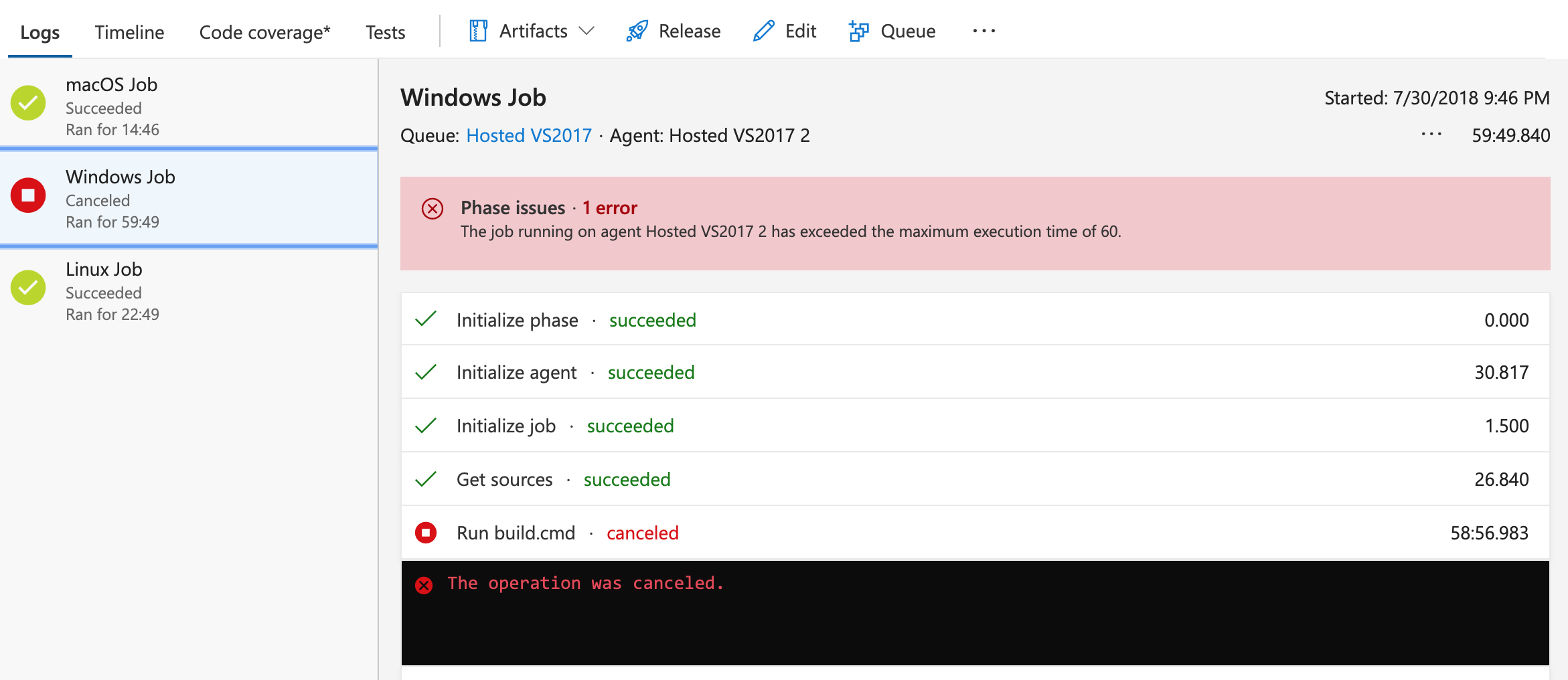
It appears something in the VSTS Windows environment causes EF Core tests to deadlock. This happens consistently in the "SqlServer.FunctionalTests/net461" test group
Recent failures:
master: https://dotnet.visualstudio.com/public/_build/results?buildId=9238&view=logs
release/2.2: https://dotnet.visualstudio.com/public/_build/results?buildId=9239&_a=summary&view=logs
 natemcmaster
All 17 comments
@natemcmaster Can you send me a link to the general new-processes-causing-hang issue that we talked about yesterday. Going to hold off on investigating this specifically until that issue is resolved.
 ajcvickers
on 1 Aug 2018
ajcvickers
on 1 Aug 2018
There were a category of bugs that appear related. @ryanbrandenburg opened https://dotnet.visualstudio.com/internal/_workitems/edit/56 regarding issues with selenium and backgrounding processes from bash, and the VSTS team was able to suggest workarounds for the moment. I don't think those workarounds apply for this situation though. It would be really helpful to have a minimal repro to hand off to the VSTS team for more investigation. I haven't taken time to create a minimal repro yet.
natemcmaster
on 1 Aug 2018
I had a conversation with the VSTS guys. As far as we can tell, this is a symptom of tests which create orphan processes. Do you know if the tests launch any kind of long-running background processes?
natemcmaster
on 2 Aug 2018
@natemcmaster We talked about this briefly in triage and @bricelam thinks probably no, except...wait for it...localdb! From what I understand, localdb is kicked of automatically as a child process, and we don't control when it is killed. I would hope that they support localdb, otherwise that seems like a pretty big blocker.
ajcvickers
on 2 Aug 2018
Hmm. Are you able to see locally on your dev box if there is in fact an orphaned localdb process still running after SQL Server tests run? I'll try to grab some diagnostics from the VSTS builds to see if I can spot an orphaned process which may be causing the issue.
natemcmaster
on 2 Aug 2018
This might be the culprit.
https://dotnet.visualstudio.com/public/_build/results?buildId=10032&_a=summary&view=logs
2018-08-02T01:52:05.7929769Z ProcessID       : 788
2018-08-02T01:52:05.7930140Z ParentProcessID : 3916
2018-08-02T01:52:05.7930481Z Description     : sqlservr.exe
2018-08-02T01:52:05.7930742Z Username        : VssAdministrator
2018-08-02T01:52:05.7937245Z CommandLine     : "C:\Program Files\Microsoft SQL Server\130\LocalDB\Binn\\sqlservr.exe"   -c -SMSSQL13E.LOCALDB
2018-08-02T01:52:05.7938204Z                   -sLOCALDB#5EE6FC6E -d"C:\Users\VssAdministrator\AppData\Local\Microsoft\Microsoft SQL Server Local
2018-08-02T01:52:05.7938975Z                   DB\Instances\MSSQLLocalDB\master.mdf" -l"C:\Users\VssAdministrator\AppData\Local\Microsoft\Microsoft
2018-08-02T01:52:05.7939310Z                   SQL Server Local DB\Instances\MSSQLLocalDB\mastlog.ldf"
2018-08-02T01:52:05.7942459Z                   -e"C:\Users\VssAdministrator\AppData\Local\Microsoft\Microsoft SQL Server Local
2018-08-02T01:52:05.7942901Z                   DB\Instances\MSSQLLocalDB\error.log"
2018-08-02T01:52:05.7943054Z
I gathered this by running this setup on VSTS.
https://github.com/aspnet/EntityFrameworkCore/blob/78f04c509fb7d4eeee226d249c19777e1cc37ad4/.vsts-pipelines/builds/ci-public.yml#L7-L22
natemcmaster
on 2 Aug 2018
Can we pro-actively spin up LocalDB in the build script instead?
SqlLocalDB start MSSQLLocalDB
 bricelam
on 2 Aug 2018
bricelam
on 2 Aug 2018
Diagnostics already use such pattern for different reason (localdb was not available when tests ran)
https://github.com/aspnet/Diagnostics/pull/445
Something similar here too
 smitpatel
on 2 Aug 2018
smitpatel
on 2 Aug 2018
Does the issue with localdb repro with small, non-KoreBuild test projects running in VSTS? Or is there something specific about the way aspnet uses LocalDB? If just using localdb in VSTS causes indefinite test hangs, I'm going to raise the urgency on this.
natemcmaster
on 2 Aug 2018
Just running sqllocaldb start wasn't enough :-/
https://dotnet.visualstudio.com/public/_build/results?buildId=10335&_a=summary&view=logs
I'm out of ideas. I've tried creating a minimal repro which runs a single connection to localdb, but this appears to work just fine.
natemcmaster
on 3 Aug 2018
It might be caused by repeatedly creating and dropping databases and perhaps related to the No process is on the other side of the pipe error we occasionally get.
 AndriySvyryd
on 3 Aug 2018
AndriySvyryd
on 3 Aug 2018
I tried switching the agent pool and tests pass on the new pool. The tests pass on agents from the "DotNetCore-Windows" pool, which are managed by DDIT. The tests deadlock on agents from the "Hosted VS2017" pool, which are VMs provided by VSTS. The deadlock happens with two different test runners - vstest.console.exe and xunit.console.exe - so I'm led to believe it's in our code or SQL Server, not the test runner. Just a hunch, but I'm guessing this is evidence of resource exhaustion such as thread pool starvation or port exhaustion. Both machines have 2 physical cores, both machines are VMs, but the DDIT machines have hyperthreading enabled. I could dig more into machine differences if that helps. I haven't figured out how to gather a memory dump of the deadlocked processes from the hosted VMs, but that's the next step to figure out where the deadlock happens.
Or we could just switch agent pools and call it good.
natemcmaster
on 3 Aug 2018
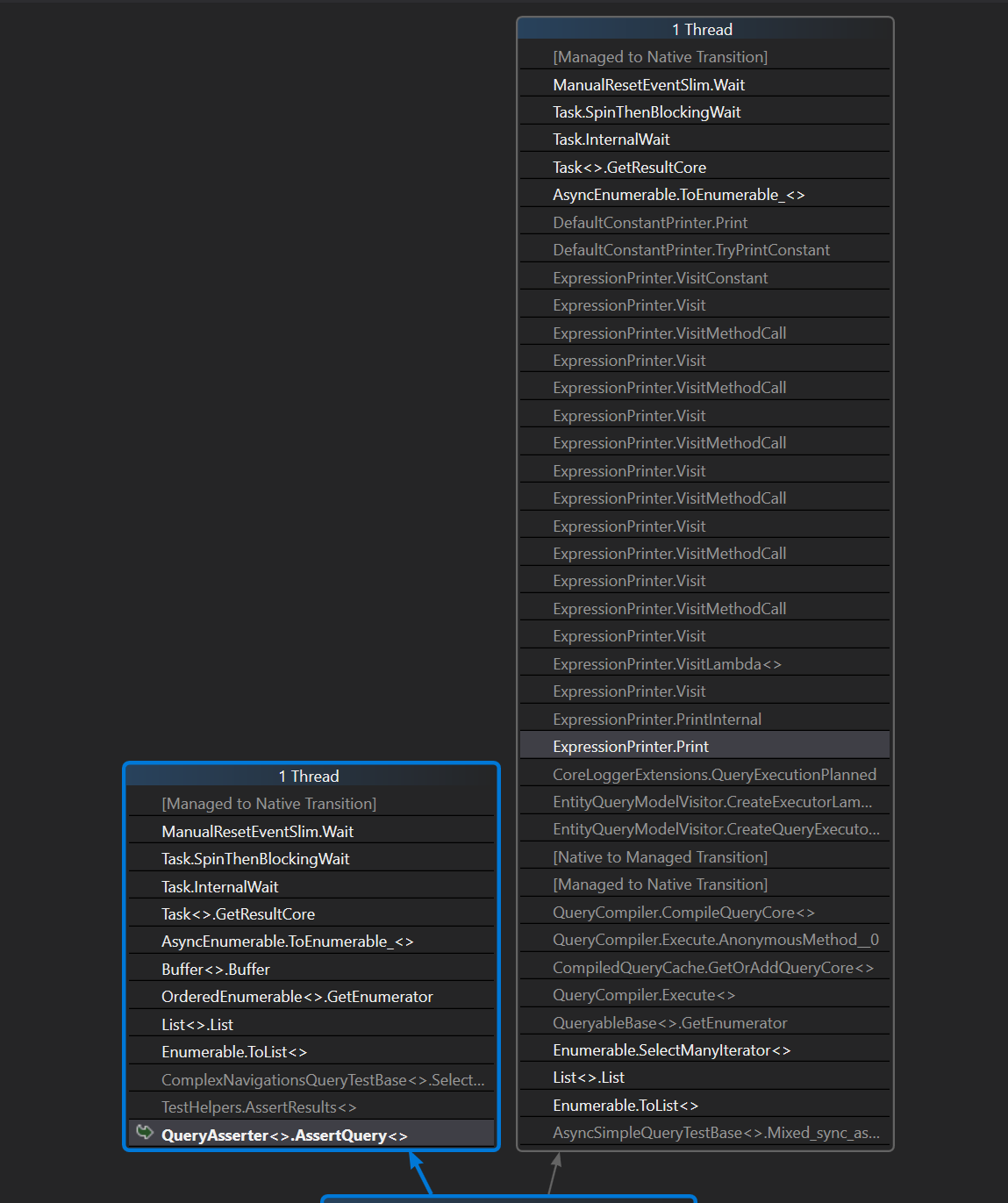
Process dump of the test process in deadlock:
If you want to repeat this, you can trigger new builds of the "namc/vsts-timeout" branch on this build definition. https://dotnet.visualstudio.com/public/public%20Team/_build?definitionId=51&_a=summary. The tests consistently hang after running for about 5 minutes. I set ProcDump to capture full process memory after 12 minutes.
Here's a suspicious call stack.
natemcmaster
on 3 Aug 2018
Note for triage: other issues that mention query deadlocks: #11848, #12337, #12382
ajcvickers
on 5 Aug 2018
@smitpatel will investigate, possibly just disabling some tests for now to unblock VSTS testing.
ajcvickers
on 6 Aug 2018
I have managed to achieve a single core VM to find out all deadlocking tests.
smitpatel
on 9 Aug 2018
When we discussed this in triage on Friday, we said we could close this issue because we no longer had net461 runs on master. However I am no sure we can close as the original issue applies to 2.x runs as well, and it is unclear why it would be different on .NET Core. Clearing milestone so we can come to a conclusion on next triage.
 divega
on 24 Jun 2019
divega
on 24 Jun 2019
Related issues
 ryanwinter
·
3Comments
ryanwinter
·
3Comments
 ra0o0f
·
3Comments
ra0o0f
·
3Comments
 RehanSaeed
·
3Comments
RehanSaeed
·
3Comments
 HappyNomad
·
3Comments
HappyNomad
·
3Comments
 leak
·
3Comments
leak
·
3Comments
Most helpful comment
Process dump of the test process in deadlock:
https://dotnet.visualstudio.com/_apis/resources/Containers/408197?itemPath=logs%2Fxunit.console.exe_180803_161508.dmp
If you want to repeat this, you can trigger new builds of the "namc/vsts-timeout" branch on this build definition. https://dotnet.visualstudio.com/public/public%20Team/_build?definitionId=51&_a=summary. The tests consistently hang after running for about 5 minutes. I set ProcDump to capture full process memory after 12 minutes.
Here's a suspicious call stack.