Efcore: Eager loading fails to include collections for the first item in the source collection
Here is my fun hierarchy:
- 1 product type -> many product categories
- 1 product category -> many products
- 1 product -> many product images
- 1 product -> many product specifications
When I try to eager load the related data for each product, it couldn't load the product images and specifications for the first product in the list. For all other products all related data is loaded fine.
For the first product in the list, I also notice that its product category and even the product type of its product category are loaded fine. Just the collections are not loaded correctly.
Steps to reproduce
Create entities
```c#
public class ProductTypeEntity
{
public Guid Id { get; set; }
public string Name { get; set; }public List<ProductCategoryEntity> ProductCategories { get; set; }}
public class ProductCategoryEntity
{
public Guid Id { get; set; }
public string Name { get; set; }public Guid ProductTypeId { get; set; } public ProductTypeEntity ProductType { get; set; } public List<ProductEntity> Products { get; set; }}
public class ProductEntity
{
public Guid Id { get; set; }
public string Name { get; set; }public Guid ProductCategoryId { get; set; } public ProductCategoryEntity ProductCategory { get; set; } public List<ProductImageEntity> ProductImages { get; set; } public List<ProductSpecificationEntity> ProductSpecifications { get; set; }}
public class ProductImageEntity
{
public Guid Id { get; set; }
public string Url { get; set; }public Guid ProductId { get; set; } public ProductEntity Product { get; set; }}
public class ProductSpecificationEntity
{
public Guid Id { get; set; }
public string Value { get; set; }
public double Price { get; set; }
public double? DiscountedPrice { get; set; }public Guid ProductId { get; set; } public ProductEntity Product { get; set; }}
```Create configurations
```c#
public class ProductTypeConfiguration : IEntityTypeConfiguration
{
public void Configure(EntityTypeBuilderbuilder)
{
builder.HasKey(x => x.Id);
builder.Property(x => x.Name).IsRequired();
builder.HasIndex(x => x.Name).IsUnique();builder.ToTable("ProductType"); }}
public class ProductCategoryConfiguration : IEntityTypeConfiguration
{
public void Configure(EntityTypeBuilderbuilder)
{
builder.HasKey(x => x.Id);
builder.Property(x => x.ProductTypeId).IsRequired();
builder.Property(x => x.Name).IsRequired();
builder.HasIndex(x => x.Name).IsUnique();builder.HasOne(x => x.ProductType) .WithMany(t => t.ProductCategories) .HasForeignKey(x => x.ProductTypeId); builder.ToTable("ProductCategory"); }}
public class ProductConfiguration : IEntityTypeConfiguration
{
public void Configure(EntityTypeBuilderbuilder)
{
builder.HasKey(x => x.Id);
builder.Property(x => x.ProductCategoryId).IsRequired();
builder.Property(x => x.Name).IsRequired();
builder.HasIndex(x => x.Name).IsUnique();builder.HasOne(x => x.ProductCategory) .WithMany(c => c.Products) .HasForeignKey(x => x.ProductCategoryId); builder.ToTable("Product"); }}
public class ProductImageConfiguration : IEntityTypeConfiguration
{
public void Configure(EntityTypeBuilderbuilder)
{
builder.HasKey(x => x.Id);
builder.Property(x => x.ProductId).IsRequired();
builder.Property(x => x.Url).IsRequired();builder.HasOne(x => x.Product) .WithMany(p => p.ProductImages) .HasForeignKey(x => x.ProductId); builder.ToTable("ProductImage"); }}
public class ProductSpecificationConfiguration : IEntityTypeConfiguration
{
public void Configure(EntityTypeBuilderbuilder)
{
builder.HasKey(x => x.Id);
builder.Property(x => x.ProductId).IsRequired();
builder.Property(x => x.Value).IsRequired();
builder.HasIndex(x => new { x.ProductId, x.Value }).IsUnique();
builder.Property(x => x.Price).IsRequired();builder.HasOne(x => x.Product) .WithMany(p => p.ProductSpecifications) .HasForeignKey(x => x.ProductId); builder.ToTable("ProductSpecification"); }}
```Create the dbContext
```c#
public class AppDbContext : DbContext
{
public AppDbContext(DbContextOptionsoptions) : base(options) { } protected override void OnModelCreating(ModelBuilder builder) { base.OnModelCreating(builder); builder.ApplyConfiguration(new ProductTypeConfiguration()); builder.ApplyConfiguration(new ProductCategoryConfiguration()); builder.ApplyConfiguration(new ProductConfiguration()); builder.ApplyConfiguration(new ProductImageConfiguration()); builder.ApplyConfiguration(new ProductSpecificationConfiguration()); } public DbSet<ProductTypeEntity> ProductTypes { get; set; } public DbSet<ProductCategoryEntity> ProductCategories { get; set; } public DbSet<ProductEntity> Products { get; set; } public DbSet<ProductImageEntity> ProductImages { get; set; } public DbSet<ProductSpecificationEntity> ProductSpecifications { get; set; }}
```Create a MVC application (or console if you like) and configure the dbContext in Startup
```c#
public class Startup
{
public IConfiguration Configuration { get; private set; }public Startup(IConfiguration configuration) { this.Configuration = configuration; } public void ConfigureServices(IServiceCollection services) { string dbConnectionString = this.Configuration.GetConnectionString("AppDbConnection"); string assemblyName = typeof(AppDbContext).Namespace; services.AddDbContext<AppDbContext>(options => options .UseSqlServer(dbConnectionString, optionsBuilder => optionsBuilder.MigrationsAssembly(assemblyName) ) ); services.AddMvc(); } public void Configure(IApplicationBuilder app) { app.UseStaticFiles(); app.UseMvcWithDefaultRoute(); }}
```Add the connection string in appsettings.json file
{
    "ConnectionStrings": {
        "AppDbConnection": "Data Source=.\\SQLEXPRESS;Initial Catalog=[YOUR_DATABASE_NAME];Integrated Security=True;MultipleActiveResultSets=False;"
    }
}
Run Add-Migration and Update-Database to generate tables, and then add some test data. Make sure you have products that have many images and specifications.
c#
Add-Migration InitTables -Context AppDbContext
Update-Database -Context AppDbContext
Create a HomeController and query products
```c#
public class HomeController : Controller
{
private readonly AppDbContext _dbContext;public HomeController(AppDbContext dbContext) { _dbContext = dbContext; } public IActionResult Index() { var products = _dbContext.Products .AsNoTracking() // This makes no difference on the issue .Include(x => x.ProductCategory) .ThenInclude(x => x.ProductType) .Include(x => x.ProductImages) .Include(x => x.ProductSpecifications) .ToList(); foreach (var product in products) { /* * You can put a breakpoint here to examine each product * For the first product: * - ProductCategory is loaded OK * - ProductType is loaded OK * - ProductImages collection NOT LOADED! * - ProductSpecifications collection NOT LOADED! * For other products: * - Everything is loaded OK! */ } return View(); }}
```
Further technical details
EF Core version: 2.0.2
Database Provider: Microsoft.EntityFrameworkCore.SqlServer
Operating system: Windows 10 Version 1709 Build 16299.371
IDE: Visual Studio Community 2017 Version 15.6.7
 davidliang2008
All 7 comments
This works correctly for me. Repro code I used https://gist.github.com/smitpatel/662f77d67bfe97cbf5217b13194f87d7
You can use the repro code as reference and modify it to demonstrate you are seeing so that we can investigate further.
 smitpatel
on 1 May 2018
smitpatel
on 1 May 2018
I decide to attach screenshots to show the weirdness. I will clone your repo and try to see if I can reproduce the issue when I have time later.
The first product didn't load its images (it has 1 image in the database) as well as its specifications (it has 3 different specs in the database):
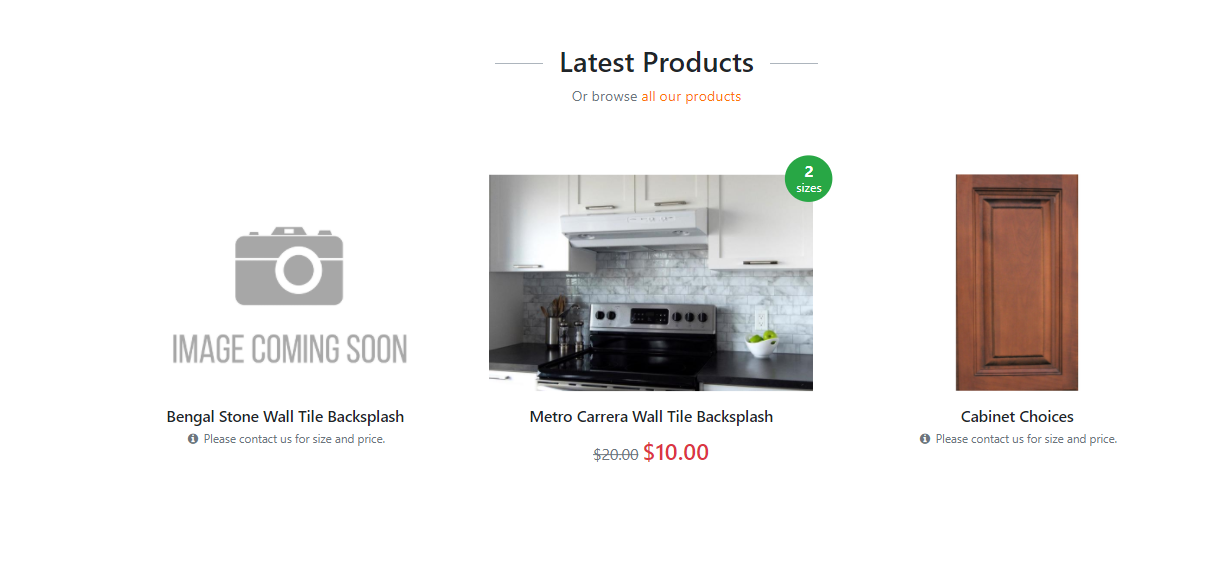
Now I even notice: after I de-activate the first product, the next product loads everything correctly! It has the same setup as the first product, and it has 1 image in the database as well.
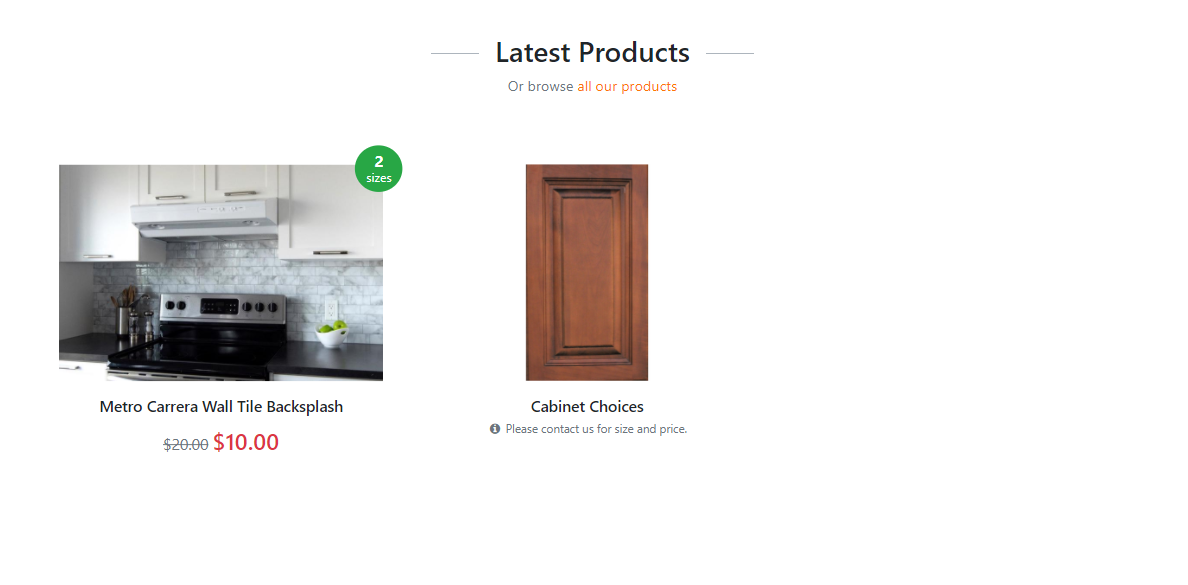
So I thought maybe the product ID got messed up so I checked the database. No they are setup correctly!

Again, I will try to reproduce the issue using your repro code later when I am free. Thanks in advanced!
davidliang2008
on 1 May 2018
@davidliang2008 - Checking the webpage may not be best way to verify this. It is quite possible that EF Core gave correct results but rendering code got off-by-one error. Can you debug your app and see if EF Core query results are correct or not?
smitpatel
on 1 May 2018
@smitpatel - Of course we shouldn't verify the results just based off the webpage but I was thinking a way to not give away too much details of the actual coding of my application (don't want everybody to see my ugly codes LOL).
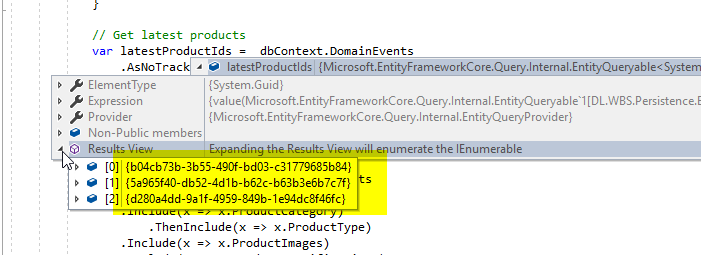
See the following actual VS debug screenshots:
I stored domain events for all my domain aggregates. So In order to get the latest products, I need to query through my DomainEvents table to get the product IDs.
And then I will query a list of published products from Products table, you know, where product id is in the latest-product-id list.
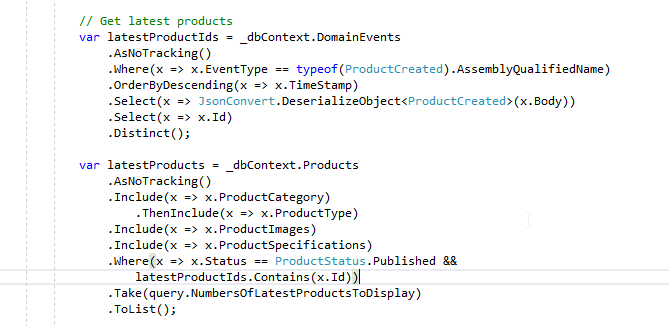
For first product, product images and specifications are not loaded.
First product (ID: d280a4dd-9a1f-4959-849b-1e94dc8f46fc)

But for other products, they're loaded correctly;
Second product (ID: 5a965f40-db52-4d1b-b62c-b63b3e6b7c7f)
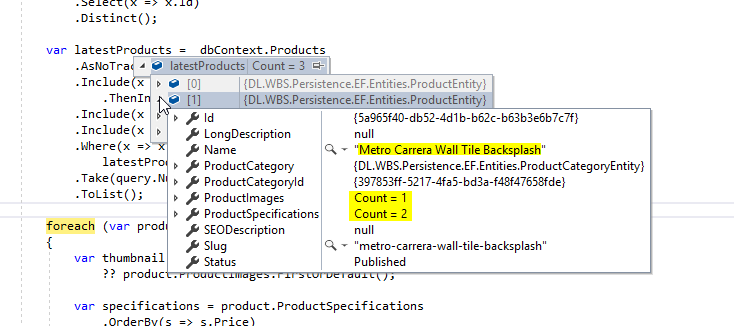
Third product (ID: b04cb73b-3b55-490f-bd03-c31779685b84)

I haven't had time to create a repro / use your repro to reproduce the issue. Will do that soon!
davidliang2008
on 1 May 2018
I guess I am closing this issue as I cannot reproduce it. I published my app to a brand new staging database and everything worked fine....
Thank you guys a lot for the time, esp @smitpatel !!!
davidliang2008
on 2 May 2018
It's still happening actually with a brand new staging/testing database @smitpatel . And I think the issue not necessary associates the first item off the list. It has to do with lastestProductIds.Contains(x.Id) filter.
I will create a Github repro and see if I can reproduce the problem. By then I will open up another issue.
davidliang2008
on 4 May 2018
@smitpatel : Sigh I can't reproduce the issue. Here is my repo to demonstrate: https://github.com/davidliang2008/DL.Issues.EFCore.EagerLoading
davidliang2008
on 10 May 2018
Related issues
 januszj
·
3Comments
januszj
·
3Comments
 ghost
·
3Comments
ghost
·
3Comments
 ra0o0f
·
3Comments
ra0o0f
·
3Comments
 pachecosoftware
·
3Comments
pachecosoftware
·
3Comments
 ryanwinter
·
3Comments
ryanwinter
·
3Comments